
A business website can contain professional images, polished colours and modern animations yet still make simple tasks difficult. Customers may struggle to understand the services, find important information or know what to do next. Staff may also find that editing one page changes several others unexpectedly.
Introduction
A custom WordPress website design solves a different problem from simply making a website look attractive. It builds the structure, navigation, page layouts and editing tools around the organisation’s brand, customers and operational needs.
Custom design does not mean creating every feature from the beginning. A responsible project uses established WordPress capabilities where they work well and introduces tailored components only where they create clear value.
The result should be distinctive without becoming difficult to maintain. It should support practical customer journeys, provide a clear editing experience and remain stable as the business adds services, content and integrations.
This guide explains how Australian businesses can plan a custom WordPress project in 2026. It covers strategy, user experience, responsive design, content management, performance, security, costs, timelines and provider selection.
What Is Custom WordPress Website Design?
Custom WordPress website design creates a website around defined brand, customer and business requirements rather than adapting the organisation to a pre-built theme.
The work may include an original visual system, tailored page templates, reusable content blocks, structured content types and custom editing controls. WordPress remains the content management system, but the public website and administration experience are shaped around the project.
A fully custom approach is not necessary for every organisation. A template can provide a practical solution for a simple website with a limited budget and standard functionality.
Custom design becomes more valuable when the website must communicate a distinctive brand, support complex services, connect with external systems or give staff more control over recurring content.
Direct Answer
Custom WordPress website design creates a unique, responsive website around a business’s brand, customers, content and goals. It can provide tailored layouts, reusable components, structured editing tools and integrations while keeping WordPress as the content management system.
In This Guide
You will learn how to:
- Decide whether a custom WordPress design is appropriate
- Plan navigation, customer journeys and reusable components
- Compare custom design with themes and page builders
- Understand costs, timelines, testing and ongoing support
- Choose a WordPress design partner using clear evidence
Custom WordPress Website Design Quick Facts
| Question | Practical answer |
|---|---|
| Who needs custom WordPress design? | Organisations with distinctive branding, complex content, unusual customer journeys or integration requirements |
| What can be customised? | Layouts, templates, navigation, forms, content types, editing controls and external connections |
| Where is content managed? | Through the WordPress administration dashboard and approved editing components |
| When should SEO and performance be planned? | During discovery and design, before templates and page structures are finalised |
| How long does a project take? | IT Company Australia publishes a broad 2–8 week design range; a fully custom or complex project may require a longer verified schedule |
| How is cost determined? | Scope, design depth, page types, content, integrations, ecommerce, migration and support requirements |
Why Businesses Choose a Custom WordPress Website
A custom website gives the organisation more control over how information is presented. The design can reflect the real brand instead of changing logos and colours inside a layout used by many unrelated businesses.
The project can also follow the customer’s decision process. A professional-services website may need to explain complex expertise, build trust and direct visitors to the right specialist. A trade or local-service website may prioritise quick service selection, locations and enquiry options.
A custom WordPress design can improve the internal editing experience as well. Staff can receive clear fields, reusable sections and content types that match the organisation’s language instead of working with confusing generic controls.
The strongest reason to choose custom design is not appearance alone. It is the ability to connect brand, customer needs, content operations and technology within one consistent system.
Custom WordPress Design Versus a Pre-Built Theme
A pre-built theme contains prepared templates, styles and features. The design team changes these elements to fit the business, which can reduce the initial budget and launch time.
A custom design begins with project requirements rather than an existing visual framework. Designers create page structures and components for the brand, then developers build those approved elements into WordPress.
Neither option is automatically better. The right decision depends on business value, design requirements, content complexity, budget, timeline and long-term plans.
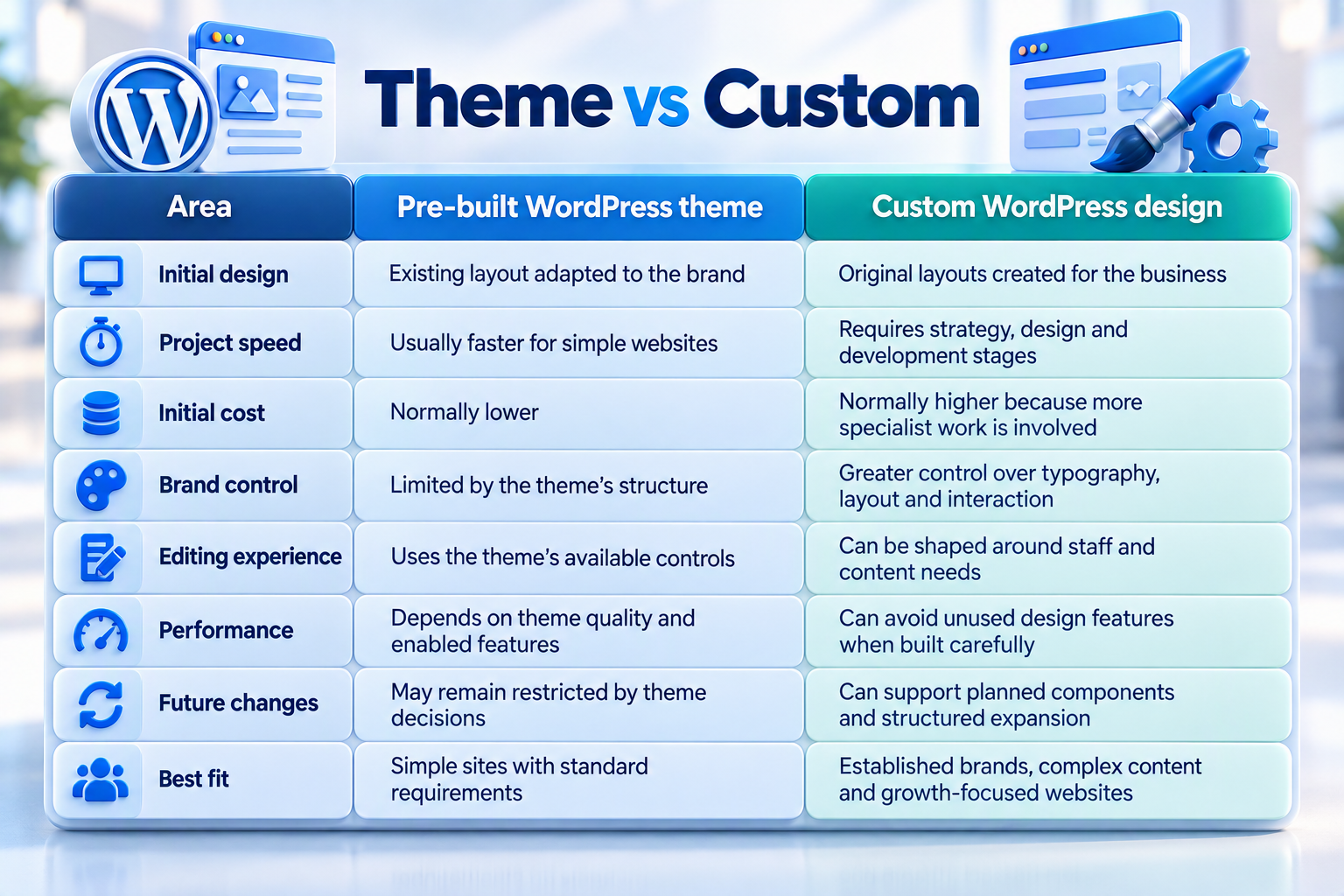
A highly customised commercial theme can sometimes cost almost as much as a purpose-built solution. The business may pay for design changes while retaining the theme’s unused code and structural limitations.
A custom website can also become unnecessarily expensive when the project lacks clear requirements. Customisation should solve specific customer, content or operational needs rather than exist only to make the project sound premium.
Start Custom WordPress Design With Business Goals
A design project should begin with the result the website must support. Common goals include generating qualified enquiries, explaining complex services, increasing bookings, selling products or helping customers find accurate information.
Each goal needs a measurable action. A general objective such as “improve the website” gives designers little direction. A clearer objective might be to help visitors reach the correct service and submit a detailed enquiry from a mobile device.
The discovery process should also identify business constraints. These may include approval processes, limited internal editing time, seasonal campaigns, several office locations or strict information requirements.
IT Company Australia’s professional website design services use a process covering discovery, wireframing, design, development, testing, launch and ongoing support. The final project scope should confirm which of these activities and deliverables are included.
Define the Website’s Main Audiences
A website designed for everyone often gives nobody a clear path. The project team should identify the people most likely to use the website and the tasks they need to complete.
A business-to-business site may serve executives, procurement teams, technical managers and job applicants. Each audience needs different evidence and may enter the website through different pages.
An ecommerce site may serve first-time buyers, repeat customers and wholesale accounts. A membership website may support prospective members, existing members and administrators.
Audience planning does not require fictional details. Use available customer enquiries, sales conversations, search data, analytics and staff knowledge to describe real questions and decision barriers.
Map Clear Customer Journeys
A customer journey shows how a visitor moves from an entry page to a useful outcome. The design should make the next step clear without forcing every visitor through the homepage.
A person searching for a specific service may land directly on a service page. That page needs enough context, evidence, related information and a suitable call to action.
The same principle applies to articles, location pages and product categories. Every important entry page should help the visitor understand where they are and what to do next.
Wireframes make these journeys visible before visual design begins. They show the order of content, navigation and actions without distracting the team with colours or finished imagery.
[VISUAL: customer-journey diagram – show how search, service pages, trust content and enquiry actions connect]
Plan a WordPress Information Architecture
Information architecture determines how pages and topics are organised. A clear structure helps customers navigate the site and gives content editors a logical place for new information.
The sitemap should reflect user needs rather than the company’s internal departments alone. Customers may think in terms of problems, services, industries or locations instead of corporate reporting lines.
Avoid creating deep layers without a clear reason. Important services should not be hidden several clicks below vague menu labels.
A strong structure also supports search discovery. Internal links, breadcrumbs and related content help search engines and visitors understand how pages connect, but the architecture must first make sense to people.
Build a Distinctive Visual Design System
A custom design needs more than one attractive homepage. The project should create reusable rules for typography, colour, spacing, buttons, forms, cards, images and content sections.
These rules form a design system. They keep new pages consistent and reduce the need for staff to make design decisions every time content changes.
The visual language should support the brand’s position. A legal practice, technology company, health organisation and creative studio require different balances of authority, warmth, clarity and visual energy.
Decoration must not interfere with reading or action. Animations, large videos and dramatic transitions should have a clear purpose and remain usable across devices.
Create Reusable WordPress Components
Reusable components give editors approved building blocks for creating pages. Examples include service summaries, team profiles, testimonials, calls to action, FAQs, accordions and related-content panels.
Each component should have defined fields and display rules. A service card might require a title, short description, icon, link and optional image rather than an unrestricted text area.
This structure protects consistency while allowing useful flexibility. Staff can build new pages without copying old layouts or relying on a developer for every small change.
Too many components can create confusion. Begin with the patterns the website genuinely needs, then add new components only when a repeated content requirement appears.
Design a Practical Content Management Experience
The WordPress dashboard should match the way staff work. Editors should understand where to update services, people, locations, articles and global information.
Custom post types can separate recurring content into meaningful areas. A team profile, case study or location should not need to be managed as a generic page when each has a repeatable structure.
Editing permissions also matter. An administrator may manage software and users, while an editor manages approved content without access to sensitive technical settings.
Training should focus on real tasks. Staff need to know how to create content, update images, preview changes, manage links and request help when a change falls outside the approved design system.
Design for Mobile Devices First
A responsive design adapts to different screen sizes, but simply stacking desktop content is not always enough. Mobile users may need shorter paths, clearer actions and easier forms.
Navigation should work without tiny links or complicated menus. Form fields need suitable labels, input types and spacing for touch interaction.
Images, tables and embeds must respond without creating horizontal page scrolling. Important information should remain visible without relying on hover effects.
IT Company Australia describes its website design approach as mobile-first and responsive. Final acceptance criteria should identify the devices, browsers and customer journeys that will be tested.
Plan Accessibility During Design
Accessibility is easier to build into the design than to repair later. The project should consider colour contrast, keyboard navigation, heading structure, form labels, focus states and alternative text.
Reusable components need consistent accessibility behaviour. An accordion, menu or modal should work with keyboards and assistive technologies as well as a mouse.
Content editors also affect accessibility after launch. Training should cover meaningful link wording, heading order and alternative text for informative images.
Accessibility requirements should be written into the project scope. A broad statement such as “accessible website” is not enough without a defined standard, testing method and responsibility.
Make Performance a Design Requirement
Performance problems often begin before development. Heavy video, oversized images, multiple font files and complex animation can make a polished design slow.
Set page-weight and performance expectations during design review. Designers and developers can then choose formats and interactions that support the target.
Google recommends evaluating overall page experience across Core Web Vitals, secure delivery, mobile presentation and access to the main content. Strong technical scores do not guarantee rankings, but they can help identify problems that affect real visitors.
Performance should be tested on important page types, not only the homepage. Service pages, forms, articles and ecommerce templates may load different scripts and media.
Build SEO Foundations Into the Website
SEO should influence structure and templates before launch. Page titles, headings, internal links, canonical tags, sitemaps and structured data all depend on development decisions.
Content must still satisfy real customer questions. A technically correct template cannot make a weak, generic service page useful.
IT Company Australia offers broader SEO services for Australian businesses, including technical, local, ecommerce and migration-related work. Confirm whether the website project includes initial SEO setup or an ongoing search strategy.
A redesign also needs migration planning when existing URLs change. Valuable old pages should receive documented outcomes and relevant redirects rather than disappearing after launch.
Use Plugins and Integrations Carefully
Plugins can add useful features without custom development. Forms, ecommerce, bookings, SEO controls and security tools often have reliable established options.
Plugins also create dependencies. Every extension requires assessment, configuration, updates and compatibility monitoring.
Choose tools for a clear requirement rather than installing several plugins that perform similar tasks. Record licences, owners, renewal costs and the business function each plugin supports.
Integrations need end-to-end testing. A form is not successful when it displays a confirmation but fails to deliver the message or create the expected CRM record.
Build WordPress Security Into the Project
WordPress security is risk reduction rather than a promise that a website can never be compromised. The WordPress security handbook recommends current software, trusted sources, controlled access, reliable hosting, backups and monitoring.
Use strong individual accounts and apply appropriate permissions. Avoid permanent shared administrator access where individual accounts can provide better control.
The project should also define update and backup responsibilities after launch. A secure build can become exposed when core software, themes and plugins remain outdated.
Businesses needing additional monitoring can review website security services. The selected agreement should distinguish monitoring, investigation, malware removal and recovery.
Choose Suitable WordPress Hosting
Hosting affects availability, response times, storage, backups and the tools available to developers. The correct environment depends on traffic, integrations and operational risk.
A basic brochure website and a busy WooCommerce store have different server needs. The proposal should explain capacity, SSL, backups, staging and technical support.
IT Company Australia publishes WordPress hosting plans with WordPress-focused hosting, SSL, storage, databases and plan-specific capacity. Businesses should confirm the live plan details and choose according to verified requirements.
Hosting is not the same as website maintenance. A server can remain online while a plugin, form or checkout function fails.
Follow a Controlled Custom WordPress Process
A clear process reduces rework and keeps decisions connected to the business goals. Each phase should have defined outputs, owners and approval conditions.
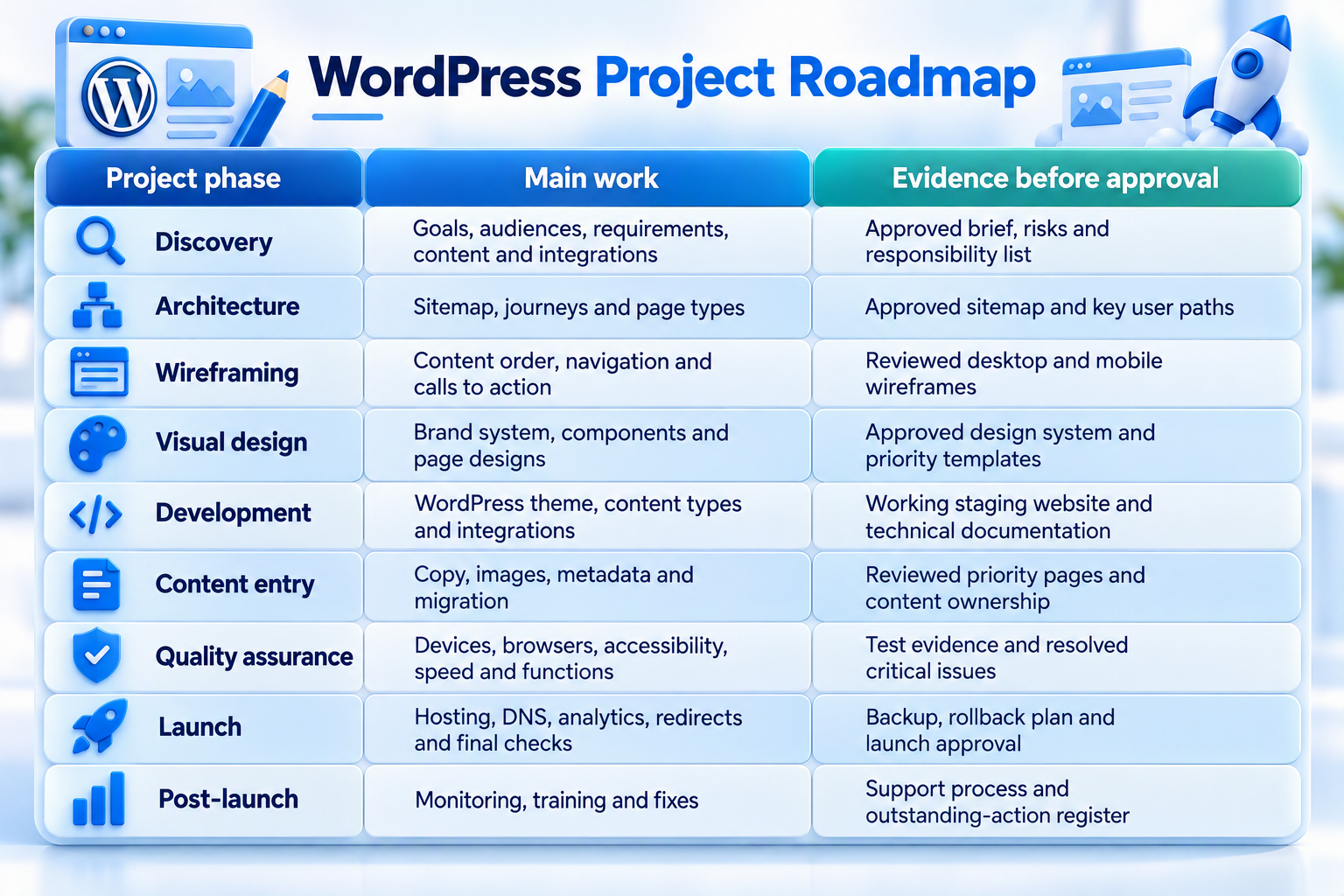
Changing approved requirements late in the process affects time and cost. A formal change request helps both parties understand the new work and impact.
The project should not be considered complete only because the homepage looks correct. Forms, navigation, mobile layouts, analytics, redirects and editing controls need practical testing.
Custom WordPress Website Costs
Custom WordPress pricing varies because the term “custom” can describe very different levels of work. One project may use a custom visual design with standard functionality, while another includes bespoke workflows, integrations and ecommerce.
Public Australian guides publish widely different ranges. This variation makes a written scope more useful than a broad market figure.
Request a GST-clear proposal that separates strategy, design, development, content, integrations, hosting, licences, maintenance and ongoing SEO. This structure makes quotes easier to compare.
Do not choose the lowest total without checking exclusions. A small quote may leave the business responsible for copy, migration, premium plugins, analytics, accessibility testing or post-launch support.
How Long Does a Custom WordPress Project Take?
Timeline depends on the number of page types, design rounds, content readiness, integrations and approval speed. IT Company Australia publishes a general website-design range of 2–8 weeks, but complex custom work may require longer.
Discovery and content planning often affect the schedule more than expected. Development cannot finish a page when approved content and functional requirements remain unclear.
Set review dates and identify who can approve each stage. Delayed or conflicting feedback increases rework and can move the launch date.
Avoid choosing a launch date before the team understands the project. A realistic schedule should include testing, content entry and time to correct important issues.
Common Custom WordPress Design Mistakes
Choosing Custom Design Without Clear Requirements
A custom project becomes expensive when every decision is explored during development. The team needs approved goals, audiences, page types and functions before building begins.
The fix is a structured discovery stage. Record requirements and separate essential launch features from later improvements.
Designing the Homepage Before the Website Structure
A homepage can look impressive while the rest of the website remains unclear. Without a sitemap and customer journeys, approval becomes based on appearance alone.
Plan the architecture and priority page types first. The homepage should introduce the wider system rather than become an isolated design exercise.
Giving Editors Unlimited Layout Control
Complete editing freedom can gradually damage consistency. Staff may create competing button styles, spacing and page structures.
Use approved components with meaningful options. Editors should control content without rebuilding the design system on every page.
Installing Too Many WordPress Plugins
Plugins can solve problems quickly, but overlapping tools increase complexity. More plugins also create additional updates and compatibility checks.
Select each plugin for a documented requirement. Remove unused extensions and avoid tools from untrusted sources.
Treating Performance as a Final Fix
A heavy design cannot always be repaired through caching. Large media, complex scripts and animation require early decisions.
Set performance expectations before visual approval. Test representative templates throughout development rather than waiting for launch.
Ignoring Content Until Development Ends
A page design built around placeholder text may not suit the final content. The real copy can be longer, shorter or structured differently.
Develop representative content early. Use it to test wireframes, headings, calls to action and component limits.
Launching Without an Ongoing Support Plan
WordPress requires updates, monitoring, backups and recovery preparation. Launch does not end the website’s technical responsibilities.
Confirm ongoing ownership before release. IT Company Australia’s WordPress maintenance and support describes staging-tested updates, off-site backups, monitoring and plan-based support.
How to Choose a Custom WordPress Design Partner
Ask the provider to explain the complete process in plain language. The answer should cover discovery, architecture, wireframes, visual design, development, testing, launch and support.
Review relevant live work instead of screenshots alone. Test navigation, mobile layouts, speed, forms and content quality.
IT Company Australia’s website design portfolio includes published WordPress examples described as custom builds without themes, including mobile-first layouts, CRM connections, analytics and multilingual or external-data features.
Ask who completes each part of the work. Design, development, copywriting, SEO, migration, hosting and maintenance may be handled by different people.
The contract should also protect business ownership. Confirm access to the WordPress installation, hosting, domain, licences, design files, analytics and technical documentation.
Questions to Ask Before Signing a Proposal
Use the same questions for every shortlisted provider. Consistent questions make scope differences easier to find.
- Will the website use a custom theme, adapted theme or page builder?
- Which page templates and reusable components are included?
- Who supplies and enters the content?
- How will performance, accessibility and security be tested?
- What support, training and documentation are included after launch?
Ask the provider to record all answers in the proposal. Verbal assurances are difficult to review when teams or project conditions change.
Frequently Asked Questions
What Is Custom WordPress Website Design?
Custom WordPress website design creates an original website around a business’s brand, content, customer journeys and functional requirements. WordPress remains the content management system, while the public layouts and editing experience are tailored to the project.
Is Custom WordPress Better Than a Template?
Custom WordPress offers more control, but it is not always the better choice. A template may suit a simple site with standard needs, while custom design is stronger for distinctive branding, complex content, integrations or long-term expansion.
How Much Does a Custom WordPress Website Cost?
Cost depends on strategy, design depth, page types, integrations, content, ecommerce, migration and support. Request a detailed, GST-clear proposal instead of relying on a broad market range.
How Long Does Custom WordPress Design Take?
A straightforward project may take several weeks, while a complex build can take longer. IT Company Australia publishes a general 2–8 week design range, but the final schedule requires a verified scope and content plan.
Will a Custom WordPress Website Work on Mobile?
It should, when responsive behaviour is included in design and testing. The proposal should identify the devices, browsers, navigation, forms and customer journeys included in quality assurance.
Is a Custom WordPress Website SEO-Friendly?
It can provide strong SEO foundations through clear structure, fast templates, metadata controls, internal links and structured data. Search performance still depends on useful content, competition, authority and ongoing optimisation.
Is Custom WordPress Secure?
WordPress can be managed securely, but no website is risk-free. Current software, trusted plugins, controlled access, secure hosting, monitoring, backups and maintenance all contribute to risk reduction.
Can Staff Update a Custom WordPress Website?
Yes. The editing experience can use structured fields and reusable components suited to the organisation’s content. Training and role-based permissions help staff make safe, consistent updates.
Can an Existing Website Move to Custom WordPress?
Yes, but migration requires planning. Content, URLs, metadata, images, forms, analytics and integrations need review, while valuable old URLs may require relevant redirects.
Does a Custom WordPress Website Need Maintenance?
Yes. WordPress core, themes, plugins, backups, forms and integrations require ongoing attention. The service agreement should define update testing, security monitoring, support and recovery responsibilities.
Final Thoughts
A custom WordPress website design should make the business easier to understand and the website easier to manage. Original visuals matter, but structure, content, responsive behaviour and editing controls determine whether the design remains useful.
Begin with goals, audiences and customer journeys. Approve the architecture before visual design, test real content during development and define performance, security and maintenance responsibilities before launch.
IT Company Australia provides custom website design services covering discovery, design, development, testing and post-launch support. Review the published portfolio and request a written scope based on the website’s audiences, content, integrations and growth plans.
A detailed discovery process will show whether the project needs a fully custom theme, an adapted design or a simpler WordPress solution. That decision protects the budget while giving the business a website suited to its real requirements.