
A business website can remain online while its most valuable function quietly fails. A payment gateway may reject valid transactions, a form may stop creating CRM records, or a backup may finish without capturing the latest database.
Introduction
A working homepage is not proof of a healthy website. Customers may be unable to enquire, book or pay even when the main pages appear normal. These failures can continue unnoticed until a customer complains or the business reviews its sales data.
Ongoing website maintenance reduces this risk through planned updates, monitoring, testing and recovery preparation. However, a generic daily, weekly or monthly checklist cannot tell every Australian business how often each component needs attention.
The correct maintenance frequency depends on business impact. A brochure website that changes once a quarter does not need the same recovery schedule as an ecommerce store processing orders every hour. This guide explains how to build a risk-based maintenance plan for 2026.
How Often Should Ongoing Website Maintenance Occur?
Website maintenance frequency should match the cost of failure. Revenue-critical functions need continuous monitoring, while changing website data should be backed up often enough to meet an approved recovery target.
Important customer journeys should also be tested after every relevant technical change. Lower-risk content, access and performance checks can follow monthly or quarterly cycles.
The strongest approach combines a baseline schedule with immediate change triggers. This prevents the business from waiting for the next calendar date after a major update, hosting migration or payment-system change.
In This Guide
You will learn how to:
- Define acceptable website data loss and recovery time
- Score maintenance risk using practical business factors
- Set maintenance frequency by component and change trigger
- Compare requirements for different website types
- Identify events that override the normal schedule
Quick Facts About Risk-Based Website Maintenance
| Question | Practical answer |
|---|---|
| Who needs ongoing maintenance? | Any business relying on a website for information, enquiries, bookings, accounts or sales |
| What determines the frequency? | Downtime impact, data changes, transactions, integrations, sensitive information and incident history |
| What needs the shortest cycle? | Checkout, security alerts, availability and frequently changing transactional data |
| What is RPO? | The maximum acceptable amount of recent website data that could be lost |
| What is RTO? | The maximum acceptable time for restoring an affected website service |
| How should cost be assessed? | Request a written, GST-clear quote based on recovery targets and support requirements |
Why Fixed Website Maintenance Schedules Can Fail
A fixed schedule assumes every website carries similar risk. This assumption can leave a busy online store underprotected while making a low-change brochure website pay for checks it may not need.
Risk-based maintenance directs time and budget towards functions with the greatest business impact. It considers what the website does, how often its information changes and what happens when an important function fails.
A calendar-only approach can also miss changes that happen between scheduled reviews. A quarterly form test offers little protection when a developer changed the form yesterday. A monthly backup may also be unsuitable for a store receiving orders throughout the day.
A stronger maintenance plan combines a baseline calendar with change-triggered maintenance. The event, rather than the normal schedule, brings the work forward.
Businesses comparing affordable website maintenance should examine monitoring, testing and recovery coverage rather than price alone. The proposal should explain what is checked, how often work occurs and which events require immediate action.
Set Recovery Targets Before Choosing a Frequency
Backup frequency should not begin with a software setting. It should begin with two business questions.
First, how much recent website data can the business afford to lose? Second, how long can an affected website service remain unavailable?
The answers establish a Recovery Point Objective and Recovery Time Objective. These recovery targets help the provider choose appropriate backups, monitoring, support and restoration procedures.
What Is a Recovery Point Objective?
A Recovery Point Objective, commonly shortened to RPO, defines the maximum acceptable age of restored data. It answers a practical question: how much recent website information can the business afford to lose?
If the approved RPO is four hours, the recovery process should not rely only on a backup created 24 hours earlier. The backup or replication frequency must support the four-hour target.
Consider a hypothetical ecommerce store receiving ten orders per hour. A daily backup could leave almost a full day of order information exposed if a serious failure occurs shortly before the next backup.
A low-change brochure website may accept a longer RPO. Recreating one recent text update is much easier than rebuilding hundreds of orders, stock changes or customer records.
RPO is therefore a business decision. It should reflect the value and speed of new website data rather than the default setting provided by a backup tool.
What Is a Recovery Time Objective?
A Recovery Time Objective, or RTO, defines the maximum acceptable time for restoring an affected website service. It answers another important question: how long can the business operate without this function?
An RTO of four hours means the response plan, people, access and technology should support restoration within that period. A backup alone does not prove that this target is achievable.
Shorter recovery targets usually require stronger preparation. The business may need priority support, tested recovery procedures and readily available access credentials.
A longer RTO may reduce service costs, but it also accepts a longer disruption. The business should understand this trade-off before approving a maintenance package.
A Worked Website Recovery Example
Imagine a Sydney appointment website that processes most bookings between 8 am and 6 pm. The business decides that it cannot afford to lose more than two hours of new bookings.
The business also decides that the booking service should not remain unavailable for more than four hours. Its provisional targets become a two-hour RPO and a four-hour RTO.
These targets affect more than the backup schedule. The provider must capture the booking database frequently enough and identify the calendar, payment and email dependencies.
The recovery process must also be tested. If restoring the website and confirming its booking functions requires eight hours, the present process cannot meet the four-hour target.
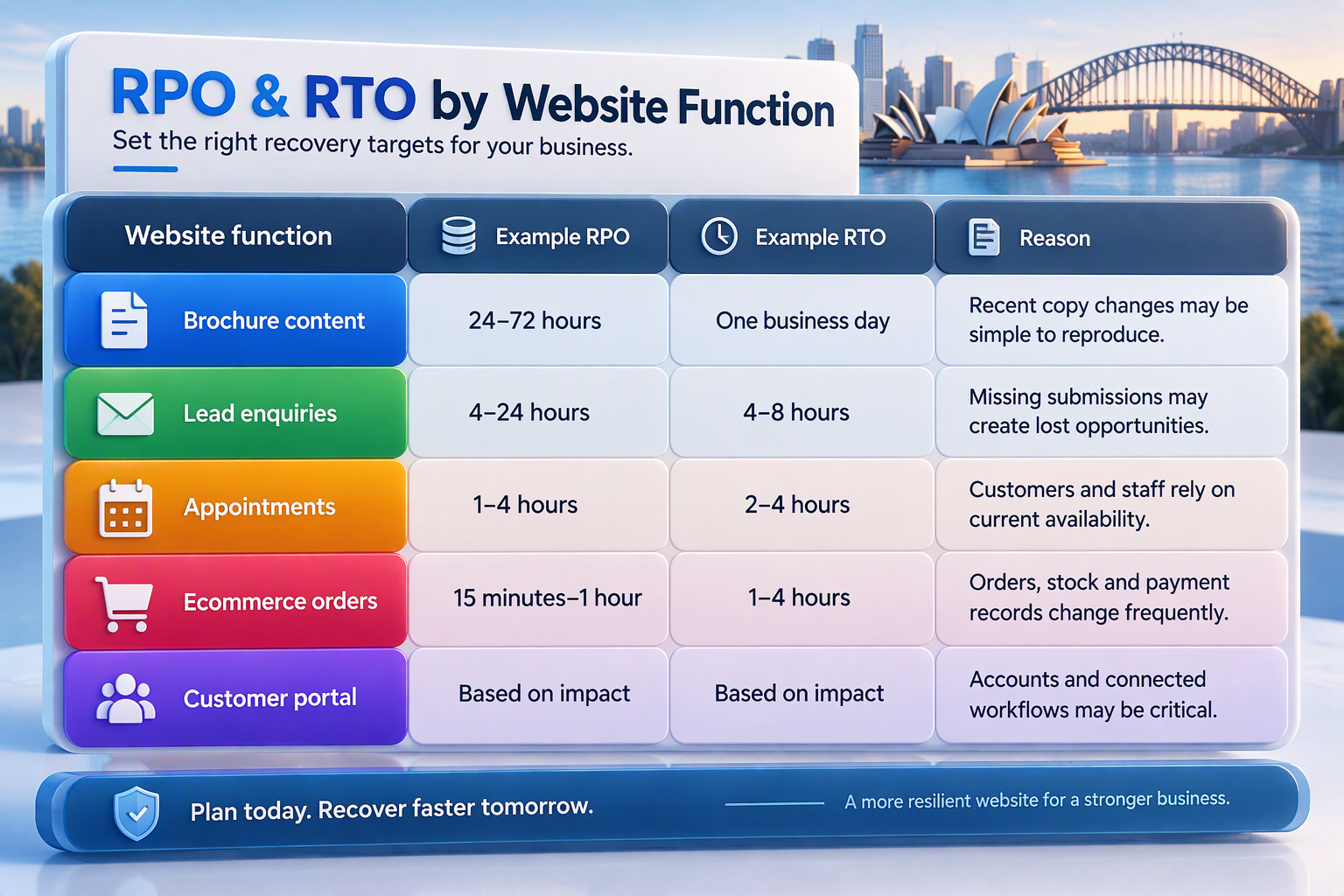
These figures are planning examples, not universal standards or service guarantees. Each business should approve targets based on financial, operational and customer impact.
Six Factors That Set Website Maintenance Frequency
1. Website Change Volume
A website that changes several times each day needs tighter controls than one updated four times a year. Change volume can include orders, account records, enquiries, products, content and configuration.
The maintenance plan should protect the fastest-changing important data. A website with frequent changes may need shorter recovery points and more regular functional testing.
Frequent releases also increase deployment risk. The business may need staging, a pre-deployment backup and post-deployment testing.
A low-change website can use a simpler process. However, every important release should still have a recovery option and a documented test.
2. Transaction and Revenue Exposure
Payments, bookings and subscriptions increase maintenance urgency. A technical fault can interrupt revenue even when the homepage remains accessible.
Transactional websites should monitor checkout availability and test payment journeys after relevant changes. The provider should also explain how failed or duplicated transactions will be handled.
Maintenance planning should consider peak trading periods. A retailer may need stronger monitoring before a major promotion or seasonal campaign.
An accommodation or events business may require additional support during a high-volume booking period. Temporary commercial risk should override the website’s normal schedule.
3. Customer-Data Sensitivity
Websites collecting customer accounts, personal information or sensitive enquiries require careful access and security control. Maintenance should include software patching, account reviews and investigation of unexpected changes.
Backup copies may also contain personal information. The provider should explain where copies are stored, who can access them and how long they are retained.
Recovery must return the website safely. Sensitive information should not be exposed through poorly controlled staging or testing environments.
The Australian Signals Directorate describes the Essential Eight as a broader cybersecurity framework for reducing common cyber risks. It is not a website-maintenance standard, but its patching and backup principles can inform a wider security program.
4. Integration Dependency
A website may depend on payment gateways, email delivery, CRM software, inventory systems, booking calendars or shipping services. Each integration creates another possible point of failure.
Maintenance should test the complete customer journey rather than the visible screen alone. A form is not working correctly when it displays a success message but fails to create the expected CRM record.
Document every critical integration and its owner. Record where alerts arrive, how access is managed and whether an approved testing environment exists.
Any integration change should trigger an immediate functional test. The business should not wait several weeks for its next scheduled review.
5. Vendor and Software Criticality
Not every plugin or service deserves the same level of attention. A payment extension, form connector or security tool carries more business risk than a decorative image gallery.
Rank software according to the function it supports and the impact of failure. High-impact components deserve more careful update testing and faster escalation.
Professional WordPress maintenance and support can help manage staged updates, off-site backups and post-update testing. WordPress websites using WooCommerce, custom code or complex integrations generally need more testing than basic brochure sites.
Updates should not be installed blindly. Review release information, create a current backup and test the key customer journeys after the change.
6. Incident and Failure History
Repeated failures can show that the current frequency or technical approach is inadequate. A form that repeatedly breaks after updates needs stronger regression testing.
A website with recurring malware infections needs more than frequent scanning. The business should investigate the original entry point, access permissions and hosting environment.
Do not treat every recurring problem as a reason to run the same check more often. Some issues require a permanent software, design or infrastructure change.
Maintenance frequency cannot permanently compensate for abandoned plugins, unstable custom code or weak account security. Repeated problems should lead to a root-cause investigation.
Risk-Based Website Maintenance Calculator
The following score provides a practical starting point. It is an editorial planning aid, not an industry standard, contractual service level or security assessment.
Add the points that apply to the website.
| Risk question | Score |
|---|---|
| Does the website process payments, bookings or subscriptions? | +3 |
| Does it store customer accounts or sensitive information? | +3 |
| Would one hour of downtime cause meaningful lost revenue? | +3 |
| Does it depend on three or more external integrations? | +2 |
| Does important website data change several times each day? | +2 |
| Has the website experienced a serious failure in the last year? | +2 |
| Is there no documented and tested restoration process? | +3 |
How to Interpret the Score
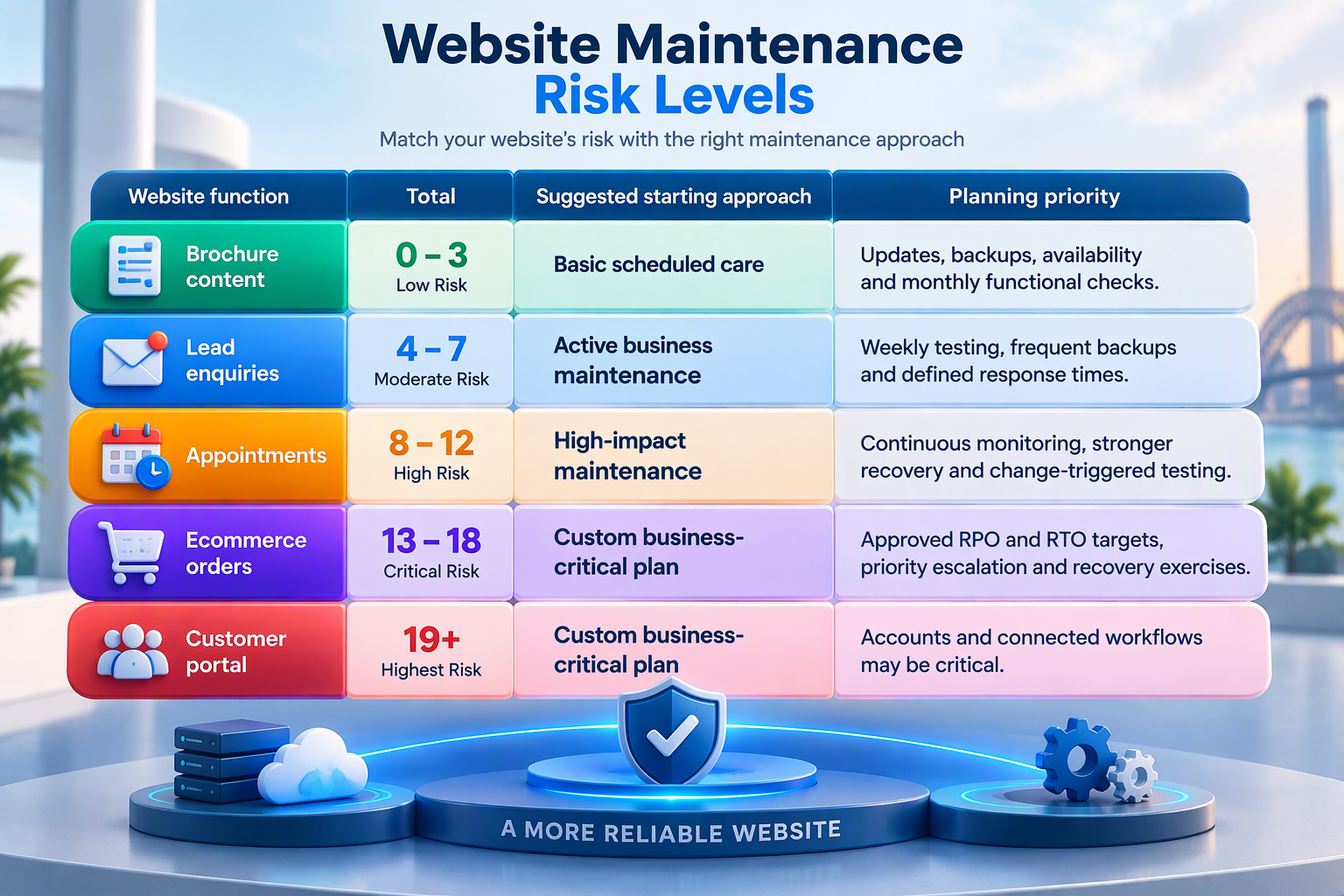
A score does not replace a technical assessment. A single critical function may justify stronger coverage even when the total score remains low.
For example, a simple payment page can carry greater business risk than a large information website. Commercial impact matters more than page count.
Maintenance Frequency by Component and Trigger
The calendar provides a baseline, while change triggers bring work forward. A weekly form test remains useful, but an email, CRM or form-plugin change should trigger an immediate end-to-end test.
This model connects maintenance work with the event most likely to cause a failure.
| Component | Baseline review | Immediate trigger | Evidence |
|---|---|---|---|
| CMS, themes and plugins | Weekly review | Critical advisory or major release | Version log and post-update test |
| Checkout and payments | Daily monitoring or agreed test cycle | Gateway, tax, shipping or checkout change | Approved test transaction |
| Enquiry forms | Weekly | Form, email, CRM or consent change | Submission and receiving record |
| Website backups | Based on approved RPO | Before software changes or deployment | Completion log and covered assets |
| Restore process | Quarterly or risk-based | Hosting, backup platform or architecture change | Timed restoration record |
| Administrator access | Quarterly | Employee, contractor or supplier departure | Account and permission report |
| Analytics and conversions | Monthly | Theme, form, consent or tag change | Test conversion and analytics record |
| Content accuracy | Monthly | Service, price, team or location change | Page review and approval date |
| Performance | Monthly on important pages | Theme, hosting, plugin or campaign change | Device-based test result |
| Security | Continuous monitoring | Malware, unknown account or file change | Alert and incident record |
Ongoing Maintenance for Information Websites
A brochure website normally changes slowly and carries limited transactional data. Monthly updates, scheduled backups and regular form testing may provide a suitable starting point.
Continuous uptime and certificate monitoring still have value. These checks can identify availability problems before customers report them.
Bring maintenance forward after plugin changes, hosting migrations or major content releases. Test every customer-facing form after a relevant change.
A low page count does not make a form unimportant. A single contact form may generate most of the company’s website enquiries.
Ongoing Maintenance for Lead-Generation Websites
A lead-generation website needs frequent form and CRM testing. A delivery failure can quietly interrupt the sales pipeline while the website continues to look normal.
Use weekly end-to-end form tests and confirm that submissions reach the correct inbox or CRM. Conversion tracking should also record an approved test enquiry correctly.
Backups should reflect the information stored on the website. If leads are sent directly to an external CRM, the business should understand which system holds the official record.
Technical upkeep can support search accessibility. However, maintenance does not replace SEO services for research, content, local visibility and authority development.
Ongoing Maintenance for Booking Websites
Booking websites depend on calendars, notifications and sometimes payment services. Test the full booking journey after changes to availability, payment, email or calendar settings.
Australian businesses operating across multiple states should check time-zone handling carefully. Daylight-saving differences can affect booking times and automated messages.
The recovery plan should consider appointments created after the latest backup. Restoring an older website database must not silently remove recent bookings.
The business should document how staff will reconcile website, calendar and payment information after recovery. This process may require information from several connected systems.
Ongoing Maintenance for Ecommerce Websites
An ecommerce store combines products, stock, orders, payments and customer records. Maintenance should include controlled updates, frequent recovery points and checkout testing after relevant changes.
Peak campaigns may justify temporary increases in monitoring and support availability. The maintenance provider should know when marketing activity is expected to generate unusual traffic.
Backups require careful planning because restoring an older database can overwrite recent orders. Recovery must protect both the website files and current transaction information.
Broader cloud backup services may support business continuity. However, the selected service must explicitly cover the website files, database and configuration required for recovery.
Ongoing Maintenance for Membership and Customer Portals
Customer portals require login, account and permission testing. Authentication should be checked after software, identity-service or access-policy changes.
Administrator access should also be reviewed when an employee or supplier leaves. Old accounts create unnecessary risk even when they are no longer actively used.
Portal recovery may depend on systems outside the website. Document identity, payment, email, licensing and external database dependencies.
A restore that brings back the pages but not authentication does not return the service to an acceptable working state. Recovery testing must cover the complete customer journey.
Events That Override the Normal Schedule
A maintenance calendar should never delay urgent work. Certain events immediately change website risk and require testing, investigation or recovery.
These triggers should appear in the maintenance agreement. The response should not depend on personal judgement during an urgent incident.
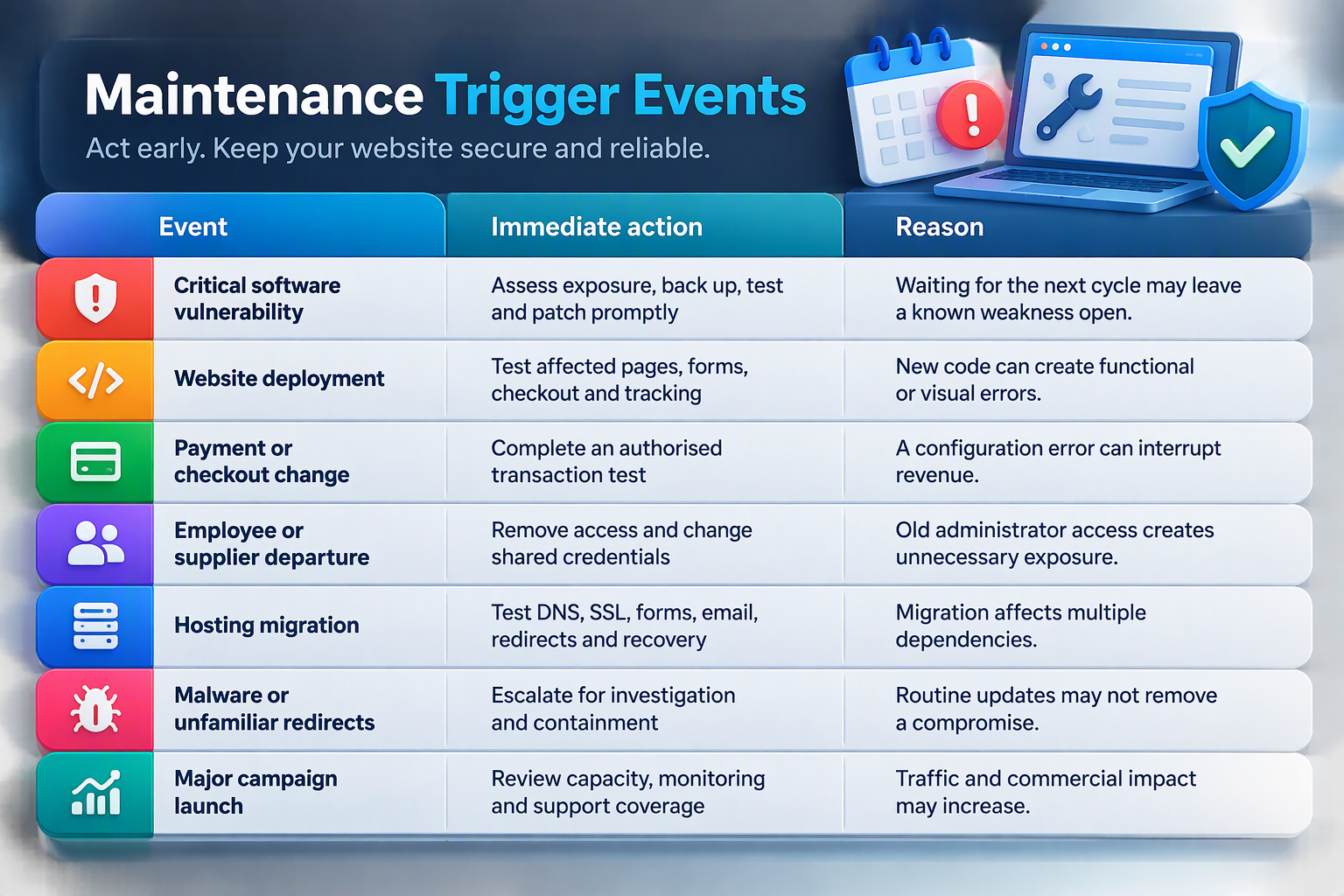
If malware, unexpected redirects or unauthorised pages appear, standard maintenance may not provide the necessary response. A specialist hacked website repair service can investigate affected files, accounts, databases and identifiable vulnerabilities.
Common Ongoing Website Maintenance Mistakes
Using One Frequency for Every Component
A single maintenance frequency can underprotect important systems while giving excessive attention to low-risk components. A payment gateway and a staff-profile page should not automatically receive the same schedule.
Set frequency according to commercial impact and rate of change. Increase testing when a component affects revenue, customer access or sensitive information.
Choosing Backup Frequency Before Setting RPO
A business may select daily backups because the schedule sounds reasonable. However, one backup each day is unsuitable when losing several hours of new orders would create a serious problem.
Approve acceptable data loss first. The backup frequency should then support that recovery objective.
Setting an RTO Without Testing Restoration
A provider may claim that a website can be restored within a few hours. The claim has limited value when the complete recovery process has never been tested.
Run a timed restoration exercise in a controlled environment. Record missing access, slow transfers, incompatible software and other delays.
Testing the Homepage Only
A homepage may load while enquiry forms, payments and customer accounts remain unavailable. Availability monitoring cannot replace functional testing.
Test complete customer journeys. Confirm the final result in the connected inbox, CRM, payment system or database.
Ignoring Change Triggers
A monthly check may leave a new failure unnoticed for several weeks. The latest technical or business change may have already affected the website.
Bring testing forward after relevant changes. Common examples include deployments, payment updates, form changes and hosting migrations.
Monitoring Without Repair Responsibility
An alert identifies a problem, but it does not solve the problem. Some services provide monitoring while treating investigation and repair as separate work.
Define who receives each alert and who can approve action. The agreement should also state response targets and additional charges.
Using Frequent Checks to Hide Unstable Technology
More frequent monitoring cannot permanently fix unsupported software or unstable custom code. Repeated faults may indicate a deeper technical problem.
Investigate the root cause rather than repeating the same temporary repair. Replacement or redevelopment may provide better long-term value.
How Hosting Affects Maintenance and Recovery
Website hosting and maintenance cover different responsibilities. Hosting supplies the server environment, while maintenance manages software, functions, content and testing.
A hosting server may remain online while a form or checkout fails. Hosting availability therefore cannot prove that the website is fully operational.
Recurring availability or performance problems may require a review of Australian web hosting. Compare server capacity, access, security controls, technical support and backup responsibilities.
Hosting migrations should trigger broader testing. Check DNS, SSL, email delivery, redirects, forms, customer accounts and recovery access.
Google Search Central recommends assessing overall page experience across Core Web Vitals, secure delivery, mobile presentation and access to the main content. Good diagnostic results do not guarantee rankings, but they can help identify problems affecting visitors.
Questions to Ask a Website Maintenance Provider
- Ask how the proposed maintenance frequency was determined. A credible answer should connect the service with the website’s purpose, transactions, changes, integrations and recovery targets.
- Confirm which functions receive change-triggered testing. The proposal should explain what happens after a plugin update, payment change, hosting migration or security alert.
- Ask what each backup includes and where copies are stored. Confirm that both website files and the current database can be recovered.
- Request evidence of restoration capability. A completed backup notification does not prove that the complete website can be restored successfully.
- Review the support response time. The provider should explain how quickly urgent and non-urgent issues are acknowledged and assessed.
- Finally, request a written, GST-clear quote. The proposal should identify included support time, exclusions and emergency rates.
Frequently Asked Questions
What Is Ongoing Website Maintenance?
Ongoing website maintenance is the recurring process of monitoring, updating, testing and recovering a website. It covers software, backups, customer journeys, security, performance, content and integrations.
The correct frequency depends on business impact and how quickly important website information changes.
How Often Should a Business Website Be Maintained?
Critical availability and security need continuous monitoring. Active forms, checkout and software require weekly or change-triggered testing.
Performance and content may be reviewed monthly. Restoration, access and dependency reviews can follow quarterly or risk-based cycles.
What Is a Website Recovery Point Objective?
A Recovery Point Objective defines the maximum acceptable amount of recent website data that could be lost.
An RPO of one hour requires recovery copies or replication frequent enough to avoid relying on data more than one hour old.
What Is a Website Recovery Time Objective?
A Recovery Time Objective defines the maximum acceptable time for restoring a website function after disruption.
Meeting a short RTO normally requires reliable access, documented recovery steps, tested backups and appropriate technical support.
Should Every Website Use Daily Backups?
No. Backup frequency should follow the approved Recovery Point Objective and rate of data change.
Daily backups may suit an active business website, while an ecommerce store may need shorter recovery points. A low-change brochure website may tolerate a longer interval.
When Should Scheduled Maintenance Be Brought Forward?
Bring maintenance forward after software releases, deployments, payment changes, form or CRM changes, hosting migrations, staff departures and security alerts.
These events change website risk immediately. Waiting for the next calendar review may leave an important failure undiscovered.
Does Ongoing Maintenance Improve SEO?
Maintenance supports search accessibility by keeping important pages secure, available and functional. It can also identify broken links and performance problems.
It does not guarantee rankings or replace content development, authority building and a complete SEO strategy.
Is Hosting Included in Website Maintenance?
Not automatically. Hosting provides the server environment, while maintenance manages the website application, content and customer-facing functions.
Some providers combine both services. Responsibilities should still be assigned clearly in the agreement.
How Much Does Ongoing Website Maintenance Cost?
Cost depends on platform complexity, monitoring, recovery targets, included support and change frequency.
Request a written, GST-clear quote for the actual website. Do not treat broad industry ranges as confirmed prices for a specific provider.
Can Maintenance Guarantee That a Website Will Never Fail?
No. Maintenance reduces avoidable risk and improves detection and recovery, but it cannot prevent every outage, attack or third-party failure.
A reliable plan defines monitoring, response, recovery and responsibility without promising impossible protection.
Final Thoughts
Ongoing website maintenance should protect the functions the business depends on most. The right schedule is not simply daily, weekly or monthly. It comes from acceptable data loss, acceptable downtime, transaction volume, sensitive information and technical dependencies.
Set recovery targets first. Then choose monitoring, backup and testing frequencies that can realistically support those targets. Add change triggers so important checks happen after deployments, payment changes, migrations and security events.
IT Company Australia provides website maintenance services covering software updates, backups, monitoring, performance, security and reporting. The published service options use different backup schedules and maintenance inclusions for different levels of website care.
Request a website assessment to identify a maintenance frequency suited to your platform, business impact and recovery needs.