
Sydney businesses depend on technology for communication, sales, finance, customer service, and daily operations. A slow network, compromised account, or failed backup can delay work across an entire team. Reliable IT support is therefore an operating requirement, not simply a technical convenience.
Comparing managed IT service providers Sydney businesses can trust is not easy. Most providers promise fast support, stronger security, proactive monitoring, and expert advice. The real differences become clear only when a business examines service scope, response commitments, technical ownership, and recovery procedures.
The largest provider is not automatically the best choice. A smaller Sydney business may receive better service from a responsive team that understands its systems. A larger organisation may need national coverage, formal governance, advanced cyber security, and support across several offices.
This guide explains how to identify the best-fit managed IT provider in 2026. It does not rank named companies without a complete and independently verified scoring process. Instead, it provides a practical framework for comparing proposals, service agreements, security capabilities, and transition plans.
What Makes a Managed IT Service Provider the Best Fit?
The best managed IT provider matches the organisation’s size, systems, risks, operating hours, and internal capability. A strong provider defines its responsibilities, responds through measurable service levels, protects critical systems, tests recovery, and gives the business a clear technology roadmap.
The right choice should improve more than ticket resolution. The relationship should make technology easier to manage, reduce preventable disruption, and help leaders make better decisions about security, cloud services, devices, and future investment.
In This Guide
You will learn how to:
- Compare managed, co-managed, and project-based IT support
- Assess help desk, security, cloud, backup, and strategic capabilities
- Review service levels, pricing, ownership, and contract terms
- Identify warning signs before signing an agreement
- Build a shortlist that matches the needs of a Sydney business
Managed IT Services Quick Facts
| Question | Practical answer |
|---|---|
| Who uses managed IT services? | Businesses that need ongoing technical support, monitoring, security, cloud administration, or IT planning |
| What is usually included? | Help desk support, endpoint management, patching, monitoring, user administration, backup, cloud support, and reporting |
| Where is support delivered? | Remotely, onsite in Sydney, or through a combined support model |
| When should a business switch? | When support is consistently slow, risks remain unresolved, documentation is weak, or the business has outgrown the current provider |
| How is pricing structured? | Common models include per-user, per-device, fixed monthly, co-managed, and project fees |
| What should be checked first? | Scope, exclusions, service levels, security ownership, backup testing, transition steps, and exit rights |
What Does a Managed IT Service Provider Do?
A managed service provider takes ongoing responsibility for agreed parts of a company’s technology. The provider may manage the full environment or work alongside an internal IT employee or department.
Typical work includes employee support, device management, network monitoring, software patching, Microsoft 365 administration, backup, cyber security, vendor coordination, and technology planning. The exact scope varies between providers and contracts.
The most important word is “agreed.” A provider cannot take responsibility for a business function that is missing from the service agreement. Every critical system should have a named owner, response process, and escalation route.
IT Company Australia publishes a broad range of managed IT services, including help desk support, network management, cloud migration, infrastructure management, backup, cyber security, IT consulting, and device management.
Managed IT, Co-Managed IT, and Project Support
Fully managed IT gives an external provider broad responsibility for day-to-day technology. This model can suit a small or medium business that does not employ a complete internal IT team.
Co-managed IT combines internal capability with specialist external support. An internal IT manager may retain strategy and business knowledge while the provider supplies service desk capacity, security monitoring, cloud expertise, or after-hours coverage.
Project support focuses on a defined piece of work. Examples include a Microsoft 365 migration, office relocation, network upgrade, server replacement, or security improvement program.
A business should not assume that a project automatically includes ongoing support. Likewise, a monthly managed plan may not include major migrations or infrastructure projects. These boundaries should appear in the written proposal.
Essential Capabilities to Compare in 2026
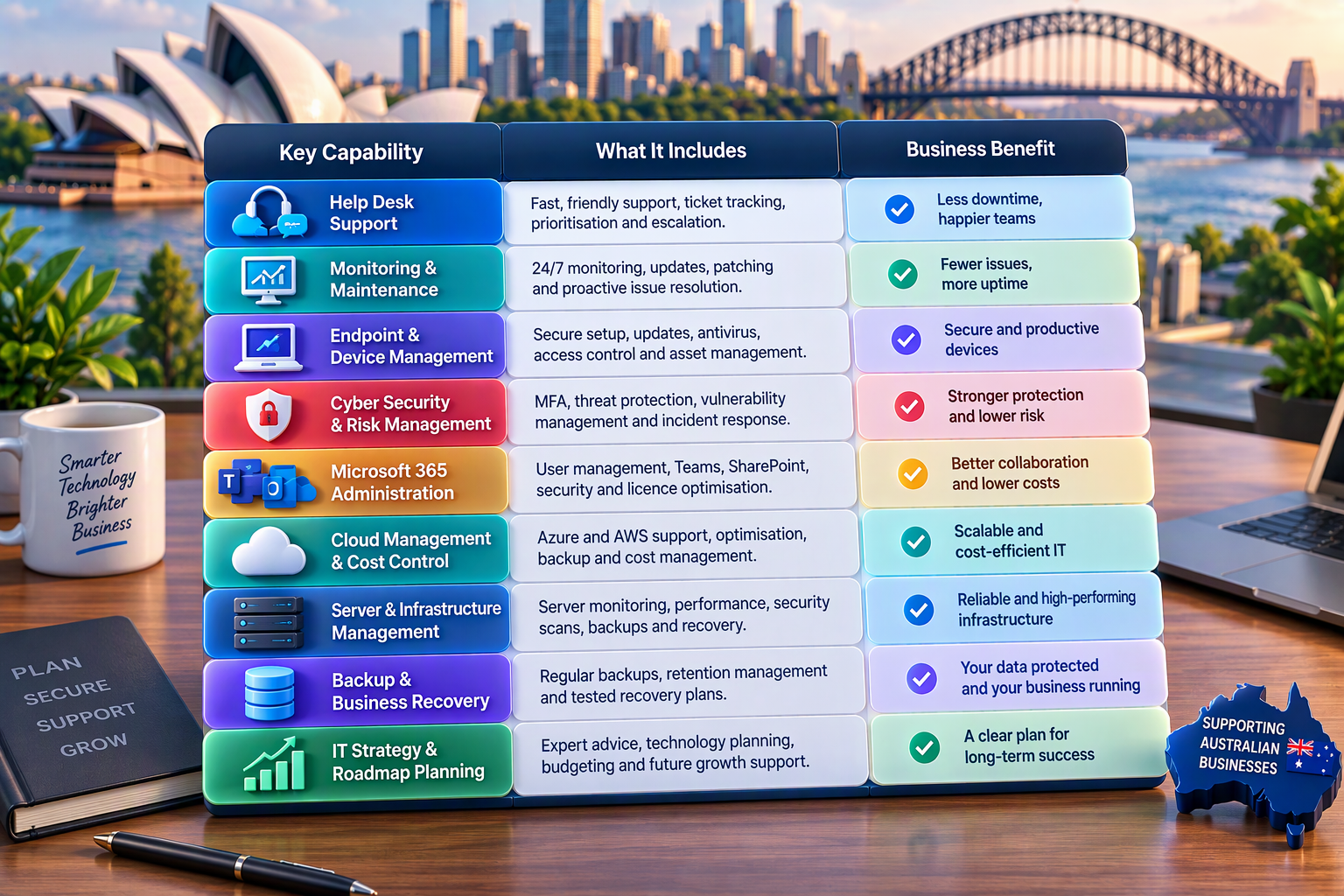
Responsive Help Desk Support
The help desk is where employees experience the provider most often. A useful service should offer clear contact methods, ticket tracking, prioritisation, and escalation.
Response time and resolution time are different measures. A provider may acknowledge a ticket quickly without resolving it. The service agreement should explain how incidents are classified and how urgent issues move through the support team.
Ask whether employees speak directly with technical staff or pass through several support layers. Confirm operating hours, after-hours arrangements, and the treatment of work requested outside the agreed scope.
Proactive Monitoring and Maintenance
Reactive support starts after something breaks. Proactive management looks for warning signs before a failure becomes more serious.
Monitoring may cover servers, endpoints, networks, cloud services, storage, backups, and security alerts. The provider should explain what is monitored, how often alerts are reviewed, and what happens when a problem appears.
A monitoring dashboard does not fix anything by itself. Ask who receives the alert, which actions are included, and when the provider needs business approval to proceed.
Endpoint and Device Management
Every laptop, desktop, mobile device, and server creates a management responsibility. Devices require secure configuration, updates, antivirus or endpoint protection, access control, and an accurate asset record.
A managed provider should support onboarding and offboarding. New employees need the correct devices and permissions, while departing employees need prompt access removal and safe data handling.
Businesses buying devices and licences may also require IT procurement services. Procurement should connect with deployment, asset tracking, warranty management, and secure disposal rather than stop when equipment arrives.
Cyber Security and Risk Management
Cyber security should be part of the service model, but “security included” is too vague. The proposal should name the controls, monitoring, tools, responsibilities, and exclusions.
Important areas may include multi-factor authentication, endpoint protection, email security, patching, privileged access, vulnerability management, incident response, and awareness training.
The Australian Signals Directorate’s Essential Eight provides a recognised framework for reducing common cyber risks. It is not a simple product bundle, and the appropriate maturity level depends on the organisation’s risks and obligations.
IT Company Australia’s managed cyber security services describe risk assessment, endpoint protection, identity and access management, backup, recovery, and threat monitoring for Australian SMEs.
Microsoft 365 Administration
Microsoft 365 management can involve much more than licence purchasing. A provider may administer users, Exchange Online, Teams, SharePoint, OneDrive, security controls, retention, and access policies.
Ask whether the provider reviews licence usage and removes unnecessary subscriptions. Confirm who manages multi-factor authentication, conditional access, shared mailboxes, distribution lists, and employee offboarding.
Businesses planning adoption or migration can compare Microsoft 365 business solutions. The published service covers consultation, migration, integration, support, cloud storage, Teams, SharePoint, and security options.
Cloud Management and Cost Control
Cloud systems can provide flexibility, but unmanaged resources can create security gaps and unexpected costs. A provider should understand the business purpose of each environment rather than focus only on technical uptime.
Cloud support may include migration, configuration, monitoring, backup, rightsizing, identity, security, and cost optimisation. The service agreement should identify which platforms and accounts are covered.
IT Company Australia provides cloud management services for Azure and AWS environments, including setup, infrastructure management, monitoring, backup, recovery, and cost management.
Backup and Business Recovery
A backup is useful only when it contains the required data and can be restored. A green status notification does not prove that a business can recover within an acceptable period.
Ask what systems are backed up, where copies are stored, how long data is retained, and how often restoration is tested. The agreement should also identify who can authorise a restore during an incident.
Broader cloud backup solutions can protect files, Microsoft 365 data, servers, databases, virtual machines, and other systems. Businesses should confirm the exact coverage of the selected plan.
Server and Infrastructure Management
Businesses using physical servers, virtual machines, or hybrid systems need clear maintenance and monitoring. Server responsibility may include operating-system updates, security scans, backups, performance, capacity, and emergency response.
IT Company Australia’s server management services include server monitoring, support, performance optimisation, vulnerability reporting, backups, restoration, and different scan frequencies.
Before choosing a provider, confirm whether server patching is automated or manually reviewed. Ask how failed patches, unexpected restarts, storage warnings, and capacity problems are handled.
IT Strategy and Roadmap Planning
Managed services should help a business plan, not only react to requests. A technology roadmap can connect system upgrades, cyber risks, licence costs, growth plans, and replacement cycles.
Strategic reviews should produce decisions and owners. A useful review identifies what needs attention, why it matters, the likely effort, and the next action.
The provider should communicate in plain language. Business leaders need to understand risk, cost, and operational impact without decoding a technical report.
How Sydney Businesses Should Compare Providers
The phrase IT managed service provider Sydney may return a long list of businesses with similar promises. A reliable comparison starts with the organisation’s own needs rather than provider marketing.
Document employee numbers, locations, operating hours, critical systems, compliance needs, internal skills, recurring problems, and expected growth. Give each shortlisted provider the same information.
Request written proposals using the same structure. This makes differences in scope, security, backup, service levels, pricing, and exclusions easier to identify.
Do not ask only, “How fast is your support?” Ask how incidents are prioritised, who handles escalation, what happens outside business hours, and which response commitments appear in the contract.
What a Managed IT Agreement Should Define
| Agreement area | What to confirm | Warning sign |
|---|---|---|
| Service scope | Covered users, devices, locations, systems, and applications | Broad promises without a detailed schedule |
| Response commitments | Priority levels, response targets, support hours, and escalation | “Fast support” without measurable targets |
| Security ownership | Tools, monitoring, patching, incident response, and exclusions | Security described as included but not defined |
| Backup and recovery | Covered data, retention, testing, and restore authority | Backups exist but restores are never tested |
| Project work | What is included monthly and what receives a separate quote | Every meaningful change becomes an extra fee |
| Reporting | Ticket trends, risks, patching, backup, security, and roadmap actions | Reports show activity without business outcomes |
| Data and access | Ownership of documentation, accounts, passwords, and configurations | The provider controls accounts the client should own |
| Exit process | Notice, documentation handover, access transfer, and transition fees | No written process for leaving the provider |
Local Sydney Support Versus National Coverage
A Sydney-based support team can provide convenient onsite assistance, local project coordination, and familiarity with the business environment. This can matter for offices that rely on networks, meeting-room technology, physical servers, or specialist equipment.
National coverage may suit businesses operating across several states. Larger providers may offer broader service hours, more specialised teams, and formal governance processes.
The choice is not simply local versus large. Ask how quickly onsite support can be arranged, where the help desk operates, and whether the same technical team will understand the account over time.
Some IT companies in Sydney Australia provide both remote and onsite assistance, while others focus mainly on cloud or remote support. Match the delivery model to how the business actually works.
What IT Company Services Should Include
Modern IT company services should connect support, security, cloud administration, backup, monitoring, and planning. Buying these areas separately can create ownership gaps when an incident crosses several systems.
For example, a Microsoft 365 login problem may involve identity, licensing, endpoint configuration, conditional access, or security policy. A provider needs enough visibility to identify the actual cause.
The service should also define vendor coordination. Employees should not have to work out whether the internet provider, software vendor, hardware supplier, or managed service provider owns the problem.
A single point of contact can simplify support, but the business should retain ownership of domains, cloud tenants, licences, and important administrator accounts.
IT Consulting Versus Managed IT Support
Managed support focuses on recurring operational work. IT consulting focuses on decisions, projects, governance, architecture, and change.
Businesses comparing IT consulting companies Sydney searches should check whether the provider can convert recommendations into practical delivery. A report without implementation ownership may leave important improvements unfinished.
Consulting may cover cloud strategy, security roadmaps, infrastructure design, business continuity, technology budgeting, or procurement planning. The proposal should define the output and decision required from each engagement.
A good managed provider may include regular strategic advice. Complex transformations can still require a separate consulting or project scope.
How Managed IT Service Pricing Works
Managed IT pricing varies because providers include different services, support hours, tools, and risk responsibilities. Comparing a monthly total without comparing inclusions can produce a misleading result.
Common methods include per-user, per-device, fixed monthly, tiered, and co-managed pricing. Projects, onsite work, after-hours requests, hardware, software licences, and security tools may sit outside the base fee.
Request a GST-clear proposal. It should list onboarding costs, recurring charges, project rates, travel or onsite fees, licence costs, and emergency work.
The cheapest proposal may exclude backup, security monitoring, strategic reviews, or after-hours support. A higher fee may offer better value when the scope is clearer and the provider accepts greater responsibility.
How to Build a Fair Provider Shortlist
A fair shortlist compares business fit rather than brand size. Each provider should receive the same requirements and answer the same questions.
The following scorecard is an editorial planning tool, not an industry standard. Adjust the weighting to reflect the organisation’s priorities.
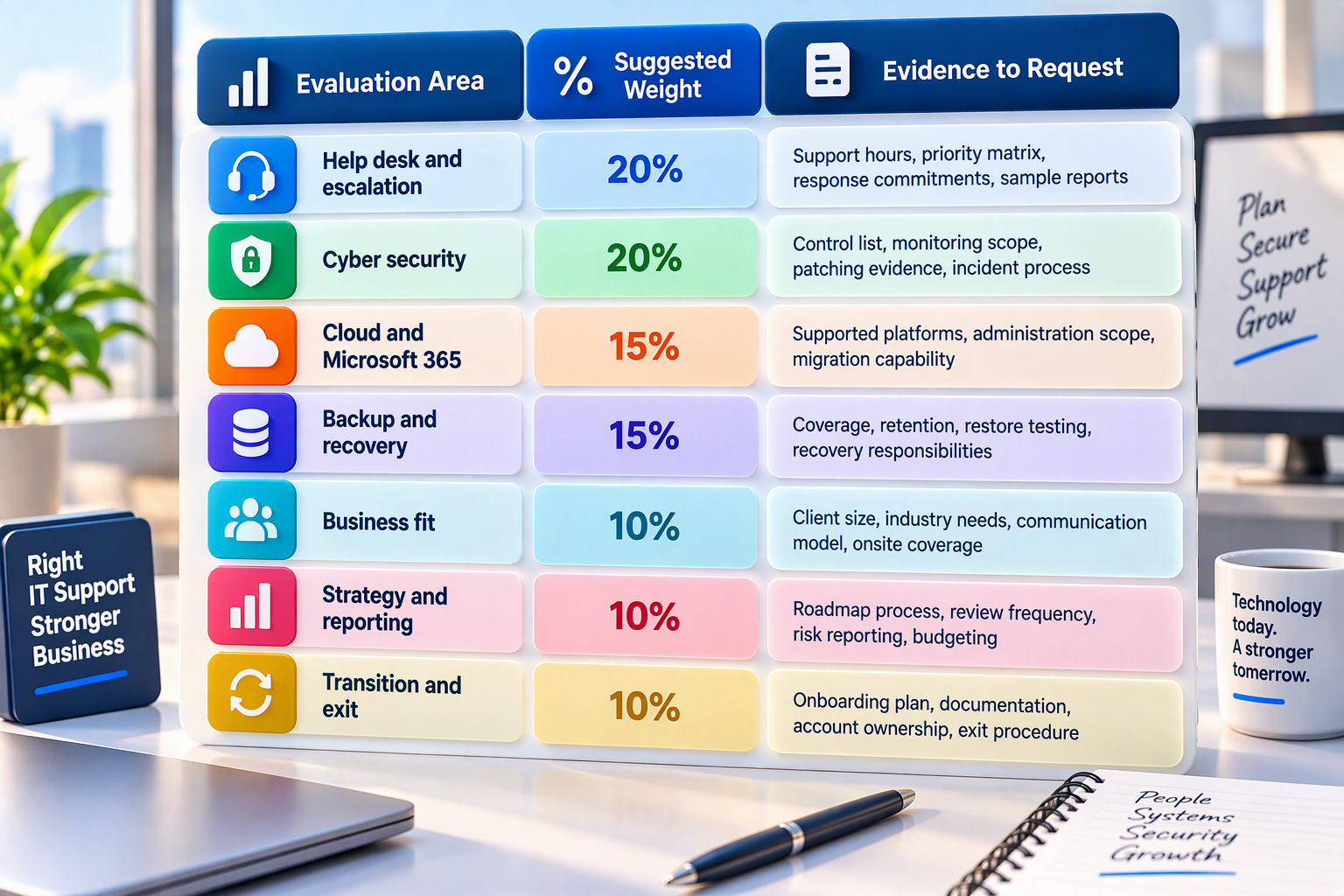
Score every provider against written evidence, not sales claims. Record conditions or exclusions beside each score so the final decision remains transparent.
Red Flags When Comparing Sydney IT Providers
Vague Service-Level Language
Promises such as “rapid response” are not measurable. Ask for priority definitions and written response targets.
A strong agreement explains the difference between an urgent outage, a standard request, and a planned change. It also defines how escalation works when the first response does not resolve the issue.
Security Without Clear Controls
A provider may say cyber security is included without listing the protections. This can leave gaps around identity, endpoints, email, patching, backup, and incident response.
Request a control schedule showing the product, process, frequency, owner, and evidence. Confirm which security work attracts an additional fee.
Backups Without Restore Testing
Successful backup jobs do not prove recoverability. A failed restoration may only become visible during a real outage.
Ask for the testing frequency, scope, evidence, and recovery procedure. Confirm whether restore labour and emergency support are included.
No Technology Documentation
A provider should maintain current information about devices, systems, vendors, licences, networks, configurations, and access. Weak documentation slows troubleshooting and creates transition risk.
The business should be able to receive its own documentation in a usable form. Confirm this right before signing.
Hidden Project and After-Hours Costs
An attractive monthly fee can become expensive when normal changes are treated as projects. Onsite support, after-hours work, onboarding, and employee moves may also cost extra.
Request practical examples of included and excluded work. Ask how the provider obtains approval before creating additional charges.
Provider-Controlled Business Accounts
The business should retain ownership of important cloud tenants, domains, subscriptions, and administrator accounts. A provider may receive controlled access without becoming the legal or practical owner.
This reduces risk during disputes or provider changes. It also makes access removal and auditing easier.
No Clear Exit Process
A managed relationship should define how it ends. The contract needs notice periods, documentation handover, credential transfer, data export, and transition support.
An unclear exit process can create delays and unexpected costs. Review it with the same care as the onboarding plan.
Sydney’s Managed IT Needs in 2026
Sydney businesses may operate from central offices, suburban locations, warehouses, clinics, professional practices, or distributed teams. Each model creates different support and connectivity requirements.
A professional-services firm may prioritise Microsoft 365, secure document access, and quick employee support. A retailer may need reliable connectivity, point-of-sale support, endpoint security, and recovery.
A construction or real-estate business may rely on mobile devices and cloud systems across many sites. A medical, finance, or legal organisation may require stronger information handling and risk controls.
The best provider understands these operational differences before recommending tools. Technology should support the business model rather than force every client into the same package.
When Should a Business Change IT Providers?
A single slow ticket may not justify moving providers. Repeated service failures, unresolved security gaps, poor communication, missing documentation, and weak strategic support are stronger warning signs.
The business should record recurring problems before starting a transition. This evidence improves the new brief and prevents the next provider from repeating the same service model.
Switching providers requires access, documentation, licences, backups, vendor details, and an agreed cutover plan. Avoid ending the old agreement before the new provider confirms readiness.
The transition should protect users and critical systems. Plan account changes, monitoring changes, security-tool replacement, and support communications carefully.
Frequently Asked Questions
What Are Managed IT Services?
Managed IT services provide ongoing support and management for business technology. The scope may include help desk support, devices, networks, cloud systems, Microsoft 365, security, backup, monitoring, vendor coordination, and technology planning.
The exact responsibilities should appear in a written service agreement.
What Is the Best Managed IT Provider in Sydney?
There is no single provider that is best for every business. The right provider depends on company size, support hours, security needs, internal capability, locations, systems, and budget.
Compare providers using the same requirements and request written evidence for every important capability.
How Much Do Managed IT Services Cost in Sydney?
Pricing varies by user numbers, devices, support scope, security tools, operating hours, onsite needs, and project requirements. Providers may charge per user, per device, or through a fixed monthly agreement.
Request a GST-clear proposal with onboarding, licences, exclusions, and after-hours costs.
What Is the Difference Between Managed IT and IT Support?
IT support may respond when employees report problems. Managed IT usually adds monitoring, maintenance, patching, security, backup, reporting, and strategic planning.
The terms are not regulated package names, so businesses should compare exact inclusions rather than labels.
Can a Managed Provider Work With an Internal IT Team?
Yes. Co-managed IT allows an external provider to support an internal team. The provider may handle help desk work, cyber security, cloud platforms, projects, or after-hours monitoring.
The responsibility matrix should identify who owns every system and process.
Does Managed IT Include Cyber Security?
Not automatically. Some plans include basic endpoint protection and patching, while advanced monitoring, incident response, awareness training, and vulnerability management may cost extra.
Ask for a clear list of tools, controls, responsibilities, and exclusions.
Does Microsoft 365 Include Backup?
Microsoft 365 provides platform resilience and retention features, but businesses should assess whether those functions meet their recovery needs. A provider should explain retention, deletion recovery, third-party backup, and restoration responsibilities.
The decision should follow the value and sensitivity of the organisation’s data.
Why Does Local Sydney Support Matter?
Local support can help with office networks, hardware, meeting rooms, servers, and urgent onsite work. However, location alone does not prove service quality.
Compare onsite response, technical capability, service hours, and account continuity.
How Long Does It Take to Change IT Providers?
The timeline depends on documentation, systems, access, security tools, and contract terms. A simple environment may switch in several weeks, while a complex multi-site business can require a longer staged transition.
The new provider should present a written onboarding and risk plan.
What Questions Should I Ask an IT Provider?
Ask about scope, response commitments, security, backup testing, account ownership, reporting, project fees, onsite coverage, provider transition, and contract exit.
Request examples of the evidence delivered during normal service, not only a sales presentation.
Final Thoughts
Sydney’s best managed IT provider is the one that fits the organisation’s systems, risks, people, and growth plans. Strong marketing cannot replace a clear service scope, measurable response commitments, tested recovery, and transparent ownership.
Compare proposals against the same requirements. Pay close attention to cyber security, Microsoft 365, cloud management, backup, strategic reviews, transition support, and the treatment of out-of-scope work.
The wider market of IT companies Australia businesses can choose from includes small specialists, Sydney-based MSPs, national providers, and enterprise consultancies. The right size depends on the business, not the provider’s marketing position.
IT Company Australia offers managed support, cyber security, cloud, Microsoft 365, backup, server administration, and technology consulting for Australian businesses. Request a written assessment to clarify your environment, priorities, risks, and required support model before selecting a provider.