
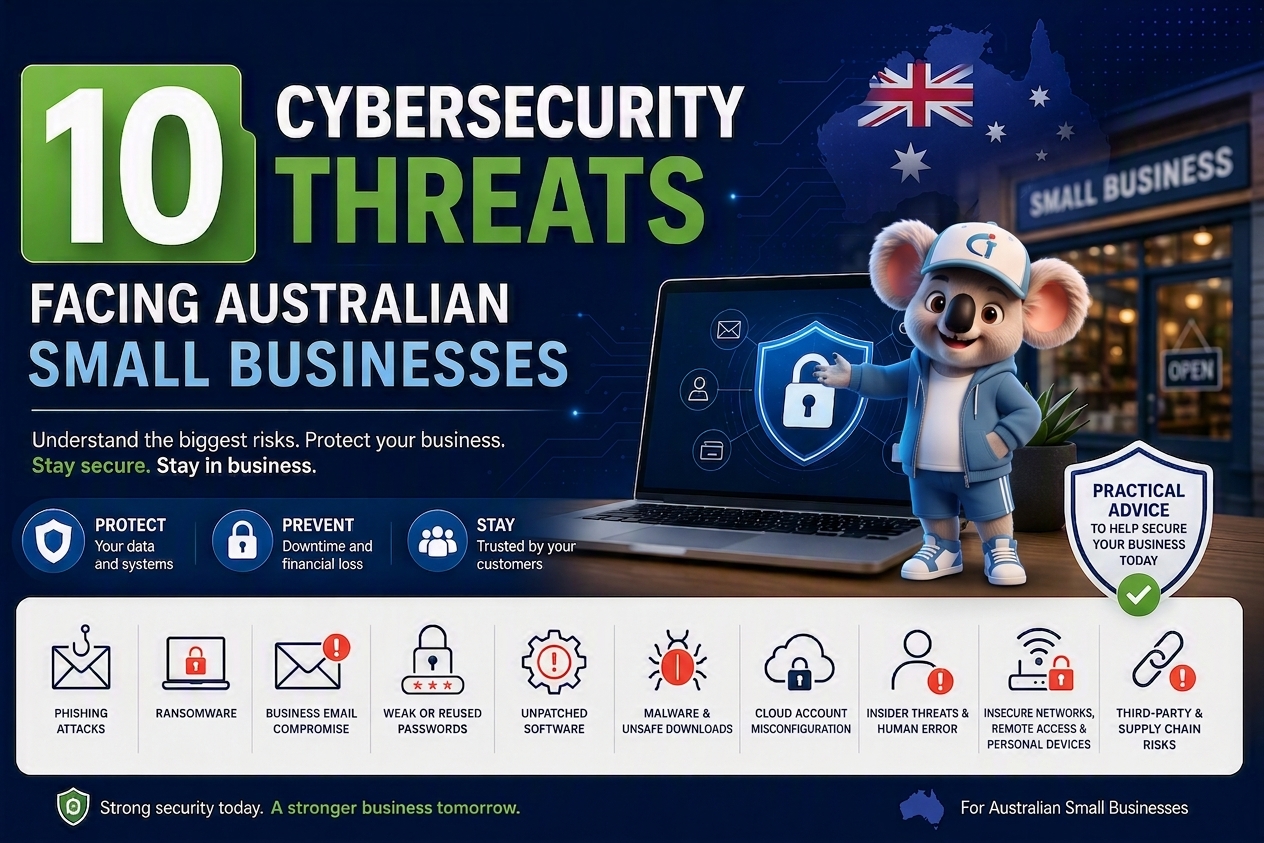
Small businesses use email, websites, cloud platforms and online payment systems every day. These tools make work easier, but they can also create opportunities for cybercriminals to access business accounts and sensitive information.
Understanding the main cybersecurity risks can help you protect your customers, prevent business disruption and respond quickly when something goes wrong. This guide explains ten common threats and the practical steps you can take to reduce them.
Why Should Small Businesses Take Cybersecurity Seriously?
Cybersecurity is not only a concern for large organisations. Small businesses also store valuable information, including customer details, financial records, passwords, emails and business documents.
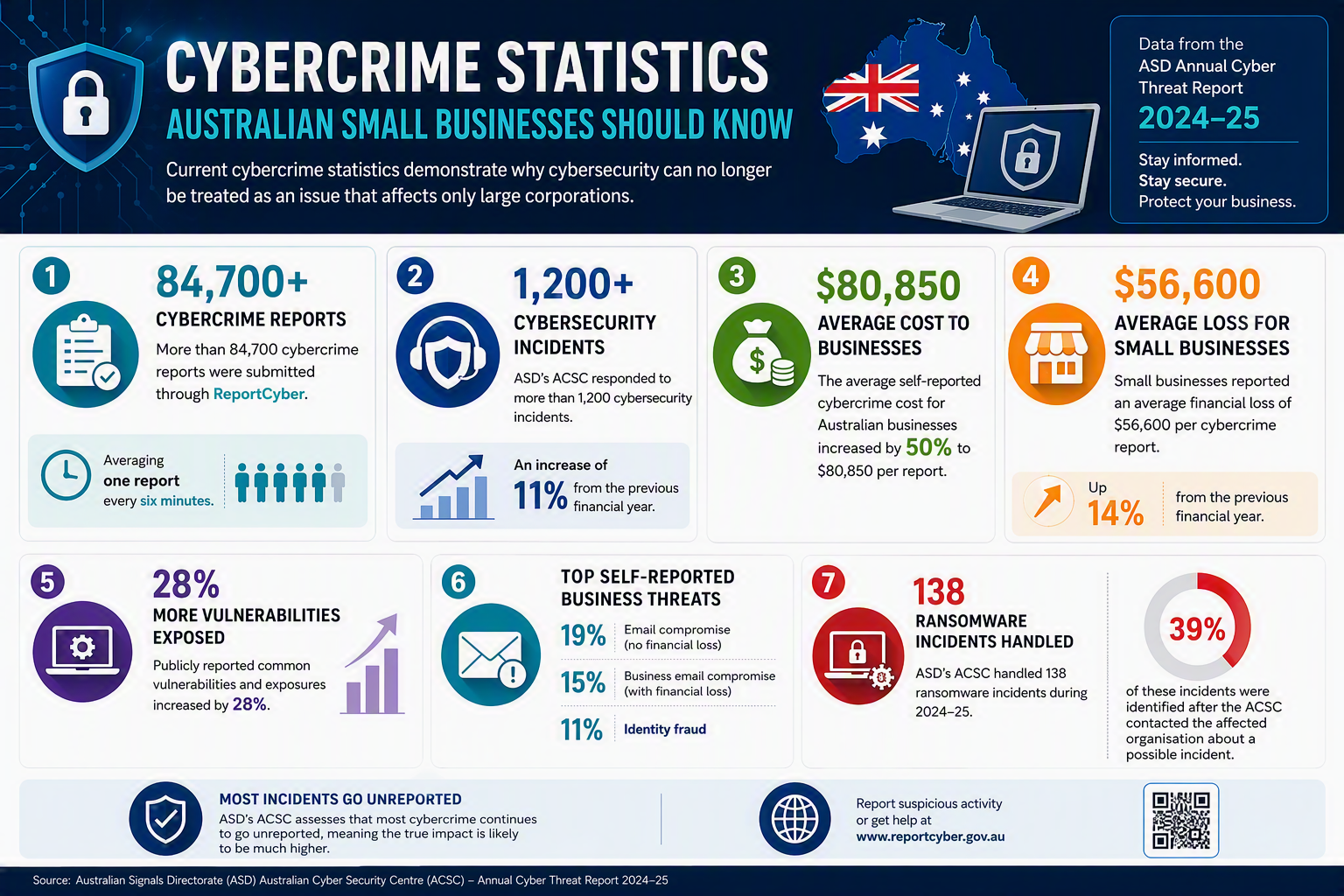
During 2024–25, more than 84,700 cybercrime reports were submitted through ReportCyber, averaging one report every six minutes. Australian small businesses reported an average cybercrime cost of $56,600 per report, while ASD’s Australian Cyber Security Centre responded to more than 1,200 cybersecurity incidents. These figures cover reported incidents only, so the real impact may be higher.
A cyberattack can stop employees from accessing important files, processing payments, sending invoices or communicating with customers. It can also damage trust if confidential information is lost or exposed. The good news is that many common attacks can be prevented. You do not need to understand every technical detail. You need clear security controls, responsible people and a practical plan for handling problems.
What Are the Main Cybersecurity Threats to Small Businesses?
The main threats include phishing, ransomware, business email compromise, weak passwords, outdated software, malware, unsafe cloud settings, human error, insecure remote access and security problems involving suppliers.
Many attacks begin with a simple mistake or an overlooked security issue. An employee may click an unsafe link, reuse a password, delay an update or share a document with the wrong settings. Cybercriminals may also enter through an old account, an unprotected device or a supplier that still has unnecessary access.
The following sections explain how each threat works, how it can affect your business and what you can do to reduce the risk.
Which Cybersecurity Risks Should You Address First?
Every business has different cybersecurity needs. A medical practice, online retailer, legal firm and construction company may use different systems and hold different information.
However, most small businesses should begin by protecting their most important accounts. These usually include business email, financial platforms, cloud administrator accounts, password managers, website logins and remote-access accounts.
These accounts should be protected first because they may provide access to other systems. For example, someone with access to your email may be able to reset passwords, read private conversations or send messages pretending to be you. You should then focus on regular security updates, protected backups and device security. You should also remove access when an employee, contractor or supplier no longer needs it.
Priority note: The ratings below provide general guidance. The correct priority for your business will depend on your systems, information, industry and existing security controls.
1. Phishing Attacks
| Priority | Primary Impact |
|---|---|
| Critical | Stolen accounts, financial fraud and malware |
Phishing happens when a cybercriminal pretends to be a person or company you trust. They may use a fake email, text message, phone call or login page.
The message may appear to come from a manager, bank, supplier or cloud provider. Its purpose is usually to steal a password, collect confidential information or convince someone to make a payment.
For example, an employee may receive an email saying that their Microsoft 365 password is about to expire. The email includes a link to a fake page that looks like the genuine Microsoft sign-in page. If the employee enters their details, the attacker may gain access to their email and cloud files. The attacker may then search for customer information, financial documents or payment conversations.
They may also use the compromised account to send believable messages to customers, colleagues and suppliers.
How Can You Reduce Phishing Risk?
Employees should carefully check unexpected requests involving passwords, payments or confidential information. If a message appears to come from a manager or supplier, the employee should contact that person using a known phone number.
The contact details included in the suspicious message should not be used. Those details may lead directly to the attacker.
Multi-factor authentication should be turned on for important accounts. It requires an additional security check, making it more difficult for an attacker to enter an account with only a stolen password. A professional email security solution can also help block phishing messages, harmful attachments and email impersonation attempts before they reach employees. Employees should also know how to report suspicious messages. If someone clicks an unsafe link or shares information by mistake, they should report it immediately.
Phishing messages do not always contain poor spelling or obvious errors. They can look professional, use familiar branding and refer to genuine business conversations.
2. Ransomware
| Priority | Primary Impact |
|---|---|
| Critical | Business downtime, lost information and recovery costs |
Ransomware is harmful software that locks files or prevents employees from using business systems. Attackers often demand money to restore access.
Some attackers also steal information before locking it. They may threaten to publish, sell or misuse the information if the business does not pay. A ransomware attack can affect accounting platforms, booking systems, customer records, shared folders and email accounts. Employees may be unable to complete orders, send invoices or access important documents.
An attack may begin when an employee opens what appears to be a normal attachment. The harmful software then runs in the background and spreads to connected files or systems. The total cost can go beyond the payment demanded by the attacker. Devices may need to be checked or rebuilt, passwords may need to be changed and information may need to be restored.
How Can You Reduce Ransomware Risk?
Keep computers, mobile devices, business applications and network equipment updated. Security updates often fix weaknesses that attackers can use.
Administrator access should only be given to people who need it. Harmful software can cause more damage when it runs through an account with full administrative control. Your business should also use managed endpoint protection. This is security software that checks computers and other devices for suspicious activity.
Backups should be protected from normal employee accounts. If an attacker can access your backup through a common user account, they may be able to delete or lock it. Backups must also be tested. Restoring selected files regularly will help confirm that important information can be recovered. A reliable cloud backup and disaster recovery plan can help your business restore clean data and return to normal operations after ransomware, accidental deletion or system failure.
Cloud syncing should not be treated as a complete backup. If a file is locked, changed or deleted, that change may be copied to other connected devices.
3. Business Email Compromise
| Priority | Primary Impact |
|---|---|
| Critical | Payment fraud and exposure of confidential information |
Business email compromise happens when an attacker enters a genuine email account or convincingly pretends to be a trusted employee, manager or supplier.
These attacks can be difficult to identify because the fraudulent message may appear inside a real email conversation. The attacker may wait until people are discussing an invoice, payment or confidential document.
For example, an employee may receive a message saying that a supplier’s bank details have changed. Because the request appears in a familiar conversation, the employee may make the payment without checking the new details. An attacker may also read emails for some time before taking action. This allows them to understand business relationships, copy writing styles and choose the best time to request money. Even when no money has been lost, a compromised account should be investigated. The attacker may still be reading emails, collecting information or preparing another attack.
How Can You Prevent Email Payment Fraud?
Changes to bank details should always be checked using a known phone number. Employees should not rely only on the information provided in the email.
Unusual or high-value payments should require approval from another authorised person. This prevents one compromised account from independently approving a payment. Every employee should have an individual email account. Shared accounts make it difficult to identify who completed an action or when a problem began. Multi-factor authentication should also be enabled. Your IT provider should investigate unusual login locations, unknown forwarding rules and unexpected account changes.
Accounts belonging to former employees should be disabled as soon as they are no longer required.
4. Weak or Reused Passwords
| Priority | Primary Impact |
|---|---|
| Critical | Account takeover and unauthorised access |
Weak passwords are easier for attackers to guess. Reusing a password creates a bigger problem because one stolen password may provide access to several accounts.
Cybercriminals can obtain login details from previous data breaches. They may then use automated tools to test those details on email, cloud and business platforms. This means a breach involving an unrelated website can put your business at risk. If an employee uses the same password for personal and work accounts, an attacker may be able to access both.
Email accounts are especially important because they often receive password-reset messages. Someone who controls an employee’s mailbox may be able to enter other business systems.
How Should You Protect Business Accounts?
Every important account should have a different password. A trusted password manager can create and securely store strong passwords for employees.
Passwords should not be saved in spreadsheets, emails, shared documents or unprotected notes. Anyone who gains access to that file may then be able to enter several systems. Multi-factor authentication should be prioritised for email, financial platforms, cloud administration, password managers, website accounts and remote access.
Where available, your business can also consider using passkeys. A passkey uses a trusted device or secure device check and can provide stronger protection against common phishing attacks. Access to the password manager should be reviewed regularly. It should be removed promptly when an employee or contractor leaves.
5. Unpatched Software and Website Vulnerabilities
| Priority | Primary Impact |
|---|---|
| High | Unauthorised access, malware and website attacks |
A software vulnerability is a weakness in a device, application, website or network. An attacker may use that weakness to enter the system or install harmful software.
Software providers release updates to fix known problems. Delaying an important update can leave the affected system open to attack.
Updates are not only important for computers. Mobile phones, routers, firewalls, printers, browsers, remote-access tools and business applications may also need attention. Business websites can create additional risks. An outdated website platform, unsafe plugin or forgotten administrator account may give an attacker access to the site. A compromised website may redirect visitors, display unwanted content or spread harmful files. Search engines and browsers may also warn visitors that the website is unsafe.
How Should You Manage Security Updates?
Keep a clear record of the devices, applications, websites and network equipment used by your business. This helps you understand what needs to be updated and who is responsible.Automatic updates should be enabled where practical. Someone should still check that important updates have installed correctly.
Software that no longer receives security support should be upgraded or replaced. If it cannot be replaced immediately, ask your IT provider how the risk can be reduced. Website plugins and themes should be checked regularly. Remove anything that is outdated, unused or no longer supported.
Administrator access should only be provided to approved employees and service providers. Regular vulnerability checks can help find unsafe settings before attackers discover them.
6. Malware and Unsafe Downloads
| Priority | Primary Impact |
|---|---|
| High | Stolen information, damaged systems and unauthorized access |
Malware is harmful software designed to steal information, damage systems or give an attacker access to a device.
It can enter a business through an email attachment, unsafe website, fake update, unapproved application or harmful browser extension. Some malware operates quietly. It may collect passwords, payment details, browser data and files without the employee noticing.
A slow computer, unfamiliar application or unexpected browser change may be a warning sign. Security software turning off without explanation can also be a concern. However, advanced malware may not produce any clear signs. Businesses should not rely only on employees noticing unusual device behavior.
How Can You Detect and Prevent Malware?
Use centrally managed endpoint protection on business devices. This allows your business or IT provider to check security across office and remote computers.
It can also show whether devices are protected, updated and sending security alerts correctly. Employees should not be allowed to install any software they want unless this is necessary for their work. An unapproved application or browser extension may collect information or introduce a security risk. Security alerts must be reviewed by a responsible person. A security tool offers limited protection if no one checks its warnings.
Applications and browser extensions should also be reviewed regularly. Anything unused, unapproved or unsupported should be removed.
7. Unsafe Cloud Settings
| Priority | Primary Impact |
|---|---|
| High | Exposed information, unnecessary access and account compromise |
Cloud platforms help employees work together and access information from different locations. However, unsafe account or sharing settings can expose confidential business information.
For example, an employee may create a public link to share a document with a customer. The link may remain active after the project ends. Anyone who later receives that link may be able to open the document. The business may not know who has viewed or downloaded it. Other problems include unnecessary administrator accounts, former employees keeping access and company information being stored in personal cloud accounts.
A cloud provider protects its main platform, but your business is normally responsible for user accounts, permissions and file-sharing settings.
How Should You Control Cloud Access?
Employees, contractors and suppliers should only receive the access they need to perform their work. This is known as the principle of least privilege.
For example, a marketing provider may need access to your website. It should not automatically receive access to financial records, employee information or unrelated cloud folders. Keep a record of the cloud platforms approved for business use. Administrator accounts, inactive users and shared documents should be reviewed regularly.
Access should also be reviewed when an employee changes roles. They may no longer need the permissions connected with their previous position. Multi-factor authentication should be enabled for important cloud accounts. Administrator activity should also be monitored because administrators can make major changes to security and sharing settings.
8. Human Error and Insider Threats
| Priority | Primary Impact |
|---|---|
| High | Accidental disclosure, unnecessary access and lost information |
An insider threat comes from someone who already has access to business systems or information. It may involve deliberate misuse, but many incidents are caused by simple mistakes.
An employee may send confidential information to the wrong person, create a public document link or lose an unlocked device. They may also save company files in a personal cloud account.
Access permissions can create another problem. An employee who moves into a different role may continue to see information they no longer need. Former employees and contractors may also keep access if their accounts are not removed promptly.
Employees should not automatically be blamed when something goes wrong. People are more likely to report mistakes quickly when they know they will be treated fairly.
What Should Cybersecurity Training Cover?
Training should use situations employees may face during normal work. These can include suspicious emails, password-reset messages, payment requests, lost devices and public document links.
Training should start when an employee joins the business and continue regularly. Additional training may be useful when the business introduces new software or changes its payment process. Employees must know whom to contact if they make a mistake or notice something unusual.
Fast reporting can give the business time to secure an account, remove a public link or stop an unsafe payment.
9. Insecure Networks, Remote Access and Personal Devices
| Priority | Primary Impact |
|---|---|
| High | Unauthorised access and exposed business information |
Old routers, weak Wi-Fi settings and unsafe remote-access services can give attackers a way into business systems.
Remote work can increase these risks. Employees may use home internet, public Wi-Fi, mobile phones or personal computers to access company accounts.
Personal devices may not have the same protection as company-owned equipment. If one is infected, lost or stolen, business information may also be exposed. Business routers should not use their default administrator passwords. Security updates for routers and firewalls should be installed when available.
Guest Wi-Fi should be separate from the main business network. This prevents visitors and personal devices from using the same network as important business systems.
What Rules Should Apply to Personal Devices?
If employees can use personal devices, your business should establish clear security rules.
The device should have a supported operating system, automatic updates, screen locking and encryption. Encryption helps prevent someone from reading stored information without the correct password or device key. Your business should explain which applications employees can use and whether company files can be downloaded. There should also be a clear process for removing business accounts and information when an employee leaves or a device is lost, replaced or no longer approved.
Remote-access accounts should use multi-factor authentication. Accounts and remote-access services that are no longer needed should be disabled.
10. Third-Party and Supply-Chain Risks
| Priority | Primary Impact |
|---|---|
| High | Indirect access, exposed information and business disruption |
Most small businesses work with external providers. These may include accountants, software companies, website developers, marketing agencies, payment processors and managed IT providers.
Some providers need access to business systems or confidential information. If the provider experiences a cybersecurity incident, your business may also be affected.
For example, a website developer may have an administrator account for your website. A bookkeeper may have access to financial records, while a marketing agency may manage advertising or social media accounts. If one of these accounts is compromised, an attacker may gain indirect access to your business. Third-party risk does not end when a supplier is first hired. The provider’s employees, services and access may change over time. An account created for a short project may remain active after the work has finished.
How Should You Manage Third-Party Risk?
Before giving a provider access, understand which systems it needs to use and what information it will handle.
Do not provide administrator access if basic access is enough. The supplier should only be able to see or change what is required for the work. The service agreement should explain how the supplier will report a cybersecurity incident. It should also define who will respond and what will happen to your information when the service ends.
Supplier accounts and permissions should be reviewed regularly. Reduce access when responsibilities change and remove it when the work is complete.
Essential Cybersecurity Controls for Small Businesses
- You do not need to solve every cybersecurity problem at once. Start with the accounts and systems that would cause the most harm if they were attacked.
- Turn on multi-factor authentication for email, financial platforms, cloud accounts, password managers, website logins and remote access.
- Install security updates on computers, phones, business applications, websites and network equipment. Remove software that is no longer needed or supported.
- Protect your backups so normal employee accounts cannot delete or change them. Test your backups regularly to make sure important information can be restored.
- Use managed endpoint protection for office and remote devices. Someone should be responsible for reviewing alerts and checking that the protection is working.
- Businesses that do not have an internal security team can use managed IT services to support device monitoring, patch management, backup planning, cloud security and ongoing technical support.
- Employees, contractors and suppliers should only have the access they need. That access should be reduced or removed when their responsibilities change.
- Your business should also have a simple incident-response plan. The plan should explain who is responsible, which systems are most important and whom to contact for help.
Every important control should have an owner and a review date. A security tool cannot protect your business if it is not set up properly or no one checks it.
Small Business Cybersecurity Protection Checklist
Use this checklist to review the most important security controls in your business. If you cannot tick an item, assign it to a responsible person and set a date for completing it.
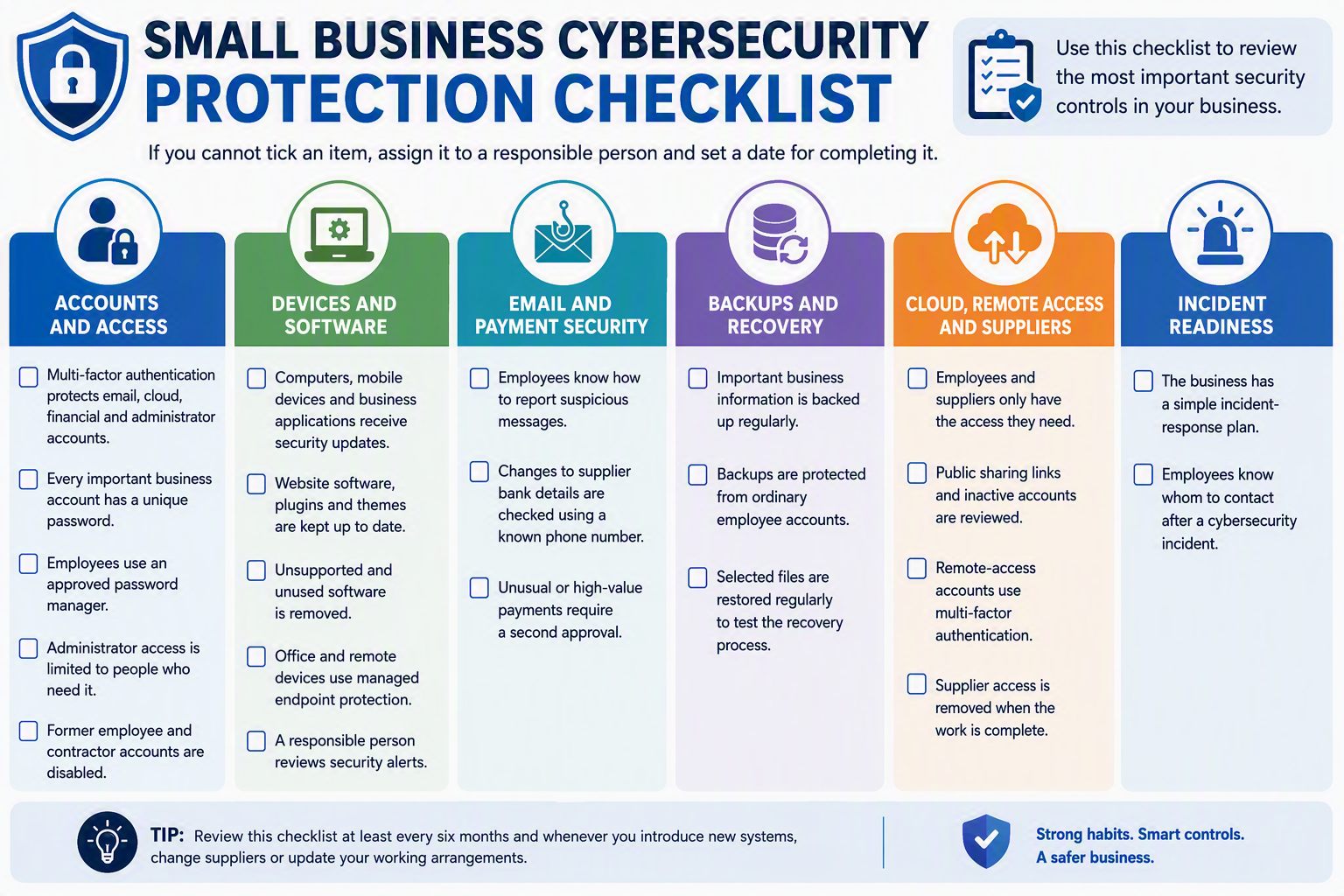
Do not try to complete every improvement at the same time. Start with unchecked items involving email, financial systems, administrator accounts, remote access and backups.
Each unchecked item should have an owner, priority and completion date. Review the checklist whenever you introduce a new system, change suppliers or update your working arrangements.
If several important controls remain unchecked, a professional cybersecurity audit and vulnerability scan can help identify security gaps and show which issues should be fixed first.
Small Business Cybersecurity Self-Assessment
A short self-assessment can help you identify areas that need attention.
Ask yourself:
- Do our important accounts use multi-factor authentication?
- Are our devices, applications, website and network equipment updated?
- Can we restore important information from a protected backup?
- Do we remove access when an employee or supplier no longer needs it?
- Does everyone know how to report a suspicious message or security mistake?
A no or not sure answer shows where your business should begin.
Assign the issue to a responsible employee or service provider. Set a clear date for reviewing and fixing it.
If you cannot confidently answer these questions, a professional cybersecurity assessment can help identify your most important risks.
What Should You Do After a Cybersecurity Incident?
First, identify which accounts, devices or services may be affected. A compromised computer may need to be disconnected from the network.
Do not immediately delete suspicious messages, erase the device or reinstall its software. This could remove information that an IT or cybersecurity specialist needs to understand the incident. Save relevant messages, account alerts and details about what happened. Write down when the problem started and who first noticed it.
Contact the person responsible for cybersecurity, your IT provider or a cybersecurity specialist as soon as possible.
If an account may be compromised, change its password from a known-safe device. The business may also need to sign the account out of other devices and remove unknown access. Further action may include checking system records, protecting connected accounts, isolating affected devices and restoring files from a secure backup.
Australian businesses can report cybercrime and suspicious online activity through ReportCyber. They can also contact the Australian Cyber Security Hotline for assistance.
Privacy and Data-Breach Responsibilities
A cybersecurity incident may create privacy, legal, insurance or contractual responsibilities. The correct response will depend on the type of business and the information involved.
Organisations covered by the Privacy Act must assess whether a data breach could cause serious harm. They may need to notify affected people and the Office of the Australian Information Commissioner. The Privacy Act does not apply to every small business in the same way. Some small businesses may still be covered because of the services they provide or the information they handle.
Seek qualified legal or privacy advice if you are uncertain about your responsibilities.
When Should You Consider Managed Cybersecurity Services?
You may need professional support if no one is clearly responsible for cybersecurity or important security work is not being completed.
Warning signs include missed security updates, untested backups, ignored alerts and active accounts belonging to former employees.
Professional support may also be helpful if you do not know which suppliers can access your systems, which cloud documents are publicly shared or how your business would respond to an attack. A managed cybersecurity provider can review your accounts, devices, networks, website, cloud platforms and existing security controls.
The provider should explain its findings in simple business language. You should understand which risks are urgent, which improvements can be planned and who is responsible for each task.
Frequently Asked Questions
What Is Cybersecurity for a Small Business?
Cybersecurity means protecting your business accounts, devices, networks, websites, cloud platforms and information from theft, damage and unauthorised access.
It includes security tools, clear processes and safe employee behaviour.
What Are the Most Common Cybersecurity Threats?
Common threats include phishing, ransomware, email fraud, stolen passwords, malware and outdated software.
Unsafe cloud settings, employee mistakes, insecure remote access and compromised suppliers can also put a business at risk.
Why Do Cybercriminals Target Small Businesses?
Small businesses often hold valuable customer, financial and account information. However, they may have fewer security resources than larger organisations.
Attackers may also target a small business to reach its customers, suppliers or connected service providers.
Is Antivirus Software Enough?
No. Antivirus or endpoint protection is only one part of cybersecurity.
A business also needs multi-factor authentication, security updates, protected backups, controlled access, employee training and an incident-response plan.
Which Accounts Should Use Multi-Factor Authentication First?
Start with business email, cloud administrator accounts, financial platforms, password managers and website administration.
Remote-access accounts should also be protected because they may provide direct access to business systems.
How Often Should Employees Receive Cybersecurity Training?
Employees should receive training when they join the business. Short refresher sessions should then be provided regularly.
Additional training may be needed when the business introduces new software or changes how payments are approved.
What Is Included in a Cybersecurity Assessment?
A cybersecurity assessment may review business email, employee access, devices, networks, websites, cloud services, backups and supplier accounts.
It can also check whether the business is ready to identify, respond to and recover from an incident.
What Security Control Should a Small Business Set Up First?
Multi-factor authentication is a strong starting point, especially for email, cloud, financial and administrator accounts.
It should be supported by regular security updates, protected backups and controlled access.
Strengthen Your Small Business Cybersecurity
You do not need to be a cybersecurity expert to make your business safer. Begin by protecting the accounts, information and systems that would cause the most disruption if they were attacked.
Turn on multi-factor authentication, install security updates and make sure your backups work. Train employees to recognise suspicious requests and report mistakes quickly.
If you are unsure where to begin, explore IT Company’s managed cybersecurity services for Australian small businesses. A cybersecurity assessment can help you find security gaps, understand which risks need urgent attention and create a practical protection plan.
