
An online store can look normal while losing sales behind the scenes. Checkout may fail for one payment method, stock levels may stop synchronising or order confirmations may disappear. Customers often find these problems before the store owner does.
Introduction
Effective ecommerce website maintenance protects the complete transaction, not only the visible website. It connects product discovery, cart activity, checkout, payment, order creation, stock adjustment and customer communication.
The Australian Cyber Security Centre recommends current software, multi-factor authentication, secure hosting, controlled access and regular backups. Its guidance also advises website owners to review websites for suspicious activity.
Payment security also needs careful management. The PCI Security Standards Council develops industry standards and resources for protecting payment data across ecommerce environments.
This guide presents five transaction-centred checks for Australian online stores in 2026. Each check covers frequency, ownership, evidence and escalation, giving store teams a practical maintenance framework without repeating a general website checklist.
Direct Answer: What Does Ecommerce Website Maintenance Include?
Ecommerce website maintenance includes controlled software updates, checkout and payment testing, security monitoring, tested backups, product-data reviews and integration checks. It should also cover customer emails, analytics and search indexing. Every critical store system needs a named owner, test frequency, evidence of completion and escalation process.
In This Guide
You will learn how to:
- Protect the complete ecommerce transaction
- Test checkout, payment and order processing
- Maintain security, backups and store access
- Validate stock, shipping and third-party integrations
- Assign ownership and escalation responsibilities
What Is Ecommerce Website Maintenance?
Ecommerce website maintenance is the continued work required to keep an online store functional, secure, accurate and recoverable. It covers the public storefront, administration system, products, checkout, payment gateway and connected business services.
An online store usually carries greater operational risk than a simple information website. Customers create accounts, submit personal information, make payments and expect accurate order confirmations.
Reliable website maintenance services may cover platform updates, monitoring, backups, security checks and reporting. The published service page lists different content, backup and protection features across its plans.
Maintenance cannot guarantee that a store will never fail. However, scheduled transaction testing can identify problems earlier and give the team a safer recovery process when an incident occurs.
Why Australian Ecommerce Stores Need a Transaction Framework
Online stores depend on several systems working together. These systems may include WooCommerce or another ecommerce platform, payment gateways, shipping tools, inventory software, analytics and customer email services.
One failed connection can interrupt the transaction. A payment may succeed while the store fails to create an order, or stock may remain available online after the last item has sold.
A general website checklist may confirm that the store loads and receives updates. A transaction-centred framework goes further by testing the complete journey from product selection to customer confirmation.
Every important system should have four controls:
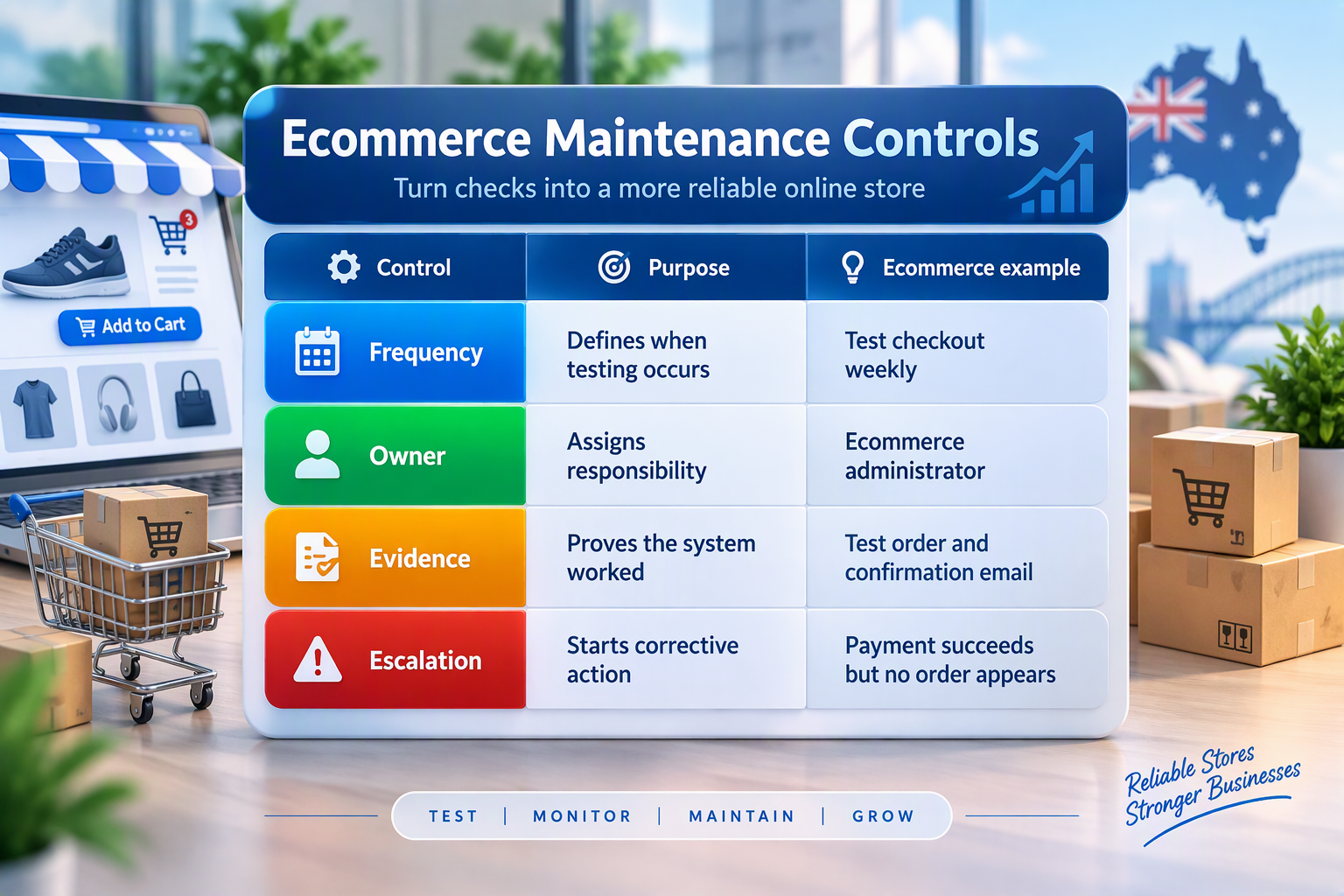
This structure helps teams move beyond a simple tick-box approach. The maintenance record shows what the team tested, who completed the work and what happened after a failure.
Ecommerce Maintenance Compared With General Website Care
A business website and an online store share several maintenance needs. Ecommerce adds payments, orders, inventory, customer accounts and operational integrations.
| Maintenance area | General website | Ecommerce store |
|---|---|---|
| Software | CMS, theme and plugins | CMS, store platform, extensions and gateway |
| Customer functions | Forms and calls to action | Product search, cart, checkout and refunds |
| Information | Services and contact details | Products, prices, stock, tax and shipping |
| Security | Users, updates and malware | Customer accounts, checkout scripts and payments |
| Recovery | Pages, media and database | Products, customers, orders and store settings |
| Analytics | Leads and page activity | Products, carts, checkout and purchases |
Businesses should not assume that a standard business plan covers online-store functions. The written scope should identify the store platform, gateway and every business-critical integration.
1. Test the Complete Purchase Transaction
The first maintenance check should cover the entire customer journey. Test product discovery, product selection, cart, checkout, payment, order creation and confirmation as one connected process.
A store can display a successful payment while failing to create the order. It can also create an order without sending the customer or fulfilment team a confirmation.
What to Test
Use an approved test product or payment-provider test mode. Review discounts, shipping, tax, address validation, payment status and final order totals.
Test representative browsers and mobile devices. A checkout may work on one browser while failing on another because of scripts, cookies or interface changes.
The test should confirm:
- The correct product and quantity reach the cart
- Shipping, tax and discounts calculate correctly
- The approved payment completes
- The store creates the order
- Customer and internal emails arrive
This is the article’s only extended task checklist. Record the device, browser, payment method and result so a technician can reproduce any failure.
Frequency, Ownership and Escalation
A low-volume store may perform a complete transaction test weekly. A busy store may need continuous payment monitoring and more frequent checkout checks.
The ecommerce administrator should own routine transaction testing. Payment or platform specialists may investigate failures.
Escalate the issue immediately when a valid payment fails, the customer receives an incorrect total or payment succeeds without an order record.
2. Control Software, Security and Account Access
Online stores rely on a content management system, ecommerce platform, theme and extensions. Each component can change and may affect compatibility, performance or security.
Create a current backup before a significant update. Test store-platform, theme and payment-extension releases in a staging environment where practical.
The WordPress maintenance and support service describes staging-tested updates, off-site backups and monthly health reporting. These controls suit WooCommerce stores where one extension conflict can affect checkout.
Secure Administrator Access
Review users with access to the store, hosting, domain, payment gateway and analytics. Remove former employees, contractors and suppliers promptly.
Give users only the permissions required for their roles. Product editors do not normally need complete access to payment settings, plugins and administrators.
Enable multi-factor authentication where supported. Current Australian Government guidance recommends MFA and appropriate access controls for website administration.
Monitor Ecommerce Security
Security monitoring should cover malware warnings, failed logins, unexpected users and suspicious file changes. Unknown checkout scripts or unexplained redirects need urgent investigation.
A specialist website security service may provide malware scanning, blacklist monitoring and application-security checks. Confirm whether the selected service covers detection only or also includes cleanup and recovery.
The store owner should approve account access and incident decisions. A technical provider may monitor and investigate warnings, but the business should retain ownership of the accounts.
3. Protect Orders With Tested Backups and Recovery
A backup is useful only when the store can restore it successfully. Ecommerce backups should include website files, database content, products, customers, orders and important configuration settings.
Backup frequency should match order activity. A store receiving orders throughout the day may need more frequent recovery points than a small seasonal catalogue.
Australian Government backup guidance states that data, applications and settings should be backed up according to business criticality and continuity requirements. It also highlights secure, resilient storage and the ability to restore systems.
Businesses with broader continuity requirements can review cloud backup services. Confirm retention, encryption, storage location and assisted-recovery options before selecting a service.
Test Store Recovery
Do not wait for a real emergency to discover that a backup is incomplete. Restore a recent copy in a protected testing environment.
The recovery test should confirm:
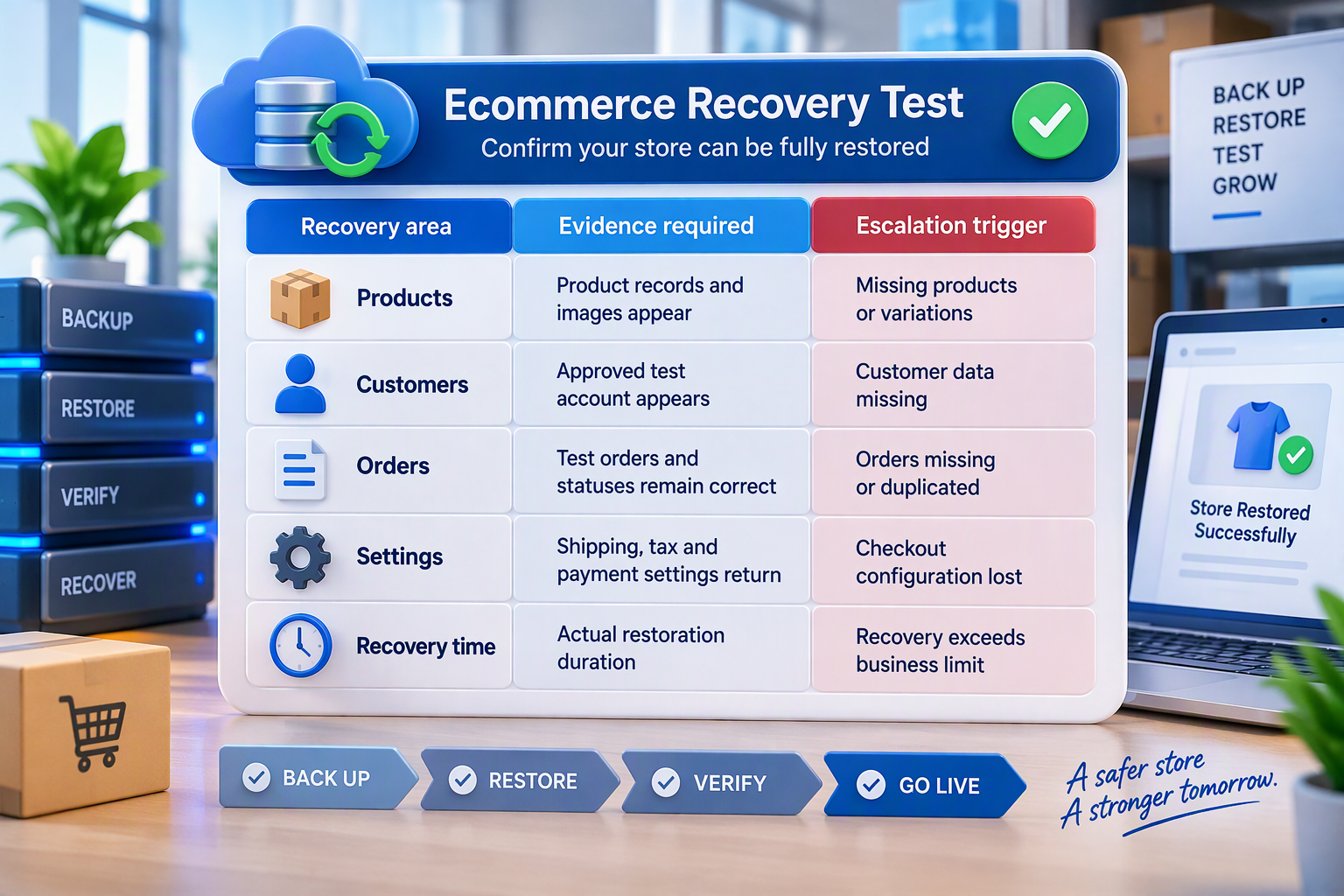
The store owner should define how much data and downtime the business can tolerate. The technical provider should document whether the tested process can meet that requirement.
4. Maintain Product, Stock, Shipping and Integrations
Product accuracy directly affects buying decisions. Review names, descriptions, images, prices, sale dates, variations, availability and delivery information.
Check promotional prices before and after campaigns. Incorrect prices or expired discounts may create complaints, refunds and manual customer-service work.
Stock integrations need end-to-end testing. Confirm that inventory changes move correctly between the stock system, storefront and order process.
A structured online store setup service can help when a business needs new product structures, inventory configuration, payment setup or broader ecommerce configuration.
Test Shipping, Tax and Discounts
Shipping and tax calculations may change through business decisions, extensions or third-party services. Test key delivery regions, order values and shipping methods.
Check free-shipping thresholds, coupon conditions and product exclusions. Confirm that the customer sees the correct final amount before payment.
Do not rely on one simple order. Test representative scenarios for the store’s main products and customer locations.
Validate Business Integrations
Review CRM, email, payment, shipping, inventory and analytics connections. Credentials, webhooks and access tokens may expire without producing an obvious storefront error.
Assign an owner to every integration. The owner should know who receives failure alerts and who can renew credentials.
Escalate missing records, delayed stock updates or silent integration failures. These issues can create overselling, missed fulfilment and inaccurate reporting.
5. Monitor Hosting, Speed, Search and Store Analytics
An online store requires stable hosting and enough processing capacity. High traffic, image-heavy catalogues and multiple extensions can increase server demand.
Review server errors, storage, memory and database performance. Several short outages may indicate limited resources or unstable software.
Businesses that have outgrown their current infrastructure can compare Australian web hosting services by scalability, security, backups and technical assistance. Hosting does not replace transaction testing or store maintenance.
Maintain Mobile Performance
Australian shoppers may browse and buy on phones, tablets and desktop computers. Test category, product, cart and checkout pages across relevant screen sizes.
Large product images, excess scripts and unused extensions can slow the buying journey. Remove tools that no longer provide enough commercial value.
Review caching carefully. Product, cart, account and checkout pages may contain dynamic data that requires different handling from static content.
Review Search Visibility and Analytics
Check category and product indexing, canonical tags, redirects and sitemap updates. Changes to faceted navigation or product URLs may create duplicate or missing pages.
Test ecommerce events such as product views, cart additions, checkout starts and purchases. A theme or consent-tool update can interrupt tracking without changing the visible store.
A broader SEO service for Australian businesses can support category optimisation, product content and technical SEO. Routine maintenance should still confirm that priority pages remain accessible.
Compare analytics with actual order records. A large difference may indicate a tracking problem rather than a sudden change in customer behaviour.
Ecommerce Transaction Reliability Matrix
The following framework connects each system with maintenance ownership and evidence.
| Store system | Frequency | Owner | Evidence | Escalation trigger |
|---|---|---|---|---|
| Checkout | Weekly and after changes | Ecommerce administrator | Test order | Valid order cannot complete |
| Payments | Continuous monitoring | Finance and technical teams | Gateway and order record | Payment and order status differ |
| Backups | Based on order volume | Technical provider | Backup and restoration report | Missed backup or failed restore |
| Inventory | Daily or automated | Operations manager | Stock-sync report | Store and inventory totals differ |
| Customer emails | Weekly and after changes | Marketing or support | Delivered test email | Confirmation not received |
| Analytics | Monthly and after releases | Marketing team | Event test | Orders and analytics differ |
| Search indexing | Monthly | SEO or technical owner | URL inspection result | Priority product disappears |
This transaction-centred framework distinguishes the article from a broad business-site maintenance checklist. It focuses on the systems that enable sales, fulfilment and customer communication.
Ecommerce Maintenance Schedule
The right schedule depends on order volume, store complexity and risk.
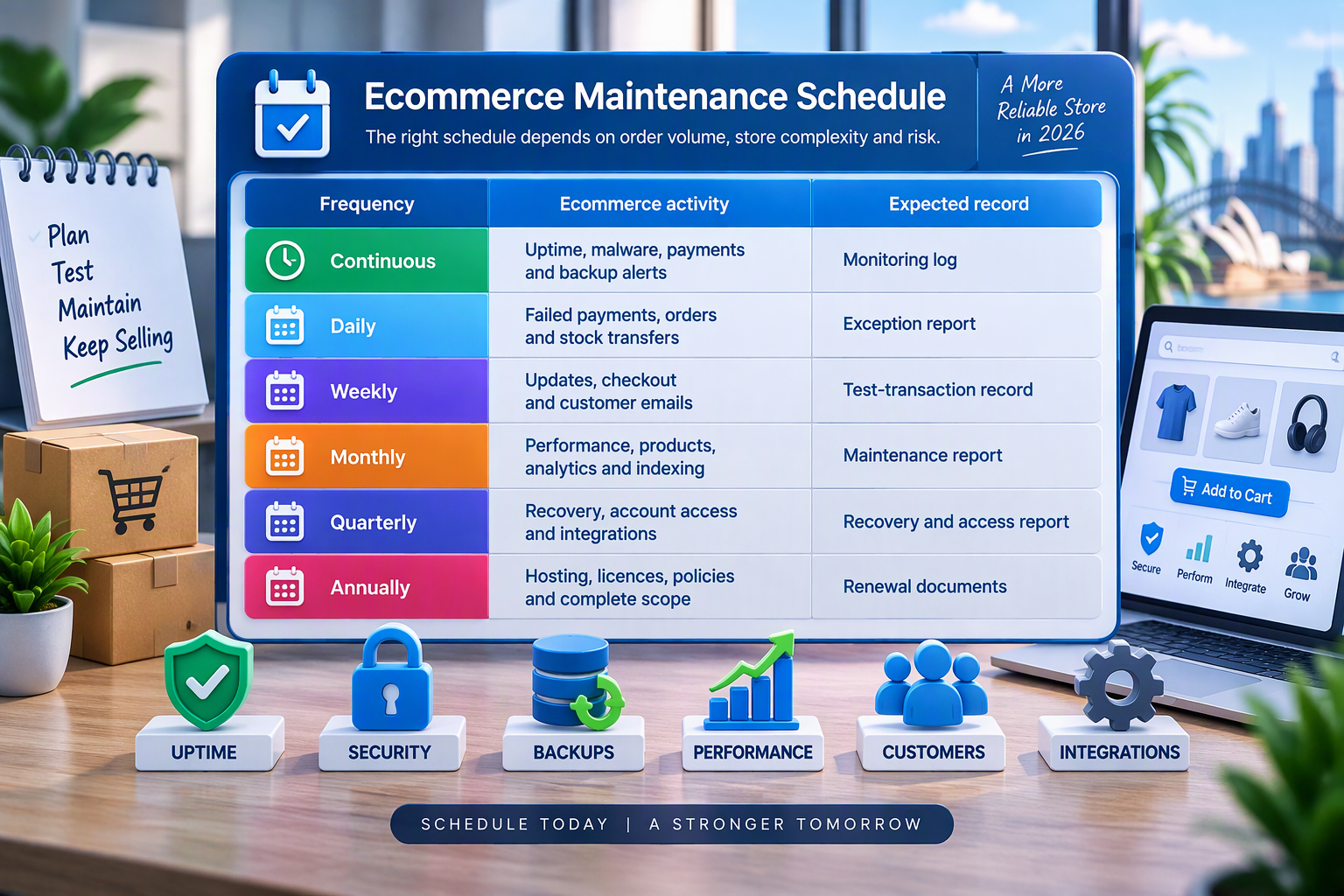
The provider should explain which activities rely on automation and which receive manual review. Automated monitoring still needs a person who can investigate alerts.
Affordable Ecommerce Maintenance
An affordable website maintenance plan should protect the store’s real transaction risks. A low monthly fee may not include checkout testing, recovery assistance or support for business integrations.
Ecommerce costs vary because stores use different platforms, payment methods, extensions and support arrangements. A store with several gateways and inventory connections requires more work than a simple catalogue.
Request a written quote for the live store. Provide the platform, payment services, integrations, order volume and required response hours.
Check whether GST, licences, emergency repairs and development work appear in the quoted total. Compare the full scope instead of the headline fee.
What a Store Maintenance Agreement Should Define
Professional maintenance for website operations should define monitoring, investigation, repair, recovery and reporting. An agreement that only sends alerts may leave the business without a repair process.
| Agreement area | What to confirm | Risk if unclear |
|---|---|---|
| Updates | Staging, testing and rollback | Broken store functions |
| Checkout | Browsers, devices and payment methods | Lost sales |
| Backups | Frequency, retention and recovery | Missing orders |
| Security | Detection, removal and response | Alerts without action |
| Integrations | Supported systems and escalation | Failed data transfers |
| Support | Hours, response targets and included time | Delayed repair |
| Reporting | Tests, changes and open risks | Limited accountability |
Ask for written exclusions. Custom development, major redesign, malware cleanup and after-hours work may need separate approval.
Common Ecommerce Maintenance Mistakes
Updating the Live Store Without Testing
A platform or extension update can affect checkout and payment notifications. Back up the store and test important changes in staging first.
Testing Only the Easiest Checkout Path
One successful card payment does not prove every customer journey works. Test key payment methods, discounts, delivery regions and error conditions.
Assuming Payment Means Order Success
A payment may complete while the store fails to create the order. Validate the gateway, order record and customer confirmation together.
Keeping Backups Without Testing Recovery
A backup file may be incomplete or unusable. Schedule restoration tests and document products, orders and settings recovered.
Ignoring Integration Failures
An online store may work while inventory or CRM transfers fail. Test both the storefront and destination systems.
Giving Suppliers Permanent Ownership
The business should own the domain, hosting, platform, payment gateway and analytics accounts. Suppliers should receive removable, role-based access.
Five-Point Ecommerce Website Maintenance Checklist
Use these five checks during each maintenance cycle:
- Test products, cart, checkout, payment and order creation.
- Review updates, administrator access and security warnings.
- Confirm backups and complete scheduled recovery tests.
- Validate stock, shipping, tax, emails and integrations.
- Check performance, analytics and search indexing.
For a broader small-business framework, use the Website Maintenance Checklist: 12 Essential Tasks for 2026.
Quick Facts
| Question | Direct answer |
|---|---|
| Who needs ecommerce maintenance? | Every business operating an online store |
| What should receive testing first? | Checkout, payments, orders and backups |
| How often should checkout be tested? | Weekly and after relevant changes |
| Should store backups be restored? | Yes, through scheduled recovery checks |
| Does hosting include store maintenance? | Not automatically |
| Who should own payment accounts? | The business |
| What affects maintenance cost? | Platform, integrations, volume and support scope |
| What is the main risk? | A hidden failure that blocks or misrecords sales |
Frequently Asked Questions
What Is Ecommerce Website Maintenance?
Ecommerce website maintenance is the continued work required to keep an online store functional, secure, accurate and recoverable. It covers software, checkout, payments, products, integrations, backups and customer communications.
How Often Should an Online Store Receive Maintenance?
Monitor security, payments and availability continuously. Test checkout weekly and after major changes. Review performance, products, tracking and indexing monthly.
Is Ecommerce Maintenance Different From General Maintenance?
Yes. Ecommerce adds payment, order, inventory, customer-account, tax and shipping requirements. These systems create additional testing and recovery needs.
Does Hosting Include Ecommerce Maintenance?
Not automatically. Hosting keeps the infrastructure available. Maintenance checks software, checkout, payments, products and connected business systems.
Should WooCommerce Updates Be Tested Before Release?
Yes. Test significant WooCommerce, theme and extension changes in staging where practical. Confirm products, cart, checkout, payments and emails before deployment.
Can Maintenance Prevent Every Security Incident?
No. Maintenance can reduce avoidable risk and improve detection and recovery, but no provider can guarantee that a store will never face an incident.
How Much Does Ecommerce Maintenance Cost?
Cost depends on the platform, product catalogue, payment methods, integrations and response requirements. Request a store-specific quote with GST, licence and emergency-work details.
Who Should Own Ecommerce Accounts?
The business should own the domain, hosting, payment gateway, store platform and analytics accounts. Providers should receive role-based access only.
What Should an Ecommerce Maintenance Report Show?
The report should show updates, transaction tests, payment results, backup status, security findings, performance, integrations, repairs and unresolved risks.
Final Thoughts
Effective ecommerce website maintenance protects the complete transaction, not only the appearance of the storefront. Products, cart, checkout, payments, orders and customer communication must work together.
Australian store owners should connect every critical system with a testing frequency, responsible owner, evidence and escalation path. This transaction-centred framework helps teams detect hidden sales failures.
The business should retain control of domains, payment accounts and administrator access. Tested backups and documented recovery procedures reduce disruption when a serious fault occurs.
Review the available website maintenance services or contact IT Company Australia to discuss your ecommerce platform, integrations and support requirements.