

A business website can appear normal while important functions fail in the background. An enquiry form may stop delivering messages, an SSL certificate may expire or an outdated plugin may create a security weakness.
Introduction
Small businesses often discover these problems after a customer reports them. By that stage, the business may have missed enquiries, interrupted sales or exposed important information to unnecessary risk.
A practical website maintenance checklist helps the business find problems earlier. The checklist should assign each task to a named person, set a suitable frequency and record the result of every check.
The Australian Cyber Security Centre recommends multi-factor authentication, current software and reliable backups as practical starting points for small businesses. Its website guidance also recommends HTTPS, controlled access and monitoring for suspicious activity.
Direct Answer
A website maintenance checklist should cover software updates, backups, security, uptime, forms, links, speed, content, search visibility, analytics, domains and user access. Businesses should monitor critical systems continuously, complete practical checks weekly or monthly, and test restoration and permissions quarterly.
In This Guide
- Schedule continuous, weekly, monthly and quarterly maintenance.
- Test backups, updates, forms and customer journeys.
- Protect website accounts and business information.
- Review content, analytics and search visibility.
- Record results and assign responsibility for repairs.
What Is a Website Maintenance Checklist?
A website maintenance checklist is a documented set of technical, security, content and performance tasks. It states what the team must inspect, who owns the task and how often the team must complete it.
The checklist should reflect the website’s actual functions. A service website may prioritise enquiry forms and contact details, while an online store also needs checkout, payment and order-notification tests.
Professional web maintenance services may cover WordPress updates, uptime checks, SSL validation, backups and reporting. However, businesses should confirm which tasks involve manual review and which depend entirely on automation.
How to Use This Operational Checklist
This guide focuses on performing maintenance rather than comparing packages. Assign every task to a named person, record the completion date and document any corrective action.
A spreadsheet, Microsoft Planner board or ticketing system can record the task owner, test date, result, problem found and repair status. For example, do not record only “form checked”. Record the form tested, receiving address and CRM result.
Businesses comparing provider scope should use the website maintenance inclusions guide. That article focuses on package inclusions, exclusions and responsibilities rather than completing each maintenance task.
Why Website Maintenance Matters for Small Businesses
A small-business website may generate enquiries, bookings and direct sales. Even a short failure can stop customers from contacting the business or completing a purchase.
Regular website maintenance for small business supports software compatibility, backups, working forms, accurate information and secure administrator access.
Maintenance records also help technicians investigate problems. The records show when a function last worked, which updates occurred and what action the team already completed.
Website Maintenance Schedule for 2026
Recommended small-business website maintenance schedule.
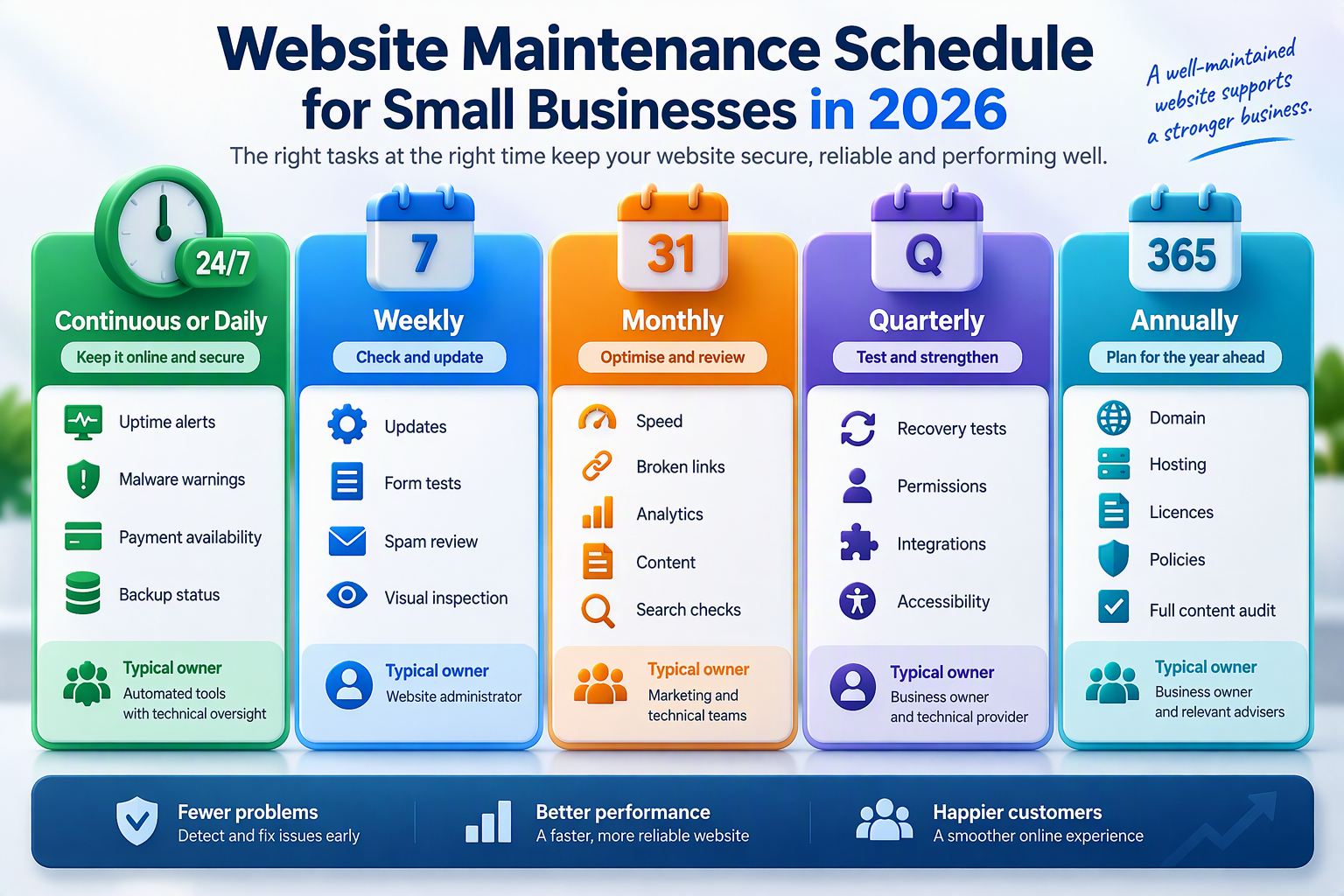
A high-volume ecommerce website may need daily checkout tests. A small service website may complete most practical checks weekly or monthly.
A professional web maintenance company should explain which tasks it automates and which tasks a technician reviews. The provider should also define what happens when monitoring detects a problem.
[VISUAL: maintenance calendar showing continuous, weekly, monthly, quarterly and annual tasks]
12 Essential Website Maintenance Tasks
1. Confirm That Backups Complete Successfully
A backup is useful only if the business can restore it successfully. Check that each backup includes the website files and database. Store at least one suitable copy separately from the live hosting environment.
Complete periodic restoration tests and record the result. The Australian Cyber Security Centre recommends backups as part of small-business cyber resilience.
Businesses needing another recovery layer can review cloud backup services. Confirm retention periods, encryption, supported data and restoration assistance before selection.
2. Update the CMS, Plugins and Themes
Content management systems, plugins, themes and extensions release updates to fix defects, maintain compatibility and address vulnerabilities. Create a fresh backup before applying significant updates.
Test major changes in a staging environment where possible. After each update, inspect navigation, forms, layouts and important service pages.
WordPress businesses can assess a dedicated WordPress hosting environment when staging, automated backups and platform-specific support form part of the requirement.
3. Review Administrator Access
Review every user with access to the CMS, hosting, domain registrar, analytics and connected tools. Remove former employees, contractors and suppliers promptly.
Give each person only the permissions required for the role. Enable multi-factor authentication wherever the platform supports it and record the primary owner of each important account.
4. Scan for Malware and Suspicious Changes
Monitor files, login activity, administrator accounts and unexpected content changes. Unfamiliar redirects, injected pages or new users may indicate a compromised website.
The Australian Government identifies malware, defacement and data breaches as common website threats. Its guidance recommends updated software, secure hosting, access controls and monitoring.
A dedicated website security service may provide malware scanning, blacklist monitoring and application checks. Features vary between plans, so confirm monitoring, removal and incident-response inclusions.
5. Test Forms, Bookings and Checkout
Complete every important form as a customer would. Confirm that the visitor receives a success message and that the correct employee or connected system receives the submission.
Test contact forms, bookings, account registration and checkout journeys. Also test invalid entries to confirm that each form shows useful error messages.
The guide to regular web maintenance for business websites provides additional context on forms, integrations, backups and monitoring.
6. Monitor Uptime and Server Errors
Uptime monitoring should alert people who can investigate the incident. Sending alerts to an unattended inbox does not protect the website.
Review recurring timeouts, database errors and server failures. Repeated short incidents may indicate resource limits, unstable software or unsuitable hosting.
Businesses that have outgrown their current platform can compare Australian web hosting services by capacity, security, backups and technical support.
7. Check SSL, Domain and Licence Expiry
An expired domain can make the website and associated email unavailable. An expired SSL certificate may trigger browser warnings and reduce customer confidence.
Record renewal dates for domains, certificates, themes, plugins and external services. Check automatic-renewal details rather than assuming that the renewal will succeed.
Businesses that manage certificates separately can review SSL certificate options. Confirm whether the hosting package already includes SSL before purchasing another certificate.
8. Review Speed and Mobile Performance
Test important pages on mobile and desktop devices. Focus on service, booking, enquiry and checkout pages rather than the homepage alone.
Compress oversized images and review scripts or integrations that delay loading. Remove tools that no longer provide enough value to justify their performance impact.
A structured website design and development process may help when slow performance results from the theme, code or page architecture rather than routine maintenance.
9. Fix Broken Links and Missing Pages
Check internal and external links for 404 errors, incorrect redirects and outdated destinations. Broken links interrupt customer journeys and reduce access to referenced information.
Fix internal links directly where possible. Create a relevant redirect when an important page moves, but do not redirect every removed page to the homepage.
10. Update Content and Business Details
Review contact information, services, prices, staff profiles, opening hours and location details. Outdated information can mislead customers even when the website works technically.
The maintenance of websites includes technical care and editorial review. Updates keep the platform working, while content checks keep business information accurate.
11. Review Search Visibility and Indexing
Use Google Search Console to review search traffic, indexing and technical issues. Search Console provides query, impression, click, sitemap and URL inspection information.
Check important pages that have disappeared or show unexpected indexing messages. Review canonical tags, redirects, sitemaps and robots instructions after major changes.
A broader SEO service can support technical reviews, internal linking and content optimisation. Routine maintenance should still confirm that priority pages remain accessible and indexable.
12. Validate Analytics and Conversion Tracking
Analytics can stop collecting accurate data after a theme update, form replacement or consent-tool change. Test tracking rather than assuming that the dashboard remains accurate.
Confirm that forms, calls, bookings, downloads and sales record correctly. Document every tracking change so the business can interpret later increases or decreases.
Regular site maintenance services should state whether analytics checks form part of the scope. The verified service page lists Google Analytics and search integration among its maintenance features.
Website Maintenance Responsibility Matrix
Small-business website maintenance responsibilities
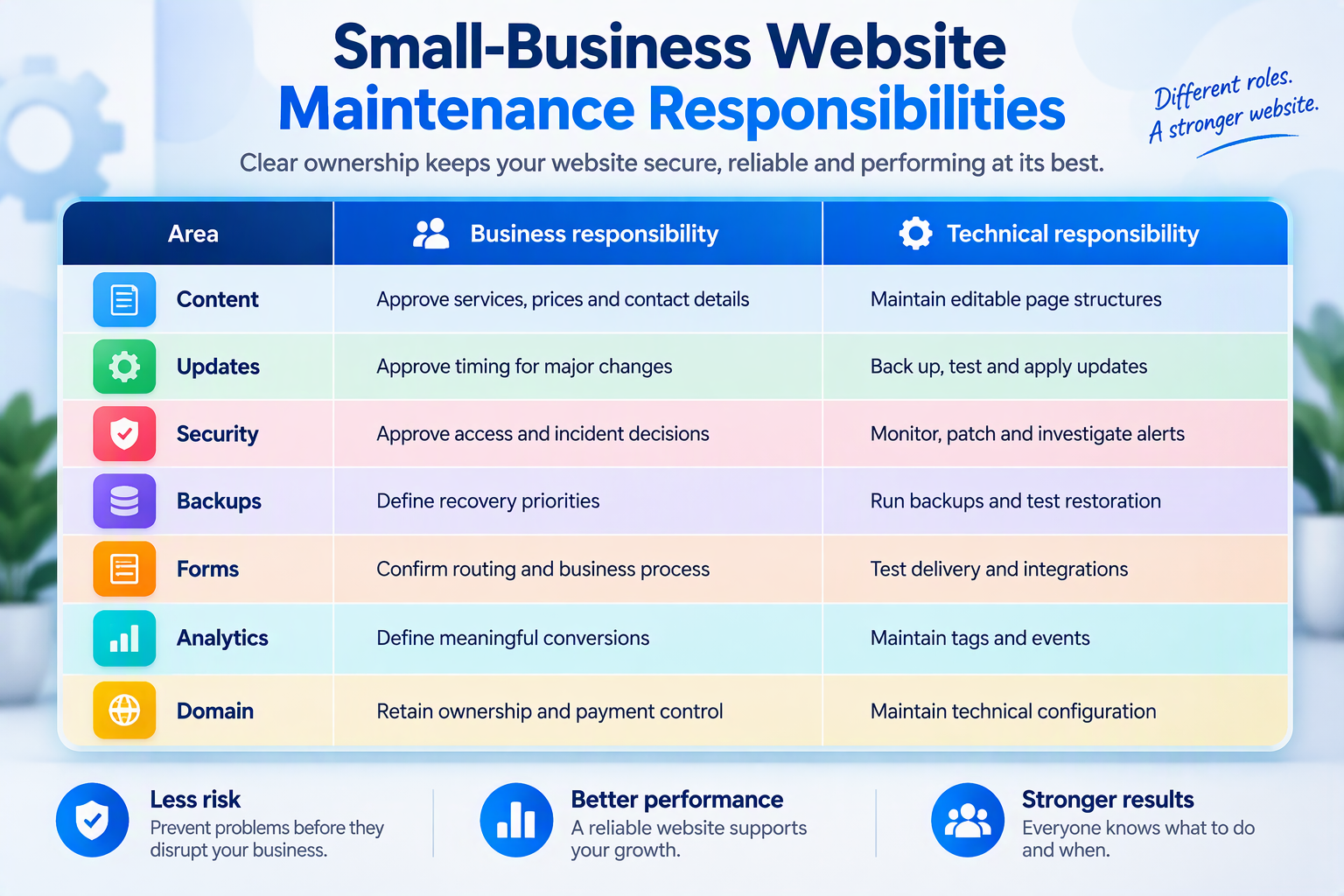
An effective maintenance process assigns every critical task to a responsible person. The business should document who monitors each area, who approves repairs and who receives urgent alerts.
Common Website Maintenance Mistakes
Assuming Hosting Includes Complete Maintenance
Hosting keeps website files available on a server, but it may not include form testing, plugin reviews or content updates. Compare the hosting agreement with the maintenance scope and assign any missing tasks.
Applying Updates Without a Backup
An update may create a compatibility problem. Create a current backup before significant changes, then test important customer journeys after completing the update.
Keeping Backups Without Testing Recovery
A backup can be incomplete or corrupted. Schedule restoration tests and document the recovery result, time required and person responsible.
Monitoring Problems Without Repair Coverage
A monitoring tool may report downtime or malware while nobody has authority to fix it. Define support hours, response contacts, repair limits and escalation steps.
Selecting a Plan Only by Price
A low monthly fee may exclude manual testing, repairs, malware removal or recovery work. Compare exact inclusions, exclusions and response commitments instead of package names.
Monthly Small-Business Website Maintenance Checklist
- Confirm successful backups and test the latest restore point.
- Apply approved updates and retest customer-facing functions.
- Review security alerts, users, SSL and domain status.
- Test forms, bookings, checkout and analytics events.
- Check speed, broken links, content and indexing.
Quick Facts
Website maintenance checklist quick facts
| Question | Direct answer |
|---|---|
| Who needs a maintenance checklist? | Every organisation that operates a website |
| What should it cover? | Updates, backups, security, functions, content and tracking |
| Where should backups be stored? | In a protected location separate from the live website |
| When should forms be tested? | After changes and during scheduled reviews |
| Does hosting include maintenance? | Not always; check the written scope |
| Who should own the domain? | The business |
| What is the main risk? | A failure that remains unnoticed |
Frequently Asked Questions
What is a website maintenance checklist?
A website maintenance checklist records the technical, security, content and performance checks required to keep a website working. It should identify each task, its frequency, owner and corrective action.
How often should a small-business website be maintained?
Monitor uptime and security continuously. Review backups and essential functions weekly, perform broader checks monthly, and test recovery, permissions and integrations quarterly.
Does website hosting include maintenance?
Not necessarily. Hosting provides server infrastructure, while maintenance covers software, forms, content, backups, testing and monitoring according to the agreement.
Can a small business maintain its own website?
Yes, when staff have enough time, technical knowledge and system access. Seek specialist help for security incidents, failed updates and complex integrations.
Does website maintenance improve SEO?
Maintenance supports SEO by keeping pages accessible, links functional and content accurate. However, maintenance cannot guarantee search rankings.
What should a web maintenance company report?
The report should cover updates, backups, security findings, uptime, performance, broken links, functional tests and unresolved risks. The provider should also identify recommended actions.
Is malware removal included in maintenance?
Not always. Some services monitor for malware but charge separately for investigation and removal. Confirm cleanup, restoration and reporting inclusions.
How much does website maintenance cost?
Pricing depends on website size, software, functions, update frequency and support requirements. Compare written inclusions and exclusions rather than relying on one general monthly figure.
Conclusion
A complete website maintenance checklist helps a small business protect website availability, customer journeys and important information. The process should cover updates, backups, access, security, forms, content, search visibility and analytics.
An effective maintenance process assigns every critical task to a responsible person. The business should record test results, repairs and recovery exercises rather than treating an automated alert as proof of completion.
Australian small businesses should prioritise multi-factor authentication, software updates, backups and controlled access. The Australian Cyber Security Centre recommends these measures as practical security foundations.
To compare maintenance schedules, backup frequencies and support options, review the available website maintenance plans or contact IT Company Australia. Confirm monitoring, testing, repair coverage and response responsibilities before choosing a plan.
