
An Australian website may perform well locally but create a poor experience for international visitors. Customers may reach content in the wrong language, see unsuitable prices or receive service information written for a different market.
Introduction
Translation alone does not solve these problems. A multilingual website also needs suitable URLs, navigation, metadata, forms, content ownership and market-level measurement. Its architecture must support every selected language without creating confusing duplicates or incomplete customer journeys.
Custom website development with multilingual SEO brings these requirements into the project before development starts. It connects website architecture, internationalisation, localisation, search visibility and conversion planning.
The goal is not to publish dozens of thin translated pages. It is to create complete, useful journeys for selected markets. A smaller multilingual website with accurate information and working conversions is stronger than a large website containing unfinished or outdated translations.
What Is Custom Website Development with Multilingual SEO?
Custom website development with multilingual SEO creates a website for several languages or regions while building international search requirements into its architecture.
The project may include locale-specific URLs, flexible templates, hreflang, localised metadata, language switching, translated forms and separate market reporting. Each feature should support a defined customer or business need.
A multilingual website serves content in more than one language. A multi-regional website targets customers in different countries or territories. One website may be multilingual, multi-regional or both.
Internationalisation, often shortened to i18n, prepares the website’s code and design for different languages and formats. Localisation then adapts its content, terminology, currency, imagery and customer journey for a particular market.
Direct Answer
Custom website development with multilingual SEO builds language and regional requirements into a website from the beginning. It combines scalable URLs, flexible design, localised content, hreflang, market-specific search research and complete conversion journeys so customers and search engines can reach the most appropriate version.
In This Guide
This guide explains how to:
- Select priority markets, languages and customer journeys
- Choose a scalable multilingual website architecture
- Plan internationalisation, localisation and multilingual SEO
- Build reliable translation, review and testing workflows
- Compare project scope, risks, costs and providers
If an international website is already live, use the International SEO Audits guide to check its hreflang, canonicals, crawling, indexing and regional signals.
This article addresses a different stage. It focuses on pre-build planning, multilingual website architecture and provider selection before a new website is developed.
Multilingual Website Quick Facts
| Question | Practical answer |
|---|---|
| Who needs a multilingual website? | Businesses serving customers who research, compare, enquire or buy in different languages |
| What should be planned first? | Markets, available services, customer journeys and content ownership |
| Where should language versions live? | On separate, stable and crawlable URLs |
| When should multilingual SEO begin? | During discovery, before URLs, templates and CMS workflows are finalised |
| What does localisation cover? | Content, metadata, forms, currency, calls to action and market information |
| How is project scope established? | By languages, regions, templates, pages, integrations, review and ongoing management |
Begin with Market Readiness
A multilingual project should begin with markets that the organisation can actually serve. Search demand can indicate an opportunity, but it does not confirm that the business can operate legally, commercially or effectively in that market.
Review current enquiries, sales, analytics, distribution and customer-support capability. These sources can reveal where real interest already exists and where the business can deliver a reliable experience.
A market requires more than translated pages. Products, services, pricing, payment methods, fulfilment, warranties and support must suit the target audience.
Avoid selecting a language only because it has a large global audience. Every market should have a commercial purpose, a content owner and a complete conversion journey.
IT Company Australia publicly references custom website development with multilingual SEO, including hreflang, localised URLs and translated metadata. Confirm translation management, language review, market research, implementation and monitoring in the written project scope.
Distinguish Language from Region
Language and region are separate planning decisions. Spanish content may serve customers in Spain, Mexico or the United States, but those audiences can use different terminology, currencies and commercial expectations.
English also varies across Australia, the United Kingdom, the United States, Canada and Singapore. A business may use English in each market while adapting prices, spelling, regulations, examples and service availability.
Define the language and region for every intended audience. Where appropriate, use recognised locale combinations such as en-AU, en-GB or fr-CA.
Do not use a country code as if it were a language. Google’s hreflang guidance requires a valid language code first, followed by an optional regional code.
Build a Multilingual Website Readiness Matrix
The readiness matrix helps the project team decide whether a market can support a complete customer journey. It should be approved before developers finalise the website’s URL structure and templates.
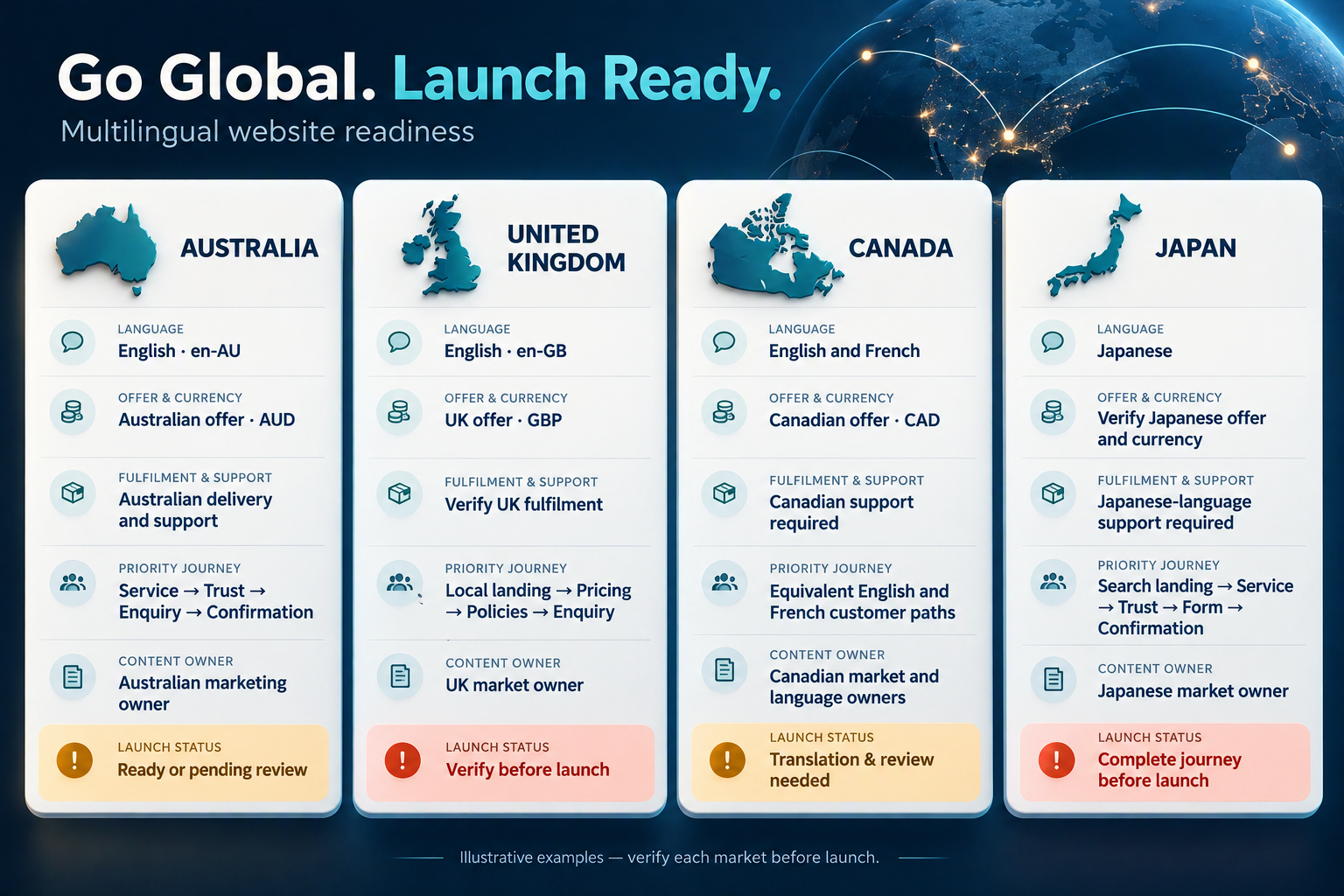
These entries are illustrative. They do not describe the current operating markets of IT Company Australia.
Replace each example with verified business information. Add requirements for tax, privacy, legal review, integrations or licensing when those factors affect a market.
Choose a Multilingual Website Architecture
Google recommends using separate URLs for different language versions. Stable URLs allow search engines to crawl each page and let visitors share a specific language or regional version.
The main options are country-code domains, subdomains and subdirectories. URL parameters are generally weak for primary language segmentation because they create less transparent structures.
Country-Code Domains
A country-code domain such as example.de provides a clear country signal. It may suit a business with separate local operations, teams, offers and legal entities.
This model creates more management work. Each domain may require separate hosting, security, analytics, search monitoring, content processes and renewal controls.
Country domains can also divide authority across several properties. Use them when operational separation creates a clear business benefit, not only because the address appears local.
Language or Regional Subdomains
A subdomain such as de.example.com can provide technical separation while keeping markets under one broader brand.
Subdomains may suit projects with separate platforms, infrastructure or regional teams. However, users may not immediately know whether the prefix represents a language or country.
Tracking, Search Console access, sitemaps and internal links require consistent management. Technical separation should not lead to fragmented design or customer experiences.
Language or Regional Subdirectories
A subdirectory such as example.com/de/ keeps language sections within one main domain. This model can simplify central hosting, content management and analytics.
Subdirectories often suit businesses adding languages gradually. They still require strong publishing permissions so editors do not place one market’s prices, forms or support information into another section.
No structure is universally best. Choose the option that matches market ownership, technical resources, business independence and long-term plans.
Design a Complete Multilingual Customer Journey
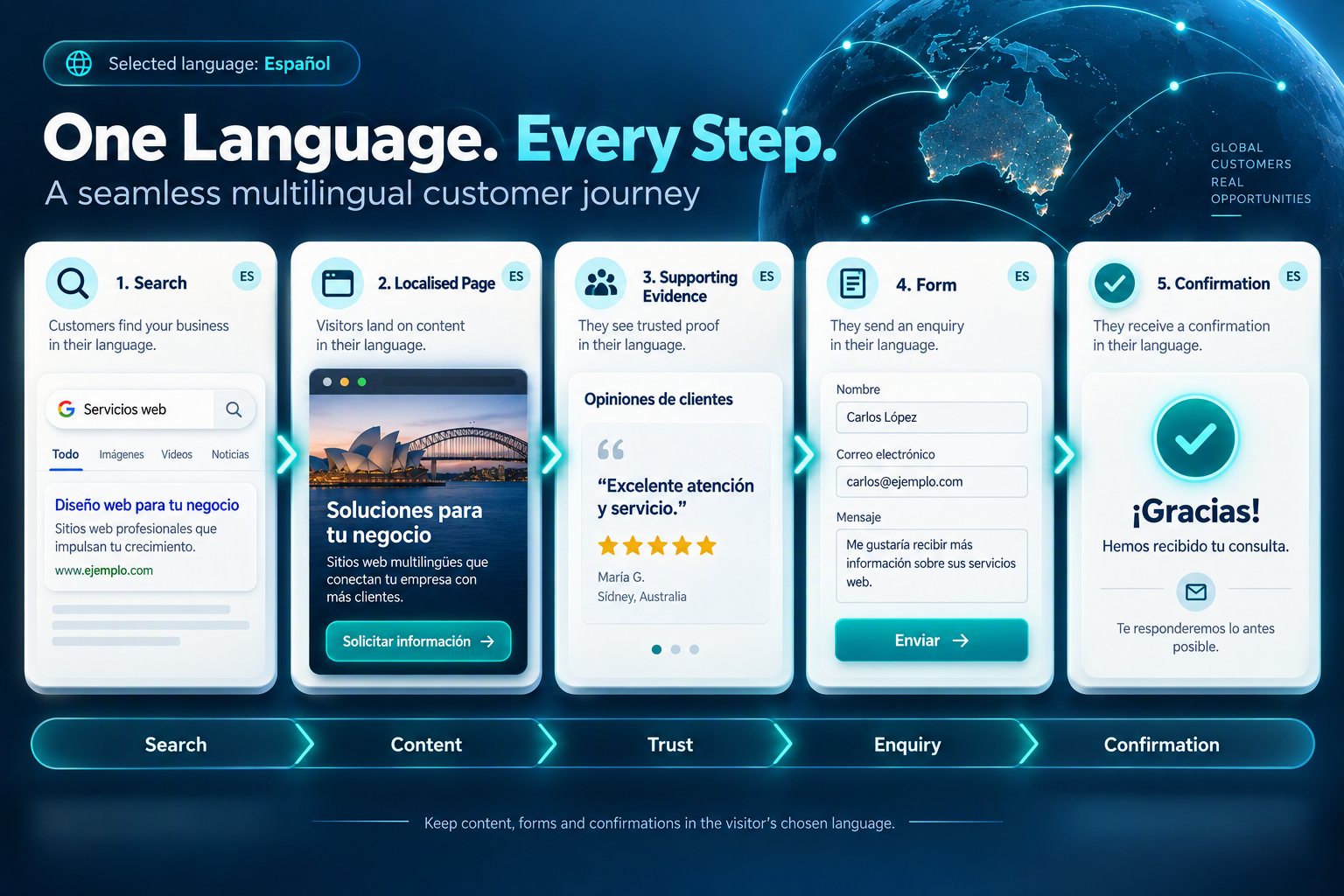
A multilingual journey should remain consistent from the search result to the final confirmation. Translating a landing page while leaving its form or automated response in English creates a broken experience.
Map every priority step. Include the landing page, service information, evidence, call to action, form labels, validation messages, confirmation and follow-up communication.
The website does not need to launch every possible journey in every language. Prioritise the services and pages most likely to create customer and business value.
A smaller number of complete journeys is easier to test and maintain. It also gives the organisation a stronger foundation for later expansion.
Apply Internationalisation Before Localisation
Internationalisation prepares templates, code and components for several languages. Buttons, headings, cards and menus need flexible dimensions because translated text may expand or wrap differently.
The system should support locale-specific dates, numbers and currencies. The CMS should separate shared design patterns from market-specific content.
Forms and connected systems must retain language and regional information. A CRM record should show which market and language produced the enquiry.
Right-to-left website design requires more than reversing text. Navigation, directional icons, field alignment, spacing and content order may need different behaviour.
Any Arabic, Hebrew or other RTL version should receive independent technical, accessibility and native-language review. This article does not claim that such a review has already occurred.
Localise Content Instead of Replacing Words
Translation reproduces meaning in another language. Localisation adapts terminology, examples, measurement systems, pricing and calls to action for the intended market.
A literal translation may sound unnatural or preserve English expressions that do not carry the same meaning elsewhere. It may also produce unsuitable levels of formality.
Human language review is important for commercially significant material. Automated tools can support drafts, translation memory and lower-risk workflows, but priority content needs appropriate review.
Product, service, safety, legal and conversion content may require specialist assessment. The project scope should define which pages need native-language review and who can approve them.
Privacy, data-transfer, retention and access requirements vary by jurisdiction. Obtain qualified legal or privacy advice when translated forms or integrations process regulated or sensitive information.
Research Search Behaviour in Each Market
International keyword research should not begin by translating an Australian keyword list. Customers in another market may use different expressions, product terms or question formats.
Review local search results and terminology for every priority page. Determine whether the intent is informational, comparative, local or transactional.
Regional English also requires research. A phrase used in Australia may not match the way customers search in the United Kingdom or North America.
Map one main intent to each page and language version. Use keywords naturally and avoid forcing exact phrases into text that a native speaker would not use.
Create Localised Metadata
Every indexable language page needs a useful page title, heading and description. Automated translation can produce metadata that is too long, repetitive or poorly aligned with local intent.
Review priority metadata in the same workflow as the main content. The title and description should accurately represent the local offer.
Templates must support different word lengths and scripts. Narrow English designs may break when translated headings require more space.
Test real multilingual content during design. Placeholder content cannot reveal wrapping, spacing or character-rendering problems.
Implement Hreflang Carefully
Hreflang helps Google understand equivalent language and regional pages. It does not translate content, replace localisation or guarantee rankings.
Each language version should reference itself and its relevant alternatives. Matching pages must also return those references.
Use complete URLs and valid language or region codes. Informal abbreviations or country-only codes can create incorrect signals.
An x-default page can provide a fallback for users whose language settings do not match a supported version. It is often appropriate for a language selector or general page.
Google supports hreflang in HTML, HTTP headers and XML sitemaps. Choose one method that the team can maintain reliably rather than creating unnecessary duplication.
Keep Canonicals and Hreflang Consistent
Canonical tags identify preferred URLs among duplicate or very similar pages. Hreflang identifies equivalent language or regional versions.
A common error occurs when every translated page declares the English page as canonical. This conflicts with the intention to index the translated pages independently.
A unique translated page should generally have an appropriate self-referencing canonical. Its hreflang annotations can then connect it with matching language versions.
Google recommends consistency between canonical tags, sitemaps and internal links. Where hreflang is used, the canonical should be in the same language where possible.
Create a User-Controlled Language Selector
Use visible language names instead of relying only on flags. A language may be used in many countries, while one country may use several languages.
A visitor changing language on a service page should reach the equivalent service page. Sending every visitor to the homepage interrupts the customer journey.
Avoid forced redirection based only on IP address or browser language. Google warns that automatic redirection may prevent users and crawlers from accessing alternative versions.
A suggestion banner can help visitors discover another version. The final decision should remain with the user.
Build Language-Specific Navigation
Menus should be reviewed in every language. An English label may fit on one line while a translated version wraps or overlaps.
Internal links should normally remain within the selected language. A visitor on a Japanese service page should not unexpectedly reach English supporting content.
Breadcrumbs, footers, related content and calls to action need the same language-specific treatment. Multilingual SEO weakens when only the main navigation is localised.
Templates should generate consistent links to canonical language URLs. Editors should not need to rebuild these relationships manually on every page.
Create a Multilingual Content Workflow
A multilingual workflow records the source page, translation status, reviewer, market owner and publication state. Editors need to know which versions are current.
Translation becomes difficult to control when source pages change during localisation. Use content freezes or version numbers for major releases.
Translation memory can help reuse approved wording and improve consistency. It does not replace native-language review or market ownership.
The CMS should support shared and market-specific fields. Global brand information may be reused, while prices, contact information and service availability remain local.
IT Company Australia describes its website design services as covering discovery, responsive design, CMS integration, development, testing and support. Multilingual workflows, locale rules and translation responsibilities should still be listed explicitly in the final proposal.
Secure Every Language Version
New languages create more pages, accounts, integrations and maintenance work. Security rules should cover every domain, subdomain, CMS role and translation tool.
Translators may need access to content without receiving administrator rights. Use individual accounts and appropriate permissions.
Review how external translation services process information. Sensitive customer or business data should not enter an unsuitable translation workflow.
IT Company Australia publishes website security services covering malware scanning, blacklist monitoring and vulnerability checks. Confirm whether the selected plan includes investigation, remediation and post-incident support.
Test Accessibility Across Languages
Accessibility applies to every language. Forms, error messages, headings, images and keyboard controls need review after localisation.
Use correct page-language information for assistive technologies. Screen readers rely on it for suitable pronunciation.
Alternative text should be translated naturally. Copying English alt text into every language version produces an inconsistent experience.
RTL layouts need complete keyboard and assistive-technology checks. Native-language review should form part of multilingual website QA rather than an optional final check.
Plan International Performance
A page that loads quickly in Sydney may perform poorly in Europe, Asia or North America. Test important templates from the actual target regions.
Large media, excessive scripts and inefficient templates affect every language. A content delivery network may reduce distance for static files, but it cannot repair weak front-end development.
IT Company Australia publishes web hosting services with plan-specific hosting, storage and SSL features. Confirm international infrastructure, CDN, capacity and support requirements before selecting a plan.
Measure performance separately by market where possible. One global average can hide a slow experience in a commercially important region.
Measure Markets Separately
Multilingual reporting should combine language, country, landing page, query and conversion data. One total traffic figure cannot show which market needs attention.
Use consistent conversion definitions while retaining local detail. One language may attract less traffic but produce more qualified enquiries.
Assign a report owner for every active market. That person should review missing translations, visibility changes and broken customer journeys.
Reporting is valuable only when it leads to action. Document each problem, owner and target resolution date.
Complete Multilingual Website QA
Multilingual website QA combines technical, language and journey testing. It should cover URLs, metadata, hreflang, canonicals, sitemaps, navigation, forms and analytics.
Test approved content on real devices and browsers. Check text expansion, character display, currencies, dates and right-to-left layouts where relevant.
Verify that CRM records and confirmation emails retain the correct language and locale. A working page does not prove that the connected process is correct.
The launch should pause when a priority conversion path remains incomplete. Missing forms, wrong pricing, broken hreflang or unsafe data handling require correction before publication.
Launch Only When the Journey Is Complete
Use the following launch check for every language or market.
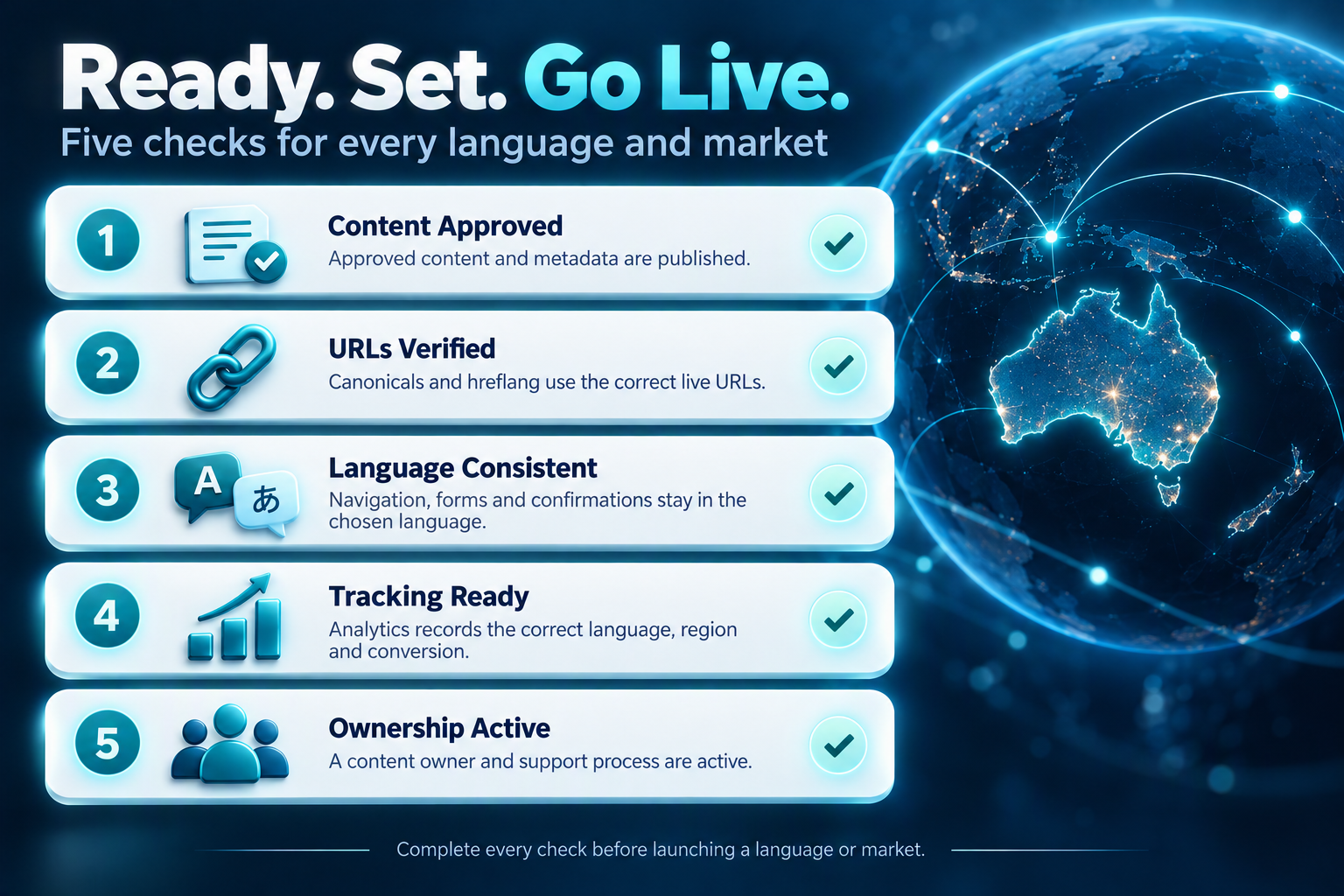
Do not launch a language section simply because its URLs exist. Search engines may index incomplete content before the team is ready.
Delaying one market is safer than publishing an unreliable customer experience. Record the reason and requirements for the later launch.
Scope Costs and Timelines from Requirements
Multilingual project costs depend on the number of languages, target markets, page types, integrations, translation requirements and review stages. Website development represents only one part of the total work.
Illustrative Bilingual Website Scope
Factors That Affect the Project Schedule
What the Written Proposal Should Include
Common Multilingual Development Mistakes
Adding Languages After Development
Late translation can force changes to URLs, navigation and components. Define language and region requirements during discovery.
Translating Keywords Literally
Literal translation may target phrases that customers do not use. Complete local research before approving headings and metadata.
Publishing Incomplete Journeys
A translated page is not complete when its form and confirmation remain in another language. Test the entire conversion path.
Redirecting Visitors Automatically
Forced redirects may send visitors to an unsuitable version. Offer a suggestion while preserving manual choice.
Canonicalising Everything to English
English canonicals can conflict with translated-page indexation. Use consistent language-specific canonicals where appropriate.
Creating Unnecessary Regional Pages
Near-identical pages increase content and maintenance risk. Create regional versions only when they deliver meaningful local value.
Leaving Translations Without an Owner
Content becomes outdated when responsibility is unclear. Assign a market owner, language reviewer and review date.
Choosing a Multilingual Development Partner
A suitable partner should explain development, international SEO and content ownership clearly. Ask who designs the architecture, implements hreflang and tests conversions.
Confirm whether the provider supplies translation management or only the technical platform. Translation, localisation and native-language review are separate responsibilities.
Review relevant live work rather than broad capability statements. IT Company Australia publishes a website design portfolio containing a custom WordPress project described as having multilingual support, mobile-first design, external-data integration and SEO structure.
One portfolio project does not verify capability for every language, script, market or platform. Request relevant technical examples and verify the people responsible for native-language and RTL review.
Frequently Asked Questions
What Is Custom Website Development with Multilingual SEO?
It is the development of a website for several languages or markets with international SEO built into its architecture. It may include locale-specific URLs, flexible templates, hreflang, localised metadata, content workflows and market reporting.
What Is Multilingual Website Development?
Multilingual website development prepares templates, components, forms and content systems for more than one language. It includes technical internationalisation and the practical management of localised content.
Does Every Multilingual Website Need Hreflang?
No. Hreflang applies when separate URLs provide equivalent language or regional versions. It helps Google understand page relationships but does not replace localisation.
Should Every Language Have a Separate URL?
Google recommends separate URLs for language versions. Stable URLs make each version easier to crawl, share and measure.
What Is the Difference Between Translation and Localisation?
Translation changes content into another language. Localisation adapts terminology, currency, examples, forms and service information for an audience or region.
Are Subdirectories Better Than Subdomains?
Neither is universally better. Subdirectories simplify central management, while subdomains provide stronger technical separation.
Can Automated Translation Be Used?
Automated translation can support drafts and lower-risk content. Important service, product, safety, legal and conversion content needs appropriate review.
How Much Does a Multilingual Website Cost?
Cost depends on languages, regions, templates, pages, translation, review, integrations and QA. Request a written scope rather than relying on a general price.
How Long Does Multilingual Development Take?
There is no reliable universal timeline. Duration depends on source-content readiness, languages, templates, review capacity, integrations and testing requirements.
Does Multilingual SEO Guarantee Rankings?
No. Technical architecture supports discovery, but visibility also depends on relevance, competition, content quality, authority and ongoing optimisation.
Final Thoughts
Custom website development with multilingual SEO gives Australian businesses a stronger foundation for serving international customers. The project should begin with verified markets, offers and customer journeys rather than the number of pages available for translation.
Define the URL architecture, templates and content workflow before final development. Build internationalisation into the design system, then apply localisation, keyword research and review. Test complete journeys before making each market public.
IT Company Australia publicly references multilingual website development features including hreflang, localised URLs and translated metadata. Confirm translation management, native-language review, technical implementation and monitoring in the written scope.
Request an assessment before finalising languages, markets or platform choices. Clear early decisions reduce rework and make the finished website easier to operate after launch.