
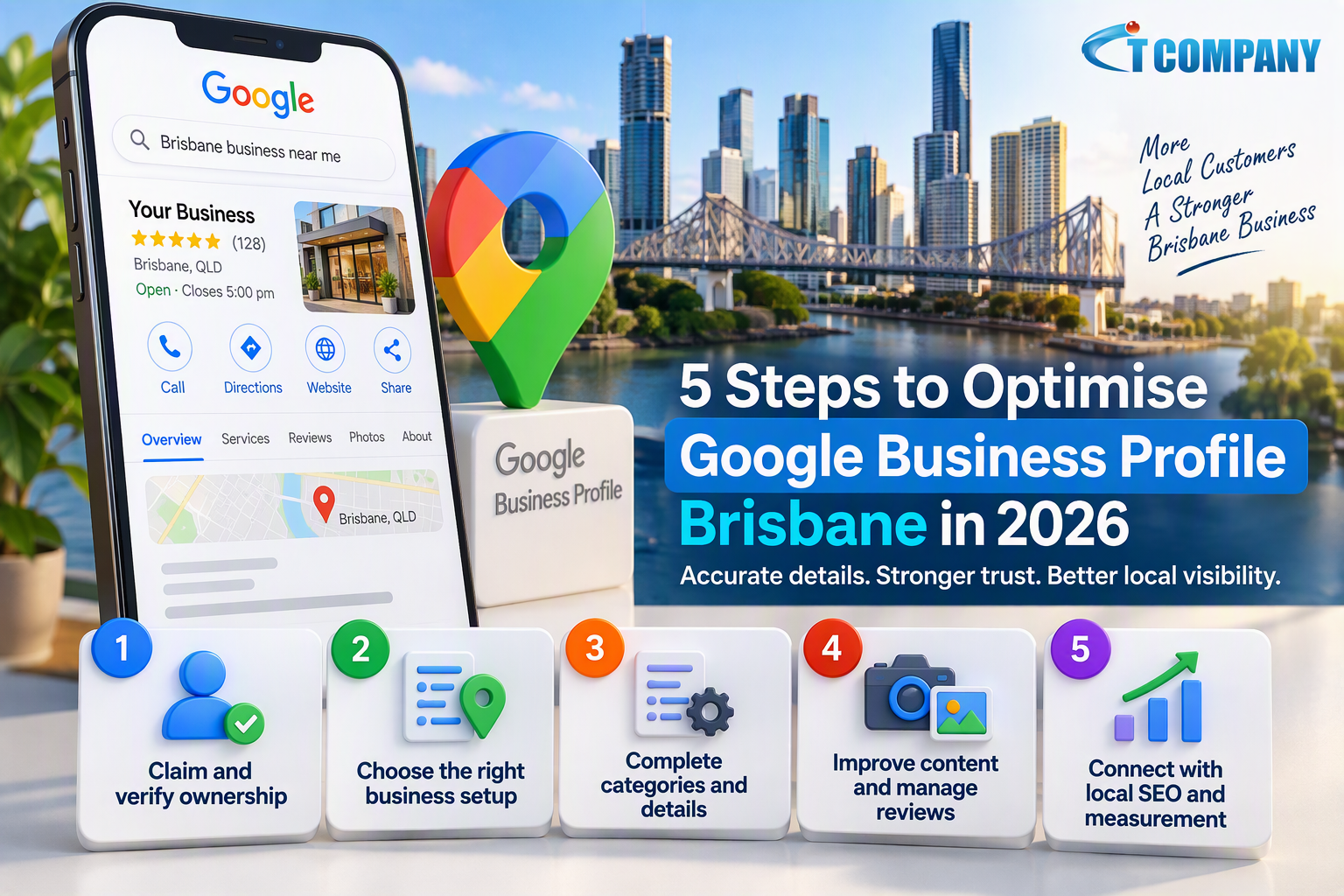
A Brisbane customer may search Google before calling a business, visiting a shop or requesting directions. The customer usually wants quick answers about services, location, opening hours, reviews and contact options.
Introduction
A complete Google Business Profile can present this information in Google Search and Maps. Incorrect categories, outdated hours or inconsistent contact details can instead create doubt and send customers towards another option.
Learning how to optimise Google Business Profile Brisbane starts with accurate information, not repeated keywords. The profile should reflect how the organisation operates in the real world, including whether customers visit a location or the business travels to them.
Google requires eligible organisations to use their real-world name, provide an accurate location or service area and select categories that describe the core business. Businesses should generally maintain one profile for each eligible location.
This guide explains five practical steps for 2026. The approach covers ownership, eligibility, categories, content, reviews, local SEO and measurement without promising a specific position in Google Maps.
Direct answer
To optimise a Google Business Profile in Brisbane, verify ownership, select the correct business model, use the real business name and choose accurate categories. Complete services and hours, add genuine photos, manage reviews ethically and connect the profile with a useful local website.
In this guide
You will learn how to:
- Claim and protect the correct profile
- Select the correct setup for a Brisbane business
- Complete categories, services and operating details
- Manage photos, posts and reviews responsibly
- Connect profile activity with local SEO and reporting
What is Google Business Profile optimisation?
Google Business Profile optimisation is the process of completing, improving and maintaining the information shown for an eligible organisation in Google Search and Maps. The profile can include the business name, category, address, service area, phone number, hours, services, photos and reviews.
Optimisation involves keeping these details accurate as operations change. It does not guarantee a particular ranking because Google controls how local results appear for each searcher.
A useful profile answers practical customer questions before contact. It should help someone determine what the business offers, where it operates, when it is available and how to take the next step.
Why Google Business Profile matters in Brisbane
Brisbane covers a large metropolitan area with many distinct commercial centres and suburbs. A customer searching from Brisbane City may see different results from someone searching in Chermside, Carindale or Indooroopilly.
Google states that local results are mainly based on relevance, distance and prominence. Relevance measures how well a profile matches the search, distance considers how far the business is from the searcher, and prominence reflects how well known the organisation is.
Google also states that businesses cannot request or pay for stronger organic local rankings. A business can improve its information and wider digital presence, but it cannot control where each searcher is located.
Profile optimisation works best alongside a useful website, consistent public information and genuine customer feedback. A broader local SEO strategy can connect the profile with Google Business setup, citations, reviews, local pages and structured data.
Five steps to optimise Google Business Profile Brisbane
These five steps focus on profile elements a business can control. Every change should represent genuine operations rather than attempt to create artificial relevance.
1. Claim, verify and protect profile ownership
Search for the business before creating another profile. An existing listing may already contain reviews, photographs or historical information, even when nobody within the organisation currently manages it.
An authorised representative should claim the legitimate listing and complete the verification method offered by Google. Verification options can vary according to the business, location and information already available.
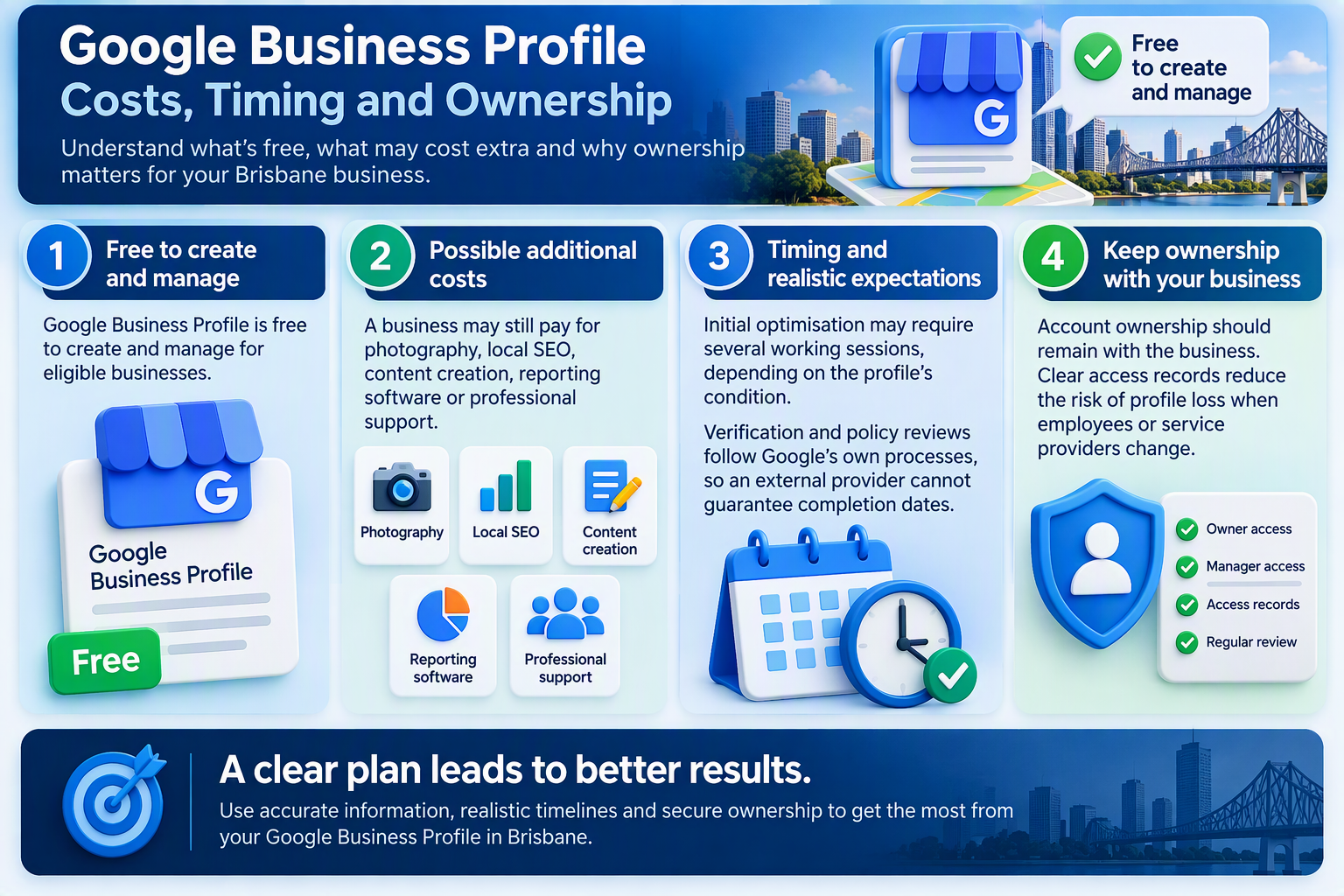
Use a business-managed Google Account rather than an employee’s personal account. Record the primary owner, limit manager access and review permissions whenever an employee or external provider leaves.
Google generally advises organisations to maintain one profile for each eligible business location. Duplicate listings can divide reviews, display conflicting details and make the genuine profile harder to manage. Keep evidence of the real business
Keep documents and operational information that support the name, location and business model. Google may request further evidence when a profile is verified, restored or changed.
Do not create another profile simply because the existing one contains mistakes. Claim the correct profile and update its information instead.
2. Choose the correct Brisbane business setup
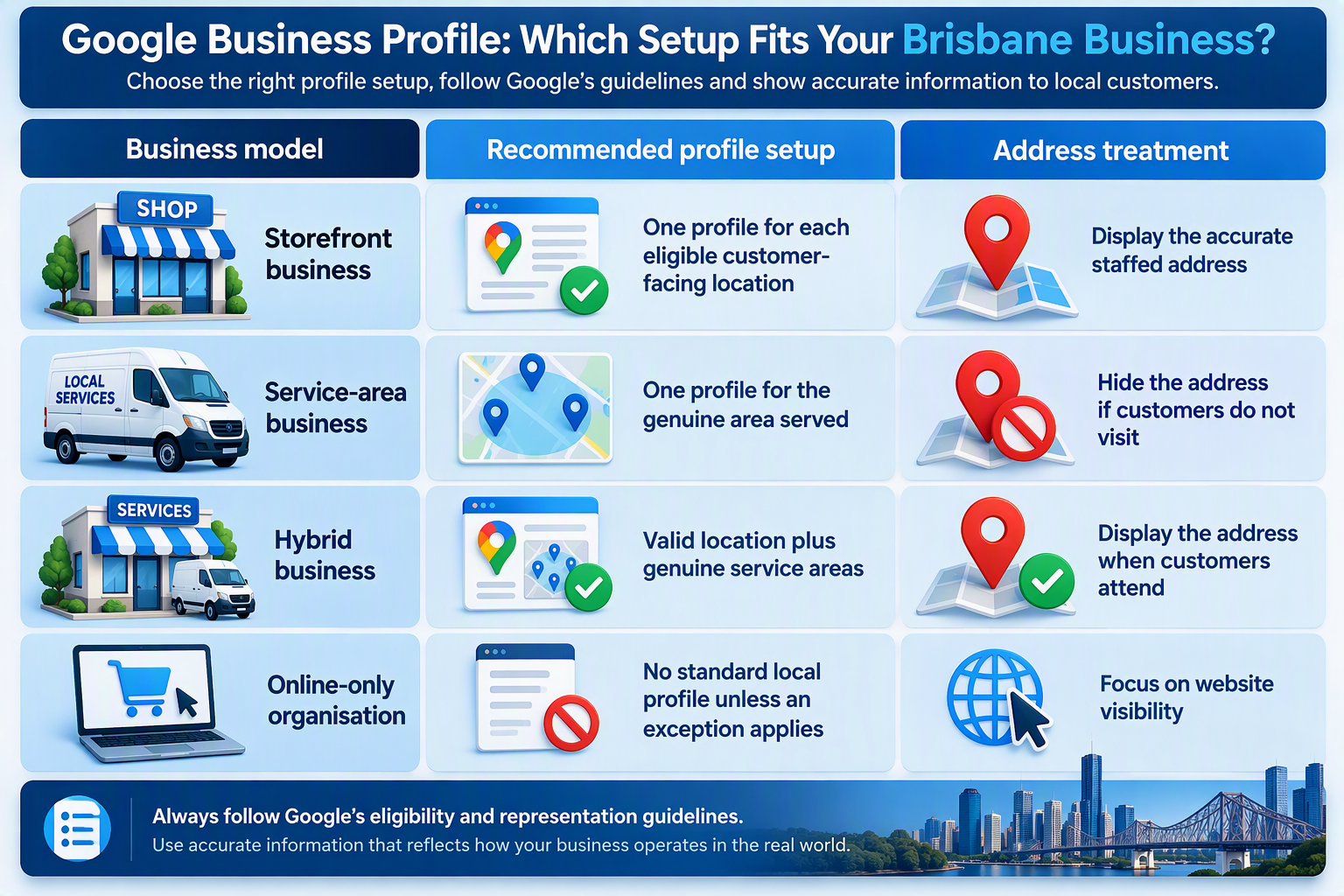
The correct profile setup depends on how the organisation serves customers. A genuine shopfront, a mobile provider and an online-only business follow different eligibility and address rules.
Google states that an eligible business generally needs to make in-person contact with customers during its stated hours. Online-only organisations, lead-generation businesses and certain property listings may not qualify for a standard profile.
Customers visit a genuine Brisbane location
A storefront business serves customers at a real location during its published hours. The profile should show the accurate customer-facing address and standard opening times.
The premises should be staffed and able to receive customers during those hours. A mailbox, unsupported virtual office or temporary workspace should not replace a genuine business location.
The business travels to Brisbane customers
A service-area business visits customers but does not serve them at its operating address. Common examples include plumbers, mobile repairers and cleaning providers.
When customers do not visit the operating address, Google instructs the business to remove the address from public display and add accurate service areas. A service-area organisation generally uses one profile for the overall area it serves.
Google permits up to 20 service areas, using cities, postal codes or other supported geographic areas rather than a radius. Google also advises keeping the overall coverage within roughly two hours’ driving time from the operating base.
The organisation is not eligible
An online-only organisation should not create a Brisbane profile merely to gain local visibility. A service-area setting cannot create eligibility for an organisation that does not interact with customers in person.
Ineligible organisations should focus on their website, organic search visibility and other suitable marketing channels. They should not use a third party’s premises, mailbox or temporary address to create artificial eligibility.
3. Complete categories, services and operating details
Use the business name shown on signage, invoices, stationery and the official website. Do not add phrases such as “best electrician Brisbane” unless those words form part of the recognised business name.
Keyword additions may appear helpful, but they can conflict with Google’s representation guidelines. Services, locations and customer information belong in their relevant fields and website pages.
Choose the most specific primary category that describes the business’s main activity. Add secondary categories only when they represent services the organisation genuinely provides.
| Profile field | Recommended approach | Avoid |
|---|---|---|
| Business name | Use the recognised real-world name | Adding keywords or suburbs |
| Primary category | Select the closest core activity | Choosing a broad category for reach |
| Other categories | Add genuine secondary activities | Adding unrelated services |
| Address | Use an accurate eligible location | Mailboxes or unsupported offices |
| Service area | Add areas genuinely served | Claiming unrealistic coverage |
| Opening hours | Publish current customer hours | Leaving holiday hours unchanged |
Google recommends choosing the fewest categories needed to describe the overall business. The profile should represent how the organisation operates outside Google.
Match the profile and website
Add an active phone number, the correct website address and current opening hours. Use special hours for public holidays, temporary closures and other changes affecting customer access.
The profile should match the website and reliable public listings. Customers may question a business when one source shows a Brisbane address while another displays a different location or phone number.
The linked page should load quickly, work on mobile devices and explain the service clearly. Businesses improving this customer pathway can review their website design and development requirements.
4. Improve profile content and manage reviews ethically
Complete the service fields using language that customers understand. Internal product names may make sense to employees but be unclear to someone comparing Brisbane providers.
A useful business description explains what the organisation does, who it serves and how customers can access its services. Keep the wording factual and avoid repeating Brisbane or suburb names unnecessarily.
Add genuine photographs
Recent photographs can help customers recognise a shopfront, understand a service and know what to expect. Suitable images may show the entrance, customer area, completed work or approved team activities.
Use photographs that accurately represent the operation. Stock images can create confusion when the people, premises or services shown do not match the customer experience.
Publish useful business updates
Profile posts can communicate genuine events, service changes or customer information. They should offer practical value rather than repeat generic sales claims.
A simple monthly routine is usually easier to maintain than several updates followed by long periods of inactivity. Businesses should:
- Confirm regular and special opening hours
- Review services, links and contact details
- Upload recent and representative photographs
- Publish a useful update when appropriate
- Check questions, reviews and profile access
When opening hours, availability or contact information changes, update the relevant profile field. Do not rely on a temporary post to correct permanent business information.
Request honest customer reviews
Ask genuine customers for feedback after a completed purchase, service or appointment. Requests should seek an honest review rather than a positive rating.
Do not offer rewards, purchase reviews or direct only satisfied customers towards Google. A consistent process should give genuine customers the same opportunity to provide feedback.
Respond professionally to both positive and negative reviews. Acknowledge the relevant point, avoid public arguments and move personal or account-specific discussions to a private channel.
Only owners and authorised representatives should manage Business Profile information. The business should retain primary ownership even when an employee or external provider monitors reviews.
5. Connect the profile with local SEO and measurement
A Google Business Profile is one part of local visibility. The website should confirm the same business name, services, contact details and genuine Brisbane location or service coverage.
A useful Brisbane page should explain local availability and customer options. This guide to local search engine optimisation in Australia provides additional context on connecting business profiles, local pages and website visibility.
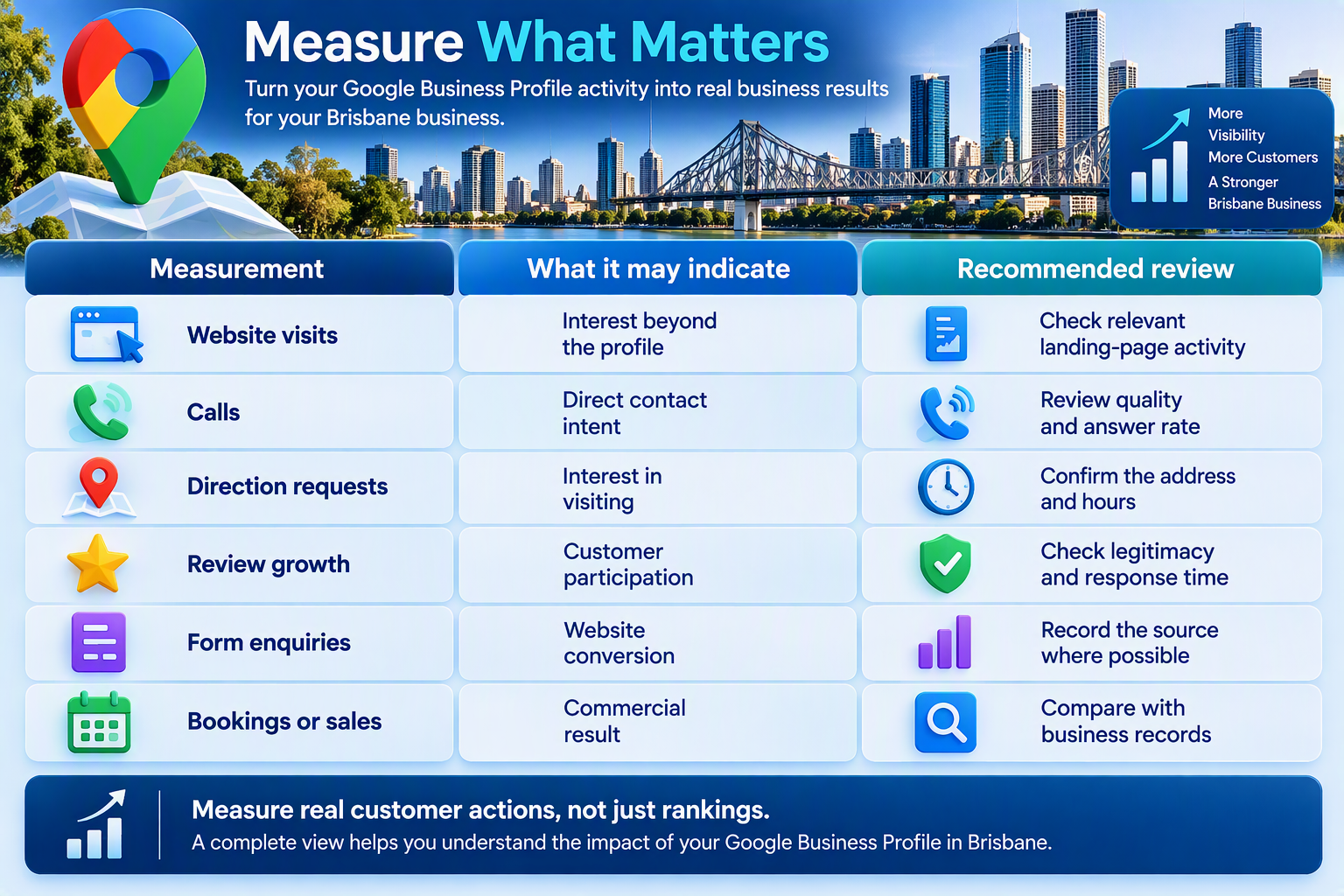
Measure customer actions
Rankings can vary according to the searcher’s location, wording and context. One position report should not be treated as the complete performance result.
Combine profile information with website analytics and internal customer records. Review calls, directions, website visits, forms and qualified enquiries.
Paid advertising and organic local visibility are separate channels. Advertising may place a sponsored result in front of selected audiences, but it does not purchase a stronger organic Google Maps position.
Common Google Business Profile mistakes
Adding keywords to the business name
Keyword additions can create policy risk and inconsistent branding. Use the recognised real-world name and place services in the correct fields.
Choosing unrelated categories
Extra categories do not guarantee broader visibility. Keep only categories that represent genuine business activities.
Publishing outdated hours
Incorrect hours create a poor customer experience. Review normal hours and add special hours before public holidays or planned closures.
Creating unsupported Brisbane locations
A mailbox or temporary address does not create a genuine office. Use only eligible locations and accurate service areas.
Ignoring customer reviews
Unanswered feedback can reduce confidence in profile management. Monitor reviews and respond without exposing private information.
Measuring rankings alone
Rankings do not show whether searches created suitable enquiries. Track customer actions and commercial outcomes alongside visibility.
Costs, timing and ownership risks
Google Business Profile checklist
Before treating the profile as complete:
- Confirm the authorised primary owner
- Use the recognised business name
- Select accurate categories
- Check service areas and special hours
- Connect profile activity with business reporting
Quick facts
| Question | Direct answer |
|---|---|
| Who should optimise a profile? | Eligible organisations serving local customers |
| What should be completed first? | Ownership, eligibility, name and category |
| Where can the profile appear? | Eligible Google Search and Maps results |
| When should details be reviewed? | Regularly and whenever operations change |
| Is Google Business Profile free? | Yes, although professional support may cost extra |
| Can optimisation guarantee first place? | No, Google controls organic local rankings |
| Should Brisbane appear in the name? | Only when it forms part of the real business name |
| What is the main risk? | Inaccurate information or policy breaches |
Frequently asked questions
How do I optimise Google Business Profile Brisbane?
Verify ownership, confirm eligibility and choose the correct business model. Use the real business name, select accurate categories, complete contact details and hours, add genuine photos, request honest reviews and connect the listing with a useful Brisbane website page.
Is Google Business Profile free?
Yes. Google does not charge an eligible organisation to create or manage a Business Profile. Photography, local SEO and professional management may create separate costs.
Can optimisation guarantee a top Maps ranking?
No. Google determines local rankings using factors that include relevance, distance and prominence. Businesses cannot request or purchase a stronger organic local position.
Should a service business show its home address?
Not when customers do not visit that address. An eligible service-area business should hide its address and enter accurate service areas.
Can an online-only business create a profile?
Online-only businesses that do not interact with customers in person are generally ineligible for a standard Business Profile. Google lists some exceptions, so organisations should check the current eligibility guidance.
How many categories should a business use?
Choose the most accurate primary category and only the additional categories needed to describe genuine operations. Avoid unrelated categories added only to seek wider exposure.
How often should the profile be reviewed?
Check the profile regularly and whenever services, locations, contact details or hours change. Review special hours before public holidays and temporary closures.
Are Google reviews important?
Reviews provide customers with information about other people’s experiences and may support prominence. Businesses should request genuine feedback without incentives, manipulation or pressure.
Does a Brisbane business still need a website?
Yes, in most cases. A website can provide detailed services, policies and contact pathways that do not fit within the profile.
Final Thoughts
Learning to optimise Google Business Profile Brisbane begins with accurate and useful business information. The profile should reflect the real name, category, location, service model, contact details and opening hours.
Brisbane organisations must also select the correct setup. A staffed shopfront, service-area provider and online-only organisation do not have the same address or eligibility rules.
Genuine photos, responsible review management and a useful website can strengthen customer confidence. Businesses should measure calls, website visits, directions and qualified enquiries rather than concentrating on one ranking.
For assistance reviewing profile information, website alignment and local-search visibility, contact IT Company Australia. The discussion can start with eligibility and genuine Brisbane operations without promising a guaranteed Google Maps position.
