

A website can look normal while important functions fail in the background. A contact form may stop delivering messages, a backup may fail or an outdated plugin may create a security weakness.
Introduction
Clear website maintenance inclusions tell an Australian business exactly what a provider will update, monitor, test and repair. They also explain what happens when the provider finds a problem.
The difficulty is that maintenance packages are not standard. One provider may offer automated updates and backups, while another includes manual testing, content changes, security monitoring and technical support.
This guide provides a complete website maintenance checklist for 2026. It focuses on package scope rather than pricing, so businesses can compare inclusions, exclusions and responsibilities before choosing a plan.
What does a website maintenance package include?
A website maintenance package covers software updates, backups, security checks, uptime monitoring, performance reviews, functional testing, broken-link checks, technical support and reporting. Broader plans may also include content updates, malware removal, technical SEO checks, staging, analytics reviews and priority incident response.
In this guide
You will learn:
- which technical and security tasks a maintenance package should cover;
- how updates, backups and testing should be managed;
- which services may involve an additional charge;
- how often different maintenance tasks should occur;
- how to compare package scope before signing an agreement.
Quick facts about website maintenance inclusions
| Question | Practical answer |
|---|---|
| Who needs maintenance? | Any business that relies on its website for information, enquiries, bookings, customer accounts or online sales. |
| What should be included? | Updates, backups, monitoring, security, testing, support and reporting. |
| Where is the work completed? | In the CMS, database, hosting environment and connected services. |
| When should maintenance occur? | Monitoring may operate continuously, while manual work may occur weekly, monthly or quarterly. |
| What affects the scope? | Website platform, functions, integrations, transaction volume and acceptable downtime. |
| Where can businesses compare prices? | The separate website maintenance cost guide should own detailed Australian pricing information. |
Core website maintenance inclusions
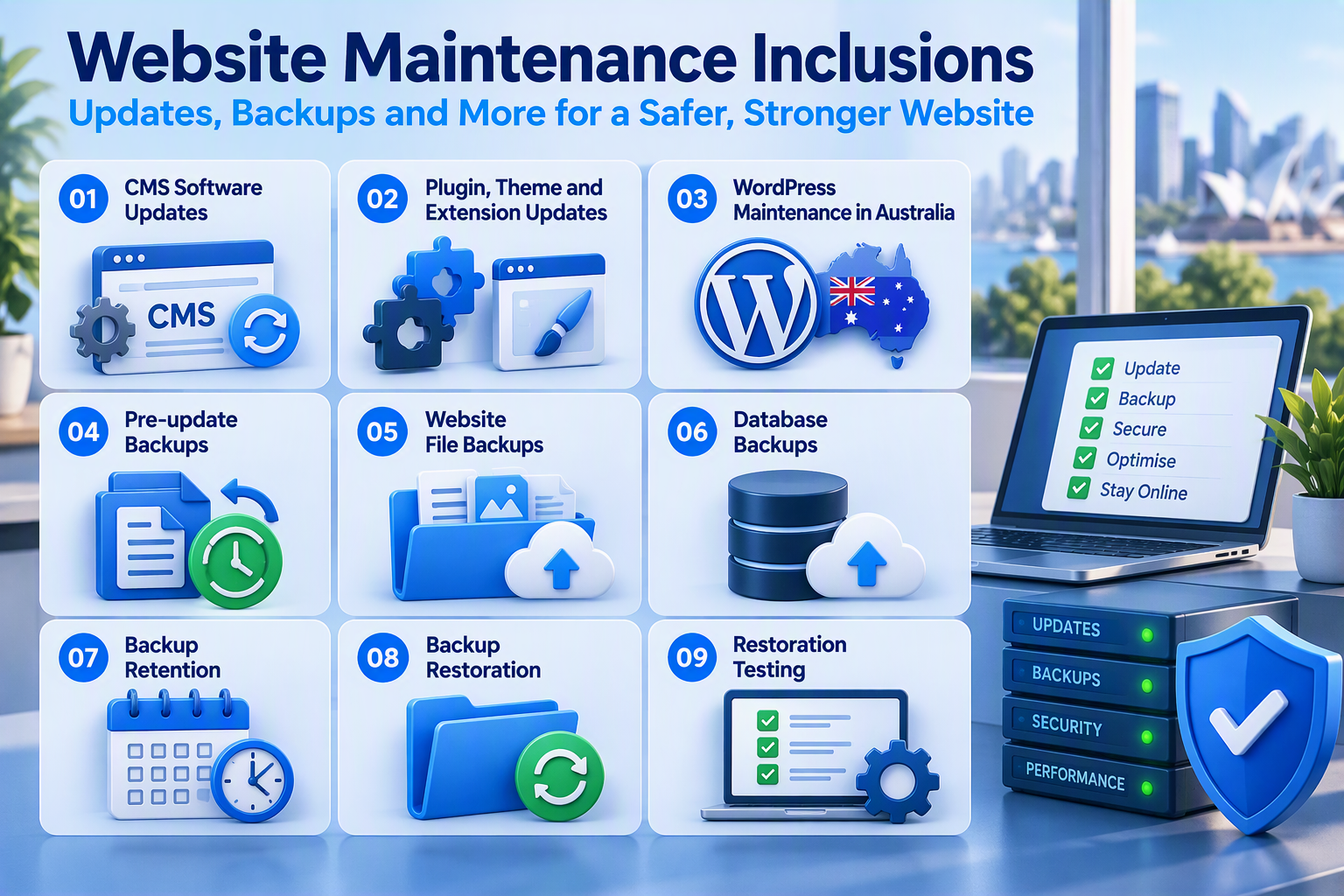
A professional website maintenance plan should describe every included task. It should also state the frequency, responsible party and action taken when a check fails.
The following inclusions form the main scope of a complete maintenance package.
Security and access inclusions
Routine maintenance supports website security, but it does not guarantee protection from every incident. The package should separate security monitoring from investigation, repair and incident response. Businesses with higher security requirements may need a dedicated website security and protection service in addition to ordinary maintenance. The IT Company Australia website describes website security separately from routine maintenance, including malware scanning, detection and removal.
- Vulnerability scanning: Checks software and configurations for known weaknesses. The scan may cover WordPress core, plugins, themes and other website components. The agreement should explain whether identified risks will be repaired or only reported.
- Malware scanning: Searches for suspicious files, harmful scripts and unexpected database changes. The scanning frequency should reflect the website’s purpose and risk level. Businesses should confirm whether malware removal is included or charged separately.
- Administrator access reviews: Reviews user accounts, roles and permissions at agreed intervals. Accounts belonging to former employees, contractors or suppliers should be removed or restricted. Administrator access should remain limited to people who need it.
- Login protection: May include multi-factor authentication, failed-login monitoring and stronger password requirements. These controls help protect administrator accounts from unauthorised access. The provider should clarify whether setup, monitoring and user support are included.
- SSL certificate checks: Confirm that the SSL certificate remains valid and that the website operates correctly through HTTPS. Maintenance should also identify expiry risks and mixed-content errors where secure pages load insecure resources.
- Domain-expiry monitoring: Provides notice before the website’s domain registration expires. An expired domain can affect the website and connected email services. The agreement should identify who owns the domain account and who is responsible for renewal.
- Package comparison: Security coverage differs between maintenance plans. Review IT Company Australia’s website maintenance packages and inclusions to compare SSL validation, domain monitoring and other available services.
Availability and performance inclusions
A website must remain available and usable. Monitoring can identify downtime, while performance checks can show why pages have become slow.
The plan should distinguish automated alerts from manual investigation. A monitoring tool may detect a problem without fixing it.
| Maintenance task | What it covers | Check with the provider |
|---|---|---|
| Uptime monitoring | Checks whether the website is online and sends downtime alerts. | Who receives alerts, and are incidents reviewed manually? |
| Downtime investigation | Finds whether an outage comes from hosting, DNS, the database, software or a third party. | How much investigation and repair work is included? |
| Page-speed reviews | Checks server response, caching, scripts, images and database activity. | Does the package include optimisation or only a report? |
| Image optimisation | Resizes and compresses images to improve loading speed. | Are existing images and new uploads both covered? |
| Database maintenance | Removes unnecessary revisions and temporary data. | Are backups and testing completed before cleanup? |
| Cache checks | Checks whether website and server caches work correctly. | Which cache systems does the provider manage? |
| Additional performance work | May include custom coding, hosting migration or script replacement. | Is this work included or quoted separately? |
Functional website testing
A website is not healthy simply because the homepage loads. A maintenance package should test the actions customers use to contact the business, create an account, make a booking or complete a purchase.
Functional testing should focus on complete customer journeys. A visible form can still fail to send information to the correct business system.
- Contact form testing: Confirms that visitors can submit forms and that messages reach the correct business inbox. Testing should also identify spam-filtering and email-delivery problems.
- Checkout testing: Checks product selection, cart behaviour, payment steps and order notifications. The maintenance plan should state whether complete test transactions and payment gateway checks are included.
- Booking and membership testing: Reviews registration, login, availability, confirmations and account access. Complex booking or membership systems may need a full test after major updates.
- Broken-link checks: Find internal and external links that lead to missing or incorrect pages. The provider should clarify whether broken links and redirects will be repaired or only reported.
- 404 error reviews: Identify requests for pages that no longer exist. Important missing pages can be restored or redirected to a relevant live page.
- Browser and mobile checks: Confirm that the website displays and functions correctly across supported browsers, devices and screen sizes. Full cross-browser testing may require a broader maintenance package.
Content and technical SEO inclusions
Some maintenance packages include content and technical SEO work. These inclusions should have clear limits because a small text update differs greatly from creating a new landing page.
The IT Company Australia service page currently lists different monthly allowances for new pages, updates, promotions and images across its package levels.

The provider should identify which analytics and conversion events receive testing. IT Company Australia includes Google Analytics and search integration within its published maintenance package table.
Reporting and support inclusions
A monthly maintenance fee should produce clear evidence of completed work. Reporting helps a business confirm which updates, checks and repairs took place.
Support conditions should be equally clear. A plan may include a standard response during business hours but apply separate terms to after-hours emergencies.
- Monthly maintenance reports: Show completed updates, backup status, uptime results, security scans, functional tests and unresolved issues. The provider should explain each result and recommend any additional work.
- Support request allowance: Sets the number of support requests or technician hours included each month. The provider should define what counts as a request and state the rate for additional support.
- Response and resolution times: Show how quickly the provider acknowledges, assesses and resolves an issue. Complex faults or third-party services may increase the resolution time.
- Service escalation: Prioritises urgent incidents based on their business impact. The provider should address failed checkout or booking systems before minor content changes.
Escalation conditions may include website unavailability, payment failure or suspected compromise. The agreement should identify support hours and after-hours charges.
What may not be included?
A maintenance package should contain a clear exclusion list. Without this information, businesses may assume that every repair or change is covered.
Common exclusions include design projects, custom development, premium licences and major security recovery.
| Possible exclusion | Why it may cost extra | Question to ask |
|---|---|---|
| Website redesign | Requires new layouts, design approval and development | Are visual layout changes included? |
| Custom functionality | Needs programming and dedicated testing | How are development tasks quoted? |
| Malware removal | May require investigation and extensive cleanup | Does security scanning include removal? |
| Hosting and domains | These are separate infrastructure services | Are hosting and renewals included? |
| Premium software licences | Third parties charge separate subscription fees | Who owns and renews each licence? |
| Large content projects | May require writing, design or migration work | What monthly content allowance applies? |
| Emergency after-hours work | Requires priority technician availability | What are the emergency support rates? |
| Integration repairs | Third-party systems may change independently | Are API and payment repairs covered? |
For hosting requirements, businesses can compare the separate Australian web hosting services and WordPress hosting options. Hosting should not be described as a website maintenance inclusion unless the selected agreement specifically combines both services.
Website maintenance schedule
The correct website maintenance schedule depends on the website’s activity, functions and business importance. There is no single schedule suitable for every Australian organisation.
Transactional websites usually need more frequent backups and testing. Simple information websites may require a less intensive plan.
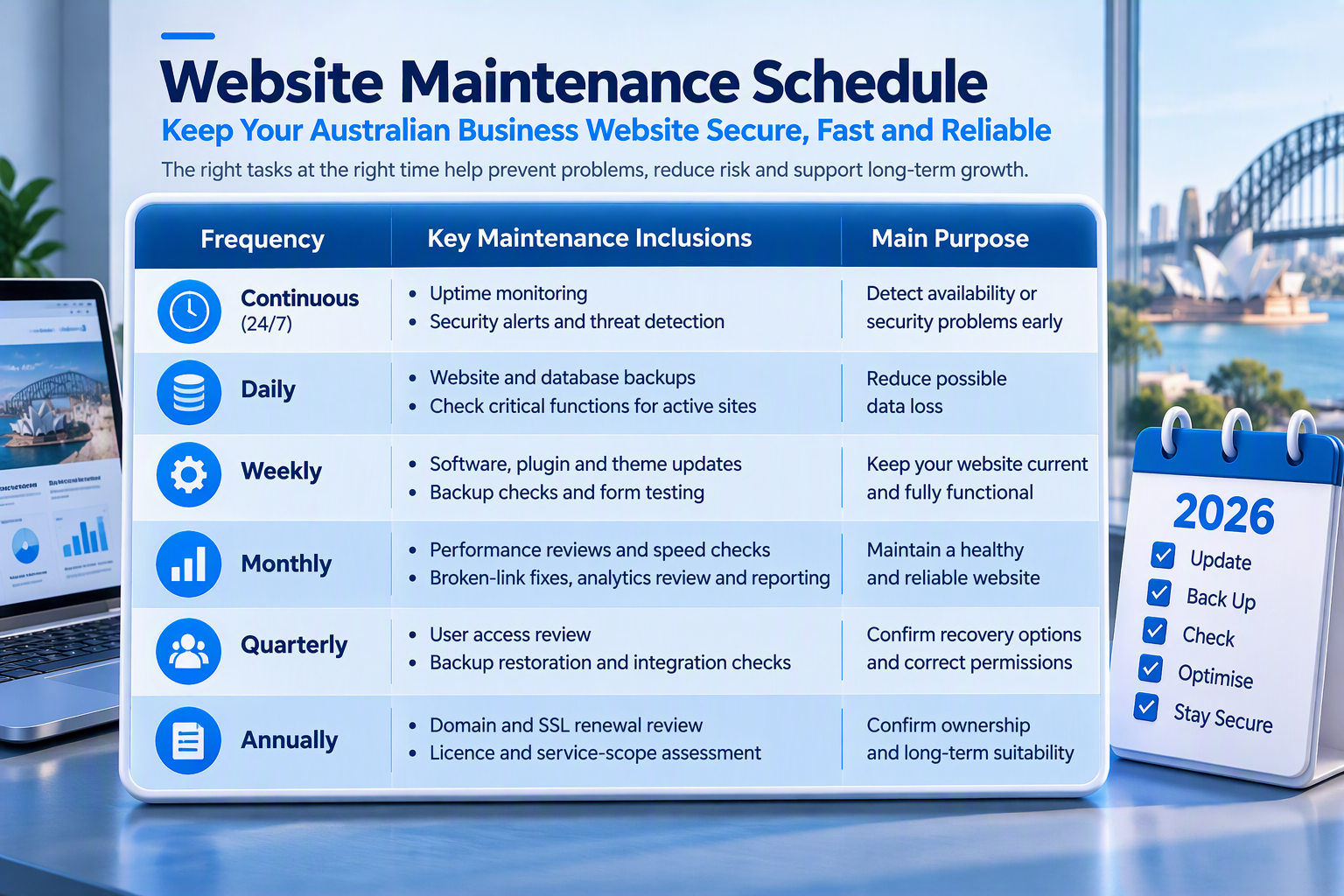
Package frequencies should be written into the agreement. The IT Company Australia service table currently lists monthly backups for Standard, weekly backups for Business and daily backups for Premium.
Website maintenance package comparison
Package names do not have a standard industry meaning. A “Premium” plan from one provider may offer less manual support than a “Business” plan from another.
Businesses should compare tasks, frequency, response and exclusions rather than the package name.
| Scope area | Basic maintenance | Business maintenance | Advanced maintenance |
|---|---|---|---|
| Updates | Routine software updates | Updates with manual checks | Staging and controlled deployment |
| Backups | Weekly or monthly | Daily or weekly | Frequent copies and restore testing |
| Security | Basic scanning | Vulnerability and malware checks | Advanced monitoring and incident support |
| Testing | Basic forms and links | Key business journeys | Transaction and integration testing |
| Content | Minor changes | Defined monthly allowance | Frequent content and page work |
| Support | Standard queue | Priority support | Critical escalation arrangements |
| Best suited to | Information websites | Lead-generating websites | E-commerce and critical platforms |
The commercial website maintenance services and packages page should remain the main destination for current Standard, Business and Premium plan details. The present service table includes updates, performance, content, monitoring, backups, security and reporting, with features varying by level.
Common Website Maintenance Mistakes
Assuming monitoring includes repairs
Assuming hosting includes maintenance
Keeping untested backups
Updating without functional tests
Ignoring package limits
Selecting a plan by price alone
Website maintenance checklist
Use this checklist before signing a website maintenance agreement:
- Confirm every website, platform and environment included in the service.
- Record update, backup, monitoring and testing frequencies.
- Define malware, downtime and emergency repair responsibilities.
- Confirm content allowances, support hours and additional rates.
- Document ownership, access, cancellation and handover conditions.
A website audit can help identify unsupported software and existing faults before a provider recommends a plan. IT Company Australia offers a free maintenance report through its website maintenance service page.
Frequently asked questions
What does website maintenance include?
Website maintenance may include software updates, backups, uptime monitoring, security checks, form testing, performance work, content changes and reporting. The exact inclusions depend on the package, website platform and agreed support level.
What are the most important website maintenance inclusions?
The most important inclusions are updates, complete backups, restoration arrangements, security checks, uptime monitoring and functional testing. Reporting and support conditions should also appear in the written agreement.
Does website maintenance include hosting?
Not necessarily. Hosting provides the server environment, while maintenance looks after website software, functions and content. Some providers combine them, but the agreement must confirm both services.
Does a maintenance package include repairs?
Minor repairs may be included within a support allowance. Custom development, malware recovery, integration repairs and redesign work may require an additional quote.
How often should website maintenance be completed?
Monitoring may operate continuously, while updates and functional checks may occur weekly or monthly. E-commerce, membership and booking websites often need more frequent backups and testing.
Are content changes normally included?
Many packages include a limited content allowance. The agreement should state the number of pages, requests, hours and revisions included each month.
Is malware removal part of website maintenance?
Not always. A plan may include malware scanning without cleanup or recovery. Businesses should confirm whether removal, investigation and restoration are included.
Does website maintenance include SEO?
Maintenance may include technical SEO checks such as broken links, metadata and sitemap reviews. It usually does not include keyword research, content strategy or authority building.
What should a WordPress maintenance plan include?
A WordPress plan should cover core, plugin and theme updates, backups, security checks, uptime monitoring and functional testing. Higher-risk websites may also need staging and rollback support.
Final Thoughts
Clear website maintenance inclusions help businesses measure the quality and value of a maintenance service. The agreement should list what the provider will update, back up, monitor and test. It should also define how often the provider completes each task and reports the results.
