
A business website can remain online while an important function fails behind the scenes. A contact form may stop delivering messages, a checkout may reject valid orders or a backup may complete without storing the latest database.
Introduction
These failures are difficult to notice because the homepage may still look normal. Customers can encounter the problem before the business receives an alert. Lost enquiries, abandoned bookings and damaged trust may continue until someone tests the complete journey.
Professional website maintenance support helps identify these warning signs before they become larger disruptions. It combines monitoring, testing, updates, security care, backups, repairs and clear responsibility for follow-up action.
Not every warning sign means the website needs a complete redesign. Many problems can be corrected through focused investigation and planned maintenance. The important step is knowing when a small symptom points to a deeper technical, security or operational issue.
What Is Website Maintenance Support?
Website maintenance support is an ongoing service that keeps a website secure, current, accurate and functional. The work may cover software updates, backups, uptime monitoring, performance checks, form testing, malware scans, broken links, content changes and technical assistance.
A useful service does more than detect problems. The agreement should explain who receives an alert, who investigates it and whether the provider completes the repair. Monitoring without a response process can leave the business aware of a fault but unable to resolve it.
Direct Answer
A website needs professional maintenance support when it becomes slow, unreliable, insecure, difficult to update or unable to complete important customer journeys. Broken forms, overdue software, failed backups, unexplained traffic changes and missing technical ownership are strong signs that reactive care is no longer sufficient.
In This Guide
You will learn how to:
- Recognise 12 practical website maintenance warning signs
- Separate urgent incidents from routine maintenance needs
- Decide whether the website needs repair, maintenance or redesign
- Compare support scope, response times and provider responsibilities
- Build an evidence-based maintenance assessment
Quick Facts About Website Maintenance Support
| Question | Practical answer |
|---|---|
| Who needs website maintenance support? | Businesses that depend on a website for information, enquiries, bookings, accounts or sales |
| What does support normally cover? | Updates, monitoring, backups, functional testing, performance, security and repairs |
| Where do hidden problems occur? | Forms, checkout, integrations, email delivery, databases, analytics and mobile layouts |
| When should urgent help be requested? | After malware, unfamiliar redirects, administrator changes, widespread downtime or customer-data exposure |
| How should a provider be compared? | By written scope, response commitments, testing, recovery capability, account ownership and exclusions |
| What affects cost? | Platform, complexity, traffic, integrations, support hours, security risk and included repair time |
Why Website Problems Often Remain Hidden
A website is not one simple page. It depends on hosting, software, databases, forms, email systems, security certificates, analytics and external integrations. One component can fail while the visible website continues loading.
Automated monitoring also has limits. An uptime check may confirm that the homepage returns a successful response, but it cannot prove that a form creates a CRM record or that the checkout accepts payment.
Regular website maintenance services can combine software updates, uptime checks, SSL validation, backups, vulnerability reviews, broken-link checks and reporting. The final agreement should still define which repairs and response times are included.
1. Your Website Has Become Noticeably Slow
A slow website is one of the clearest signs that maintenance is overdue. Visitors may wait for a large image, delayed script or database query before the main content becomes usable.
Common causes include oversized media, unnecessary plugins, poor caching, database growth and weak hosting resources. The cause should be diagnosed before a tool or plugin is added, because another optimisation layer can increase complexity.
Test the homepage and commercially important pages on a mobile connection. Service pages, forms, product categories and checkout may perform differently because they load separate scripts and content.
Google recommends evaluating page experience across Core Web Vitals, secure delivery, mobile presentation and clear access to main content. Strong scores do not guarantee rankings, but poor performance can reveal a weak visitor experience.
When Slow Performance Needs Professional Help
One poor test result does not automatically require a maintenance contract. Repeated slowdowns, unexplained variation or failed changes suggest that the website needs a structured performance review.
Professional support can identify whether the problem comes from images, code, plugins, databases, third-party scripts or hosting. Where server resources contribute to the problem, suitable Australian web hosting may provide a more stable foundation.
2. Enquiry Forms Stop Delivering Messages
A contact form can display a success message while failing to send the enquiry. The customer believes the message arrived, while the business receives nothing.
Email authentication, spam controls, plugin conflicts, API changes and incorrect recipient settings can cause silent delivery failures. A website may lose leads for weeks because no visible error appears.
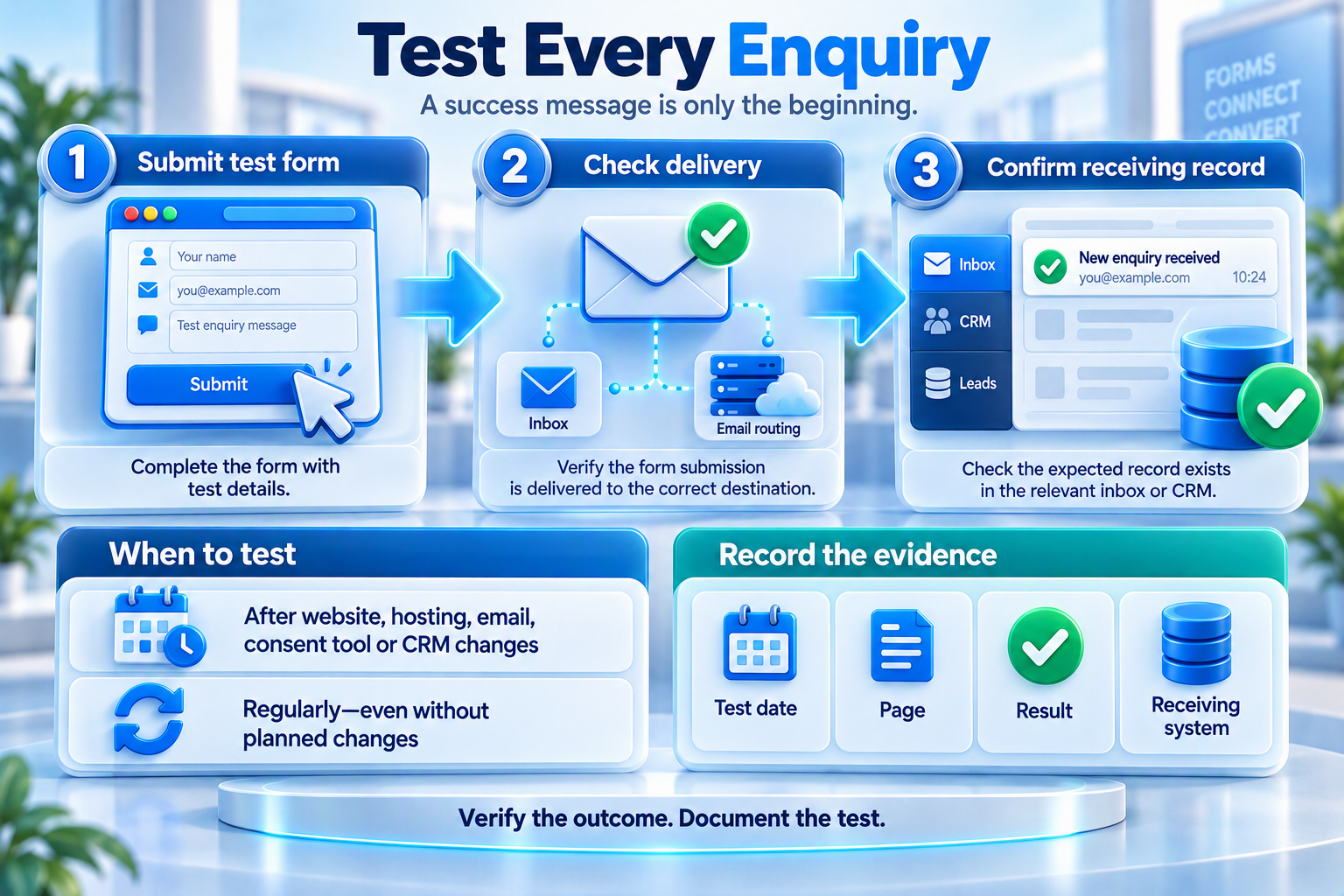
Submit a real test enquiry and confirm the result in the final business system. Verification should include the inbox, CRM, booking platform or ticketing tool rather than stop at the browser confirmation.
Why Form Testing Belongs in Maintenance
Forms should be tested after updates to the website, hosting, email service, consent tool or CRM. They should also receive regular end-to-end tests even when no planned change has occurred.
3. Buttons, Links or Navigation No Longer Work
Broken buttons and links interrupt customer journeys. A visitor may find the right service but fail to open the enquiry page, download a document or complete the next step.
Links can break after pages move, files are deleted or navigation is changed. JavaScript conflicts can also leave buttons visible but unresponsive on certain devices.
Check menus, footer links, calls to action, telephone links, email links and downloadable files. Priority should go to elements connected with enquiries, bookings, sign-ins and purchases.
The website maintenance inclusions checklist explains how broken-link reviews, functional testing and repair responsibilities can fit within a maintenance package.
4. Updates Are Overdue or Feel Too Risky
Content management systems, plugins, themes and extensions receive updates for security, compatibility and functionality. A long list of pending updates shows that routine care has fallen behind.
Some businesses avoid updates because an earlier change broke a page or checkout. This concern is understandable, but indefinite delay leaves the website exposed to known weaknesses and growing compatibility problems.
The safer approach is not to update blindly. Create a current backup, review release information, test important changes in staging and verify customer journeys after deployment.
WordPress Updates Need Change Control
The official WordPress security guidance recommends current software, trusted plugin sources, controlled access, backups and monitoring. It describes website security as risk reduction rather than complete protection.
Professional WordPress maintenance and support can use staged testing, off-site backups and post-update checks. Confirm which pages, forms and integrations the provider tests before approving a plan.
5. Visitors See Security or Certificate Warnings
A browser warning can prevent customers from opening the website. An expired or incorrectly configured SSL certificate may display a “not secure” message before the visitor reaches the content.
Other serious warnings include deceptive-site notices, malware labels in search results and hosting suspension messages. Unknown pages, unfamiliar administrator accounts and unexpected redirects can also indicate compromise.
These symptoms require prompt investigation. Routine maintenance may reduce risk, but an active compromise needs containment, diagnosis, cleanup and recovery.
IT Company Australia publishes website security services covering malware scanning, blacklist monitoring and vulnerability checks. Confirm whether the selected plan includes investigation and remediation rather than detection alone.
6. The Website Redirects Visitors Unexpectedly
Unexpected redirects are a serious warning sign. Visitors may be sent to gambling, counterfeit-product or unrelated pages, sometimes only on mobile devices or when arriving from a search engine.
A compromised plugin, modified file, database injection or malicious administrator account may create the redirect. Clearing a cache or deleting the visible link may not remove the underlying access route.
Document the affected page, device, browser and referral source. Preserve warning messages and screenshots, then limit unnecessary changes until the website has been investigated.
A specialist hacked website repair service may be necessary when malware, injected pages or malicious redirects are present. No provider can guarantee a search engine’s review time after cleanup.
7. The Website Goes Offline Without Warning
Unexpected downtime may come from hosting failure, DNS errors, resource limits, expired services or application faults. A website can also be partly unavailable, with only certain pages returning server errors.
Businesses often discover downtime through a customer complaint. This means nobody is actively monitoring the service or the alert has no assigned recipient.
Uptime monitoring should check important pages at a suitable interval and send failures to someone who can investigate. The response process should distinguish a temporary check failure from a confirmed incident.
Hosting and Website Maintenance Have Different Roles
Hosting provides the infrastructure that serves the website. Maintenance manages the website application, software, content and customer functions.
A server can remain online while a form or checkout remains broken. Likewise, a healthy website application cannot operate when DNS or server infrastructure fails. Responsibility for both layers must be documented.
8. Backups Exist but Nobody Has Tested a Restore
A successful backup notification does not prove that the complete website can be recovered. The archive may omit the database, uploads, configuration or current transaction data.
The business should know where backups are stored, how often they run and how long they are retained. It should also know who can authorise and perform a restore.
Recovery testing verifies more than file availability. The restored website must load correctly and complete important customer journeys in a controlled environment.
The ongoing website maintenance guide explains how backup frequency should follow acceptable data loss and recovery targets rather than a generic daily or weekly schedule.
9. Mobile Visitors Struggle to Use the Website
A desktop website may appear correct while mobile navigation, forms or tables fail. Buttons can become too small, content may overflow and pop-ups may cover the main page.
Mobile problems sometimes appear after content changes rather than development work. A wide image, embedded form or long heading can break a previously stable layout.
Test real customer journeys on several screen sizes. Check menus, forms, maps, telephone links, account pages and checkout rather than reviewing screenshots alone.
A maintenance plan should include mobile checks after major design, plugin and content changes. Significant structural problems may require development or redesign beyond routine maintenance.
10. Business Information Is Outdated
Old prices, opening hours, staff profiles and service descriptions weaken trust. They can also create operational problems when customers act on incorrect information.
Outdated content often shows that website ownership is unclear. Marketing may assume operations controls the pages, while operations expects the website provider to make changes.
Create an approval process for important information. Assign an owner, review frequency and update trigger for prices, services, locations, contact details and policies.
Content updates may be included within website maintenance packages, but limits can vary by plan. Confirm the number of pages, revisions and support hours included.
11. Traffic, Rankings or Enquiries Decline Unexpectedly
A sudden decline does not always mean the marketing strategy has failed. Analytics tags, consent controls, redirects, forms or search indexation can break without obvious visual symptoms.
Compare several sources before reaching a conclusion. Review Search Console clicks and impressions, analytics sessions, conversion events, form records and sales data.
A traffic decline accompanied by stable enquiries may reflect measurement failure. Stable traffic with falling enquiries may point to broken conversions, weaker content or changed customer behaviour.
Broader SEO services for Australian businesses may be relevant after technical faults are ruled out. Maintenance supports search accessibility but does not replace content, authority and search strategy.
12. Nobody Owns Website Maintenance
The strongest warning sign may be organisational rather than technical. If nobody knows who updates, monitors or restores the website, smaller faults can remain unresolved.
The business should have named owners for content, software, security, hosting, backups, analytics and customer functions. External providers may perform the work, but the business still needs a decision-maker.
Ownership also includes accounts and documentation. The business should control its domain, hosting, analytics, Search Console and key licences rather than depend on one supplier’s private account.
The website maintenance tasks guide connects maintenance activities with frequency, ownership, evidence and escalation. This governance layer prevents tasks from becoming an informal checklist that nobody follows.
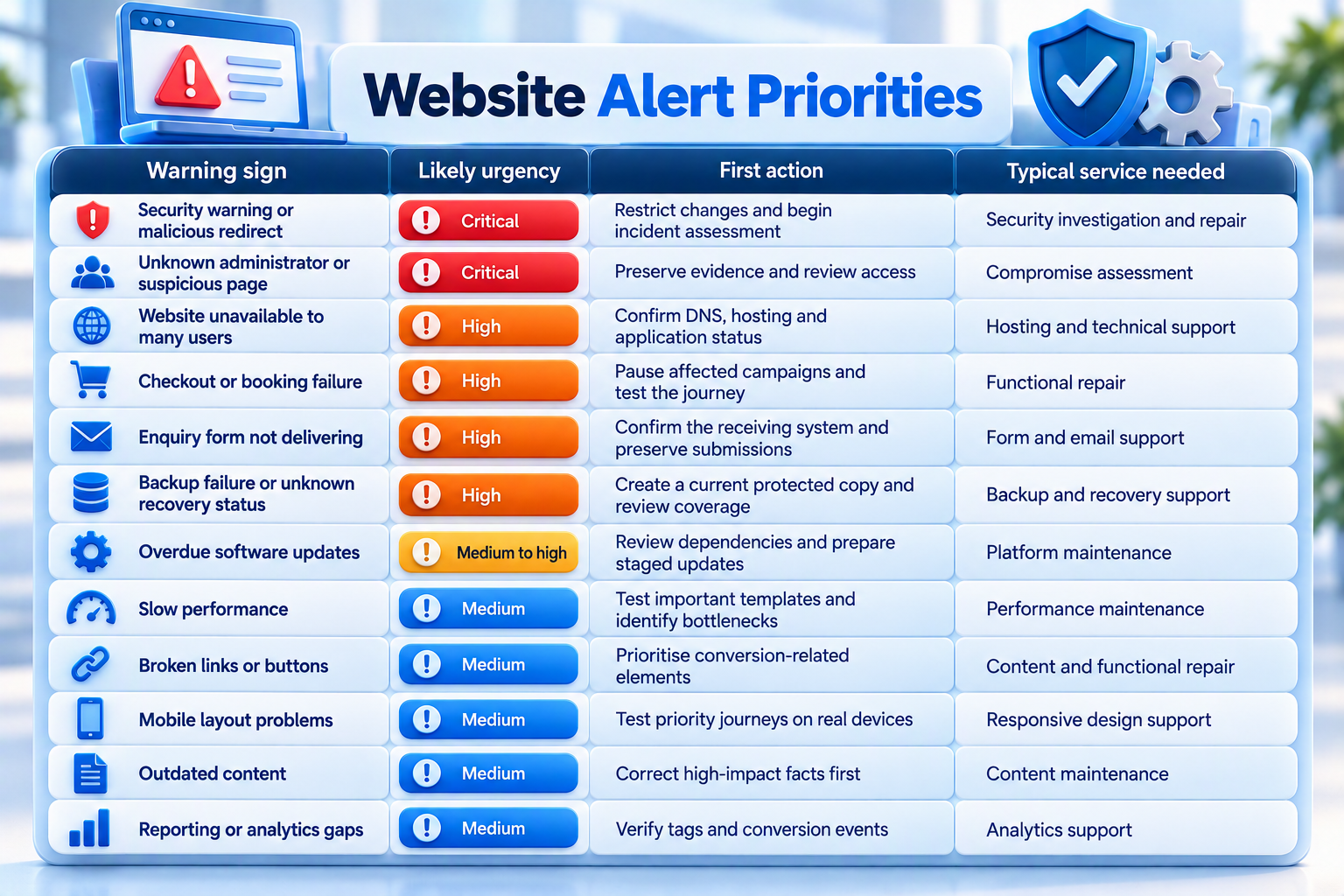
Warning-Sign Priority Matrix
When Is a Problem an Emergency?
A website issue becomes urgent when it affects security, customer data, payments, business-wide access or a major source of enquiries. Security warnings, malicious redirects and unfamiliar administrator accounts should not wait for the next scheduled review.
Other problems may be important without requiring emergency work. A broken blog link can enter a maintenance queue, while a broken checkout needs immediate escalation.
The maintenance agreement should define priority levels and response commitments. Terms such as “fast support” provide little value without hours, escalation rules and scope.
Website Repair, Maintenance or Redesign?
Repair addresses a current fault. Maintenance reduces the chance of recurring faults through monitoring, updates, testing and planned improvements.
Redesign changes the visual experience, structure or customer journey. A slow form does not automatically justify a new website, but widespread layout, accessibility and editing problems may indicate that maintenance alone cannot solve the underlying limitations.
| Situation | Repair | Maintenance | Redesign |
|---|---|---|---|
| One form stops delivering | Fix form and email settings | Add regular end-to-end testing | Usually unnecessary |
| Software is several versions behind | Resolve update conflicts | Introduce staged updates and reporting | Consider if the platform is unsupported |
| Homepage is slow | Diagnose images, scripts and server response | Monitor and optimise important templates | Consider if the theme or framework is structurally heavy |
| Content is outdated | Correct high-impact pages | Assign content owners and review triggers | Consider if editing is too difficult |
| Mobile customers cannot complete journeys | Repair affected layouts | Test mobile after changes | Consider when several templates require rebuilding |
| Website is compromised | Clean, recover and secure | Add monitoring, backups and access reviews | Consider if the stack is abandoned or repeatedly reinfected |
The correct decision depends on root cause. Rebuilding a website without fixing hosting, access or process failures can transfer the same weaknesses into the new version.
What Professional Website Maintenance Should Include
A provider should describe services in measurable language. “Complete website care” can mean automated updates only, while another package includes manual testing, repairs and content changes.
Core scope may include content management system updates, plugin or extension care, backups, uptime checks, SSL monitoring, security scans, form tests, performance reviews and reporting.
Broader plans may include content updates, broken-link repairs, analytics checks, malware removal and priority response. The agreement should state which activities are included and which require approval or a separate quote.
The site maintenance services guide explains the full responsibility chain from monitoring and investigation to repair, recovery and reporting. Use that framework when comparing providers.
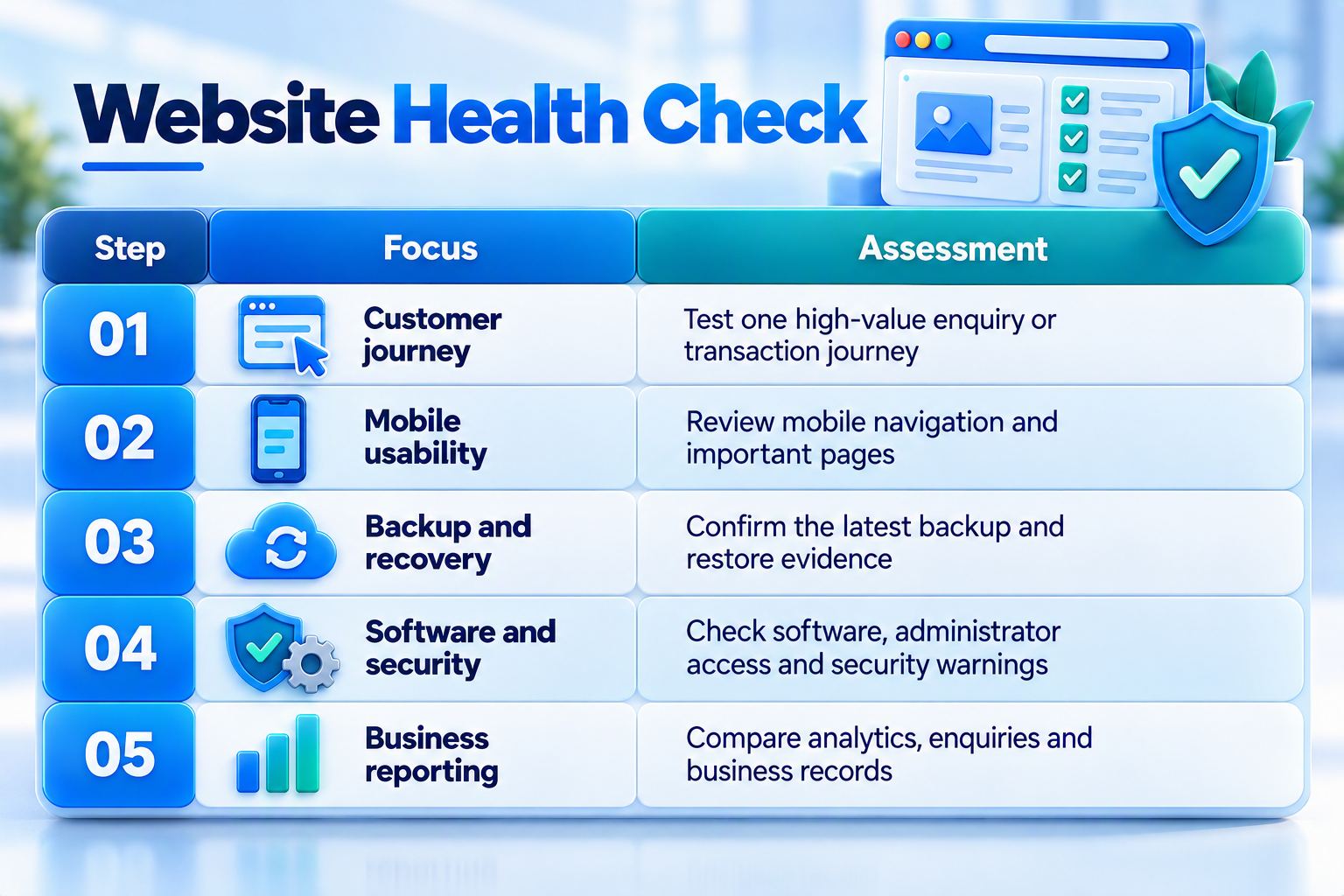
How to Assess Your Website Before Requesting Support
Begin with customer journeys rather than a general homepage review. Submit an enquiry, complete a booking or run an approved test transaction where suitable.
Check the website on a mobile device and an ordinary connection. Review security warnings, administrator accounts, pending updates, backup status and the latest maintenance report.
Record each issue with the affected page, device, time and business impact. Clear evidence helps the provider reproduce and prioritise the problem.
Use the following short assessment:
What Website Maintenance Costs
Website maintenance pricing depends on platform, complexity, transaction volume, integrations, security risk and response requirements. A small brochure website does not need the same support model as an active ecommerce store.
IT Company Australia publishes current WordPress support and maintenance plans at $100, $200 and $300 per month for Essential, Business and ecommerce scopes respectively. Published inclusions vary across update frequency, backups, security, optimisation, testing and support time.
These prices should not be treated as a quote for every website. Confirm current pricing, GST, onboarding, emergency work, excluded plugins, content limits and repair hours in writing.
A plan should be compared by risk coverage rather than monthly price alone. Low-cost monitoring provides limited value when investigation and repairs always attract separate approval or fees.
Choosing a Website Maintenance Provider
Ask the provider to review the current website before recommending a plan. A proper assessment should consider platform, hosting, traffic, integrations, software age and customer journeys.
Request a responsibility matrix. It should show who owns hosting, domain management, security alerts, backups, updates, form testing and emergency decisions.
The provider should explain its update process. Staging, backups, post-update testing and rollback options reduce the risk of changes reaching the live website untested.
Confirm the reporting evidence. Useful reports show what changed, which tests passed, what risks remain and what action is recommended next.
Common Website Maintenance Mistakes
Waiting for Customers to Report Problems
Customer complaints are a late monitoring method. Add uptime, form and transaction checks so the business can discover failures earlier.
Assuming Hosting Includes Application Maintenance
Hosting manages infrastructure, while website maintenance manages software and functions. Define both responsibilities in writing.
Running Updates Without a Backup
An update can create compatibility problems. Create a current recovery point and test business-critical functions after deployment.
Keeping Backups Without Restore Tests
Stored files do not prove recovery capability. Run a controlled restoration test and document the result.
Treating Monitoring as Repair
An alert identifies a problem but does not solve it. Confirm who investigates and whether repair time is included.
Giving a Provider Permanent Ownership
The business should own domains, hosting, analytics and key accounts. Give suppliers-controlled access rather than transferring ownership.
Frequently Asked Questions
What Is Website Maintenance Support?
Website maintenance support keeps a website current, secure and functional through updates, monitoring, backups, testing, repairs and reporting. The exact service depends on the written agreement.
How Do I Know If My Website Needs Maintenance?
Warning signs include slow pages, failed forms, broken links, security warnings, overdue updates, unexpected downtime and outdated content. Missing backups or unclear ownership also indicate risk.
Does Every Website Need Professional Maintenance?
Not every website needs the same level of professional support. A simple low-risk site may use basic scheduled care, while ecommerce, booking and membership websites generally need closer monitoring and recovery preparation.
Is Website Maintenance the Same as Hosting?
No. Hosting provides the server environment. Website maintenance manages the application, software, content, customer functions and related testing.
Can Website Maintenance Improve SEO?
Maintenance can support search accessibility by keeping pages available, secure, mobile-friendly and technically functional. It does not guarantee rankings or replace content and authority building.
How Often Should Website Maintenance Be Completed?
Frequency should follow website risk, data changes and business impact. Availability and security may need continuous monitoring, while content, access and performance reviews can follow scheduled cycles.
Does Maintenance Include Malware Removal?
Not automatically. Some plans include malware scanning but charge separately for investigation and cleanup. Confirm the complete response process before choosing a plan.
Should a Maintenance Provider Test Forms?
Yes, when forms generate enquiries or connect with another system. Testing should confirm the final delivery or CRM record, not only the on-screen success message.
How Much Does Website Maintenance Cost?
Cost depends on platform, complexity, support hours, security and repair coverage. Request a GST-clear quote and compare inclusions, exclusions and emergency rates.
Can Maintenance Prevent Every Website Problem?
No. Maintenance reduces avoidable risk and improves detection and recovery, but it cannot prevent every outage, attack or third-party failure.
Final Thoughts
Professional website maintenance support is most valuable before a visible failure becomes a business interruption. Slow pages, broken forms and overdue updates can appear minor, but they may reveal deeper problems with ownership, testing or recovery.
Begin with the customer journeys that matter most. Test enquiries, bookings, checkout, mobile use, backups and access. Record the evidence, then address issues according to security and commercial impact.
IT Company Australia provides website maintenance services covering published options for updates, backups, monitoring, performance, security, content and reporting. The exact level of repair and response varies by plan and should be confirmed in writing.
Request a website assessment before choosing a package. A clear review can show whether the website needs an urgent repair, ongoing maintenance or a wider redesign.