
A website can remain online while an important business function fails. A contact form may stop sending enquiries, analytics may stop recording conversions or an outdated plugin may create a security weakness. Customers may notice these failures before the business does.
Introduction
Australian organisations need more than a list of website maintenance tasks. Each task needs a frequency, named owner, evidence of completion and escalation trigger. Without these details, a business may monitor a website without knowing who must investigate or repair a failure.
The Australian Cyber Security Centre recommends multi-factor authentication, current software and reliable backups as starting measures for small businesses. Its website guidance also recommends HTTPS, secure hosting, controlled access and checks for suspicious activity.
This guide explains how to govern website maintenance in 2026. It connects each maintenance area with accountability, evidence and escalation rather than repeating a basic task checklist.
Direct Answer: How Should Businesses Manage Website Maintenance Tasks?
Businesses should manage website maintenance tasks through five controls: task, frequency, owner, evidence and escalation trigger. Monitor critical systems continuously, test customer journeys weekly, review content and performance monthly, and examine recovery, permissions and integrations quarterly. Record every result and assign corrective work to a named person.
In This Guide
You will learn how to:
- Organise maintenance by frequency and business risk
- Assign a named owner to every critical task
- Define evidence that proves completion
- Set escalation triggers for failures
- Report unresolved technical and business risks
What Are Website Maintenance Tasks?
Website maintenance tasks are recurring checks and updates that keep a website secure, accurate, functional and recoverable. The work covers the website platform, customer journeys, external integrations, public information and administrator access.
The exact tasks depend on the website’s purpose. A professional-services website may prioritise enquiry forms and contact information. An ecommerce store must also test checkout, payments, stock data, customer emails and order notifications.
Professional website maintenance services may cover WordPress updates, uptime monitoring, SSL validation, backups, performance checks and reporting. The published service page shows that security, content and backup features vary between plans.
An automated success notification does not prove that a task has been completed correctly. A responsible person must review the evidence, investigate warnings and record any corrective work.
The Five-Part Website Maintenance Governance Model
Every important maintenance activity should include five defined elements. This model turns maintenance from an informal technical routine into an accountable business process.
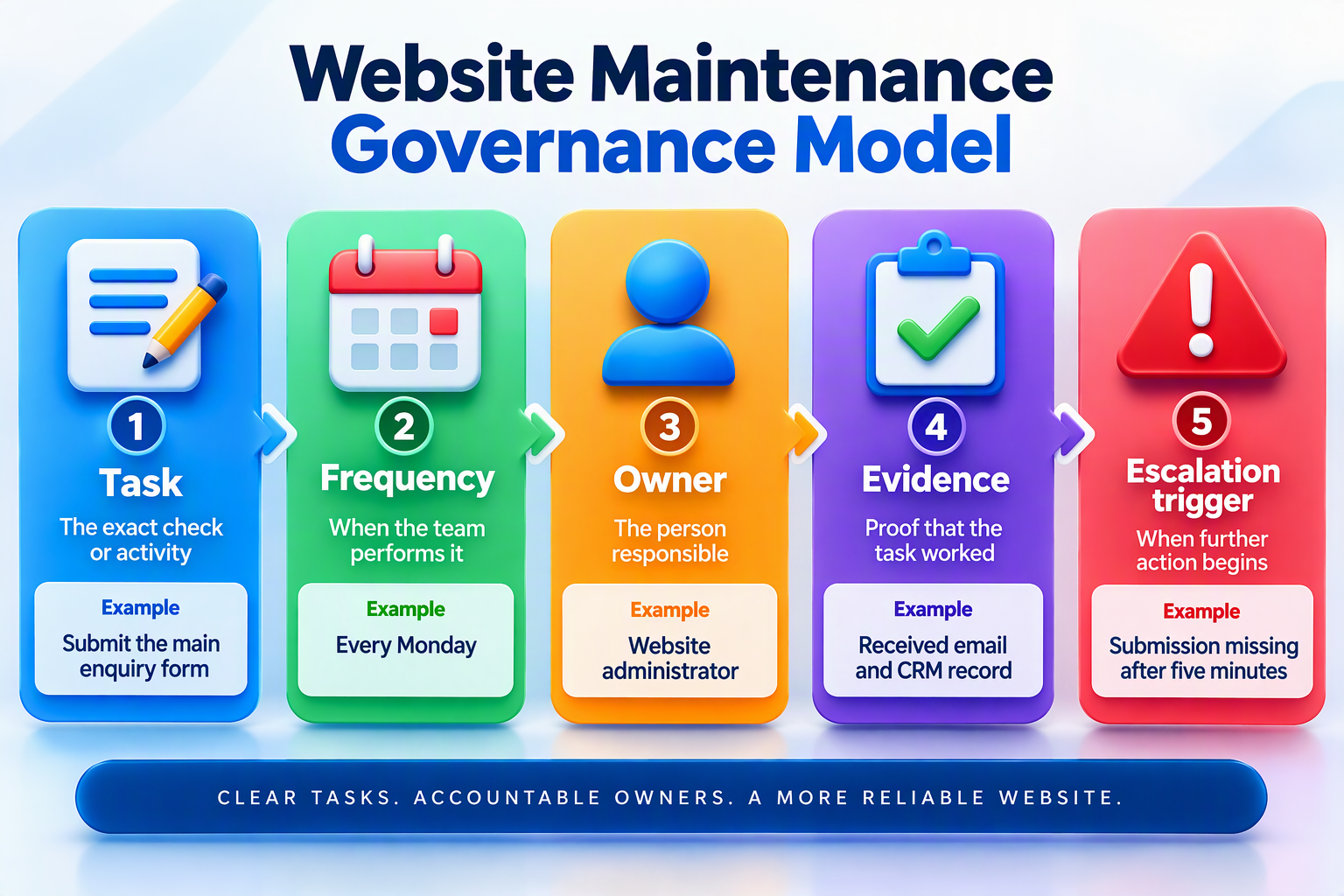
A maintenance plan that lists tasks without owners can leave work unfinished. A plan that lists owners without evidence can make it difficult to confirm whether anyone completed the work.
Escalation triggers are equally important. The business should define when a warning becomes an incident, who receives the alert and which person can approve repair or recovery.
Why Website Maintenance Needs a Schedule
A schedule distributes security, technical and content work across a manageable cycle. It prevents teams from checking everything once and then ignoring the website for several weeks.
Maintenance records also support technical investigations. A complete record shows when a function last worked, which software changed and whether the latest backup passed its restoration test.
The 2026 Australian Government Information Security Manual recommends repeatable and accountable system-administration procedures. Its guidance covers software updates, configuration changes, approvals and supporting documentation.
Not every task belongs on a monthly timetable. Uptime, malware and payment availability require continuous monitoring. Account reviews, integration checks and backup restoration tests may occur quarterly.
Website Maintenance Schedule and Governance Matrix
| Frequency | Maintenance task | Owner | Evidence | Escalation trigger |
|---|---|---|---|---|
| Continuous | Uptime and security monitoring | Technical provider | Monitoring log | Website unavailable or malware found |
| Weekly | Software and form testing | Website administrator | Test submission and update log | Failed form or software conflict |
| Monthly | Content, speed and search review | Marketing and technical teams | Audit report | Incorrect information or major slowdown |
| Quarterly | Recovery and account review | Business owner and provider | Restoration and access report | Recovery failure or unauthorised account |
| Annually | Domain, hosting and scope review | Business owner | Renewal and contract records | Service no longer meets business needs |
A high-volume online store may require daily checkout testing. A small information website may complete most functional checks weekly or monthly. Each business should adjust the frequency to its operational risk.
Assign Website Maintenance Ownership
Every critical task needs a named owner. Avoid assigning responsibility to broad groups such as “IT”, “marketing” or “the agency” without identifying who receives alerts and approves action.
The business should own its domain, hosting, analytics and primary administrator accounts. External suppliers may receive controlled access, but the business should retain authority to change or remove that access.
A practical maintenance register should include:
- Task, frequency and responsible owner
- Scheduled and completed dates
- Evidence and test result
- Problem found and corrective action
- Escalation status and closure date
Keep the register simple enough for staff to maintain. A short and current record provides more value than a complex document that employees stop using.
Continuous Website Maintenance Tasks
Monitor Website Availability
Uptime monitoring should alert someone who can investigate a failure. An alert sent to an unattended inbox provides limited value and may allow an outage to continue unnoticed.
The support agreement should identify response hours, escalation contacts and repair responsibilities. Monitoring detects downtime, but it does not automatically include investigation or repair.
Acceptable evidence may include the monitoring log, incident timestamp and response record. Escalate the issue when the website remains unavailable beyond the agreed threshold or repeated short outages appear.
Businesses experiencing recurring server problems can compare Australian web hosting services by capacity, security, backup arrangements and technical support.
Monitor Website Security Warnings
Review malware alerts, failed logins, unfamiliar accounts and unexpected file changes. Investigate unexplained redirects, injected pages and altered content because these signs may indicate unauthorised access.
The Australian Cyber Security Centre identifies malware, website defacement and data breaches as website risks. Its guidance recommends current software, secure hosting, controlled access and regular website checks.
A dedicated website security service may provide malware scanning, blacklist monitoring and application checks. Confirm whether the plan includes detection only or also covers cleanup, recovery and incident reporting.
The security owner should preserve scan results and incident records. Escalate unexpected administrator accounts, confirmed malware, unauthorised content or unexplained traffic redirection immediately.
Review Website Backup Alerts
Check automated backup reports instead of assuming that every scheduled backup succeeded. Investigate incomplete copies, missed schedules and storage warnings promptly.
A backup is useful only when the business can restore it successfully. Keep at least one suitable copy separate from the live hosting environment to reduce the risk of losing the website and its recovery data together.
Businesses requiring another recovery layer can review cloud backup services. Confirm retention periods, encryption, covered systems and restoration support before selecting a service.
Backup evidence should identify the completion time, included data and storage location. Escalate missed backups, storage failures or a recovery point that falls outside the business’s approved tolerance.
Weekly Website Maintenance Tasks
Update the CMS, Plugins and Themes
Review updates for the content management system, themes, plugins and extensions. Check release notes and compatibility information before installing major changes.
Create a current backup before updating the website. Test significant releases in a staging environment where practical, especially when the update affects payments, forms or integrations.
Businesses using WordPress can consider a WordPress hosting environment when staging, automated backups and platform-specific support are important requirements.
Record software versions, test results and changes applied. Escalate failed updates, visual conflicts, missing features or security releases that the team cannot install safely.
Test Enquiry Forms
Submit every important form with approved test information. Confirm that the visitor receives a success message and that the intended employee receives the submission.
When a form connects with a CRM, test the complete data path. A successful website message does not prove that the CRM captured the enquiry.
Evidence should include the form name, test time, receiving address and CRM record. Escalate missing notifications, duplicate records, delayed delivery or incorrect routing.
Test Bookings and Checkout
Complete an approved test booking, registration or order. Confirm payment status, customer emails, internal notifications and connected records.
Use the payment provider’s authorised test environment where available. Remove unnecessary test accounts and orders after the review.
Evidence should show each completed stage, including confirmation and internal processing. Escalate incorrect totals, rejected valid payments, missing emails or absent order records.
Inspect Important Customer Pages
Review service, location, booking and checkout pages on current desktop and mobile browsers. Look for missing images, overlapping elements, unreadable text and broken buttons.
Do not limit testing to the homepage. High-value pages often create more business risk than general information pages.
Record the URL, device, browser and screenshot when reporting an issue. Escalate any failure that blocks an enquiry, booking, payment or important customer instruction.
Monthly Website Maintenance Tasks
Review Speed and Mobile Performance
Test important landing pages, forms and checkout screens on mobile and desktop devices. Large images, unused scripts and third-party applications can reduce performance.
A performance score provides diagnostic information, but the customer journey matters more than one headline number. Confirm that visitors can navigate and complete important actions without unreasonable delays.
When outdated code or page architecture causes repeated problems, a structured website design and development process may offer a more reliable solution than repeated minor repairs.
Record the pages and devices tested. Escalate large performance changes, repeated timeouts or delays affecting important customer actions.
Find and Repair Broken Links
Check navigation, footer links, calls to action and downloadable files for missing pages or outdated destinations. Broken links interrupt customer journeys and reduce access to useful information.
Fix incorrect internal links directly where possible. Apply a relevant redirect when an important page moves, but avoid redirecting every deleted page to the homepage.
Evidence should include the broken URL and corrected destination. Escalate widespread errors that may indicate a failed migration, incorrect deployment or damaged navigation component.
Update Business Information
Review services, prices, contact details, staff profiles, locations and opening hours. Remove expired offers, old events and outdated downloadable files.
Assign a content owner to every priority page. The owner should know when the information requires review and who can approve changes.
Record the page, reviewer and change date. Escalate information that may create legal, financial, safety or customer-service risk if it remains incorrect.
Review Search Visibility
Use Google Search Console to review search traffic, sitemaps, indexing issues and individual URLs. The platform provides performance data, issue alerts and URL Inspection information.
Check canonical tags, redirects and robots settings after website changes. Investigate unexpected changes affecting priority pages before adjusting technical search settings.
A broader SEO service for Australian businesses can support technical optimisation, content and internal linking. Maintenance should still confirm that important pages remain accessible and indexable.
Record indexing checks and affected URLs. Escalate the unexpected disappearance of a priority service, location or product page.
Validate Analytics and Conversion Tracking
Test tracking for forms, calls, bookings, downloads and purchases. Theme updates, consent tools and form replacements can interrupt analytics without causing a visible website error.
Document changes to tags and event definitions. Compare analytics with internal business records where practical, such as submitted forms or completed orders.
Evidence should include the event name and test result. Escalate missing data, duplicate events or unexplained differences between analytics and business records.
Quarterly Website Maintenance Tasks
Test Website Restoration
Restore a recent backup in a protected test environment. Record the backup used, restoration time, missing information and problems found during the test.
Do not overwrite the live website during a routine recovery exercise. An experienced administrator should approve and supervise any production restoration.
The business should define an acceptable recovery period. Escalate a failed test, missing database records or recovery time that exceeds the approved limit.
Review Accounts and Permissions
Review access to the CMS, hosting, domain registrar, analytics and payment tools. Remove users who no longer need access.
Give each person only the permissions required for the role. Enable multi-factor authentication for privileged accounts where supported.
Keep an approved access register as evidence. Escalate unknown administrators, shared accounts, former-worker access or recovery details controlled by an external person.
Test Website Integrations
Review CRM, email, payment, maps, booking and analytics connections. Confirm that API keys, credentials and access tokens remain current.
Test both the website and destination platform. A website may accept information while failing to transfer it to another system.
Record the integration owner and last successful test. Escalate expired credentials, missing records or failures that do not generate alerts.
Review Website Accessibility
Use keyboard navigation to test menus, links, buttons and forms. Review headings, labels, visible focus, alternative text and colour contrast.
Automated accessibility tools can identify some issues. Manual testing remains important because software cannot determine whether instructions and customer journeys make sense.
Record the pages and actions reviewed. Escalate barriers that prevent visitors from accessing information, submitting forms or completing transactions.
Website Maintenance Responsibility Matrix
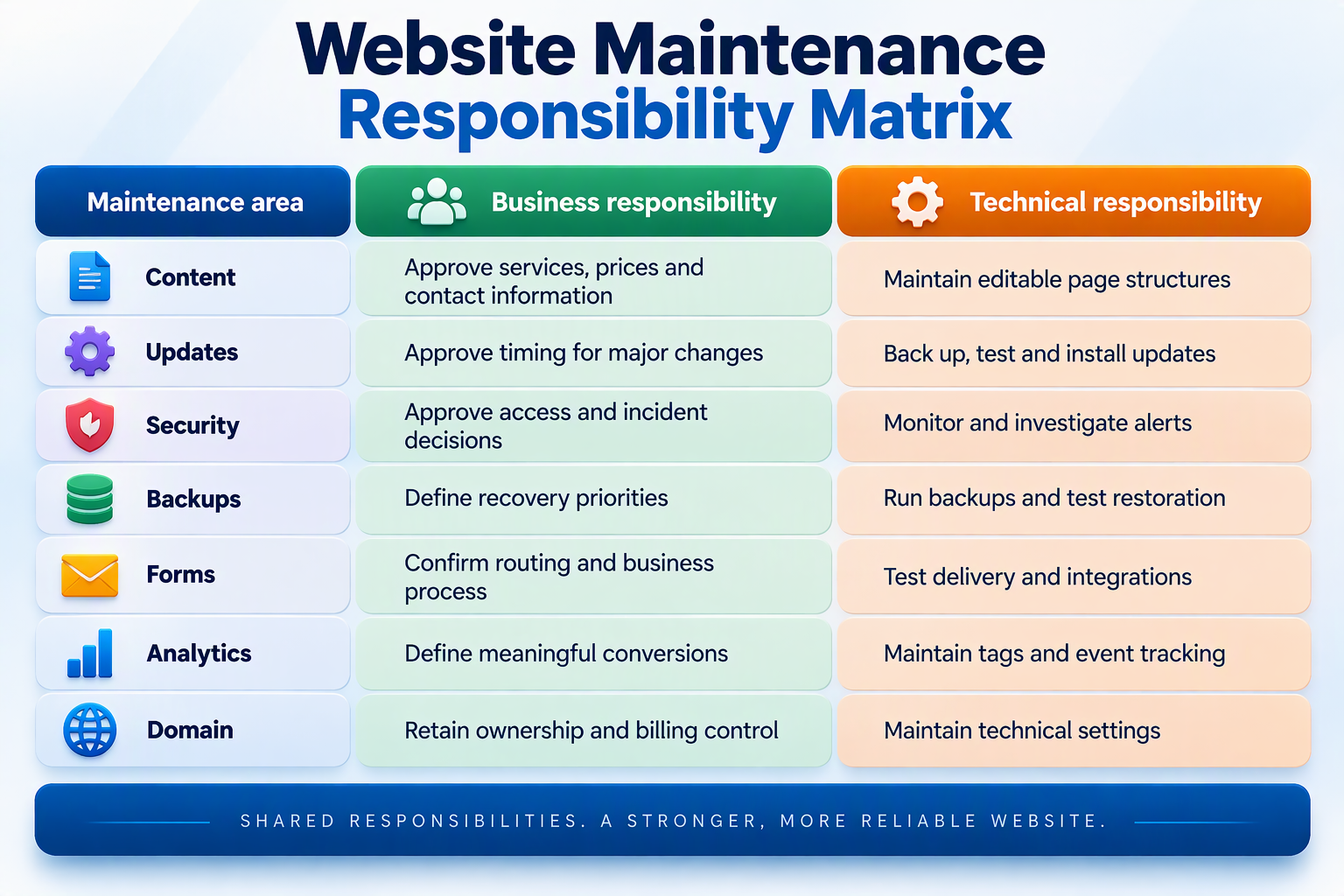
This division reduces confusion between business and technical owners. Hosting companies, developers and marketing teams may manage different areas, so the agreement should document every service boundary.
Website Maintenance Report Requirements
A maintenance report should explain what the team tested, what changed and which risks remain unresolved. A statement such as “all systems updated” provides limited operational evidence.
| Report area | Evidence to include | Escalation trigger |
|---|---|---|
| Updates | Software versions and completed tests | Failed or incompatible update |
| Backups | Completion and recovery result | Missing or unusable backup |
| Security | Alerts, scans and action taken | Malware or unauthorised access |
| Availability | Uptime and recurring errors | Repeated outages |
| Forms | Submissions and destinations | Missing enquiry or CRM record |
| Performance | Priority-page results | Significant slowdown |
| Search | Indexing and analytics checks | Priority page disappears |
The report should separate automated monitoring from technician work. It should identify completed repairs, unresolved risks, actions awaiting approval and possible additional costs.
Common Website Maintenance Governance Mistakes
Assigning Tasks Without Named Owners
A task assigned to a department may remain unfinished because nobody accepts responsibility. Assign a named owner, alternate contact and escalation route.
Recording Completion Without Evidence
A tick in a checklist does not prove that a form, backup or integration worked. Require a test result, log, screenshot or receiving record.
Monitoring Without Repair Responsibility
An alert provides limited protection when nobody investigates it. Define monitoring, investigation, repair and recovery responsibilities in writing.
Keeping Backups Without Testing Recovery
A backup may contain incomplete information or fail during restoration. Schedule recovery exercises and record the result.
Allowing Unnecessary Administrator Access
Unused administrator accounts create avoidable risk. Review access regularly and remove former employees, contractors and suppliers promptly.
Website Maintenance Governance Checklist
- Define each task, frequency and named owner.
- State what evidence will prove completion.
- Set an escalation trigger for every critical task.
- Record repairs, recovery tests and unresolved risks.
- Review responsibilities after platform or supplier changes.
For a detailed task inventory, use the existing Website Maintenance Checklist: 12 Essential Tasks for 2026. That article retains the recurring checklist intent.
Quick Facts
| Question | Direct answer |
|---|---|
| What are website maintenance tasks? | Recurring checks that keep a website functional and recoverable |
| What makes a task accountable? | A frequency, owner, evidence and escalation trigger |
| Who should own website accounts? | The business |
| How often should forms be tested? | Weekly and after relevant changes |
| Should backups be restored? | Yes, through scheduled recovery tests |
| Does hosting include maintenance? | Not automatically |
| What is the main risk? | A failure remaining unnoticed or unassigned |
| What affects cost? | Website complexity, frequency, scope and support level |
Frequently Asked Questions
What Are the Most Important Website Maintenance Tasks?
Start with backups, updates, administrator access, malware monitoring and form testing. Then review uptime, performance, links, content, search visibility and analytics.
Who Should Own Website Maintenance Tasks?
The business should assign a named owner to each critical task. Technical providers may complete the work, but the business should retain account ownership and approval authority.
What Evidence Should a Maintenance Task Produce?
Suitable evidence may include logs, test submissions, screenshots, recovery records, software versions or incident reports. Evidence should prove that the relevant website function worked.
How Often Should Website Maintenance Occur?
Monitor security and availability continuously. Complete functional checks weekly, broader reviews monthly, and recovery, permission and integration tests quarterly.
Does Hosting Include Website Maintenance?
Not automatically. Hosting keeps website files online. Maintenance covers software, customer functions, content, backups and testing according to the written agreement.
Can a Small Business Complete Its Own Maintenance?
Yes, when staff have enough technical knowledge, time and access. Specialist assistance may be needed for malware, failed updates, server problems and complex integrations.
Does Website Maintenance Support SEO?
Maintenance helps keep pages accessible, links functional and information current. These actions support search health, but maintenance cannot guarantee rankings.
What Should a Maintenance Report Include?
The report should show updates, backup results, security findings, uptime, functional tests, performance checks, completed repairs and unresolved risks.
How Much Does Website Maintenance Cost?
Cost depends on the platform, website size, integrations, task frequency and response requirements. Review the Australian website maintenance cost guide for relevant pricing factors.
Final Thoughts
A clear governance framework makes website maintenance tasks easier to manage, prove and escalate. Australian businesses should define each task, frequency, owner, evidence requirement and escalation trigger.
Continuous monitoring, weekly testing, monthly reviews and quarterly recovery exercises address different risks. Combining them creates a more reliable maintenance process than relying on occasional software updates.
The business should retain account ownership and maintain clear records. Update logs, test evidence and incident reports provide valuable context when a failure occurs.
Review the available website maintenance plans or contact IT Company Australia to discuss task ownership, maintenance frequency and technical-support responsibilities.