
Perth customers often use Google Search and Maps when comparing nearby services, suppliers and shops. Incorrect opening hours, an unsuitable category or an outdated website link can create doubt before a customer makes contact.
Effective Google My Business optimisation Perth businesses can use begins with accuracy rather than ranking tricks. Although the platform is now officially called Google Business Profile, many business owners and customers still use its former name, Google My Business.
This practical 30-point checklist explains how to review ownership, eligibility, business information, services, photographs, reviews, website alignment and performance measurement. It is designed to help Perth businesses identify profile problems and establish a repeatable optimisation process.
Direct answer
Google My Business optimisation is the process of improving and maintaining the information an eligible business displays across Google Search and Maps. For a Perth business, this normally includes ownership, categories, services, opening hours, contact details, location settings, photographs, reviews, website links and performance monitoring.
Optimisation can improve the profile’s accuracy, relevance and usefulness. It cannot guarantee a particular Maps position because local results also depend on distance, competition and other factors outside the business’s control.
How to use this checklist
Assign one of these statuses to every check:
| Status | Meaning | Required action |
|---|---|---|
| Correct | The information is accurate and supported | Retain it and review it periodically |
| Needs update | The information is incomplete or outdated | Schedule an authorised correction |
| Evidence required | The information may be unsupported | Verify it before making a change |
Record the person or team responsible for each correction. Operational details should be checked against a reliable business source instead of copied from an old directory or marketing document.
Google My Business optimisation Perth: ownership and eligibility checks
1. Confirm primary ownership
The business should know which account controls the profile and who holds primary ownership.
Where possible, control should remain with an organisation-managed account. An agency or external consultant can receive suitable access without becoming the permanent controller of the profile.
2. Review everyone with access
Check all current owners and managers. Remove previous employees, suppliers or contractors who no longer require access.
Apply the same review to connected website, analytics and marketing accounts.
3. Confirm profile eligibility
A business generally needs to serve customers at a physical location or travel to customers. A profile should not be created simply to target a Perth suburb where the business has no eligible operation.
4. Identify the correct business model
Determine whether the company is:
- A customer-facing storefront
- A service-area business that travels to customers
- A hybrid business that serves customers both on-site and at their locations
The profile settings should match the real operating model.
5. Look for duplicate profiles
Search for old, accidental or unauthorised profiles representing the same business location.
Google advises that there should generally be only one profile per business because duplicates can cause problems with how information appears in Search and Maps.
Do not create a replacement profile merely because access to the original has been lost.
Check the business identity and contact information
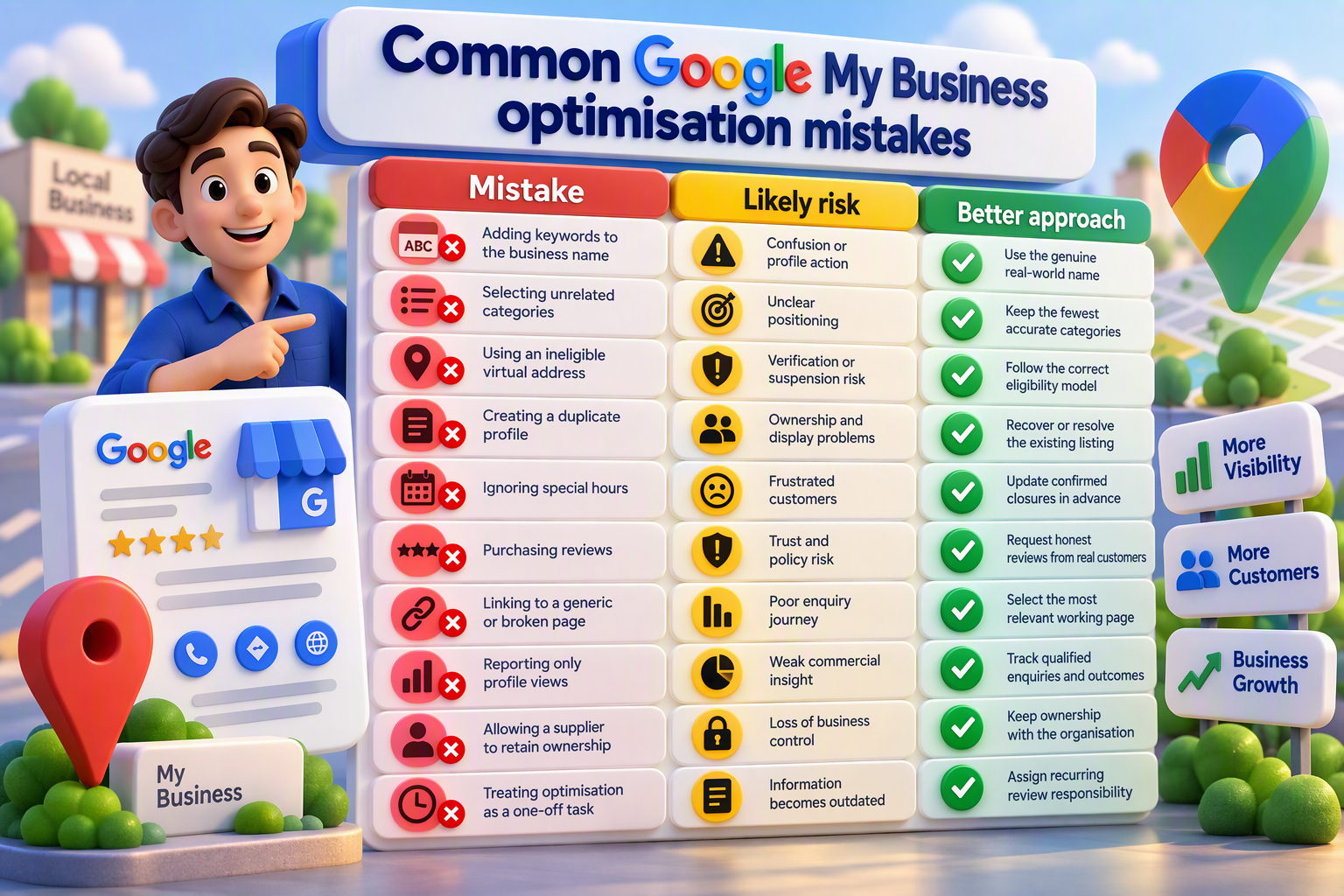
6. Verify the real-world business name
The profile should use the name displayed consistently on the company’s website, signage, stationery and customer-facing branding.
Do not add services or location keywords unless they are genuinely part of the recognised business name.
For example, a company called “Example Plumbing” should not rename its profile “Example Plumbing Best Emergency Plumber Perth” merely to target additional searches. Google says unnecessary information in a profile name is not permitted and may result in suspension.
7. Check the business address
If customers visit the business, confirm that the address is complete, precise and connected to the real operating location.
Do not use a remote mailbox or ineligible virtual office. Google states that a co-working office is not eligible unless the business has clear signage, receives customers there during business hours and has its staff present during those hours.
8. Review address visibility
A service-area business that does not receive customers at its address should normally hide the address from the public.
A hybrid business should display an address only if the location is staffed and able to receive customers during its stated hours.
9. Test the telephone number
Call the listed number and confirm that it reaches the correct business or location.
The number should be controlled by the business, and the people answering it should understand how to handle profile-generated enquiries.
10. Test the website destination
Open the link on both desktop and mobile. Confirm that the destination:
- Loads correctly
- Uses HTTPS
- Represents the right business or location
- Works properly on a mobile device
- Contains consistent contact details
- Offers a clear next step
A profile should not send a high-intent customer to an irrelevant, outdated or broken page.
Review categories, services and profile content
11. Review the primary category
The primary category should describe the business’s main activity as closely as possible.
Avoid selecting a broad or loosely related category simply because it appears to attract more searches.
12. Review additional categories
Remove categories that do not represent genuine business activities.
Google advises businesses to use the fewest categories required to describe the overall core business.
Adding more categories does not automatically improve visibility. It may make the business’s positioning less clear.
13. Compare the services with current operations
Check the profile’s services against the website and the operational service list.
Remove discontinued services and add important missing services where the profile supports them.
14. Improve service descriptions
Each description should help a customer understand the service. Explain what it is, who it assists and any important limitation the customer should know.
Avoid repeating the same service with different Perth suburb names.
15. Audit the business description
Use the description to explain the company’s services, products, purpose or history clearly and factually.
Google’s guidance says this field should contain relevant and useful information. Links, irrelevant text and promotion-led price messaging are not permitted in the business description.
16. Review profile attributes
Check the attributes available for the selected business category. Retain only those that accurately apply.
Do not select an attribute without confirmation from the business team.
Review opening hours and service areas
17. Verify regular customer-facing hours
Check that the published hours match the times when customers can genuinely receive service.
Administrative working hours may not be appropriate when the customer-facing schedule is different.
18. Update special hours
Review special hours before Western Australian public holidays, confirmed temporary closures and other schedule changes.
An incorrect “open” status may send a customer to a closed location and weaken trust.
19. Check the stated service area
The service area should represent locations the business can realistically serve.
Google says the boundaries of a service-area profile generally should not extend much farther than approximately two hours’ driving time from the business base, although larger service areas may be appropriate for some businesses.
A wide service area does not by itself prove local relevance across every listed location.
20. Align service areas with the website
If the profile says that a business serves a particular area, the website should help customers understand whether and how that service is available there.
Avoid producing dozens of near-identical suburb pages. Useful location content should explain matters such as availability, booking processes, travel restrictions or genuine differences in service delivery.
Businesses requiring broader website and local search support can review the verified Local SEO Services Australia | Boost Ranking | IT Company page.
Improve photographs and customer information
21. Audit existing photographs
Review the images customers currently see. Identify images that are outdated, misleading, duplicated, irrelevant or poor quality.
Add recent photographs that accurately represent the premises, team, products or completed work where appropriate.
22. Confirm accuracy and permission
Do not use stock images as if they show the actual team, premises or customer work.
Confirm that the business has permission to publish each image. Avoid photographs containing unnecessary personal or confidential information.
23. Review published updates
Check whether old events, offers or business updates could mislead customers.
New posts should communicate genuine information, such as an operational update, event or useful announcement. Posting regularly does not compensate for incorrect business details.
24. Test the customer journey
Follow the process a potential customer may use:
- Search for a relevant service
- Open the Business Profile
- Review services, opening hours and reviews
- Visit the website
- Find the relevant service information
- Make an enquiry
Record every point where the information becomes inconsistent, confusing or difficult to use.
Suggested internal link: Readers seeking a broader explanation can review the Google Business Profile Services Perth: Local Growth Guide 2026.
Establish an ethical review process
25. Review how feedback is requested
Ask genuine customers for honest feedback after a real interaction.
Do not purchase reviews, fabricate reviewer identities or pressure customers to submit only positive feedback.
26. Audit review responses
Check recent responses for accuracy, professionalism and privacy.
A suitable response may thank a positive reviewer or acknowledge a concern without revealing private information. Avoid arguments, generic sales messages and promises the business cannot verify.
27. Escalate recurring service issues
Repeated complaints may indicate an operational problem that profile optimisation cannot fix.
Establish an internal route for recurring themes to reach the person or team capable of reviewing the underlying service issue.
Connect the profile with the website
28. Compare profile and website information
Check the following information across both properties:
- Business name
- Telephone number
- Address or service area
- Opening hours
- Main services
- Location details
- Contact options
Minor formatting differences are not necessarily a problem, but the information should not contradict itself.
29. Choose the right landing page
A homepage may be suitable for a simple single-location business. A multi-location company may require an individual page for each genuine staffed location.
The selected landing page should confirm what the business offers, where it operates and how a customer can make contact.
Approved tracking parameters can be added to the profile link where the analytics setup supports them. They should not redirect the visitor to an unrelated destination.
Measure profile activity and qualified enquiries
30. Connect profile interactions with outcomes
Google says performance information is available for verified Business Profiles. Depending on the business, available metrics may include searches, views, call clicks, direction requests, website clicks and other interactions. Not every metric is available for every profile. [support.google.com]
Compare profile activity with actual business evidence:
| Profile evidence | Business evidence | Question to investigate |
|---|---|---|
| Website clicks | Completed enquiry forms | Can visitors easily take the next step? |
| Call clicks | Answered and qualified calls | Are calls reaching the correct team? |
| Direction requests | Recorded visits | Is the location information correct? |
| Search terms | Relevant enquiries | Is the profile attracting suitable demand? |
| Profile views | Bookings or sales | Is visibility translating into outcomes? |
A rise in profile views does not prove commercial success. Review activity alongside qualified enquiries, bookings or another approved business outcome.
Who should manage Google My Business optimisation?
Responsibility should be divided according to the issue.
| Area | Suitable owner |
|---|---|
| Trading name, hours and service delivery | Business operations |
| Ownership and access permissions | Authorised business administrator |
| Categories and services | Operations and marketing |
| Website content and landing pages | Website or marketing team |
| Review escalation | Customer service or management |
| Measurement and reporting | Marketing or analytics owner |
| Eligibility or policy concerns | Authorised owner with specialist support where required |
An external provider can perform approved optimisation work, but the business should understand what will change, why it will change and who retains access when the engagement ends.
Businesses comparing external providers can use the existing Google Business Profile Optimisation Perth: 10 Agencies 2026 article to assess scope, ownership, website integration and reporting.
How often should the profile be reviewed?
There is no universal schedule for every business. Review the relevant profile information whenever:
- Opening hours change
- A public-holiday schedule is confirmed
- A service is introduced or discontinued
- A location opens, moves or closes
- A telephone number changes
- The website is restructured
- An employee or supplier no longer needs access
- Customers report incorrect information
- Verification or policy problems arise
A scheduled recurring audit can help identify unintended changes before they affect more customers.
How much does Google My Business optimisation cost in Perth?
There is no standard price that applies to every Perth business.
The scope may vary according to:
- Number of eligible locations
- Ownership or verification problems
- Amount of incorrect information
- Website changes required
- Analytics and reporting requirements
- Review-process support
- Need for ongoing management
Ask for a written scope that separates:
- Initial profile audit
- Profile corrections
- Website changes
- Analytics and reporting
- Ongoing management
- Additional location work
The verified IT Company Australia SEO page follows a request-a-quote model. Therefore, this article should not publish a fixed company price unless an approved commercial source confirms it.
Frequently asked questions
What is Google My Business optimisation?
It is the process of improving and maintaining the information an eligible business presents through Google Search and Maps. It may cover ownership, categories, services, contact details, hours, photographs, reviews, website alignment and measurement.
Is Google My Business still called that?
Google Business Profile is the current product name. Google My Business is the former name and remains widely used by business owners and searchers.
Can optimisation guarantee a top-three Maps position?
No. Local results depend on factors including relevance, distance and prominence. A business can improve the elements it controls, but it cannot guarantee a permanent ranking.
Can I optimise my own Business Profile?
Yes. An authorised business owner or manager can review and maintain an eligible profile. External support may be useful when ownership, verification, multiple locations, policy issues or website integration make the work more complex.
Can a service-area business have a profile?
An eligible business that travels to customers may use a service-area profile. It should not publicly display an address where customers are not served or use an ineligible virtual office to target a location. [support.google.com]
Should an agency own the profile?
The business should retain suitable control. An agency can be given the access needed to complete agreed work without permanently owning the profile.
Should I add keywords to the business name?
Only when they genuinely form part of the recognised real-world name. Google requires the profile name to reflect how the business is represented through its signage, website, stationery and branding.
Do reviews affect local visibility?
Reviews help customers assess a business and can form part of its wider prominence. Feedback should come from genuine customer experiences, and responses should remain professional.
What should a local profile report include?
Where available, reporting may include searches, views, calls, website clicks, direction requests and other profile interactions. It should also connect that activity with qualified enquiries or another business outcome.
Is a Google Business Profile enough for local SEO?
No single profile replaces a clear, technically reliable website and a useful customer journey. Website content, local relevance, business information and a usable enquiry process also matter.
Conclusion
Effective Google My Business optimisation Perth businesses can rely on is based on accuracy, eligibility and ongoing care. It does not depend on keyword-stuffed names, artificial reviews, duplicate locations or unsupported ranking promises.
Begin with profile ownership, access and core business information. Then review categories, services, opening hours, service areas, photographs, reviews and the connected landing page. Finally, compare profile interactions with qualified enquiries rather than relying on one ranking screenshot.
A well-managed profile should help a customer understand three things quickly: what the business does, where it operates and how to make contact.
If your review identifies ownership problems, inaccurate information or weak website alignment, contact IT Company Australia to discuss Google Business Profile and local SEO support. The linked page is the verified contact destination for the site.
Final recommendation
Keep“Google My Business optimisation Perth” as the main keyword, but retain the 30-point checklist angle throughout the metadata, introduction, headings and content. That gives the required keyword a defined search purpose while reducing, though not completely eliminating, competition with the existing broad guide and agency-comparison page.
