
A not-for-profit website must serve several audiences at once. Donors need confidence, volunteers need clear opportunities, service users need accessible information and staff need a manageable publishing system.
Introduction
This makes non profit web development more complex than creating a polished homepage. The website must explain the organisation’s purpose, present credible evidence and help people take useful action without creating unnecessary barriers.
The Australian Charities and Not-for-profits Commission, or ACNC, registers and regulates Australian charities. The ACNC also provides a searchable public Charity Register. Depending on its legal structure, an organisation may also have registration or reporting obligations involving ASIC.
A successful project should connect communication, accessibility, fundraising, security and long-term governance. Most importantly, the organisation should assign owners for public information, donations, domains, integrations, backups and emergency publishing before launch.
Direct Answer
Non profit web development should create an accessible, secure and manageable website that explains the organisation’s purpose and supports donations, services, volunteering and public accountability. The project should address audience needs, content, fundraising integrations, mobile access, privacy, security, ownership and ongoing maintenance.
In This Guide
You will learn how to:
- Organise content around donors, volunteers and service users
- Build trust through accurate and verifiable information
- Create accessible donation and supporter journeys
- Protect personal information, accounts and payments
- Assign website ownership and maintenance responsibilities
What Is Non Profit Web Development?
Non profit web development covers the planning, design, development and maintenance of websites for charities, associations, foundations, community groups and other purpose-led organisations.
The work may include online donations, volunteer applications, service directories, event registration, memberships and fundraising-system integrations. It may also connect the website with customer relationship management platforms, email tools, analytics and reporting systems.
Unlike a standard commercial website, a not-for-profit site often balances fundraising with public education and service access. A person seeking urgent assistance has different priorities from a corporate donor examining partnership opportunities.
A structured website design and development process can connect discovery, audience journeys, wireframes, responsive development, integrations and testing. The published process covers discovery, design, CMS integration, testing, launch and post-launch support.
Why Nonprofit Website Development Matters
A website often provides the first detailed explanation of a nonprofit’s work. Visitors may use it to verify the organisation, examine programs, review annual reports or decide whether to contribute money or time.
Australian donors can search the ACNC Charity Register by charity name, Australian Business Number or location. They can also use additional filters and search for specific charity programs.
Trust can weaken when a website contains outdated details, unsupported impact claims or broken donation forms. A modern visual design cannot compensate for incomplete governance information or a confusing donor journey.
Effective development reduces these problems through clear content structures, reliable technical foundations and defined ownership. The organisation still needs trained staff or volunteers who can maintain the website after launch.
The 7 Non Profit Web Development Essentials
1. Design Around Real Nonprofit Audiences
A nonprofit should begin with audience needs rather than a preferred theme. Early research should identify who uses the website, what each audience wants and which tasks need the most support.
Common audiences include donors, volunteers, service users, members, corporate partners, grant makers and journalists. Each group may require different evidence, language and contact options.
A donor may want financial and impact information before contributing. A volunteer may need role details, time commitments and application steps. Meanwhile, someone seeking urgent support may need a service location or telephone number immediately.
The project team should review analytics, common enquiries, search terms and staff feedback. Short interviews and task-based testing can reveal barriers that internal teams may no longer notice.
Useful audience-planning questions include:
- Why does each audience visit the website?
- What information does each audience need before acting?
- Which accessibility or language requirements apply?
- What privacy or consent questions may arise?
- Who owns each journey after launch?
Every major page should support a defined audience need or organisational obligation. Copying sections from another charity website may create unnecessary content that staff cannot maintain.
2. Build Trust With Credible Evidence
A nonprofit website should explain the problem, the organisation’s response and the people or communities it serves. Direct language usually communicates this information more effectively than broad claims about changing lives or transforming communities.
Credibility depends on verifiable evidence. The website may include governance details, annual reports, program descriptions, leadership information and current registration data where appropriate.
Registered charities can link to their current ACNC Charity Register entry. However, staff should confirm that the website and public record use consistent names, addresses and registration details.
Impact stories can make programs easier to understand. Nevertheless, the organisation must consider consent, privacy and dignity before publishing personal stories or photographs.
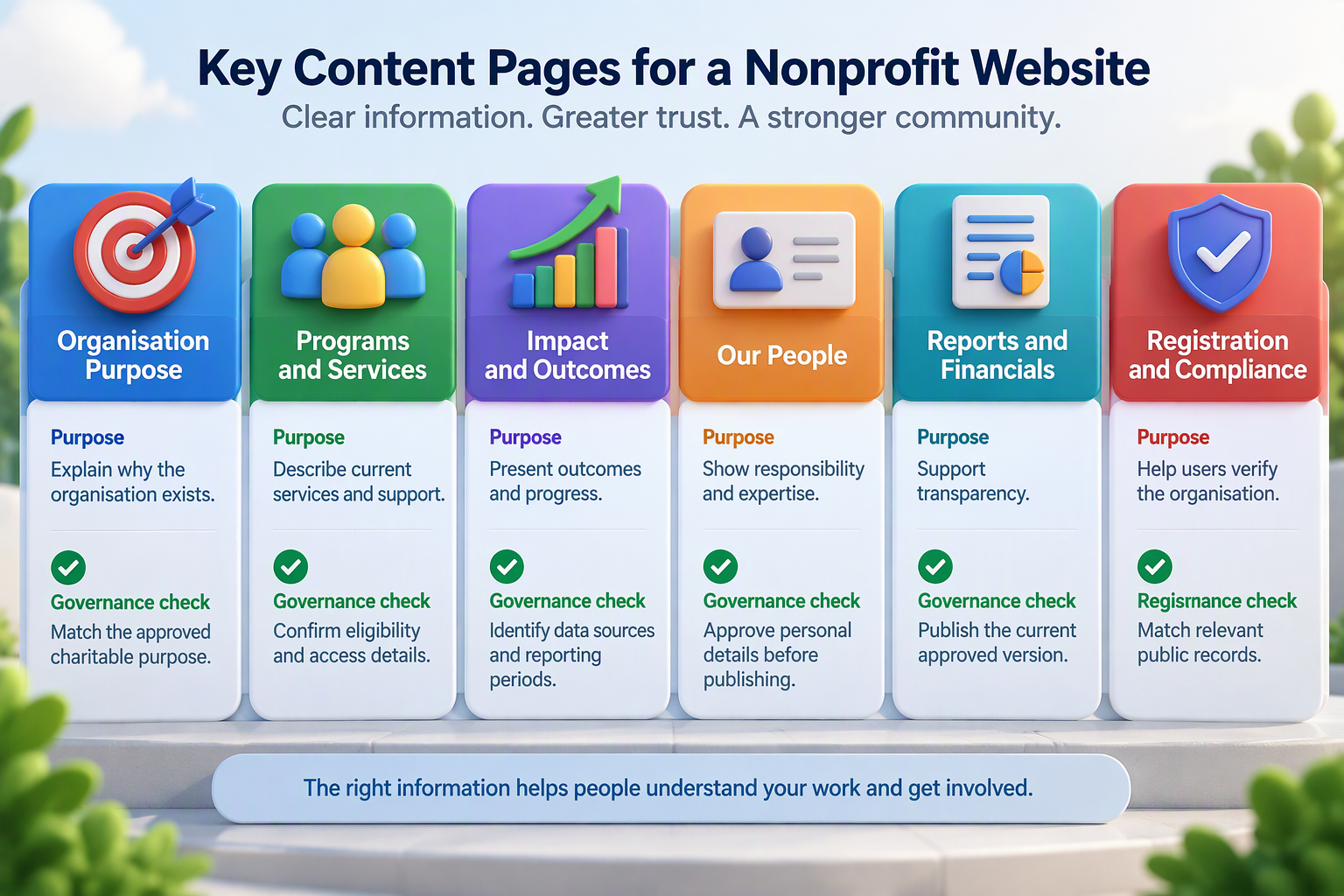
Clear visual communication can make verified information easier to understand. Professional graphic design and branding services can support reports, diagrams and campaign materials, but the organisation should approve every claim and data source before publication.
3. Build Accessible Donation and Supporter Journeys
A donation website should explain what contributions support, which payment options exist and what happens after payment. The donor journey should remain clear from the first campaign page through payment confirmation and receipt delivery.
The organisation should document who controls the payment account, donation records, refunds and recurring contributions. Donation forms should collect only the information required to process the contribution and meet applicable reporting obligations.
The PCI Security Standards Council develops standards and resources for protecting payment-card information. Its ecommerce guidance addresses payment pages, third-party scripts, integrity monitoring and tampering risks.
A hosted payment solution may reduce the amount of cardholder data handled within the nonprofit’s environment. However, embedded scripts, integrations and the surrounding website may still affect the organisation’s security responsibilities.
Nonprofit participation may also extend beyond money. GIVIT, for example, presents separate pathways for donating funds, goods and time, showing how contribution options can reflect different supporter intentions.
An organisation may need pathways for:
- One-time or recurring donations
- Volunteer applications
- Event registrations
- Membership enquiries
- Corporate partnerships
Where the nonprofit also sells event tickets, memberships or campaign merchandise, a suitable online store setup may support those transactions. The organisation should separate commercial purchases from donations and obtain suitable financial or tax advice.
4. Apply Charity Website Accessibility From the Start
A nonprofit website should serve people using different devices, browsers and assistive technologies. Therefore, the team should address charity website accessibility during research, design, development, content entry and testing.
The World Wide Web Consortium recommends WCAG 2.2 when organisations create or update accessibility policies. WCAG 2.2 addresses text alternatives, contrast, keyboard access, focus order, visible focus, headings, labels and error identification.
Developers should make interactive elements keyboard operable and maintain a logical focus sequence. Content editors should use descriptive headings, meaningful links and useful alternative text.
Forms need clear labels, instructions and error messages. A person should understand which field caused a problem and how to correct it without losing safe information already entered.
A nonprofit should combine automated checks with manual keyboard and screen-reader testing where practical. Automated tools can find some technical failures, but they cannot determine whether donation or service instructions make sense.
WCAG provides an internationally recognised technical framework. However, this article does not claim that every Australian charity must meet one universal WCAG conformance level. Each organisation should confirm the requirements created by its funding agreements, procurement rules, services, jurisdiction and legal obligations.
A nonprofit using WordPress may consider a WordPress hosting environment with suitable staging, backups and security features. The organisation should confirm current storage, traffic, recovery and support inclusions before selecting a plan.
5. Protect Personal Information, Payments and Accounts
Nonprofit websites may collect names, contact details, donation records, volunteer applications and service enquiries. The organisation should identify why it needs each field before adding that field to a form.
The Office of the Australian Information Commissioner states that an organisation may only collect personal information that is reasonably necessary for its work. Organisations must usually obtain consent before collecting sensitive information, subject to applicable exceptions.
Where the Australian Privacy Principles apply, APP 5 requires an APP entity to take reasonable steps to notify people about relevant collection matters. These matters may include the organisation’s identity, collection purpose, usual disclosures and possible overseas recipients.
The organisation should place a suitable collection notice at or near each relevant form. A general privacy policy may not explain the purpose and disclosures applying to a particular form.
Not every not-for-profit has identical privacy obligations. Coverage can depend on the organisation’s activities, size and information practices. Organisations should obtain legal or privacy advice when they handle sensitive, health-related or high-risk information.
Website accounts also require clear ownership. Teams should use strong authentication, limit permissions and promptly remove access for former staff, volunteers and suppliers.
A website security service can support malware scanning, blacklist monitoring and application security checks. The verified service page offers different features across its packages, so the nonprofit should confirm the required scope rather than assume that every plan includes the same protection.
6. Give Staff a Manageable Content System
A content management system should make routine updates simple. Staff should not need a developer whenever they change an event, publish a report or update a program page.
Reusable components can maintain consistency across campaigns and services. Structured content may support programs, locations, team profiles, resources, events and impact stories.
Permissions should match individual responsibilities. A communications employee may publish approved news, while an administrator manages integrations, users and software.
The development team should provide guidance for headings, links, images and documents. Clear publishing rules help staff protect accessibility and consistency after launch.
Page structure also affects discovery. An SEO strategy for Australian organisations can support keyword research, internal links and on-page optimisation. However, SEO cannot replace accurate program information or credible evidence.
7. Make Website Governance the Core Deliverable
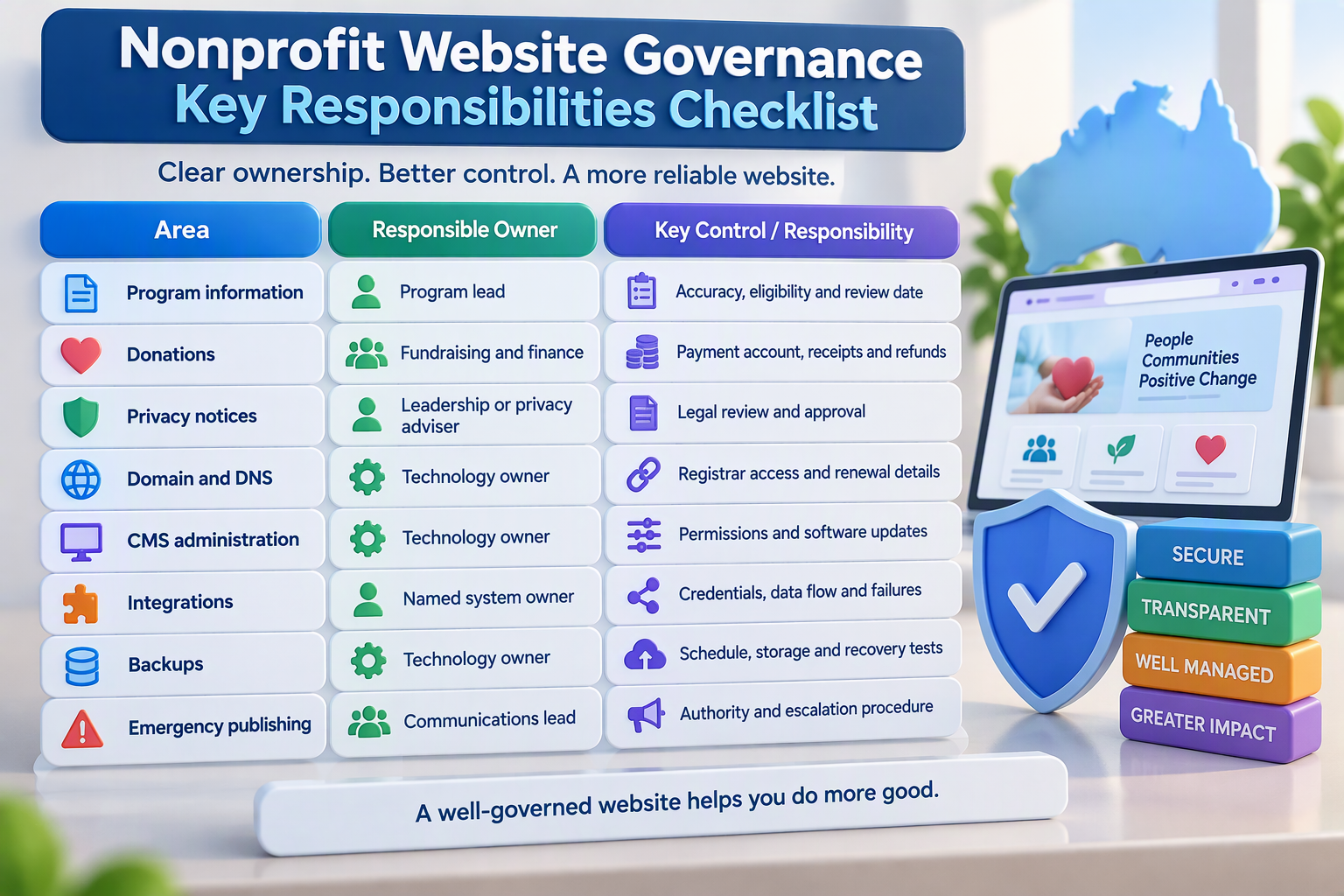
A nonprofit website is not finished when it launches. The organisation needs defined owners for public information, donations, administrator access, integrations, domains, backups and emergency publishing.
Website governance defines who creates, approves, publishes, reviews and removes information. It also establishes who responds when a form, payment service or integration stops working.
Every priority page should have a content owner and review date. Donation instructions and service eligibility may require more frequent review than organisational history.
Technical ownership should remain with the nonprofit. Suppliers may receive controlled access, but the organisation should own its domain, hosting account, analytics property and administrator records.
Nonprofit Website Governance Checklist
A website maintenance service can support CMS updates, uptime checks, backups and reporting. The verified maintenance page shows that update services, security features and backup frequencies vary between packages.
The nonprofit should still own content approvals and emergency decisions. A supplier cannot confirm whether service details, impact claims or eligibility rules remain accurate.
A Practical Nonprofit Website Development Process
Discovery should define audiences, goals, content, systems and risks. The organisation can then create a sitemap and content model before approving detailed visual designs.
Wireframes should test donation, volunteering and service journeys without relying on finished artwork. After approval, visual design can apply the brand and accessibility requirements.
Developers should build the website in a protected staging environment. This private version allows the team to test forms, donations, permissions and integrations without affecting the public site.
Content migration should include an editorial review. Staff should remove expired campaigns, duplicate pages and files that no longer support an audience need.
Before launch, complete these quick checks:
- Test donation, volunteering and contact forms
- Review keyboard access and focus order
- Confirm redirects, analytics and search settings
- Test backups and administrator access
- Record content and technical owners
The website design portfolio includes custom WordPress work with responsive design, analytics and CRM integrations. A portfolio can demonstrate capability, but each nonprofit project needs its own scope and acceptance criteria.
Template or Custom Nonprofit Website?
A supported template may suit a small community organisation with straightforward content and basic forms. It can reduce initial effort, although licences, accessibility, security and maintenance still require review.
Custom development becomes more useful when the nonprofit needs structured program information, advanced donations, member portals, multilingual content or specialised integrations.
The decision should reflect actual requirements rather than prestige. An overengineered website can consume resources that the organisation would rather direct towards its purpose.
Costs, Timeframes and Procurement Risks
Nonprofit website costs depend on content volume, accessibility testing, donation pathways, integrations, migration and staff training. A small community website cannot be compared directly with a national charity platform.
No verified standard nonprofit-project price or delivery period appears on the reviewed company pages. Organisations should request itemised proposals covering discovery, content, design, development, integrations, testing, training and support.
Australian nonprofit directories show providers with different minimum budgets, specialties and commercial models. Some directories also identify featured or sponsored placements, so organisations should use them for market research rather than universal pricing evidence.
Procurement should compare total operating cost rather than launch price alone. Hosting, licences, payment fees, accessibility reviews, integration changes and charity website maintenance may continue after launch.
Common Non Profit Web Development Mistakes
Starting With Design Before Content
A visual layout cannot repair unclear program information. Define audiences, tasks, evidence and approval responsibilities before detailed design begins.
Publishing Essential Information Only in PDFs
PDFs can create search, mobile and accessibility barriers. Publish important service and donation instructions as accessible web content whenever practical.
Adding Too Many Donation Choices
Several competing pathways can confuse supporters. Present the main donor journey first and explain alternative contribution options clearly.
Collecting Unnecessary Personal Information
Extra fields increase friction and privacy risk. Request only information needed for the stated purpose.
Treating Accessibility as a Final Audit
Late accessibility work can affect forms, layouts and reusable components. Include accessibility in procurement, design, development and testing.
Leaving Platform Ownership With a Supplier
The organisation should own its domain, hosting and important administrative accounts. Give suppliers controlled and removable access.
Launching Without Recovery and Maintenance Plans
A website can become outdated or unreliable after launch. Assign maintenance, backup, incident-response and emergency-publishing responsibilities in writing.
Quick Facts
| Question | Direct answer |
|---|---|
| Who needs nonprofit web development? | Charities, associations and community organisations |
| Where should planning begin? | Audiences, content, tasks and integrations |
| What can the website support? | Donations, volunteers, services, events and reports |
| Is accessibility important? | Yes, throughout design, content and testing |
| Who should own the domain? | The nonprofit organisation |
| What affects cost? | Content, accessibility, integrations and migration |
| Does the site need maintenance? | Yes, technology and information both change |
| What is the main risk? | Losing control of content, accounts or critical services |
Frequently Asked Questions
What Is Non Profit Web Development?
Non profit web development creates and maintains websites for charities, foundations, associations and community organisations. It may include public information, donations, volunteering, events, memberships and system integrations.
What Should a Nonprofit Website Include?
A nonprofit website should explain its purpose, programs, governance, impact and contact options. It should also provide clear ways to donate, volunteer, access services or form a partnership.
How Much Does Nonprofit Web Development Cost in Australia?
Cost depends on content, design, accessibility, donations, integrations, migration and training. Organisations should request an itemised proposal because no standard price fits every nonprofit.
How Long Does a Nonprofit Website Take to Build?
Timing depends on research, content approval, integrations, migration and testing. A project plan should define stages and responsibilities rather than promise a general timeframe.
Does Every Nonprofit Need Online Donations?
No. The website should support the organisation’s actual funding model, which may include donations, grants, memberships, fundraising events or corporate partnerships.
Which Platform Is Best for a Nonprofit?
The best platform depends on editing needs, integrations, internal skills, security requirements and budget. WordPress may suit many organisations, while other managed or custom platforms may suit specialised needs.
How Can a Nonprofit Website Build Trust?
Publish accurate program information, current reports, leadership details and verifiable registration information. Avoid unsupported impact claims and protect personal information.
Does a Nonprofit Website Need Accessibility Testing?
Yes. Test important journeys such as finding services, donating and volunteering. Combine automated tools with manual and real-user testing where practical.
Who Should Maintain a Charity Website?
The organisation should appoint content and technology owners. An external provider may complete technical work, but the nonprofit should retain ownership and approval authority.
Final Thoughts
Effective non profit web development connects purpose, credible evidence and useful action. Australian organisations need websites that serve donors, volunteers, members and service users without unnecessary technical or communication barriers.
Strong projects begin with audience needs, accessible content and secure supporter journeys. The organisation should also verify the privacy, payment and regulatory requirements applying to its activities.
Website governance provides the most important long-term safeguard. The nonprofit should assign owners for content, domains, accounts, donations, integrations, backups and emergency publishing before launch.
To discuss audience journeys, fundraising integrations or ongoing technical support, contact IT Company Australia. The initial discussion can focus on the organisation’s real requirements without assuming a platform or package.
