
Cloud spam is not always harmless inbox clutter. Some unsolicited messages are designed to steal credentials, obtain account permissions or persuade users to authorise access to cloud services.
A successful attack may expose more than an email inbox. If the same identity connects email, file storage, collaboration tools and business applications, one compromised login can provide access to several cloud services.
The exact impact depends on the user’s permissions and the organisation’s security controls. However, understanding how malicious emails lead to cloud account compromise can help businesses prevent attacks, recognise warning signs and respond more confidently.
What is cloud spam?
Cloud spam broadly refers to unwanted messages sent through, or directed at users of, cloud-based communication platforms. These messages can include bulk advertising, fake service notifications, misleading document-sharing requests and malicious emails.
Not every spam message is a cyber attack.
In the Australian regulatory context, the Australian Communications and Media Authority describes spam as an unwanted commercial electronic message containing an offer, advertisement or promotion. It also notes that legitimate senders generally need consent, must identify themselves and must offer a way to unsubscribe.
Malicious spam has a different purpose. Rather than simply promoting something, it tries to deceive the recipient into revealing information, opening a harmful file or granting access.
This distinction is important:
| Message type | Main purpose | Potential outcome |
|---|---|---|
| Commercial spam | Promote products or services | Inbox clutter and lost time |
| Phishing email | Steal information or access | Cloud account compromise |
| Malicious attachment | Install harmful software | Credential or data theft |
| Impersonation email | Manipulate a trusted process | Invoice or payment fraud |
| Fake cloud alert | Create urgency or fear | Stolen login details or permissions |
Cloud spam becomes a serious security concern when it contains phishing, malware, impersonation or fraudulent authentication requests.
How cloud spam can compromise an account
The email itself does not normally give an attacker access. Instead, it creates a situation in which the recipient is encouraged to take an unsafe action.
1. A convincing message reaches the user
Attackers often imitate services and situations that employees encounter during an ordinary working day.
A malicious message may claim that:
- A document has been shared with the recipient
- A cloud password is about to expire
- A mailbox has exceeded its storage limit
- An invoice is waiting for approval
- A voicemail could not be delivered
- A suspicious login needs confirmation
- Cloud files will be deleted
- A colleague needs urgent assistance
These messages may use copied branding, familiar language or sender names that resemble legitimate contacts. Some attackers also register domains with subtle spelling differences.
Poor grammar can indicate a suspicious message, but correct spelling does not make an email safe. A professional-looking message can still contain a fraudulent link or request.
2. The email creates urgency
Cloud spam often tries to prevent careful thinking.
A fake security notice may tell the user that access will be suspended within hours. A fraudulent invoice may appear to require immediate approval. A document notification may suggest that a customer or manager is waiting.
Urgency encourages recipients to act before verifying the message through another channel.
Employees should be especially cautious when a message combines time pressure with a request to sign in, approve access, disclose information or change payment details.
3. The user is directed towards an unsafe action
The email may ask the recipient to:
- Open a link to a fake login page
- Download and open an attachment
- Approve an unexpected authentication prompt
- Enter a device or verification code
- Grant a cloud application access
- Provide personal or payment information
- Reset a password through an unverified page
A traditional phishing page copies the appearance of a genuine cloud login screen and records the information entered by the user.
However, attackers do not always need to steal a password directly. They may attempt to capture an active session, obtain an authentication token or persuade the user to approve a connected application.
In May 2026, the Federal Bureau of Investigation Internet Crime Complaint Center warned about a phishing platform that used fraudulent messages and device codes to obtain access to Microsoft 365 environments. Targets were directed to a legitimate verification page but were unknowingly authorising an attacker-controlled device.
This example shows why a genuine website address does not automatically make an authentication request trustworthy. The user must also understand what they are being asked to approve.
4. Credentials, tokens or permissions are exposed
If the attack succeeds, the criminal may obtain one or more of the following:
- A username and password
- An authenticated browser session
- An access or refresh token
- Approval for a connected application
- A multi-factor authentication confirmation
- Recovery information
- A device registration
Passwords are only one part of cloud identity security.
An authentication token can represent a session that has already been verified. Application permissions may allow a connected service to read information or perform actions. Therefore, changing the password might not remove every form of unauthorised access.
Security teams may also need to revoke sessions, remove unrecognised devices, review authentication methods and withdraw suspicious application permissions.

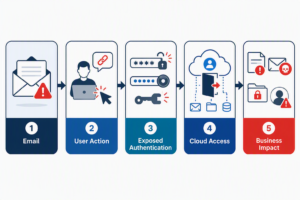
Why one cloud identity can expose multiple services
Many businesses use a central identity system or single sign-on. Employees can use one account to access email, storage, calendars, collaboration platforms and other applications.
This arrangement improves productivity. However, it also makes the account a valuable target.
According to Microsoft, an attacker who gains control of a Microsoft Entra ID account may access the associated Microsoft 365 mailbox, SharePoint folders or OneDrive files, depending on the identity’s permissions.
A criminal with cloud access may search for:
- Customer and supplier details
- Financial correspondence
- Shared business documents
- Internal contact lists
- Meeting information
- Password-reset messages
- Project conversations
- Payment approval processes
- Confidential attachments
The reach of the incident depends on the account. An employee with limited permissions may expose fewer resources than an administrator or staff member with broad access.
For this reason, organisations should apply least privilege. Employees should receive only the access they need for their roles.
What attackers do with compromised cloud accounts
Attackers do not always take immediate, visible action. Some monitor an account quietly to learn how the business communicates and approves requests.
Create forwarding and inbox rules
A criminal may create rules that automatically forward messages to an external account. They may also move selected emails into an archive, junk or rarely checked folder.
These rules can help the attacker monitor conversations while hiding replies and security notifications.
Unfamiliar inbox rules, new external forwarding, missing messages and suspicious sent items are among the compromise indicators identified by Microsoft.
Commit business email compromise
A genuine business account makes a fraudulent message appear more credible.
An attacker may study an invoice conversation before sending altered payment details. They might impersonate a manager and request an urgent transfer. They could also ask payroll staff to change an employee’s bank account.
The Australian Cyber Security Centre explains that business email compromise can involve invoice fraud, employee impersonation and company impersonation. Criminals may use compromised accounts or similar-looking domains to abuse trust in normal business processes.
Steal business information
A compromised mailbox may reveal confidential attachments, commercial discussions and customer information. Connected cloud storage can expose additional documents if the user has permission to access them.
An attacker may download files, copy contact lists or search for information that supports further fraud.
Send more malicious email
Attackers may use the compromised account to distribute additional cloud spam.
Messages sent from a genuine business address are more likely to be trusted by colleagues, customers and suppliers. They may also carry details from existing conversations, making fraudulent requests harder to recognise.
This creates a repeating cycle:
- A malicious message compromises one cloud account.
- The attacker accesses a trusted mailbox.
- The account sends new phishing messages.
- Recipients recognise the sender and respond.
- More identities may become compromised.
Signs of cloud account compromise
Employees and administrators should know what unusual activity looks like. Early reporting can reduce the reach of an incident.
Possible warning signs include:
- Unexpected multi-factor authentication prompts
- Sign-ins from unfamiliar devices or locations
- Messages the user does not remember sending
- Missing or unexpectedly deleted email
- New forwarding addresses
- Unfamiliar inbox rules
- Changes to recovery details
- Unexpected application permissions
- Files shared or changed without authorisation
- Contacts receiving unusual requests
- Frequent account lockouts
- A mailbox being blocked from sending messages
- Login activity at unusual times
A single indicator does not always prove that an account has been compromised. For example, location data can be affected by mobile networks or business VPNs. However, several related warning signs require prompt investigation.
How businesses can reduce cloud spam risk
No single product or policy can block every malicious email. Businesses need layers of protection that address email, identity, cloud access and user behaviour.
Use strong authentication
Multi-factor authentication adds a verification step beyond the password. Businesses should apply it to users and administrators wherever practical.
Employees must also understand authentication prompts. They should deny and report any prompt they did not initiate.
Where supported and appropriate, organisations can consider phishing-resistant authentication methods. Administrators should also apply access policies suited to the company’s risks and working arrangements.
Improve email filtering
Cloud email security controls may inspect senders, links, attachments and message content before delivery. These systems can reduce exposure, but no filter is perfect.
Filtering policies should be maintained and reviewed. Administrators should also avoid overly broad allow lists, which may let unsafe messages bypass normal checks.
Protect cloud identities
Businesses should:
- Require unique passwords
- Disable inactive accounts
- Review administrator privileges
- Use separate administrative identities
- Remove unnecessary application access
- Monitor risky or unusual sign-ins
- Restrict external forwarding where appropriate
- Remove access when employees leave
- Review connected devices and applications
- Apply least-privilege access
Cloud security should focus on the identity as well as the device. Even a protected laptop cannot prevent compromise if a user authorises a fraudulent cloud session elsewhere.
Train employees using realistic scenarios
Security awareness should reflect genuine business tasks.
Employees need practical guidance for verifying shared documents, password notices, invoice requests and cloud storage alerts. They should know how to open the provider’s official application or a saved bookmark instead of using the email link.
Payment changes should be confirmed through a known contact method. Staff should never rely solely on the telephone number or details supplied in a suspicious message.
Monitor cloud activity
Monitoring can help identify unfamiliar sign-ins, forwarding rules, account changes and unexpected data access.
Effective monitoring also requires a response process. Alerts must reach someone who can investigate them and take appropriate action.
The target cloud management service includes real-time monitoring and alerts, preventive maintenance, backup, disaster recovery, and security and compliance monitoring. These capabilities can support a layered cloud-risk strategy, although the page does not explicitly advertise a dedicated spam-filtering service.
What to do after interacting with suspicious cloud spam
An employee who opens a suspicious attachment, enters credentials or approves an unexpected request should report it immediately. Prompt reporting is more useful than attempting to hide an honest mistake.
The authorised IT or security team should consider these actions:
- Contain the identity. Restrict or disable access if compromise is suspected.
- Reset affected credentials. Use a trusted device and the official account portal.
- Revoke active sessions. End unauthorised browser, device and application sessions.
- Review authentication methods. Remove unfamiliar devices, recovery details or verification methods.
- Check application permissions. Withdraw access granted to unknown services.
- Inspect mailbox settings. Review forwarding, delegates, inbox rules, deleted items and sent messages.
- Review sign-in activity. Look for unfamiliar applications, devices, locations and access patterns.
- Assess connected services. Examine cloud storage, collaboration tools and integrated applications.
- Protect other users. Find related emails and notify affected contacts.
- Preserve appropriate evidence. Retain relevant logs and records for investigation.
- Follow the incident-response plan. Escalate financial, privacy, legal or regulatory concerns to qualified advisers.
If the incident involves an invoice or payment, the organisation should promptly contact its financial institution through a verified channel.
Frequently asked questions
Can opening a spam email compromise a cloud account?
Simply viewing an email does not usually compromise an account. Risk increases when a user opens a harmful attachment, enters information on a fake page, approves an unexpected authentication request or grants application access.
Is cloud spam the same as phishing?
No. Spam generally means unsolicited bulk or commercial messaging. Phishing is an attempt to deceive someone into providing information, money or system access. A cloud spam campaign can distribute phishing messages.
Can multi-factor authentication stop account compromise?
Multi-factor authentication reduces risk, but it cannot stop every attack. Criminals may try to steal authenticated sessions or trick users into approving access. Authentication should operate alongside filtering, monitoring, secure configuration and employee training.
What is the first sign of a compromised cloud account?
Common early warning signs include unrequested authentication prompts, unfamiliar logins, unexpected sent messages and new forwarding rules. Unauthorised file or account changes may also indicate compromise.
Is changing the password enough?
Not always. Administrators may also need to revoke sessions and tokens, remove suspicious authentication methods, inspect inbox rules and review connected applications.
Why do criminals send spam from compromised accounts?
A message from a recognised account can appear trustworthy. Attackers may also use genuine contacts and previous conversations to make a fraudulent request more convincing.
How should an employee verify a cloud security warning?
The employee should avoid the message link and open the provider’s official application or a previously saved website. Workplace account warnings should be reported to the authorised IT team through a known communication channel.
Can cloud management prevent every phishing attack?
No service can guarantee complete prevention. Cloud monitoring, access management, maintenance and incident support may reduce exposure and improve detection, but secure identity controls and employee awareness remain essential.
Conclusion
Cloud spam can be the first step in a wider cloud security incident. A deceptive email may expose a password, authentication token, active session or application permission. The attacker may then access email, files and connected business services.
Businesses can reduce this risk by combining strong authentication, email filtering, least-privilege access, employee education, cloud monitoring and a tested incident-response process.
Organisations that need stronger oversight of their cloud environment can review the available cloud management and monitoring services. Professional support can improve visibility, maintenance and response as part of a broader cloud security strategy.
