A ready-made WordPress theme can provide a useful starting point, but standard layouts do not suit every organisation. Complex services, structured content and specialised customer journeys may require a website designed around specific business requirements.
Introduction
Custom WordPress website development gives organisations greater control over layouts, content management and system integrations. Instead of forcing information into fixed templates, the website can be planned around its audiences, editors and long-term operational needs.
Custom development does not mean building every feature from the beginning. A responsible project uses reliable WordPress capabilities where they meet the requirement and introduces custom code only when it provides clear user, editorial or business value.
This guide explains six essential parts of a custom WordPress project in Australia. It covers planning, theme development, content management, accessibility, integrations, performance, security and maintenance without suggesting that every organisation needs a fully custom website.
What Is Custom WordPress Website Development?
Custom WordPress website development creates a WordPress website around defined business, content and user requirements. The work can include a custom theme, reusable page components, structured content types, tailored editing controls and connections with external systems.
The finished website still uses WordPress as its content management system. However, its layouts and editing experience are not restricted by the default options of a ready-made theme.
Custom development can suit businesses with several service divisions, extensive resources, unusual content relationships or advanced integrations. A smaller organisation with simple pages may receive better value from a carefully selected and properly configured theme.
Direct Answer
Custom WordPress development creates a website around an organisation’s branding, content and functional requirements. It can provide more flexibility than a standard theme, but it requires careful planning, controlled customisation, technical testing and continuing maintenance.
In This Guide
You will learn:
- When custom WordPress development is appropriate
- How custom themes and content structures work
- How to select plugins and plan integrations
- What affects accessibility, performance and security
- When a ready-made WordPress theme may provide better value
Why Custom WordPress Development Matters
A template-based website can work well when a business has straightforward content and familiar customer journeys. Problems arise when teams repeatedly work around the theme, duplicate information or install several plugins to achieve one important function.
Custom development can reduce those restrictions by defining the website structure before selecting visual components. Pages and content types can reflect how users explore services, case studies, locations and resources.
The approach can also improve the internal editing experience. Reusable sections and clearly labelled fields allow staff to publish consistent content without changing code or creating a new layout for every page.
A structured website design and development process can connect discovery, wireframing, responsive development, integration and testing. These stages help resolve structural decisions before detailed development begins.
The 6 Essentials of Custom WordPress Website Development
Each custom feature should support a genuine customer, editorial or operational requirement. Customisation without a defined purpose can increase development and maintenance work without improving the website.
1. Begin With Requirements and User Journeys
A custom WordPress project should begin with the website’s audiences, content and required functions rather than a preferred theme. Selecting visual components too early may place unnecessary restrictions around the project.
Discovery should examine the existing website, customer questions, business objectives and internal publishing responsibilities. Analytics, customer feedback and common sales questions can provide stronger evidence than personal design preferences.
Initial requirements should cover:
- Priority audiences and their main website tasks
- Services, products, resources and location content
- Contact, booking or purchasing journeys
- Required integrations and data ownership
- Editing permissions and approval responsibilities
These requirements can then be converted into a sitemap, content model and functional specification. The documents help developers estimate the work and reduce expensive changes caused by unclear expectations.
2. Build a Purposeful Custom WordPress Theme
A custom theme controls the public appearance of the website. The theme can define typography, colours, navigation, responsive layouts and reusable design components.
The theme should use established WordPress features where they support the requirement. Rebuilding basic platform functions without a practical reason can introduce unnecessary code and make future updates more difficult.
A well-defined design system also protects brand consistency. Editors can access approved colours, page patterns and spacing options without being able to introduce unrelated styles throughout the website.
Businesses can review the website design portfolio to assess layout styles and responsive website work. A portfolio may demonstrate design range, but every new custom WordPress website still needs its own functional and technical scope.
3. Create a Clear Content Management System
A custom website should make routine publishing easier rather than more technical. Editors need clear field names, predictable page structures and reusable content components that reflect their daily responsibilities.
Structured content can be useful for services, team profiles, case studies, resources and office locations. A team member’s details, for example, can be stored once and connected with relevant services rather than copied across several pages.
| Content requirement | WordPress structure | Practical benefit |
|---|---|---|
| Services | Structured pages or content types | Consistent service information |
| Team profiles | Reusable profile records | Simpler staff updates |
| Case studies | Standard project template | Comparable project evidence |
| Locations | Structured location records | Consistent contact information |
| Resources | Categorised articles and files | Easier content discovery |
| Landing pages | Approved block patterns | Faster campaign publishing |
Permissions should reflect staff responsibilities. A content editor may publish articles, while an administrator manages plugins, integrations and user access.
Giving every user complete administrative permissions increases unnecessary risk. User roles and approval rules should be documented before content migration begins.
4. Plan Responsive Design and Accessibility Early
A custom website should remain usable across phones, tablets, laptops and larger displays. Responsive development involves more than reducing the width of a desktop layout.
Headings, navigation, forms and calls to action require a clear order on smaller screens. Tables, diagrams and media should also remain understandable without excessive zooming or horizontal scrolling.
Accessibility should be considered during wireframing, design and development. Important requirements include suitable colour contrast, keyboard navigation, visible focus states, form labels, descriptive links and alternative text for meaningful images.
Content editors also influence accessibility after launch. Staff need clear guidance for headings, link wording, image descriptions and downloadable documents so that new content does not weaken the original work.
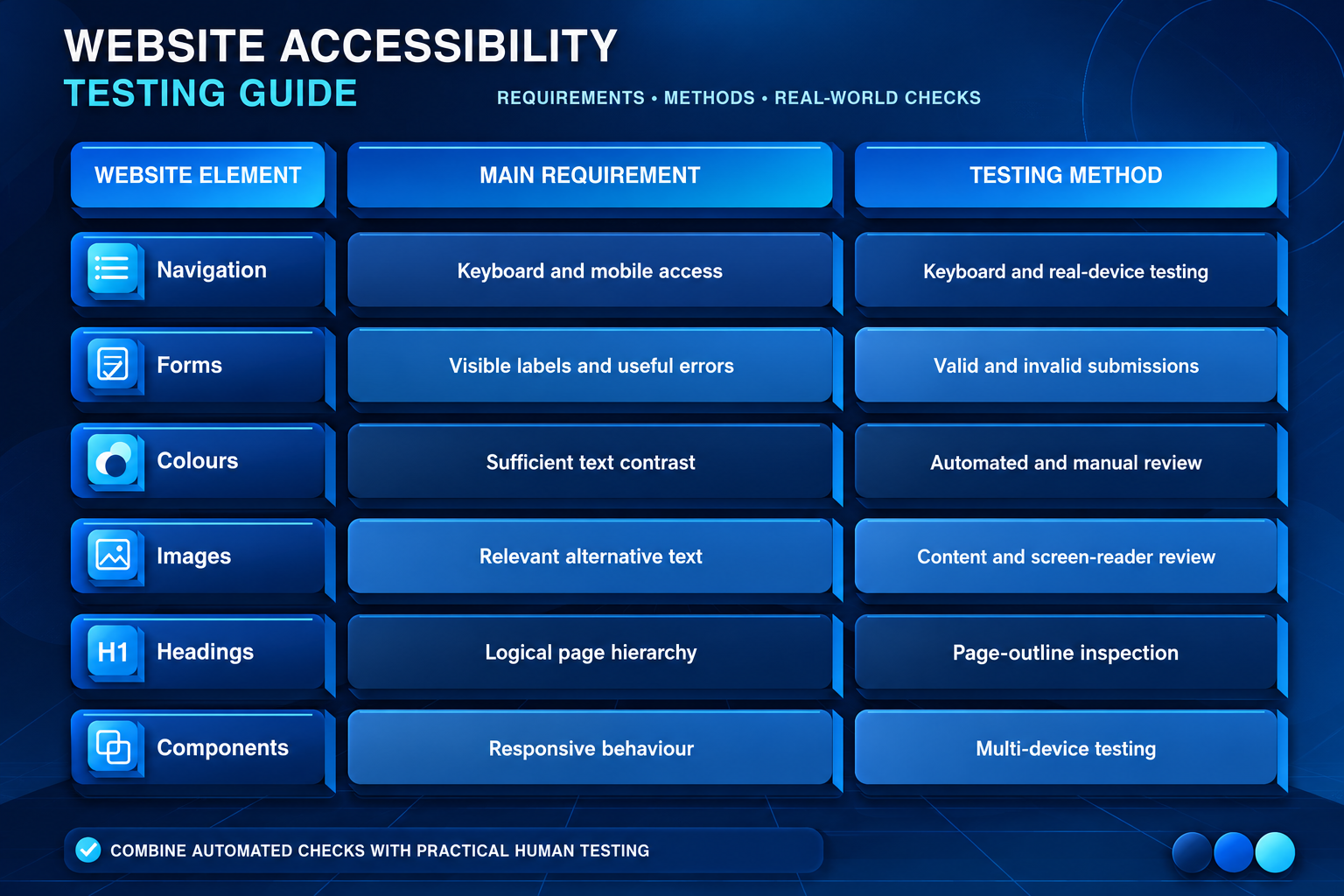
Testing should cover real content and common tasks. Reviewing only the homepage can miss problems within contact forms, search results, account areas or long service pages.
5. Select Plugins and Integrations Carefully
Plugins can add forms, SEO controls, e-commerce, memberships and other useful features. However, selection should consider maintenance, compatibility and overlapping functions rather than convenience alone.
Every plugin should have a clear purpose and technical owner. Installing several tools that perform similar tasks can duplicate scripts, increase conflicts and make the administration area harder to manage.
Custom integrations may connect WordPress with a CRM, booking system, payment service or internal application. The scope should define authentication, data fields, error handling and which system controls the master record.
Search visibility should also be considered while planning URLs, navigation and content. Continuing keyword research and optimisation can be handled through a separate SEO services strategy rather than being treated as an automatic result of development.
For broader planning, the guide to website design services in Australia discusses information architecture, responsive design, performance and website optimisation.
6. Plan Performance, Security and Maintenance Together
A custom design does not automatically create a fast website. Oversized images, unnecessary scripts, inefficient database requests and excessive third-party tools can still reduce performance.
Performance planning should cover image preparation, caching, database use and external scripts. Testing should include service pages, articles, forms and search results rather than focusing only on the homepage.
Hosting should match the website’s traffic, staging needs, backup process and support requirements. Businesses can review available WordPress hosting options while confirming the exact security, backup and staging features included in each plan.
Security planning should address administrator access, software updates, form protection and recovery. Businesses requiring additional monitoring or malware assistance can assess website security services separately.
A custom website also requires continuing care after launch. A defined website maintenance service can support WordPress updates, backups, uptime checks and performance monitoring.
A Practical Custom WordPress Development Process
Discovery defines the website’s goals, users, content and technical requirements. The project team can then create a sitemap and content model before detailed visual work begins.
Wireframes show how visitors move between important pages and actions. Visual design applies the approved brand system after the page hierarchy and user journeys have been reviewed.
Development should take place in a protected staging environment. The project team can test components, permissions, integrations and responsive behaviour without affecting the live website.
| Stage | Main activity | Expected result |
|---|---|---|
| Discovery | Define users, goals and systems | Requirements document |
| Architecture | Plan navigation and content | Sitemap and content model |
| UX and design | Test layouts and journeys | Approved designs |
| Development | Build theme and components | Functional staging website |
| Testing | Review devices, forms and access | Resolved issue register |
| Launch | Apply redirects and analytics | Monitored live website |
| Maintenance | Update and test the platform | Ongoing support plan |
Before launch, the team should check forms, permissions, redirects, analytics, backups and security settings. Staff responsible for routine publishing should also receive suitable training.
Template or Custom WordPress Website?
A ready-made theme may meet the needs of a smaller organisation with straightforward services and standard page layouts. It normally provides a faster starting point, although licence conditions, accessibility and future support still require review.
Custom development becomes more useful when the business needs distinctive layouts, structured content, advanced integrations or stronger control over the editing experience.
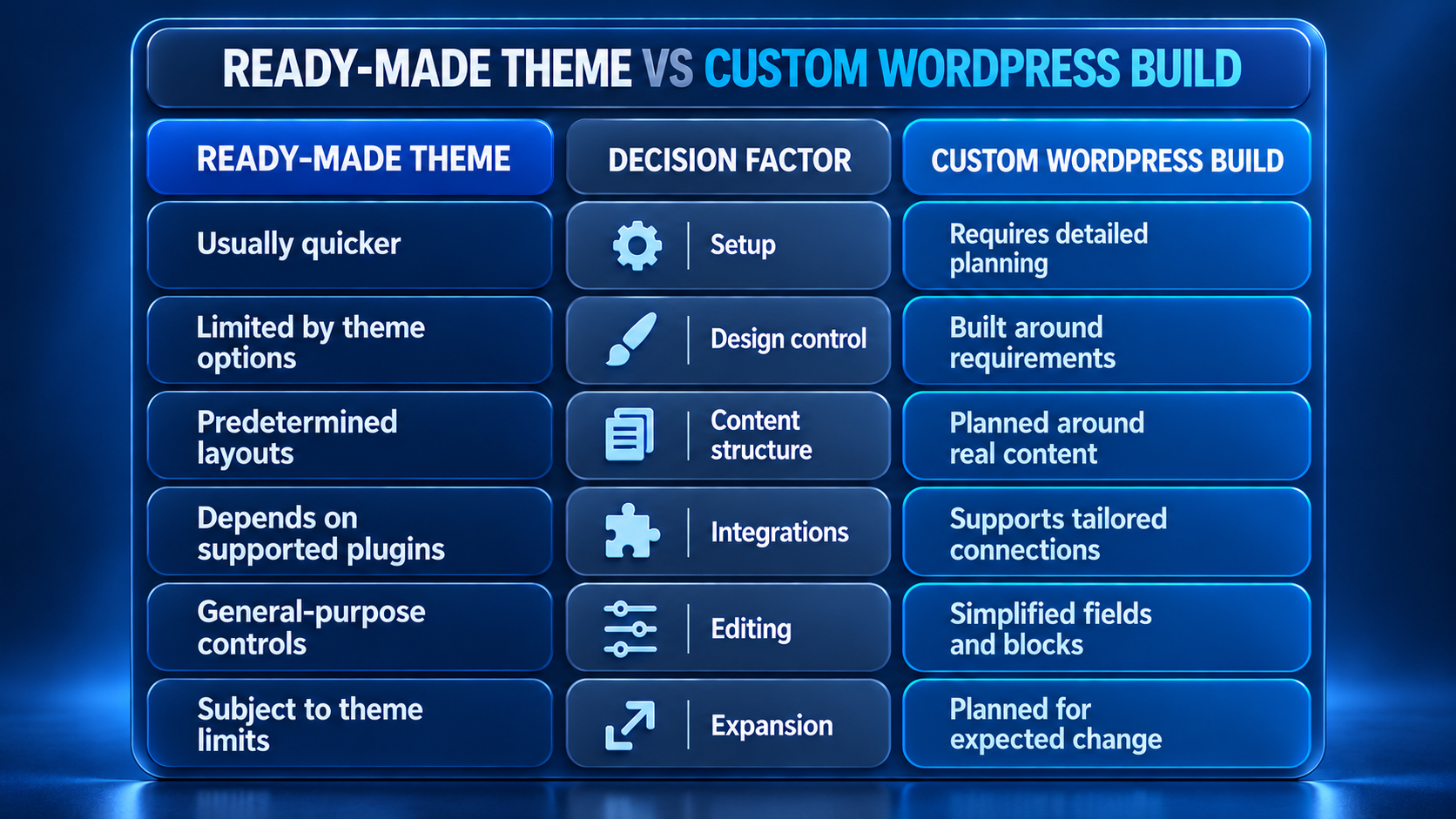
Custom does not automatically mean better. A focused theme can outperform an overengineered custom build, while a restrictive theme may create expensive workarounds when business requirements grow.
When Not to Choose Custom WordPress Development
Custom development may not suit a business with a small website, standard content and no unusual integrations. A supported theme can offer a faster and simpler solution when its layouts, accessibility and editing tools already satisfy the documented requirements.
A custom build may also be unsuitable when the business cannot maintain the finished website. Bespoke components still require documentation, testing, updates and technical ownership.
Custom development may be unnecessary when:
- A supported theme already meets the documented requirements
- The requested feature has no clear user or operational value
- Content and integration responsibilities remain undefined
- The business has no plan for backups and technical support
- The available budget cannot cover testing and maintenance
Custom code should solve a verified problem. It should not be selected only because the word “custom” sounds more advanced.
Costs, Timeframes and Project Risks
The cost of a custom WordPress website depends on page templates, specialised components, integrations, content and testing. A professional-services website cannot be compared directly with a membership platform, booking system or online store.
Published website-design examples provide broad price and timeframe guidance, but they do not establish a standard price or delivery timeframe specifically for custom WordPress projects. A written proposal should define discovery, design, development, migration, testing, revisions and ongoing support for the individual scope.
Content preparation can delay a project as much as technical development. The organisation should identify who supplies copy, verifies claims and approves each project stage before establishing a launch date.
Common project risks include unclear requirements, excessive plugins, unfinished content and undocumented integrations. Addressing these issues during discovery is generally easier than resolving them during final testing.
Custom WordPress Development Support Across Australia
Australian businesses can usually manage WordPress projects through online meetings, staging websites and documented reviews. Any requirement for onsite workshops or in-person support should be confirmed before the project begins.
Businesses needing a Sydney contact point can view the approved map for IT Company Sydney.
Organisations contacting IT Company Melbourne or IT Company Brisbane should prepare their existing website details, content requirements and required integrations before the first project discussion. Clear documentation helps separate standard WordPress functions from features that genuinely require custom development.
Businesses assessing IT Company Perth should confirm meeting times, support hours and escalation procedures. These arrangements become more important when the website supports bookings, online sales or time-sensitive customer enquiries.
Common Custom WordPress Development Mistakes
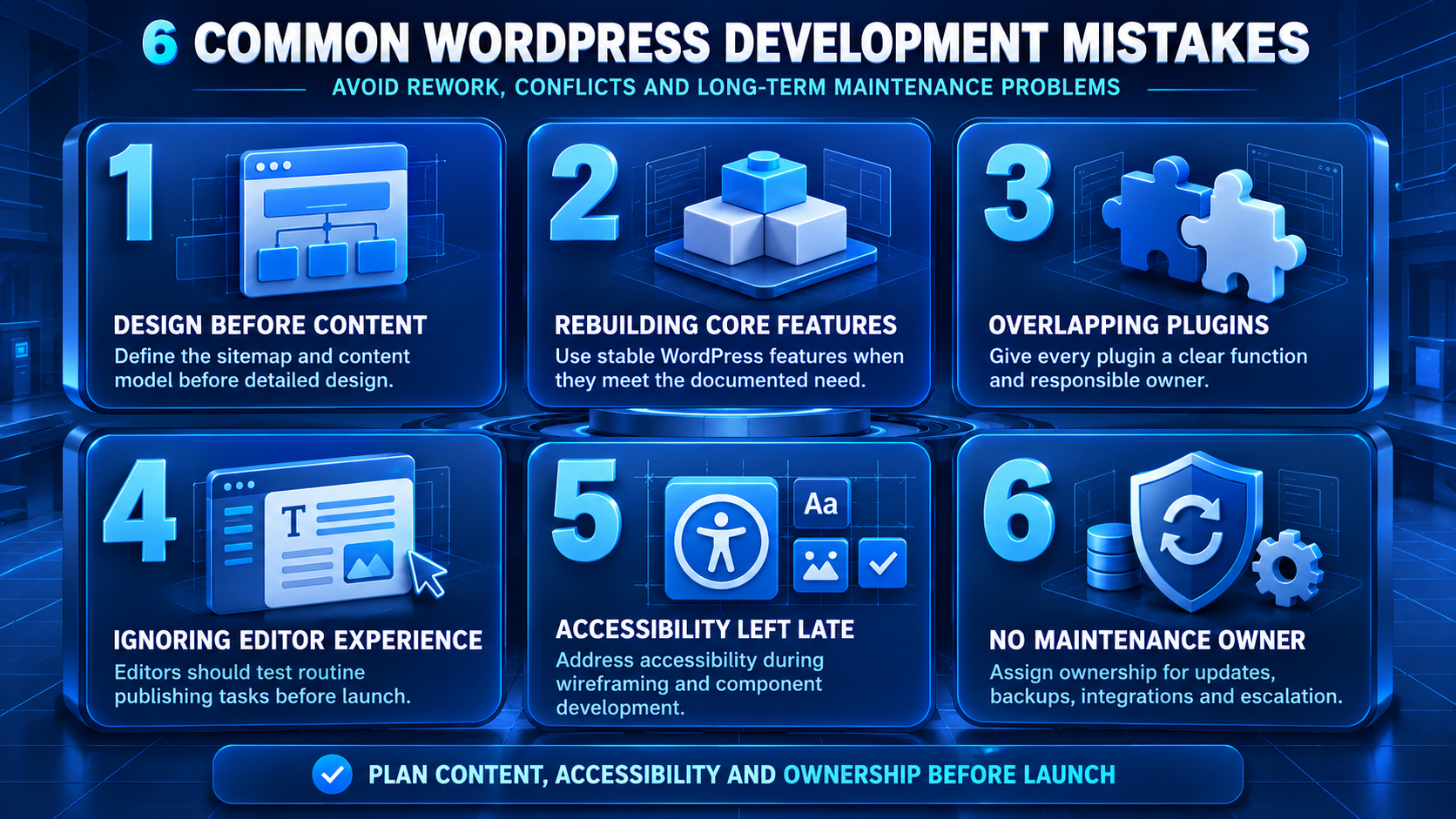
Quick Facts
| Question | Direct answer |
|---|---|
| Who needs custom development? | Organisations with specific content or functional needs |
| What can be customised? | Themes, components, content types and integrations |
| Does every function need custom code? | No, established tools may be more suitable |
| Is custom always better? | No, the extra complexity must provide clear value |
| What affects project cost? | Design, content, integrations, migration and testing |
| Is WordPress suitable for mobile design? | Yes, with responsive development and testing |
| Does a custom website need maintenance? | Yes, software and integrations continue to change |
| Where should planning begin? | Users, goals, content and required functions |
Frequently Asked Questions
What is custom WordPress website development?
Custom WordPress website development creates a WordPress website around defined business, content and user requirements. The work may include a custom theme, reusable components, structured content and external integrations.
Is a custom WordPress website different from a template?
Yes. A template provides predetermined layouts and options. A custom build creates the design system and content structure around the organisation’s documented requirements.
Does every business need custom WordPress development?
No. A supported theme may suit a straightforward website. Custom development is more useful when standard themes cannot support important branding, content or workflow needs.
How long does a custom WordPress project take?
Timing depends on planning, content, design, integrations and stakeholder approvals. The written proposal should define project stages and responsibilities rather than promise one standard timeframe.
What does custom WordPress development cost?
Cost depends on layouts, custom functions, integrations, content and migration requirements. Businesses should compare scope, ownership terms and continuing support rather than relying only on headline prices.
Can an existing WordPress website be customised?
Yes, but the existing theme, plugins and code should be assessed first. Rebuilding selected components may be safer than adding further modifications to an unstable setup.
Is custom WordPress development secure?
A custom website can follow sound security practices, but no website is risk-free. Updates, access controls, backups, monitoring and recovery planning remain necessary.
Does a custom WordPress website require maintenance?
Yes. WordPress core, themes, plugins, integrations and hosting environments change over time. Regular maintenance helps identify compatibility issues and preserve important functions.
Conclusion
Custom WordPress website development gives Australian organisations greater control over design, structured content and system integrations. That flexibility is valuable when customisation solves a genuine customer, editorial or operational problem.
The strongest projects begin with requirements rather than a theme. They use reliable WordPress capabilities where appropriate, introduce custom code carefully and test accessibility, performance and security before launch.
Businesses should also consider the people responsible for managing the website. Clear editing controls, documented integrations and assigned maintenance responsibilities can be as important as the public design.
To discuss website requirements, integrations or ongoing support, contact IT Company Australia. The initial discussion can focus on audiences, content and required functions rather than assuming that every website feature needs custom development.
