
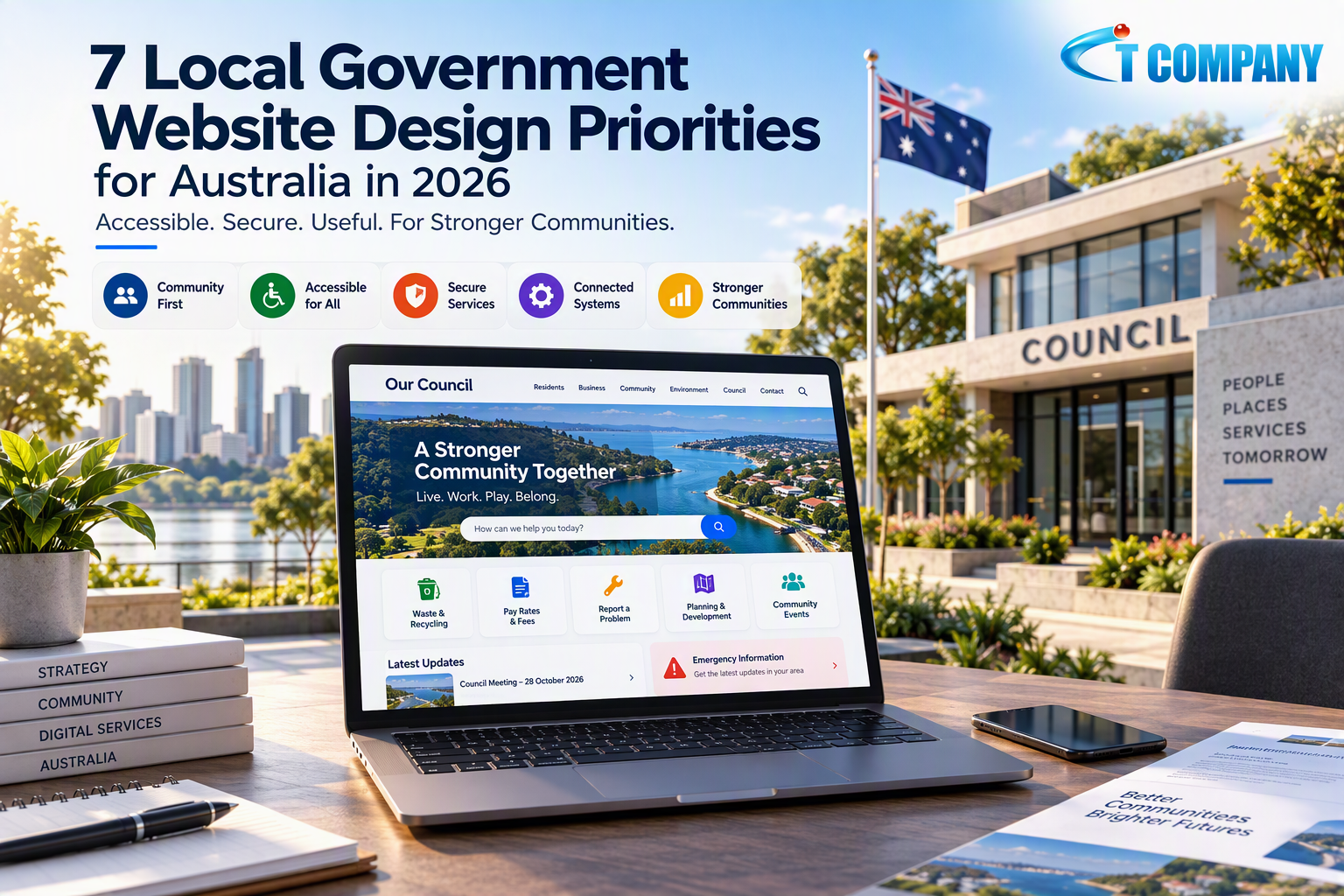
Residents use council websites to complete important everyday tasks. They may report damaged infrastructure, check waste collection information, pay rates or find planning documents. During an emergency, the council website may also become a key source of current public instructions.
Introduction
This makes local government website design more complex than creating an attractive homepage. A council website must organise large amounts of information while remaining accessible to people using different devices, languages, abilities and levels of digital confidence.
The Australian Government Digital Inclusion Standard sets requirements for inclusive and accessible government experiences. Its five criteria cover embracing diversity, motivating digital use, protecting users, accessibility, and providing flexibility and choice.
A council website should support these outcomes through clear content, reliable search and secure online services. The following seven priorities provide a practical foundation for Australian local government website projects in 2026.
Direct answer
Effective local government website design helps residents find information, complete transactions and contact council services without needing to understand internal departments. The website should provide accessible content, task-based navigation, accurate search, secure forms, reliable integrations, mobile access and clear ownership after launch.
In this guide
This guide explains how councils can:
- Organise information around community tasks
- Include accessibility throughout the project
- Connect forms, payments and service platforms
- Protect online services and submitted information
- Manage content and technology after launch
What is local government website design?
Local government website design is the planning, development and maintenance of digital services for councils and related public bodies. The work may cover information architecture, online forms, payments, planning searches, emergency notices, accessibility, security and content management.
Unlike a standard business website, a council website serves almost every part of its community. Users may include residents, business owners, visitors, community groups, developers, journalists and people seeking urgent assistance.
A structured website design and development process can connect discovery, user research, wireframes, responsive development, integrations and testing. The published process covers discovery, wireframing, CMS integration, cross-device testing, launch and post-launch support.
Why local government website design matters
A council website often acts as the main digital access point for many unrelated services. Residents generally arrive with a specific task but may not know which council department manages it.
Navigation based on an internal organisation chart can create confusion. Residents usually think about reporting a problem, paying a charge or checking an application rather than selecting a business unit.
Public confidence also depends on accuracy. Outdated meeting information, broken forms and unclear emergency notices can prevent people from completing important tasks. These failures may also increase telephone calls and manual work for council employees.
Strong council website design reduces this friction. Clear digital pathways make services easier to use while creating a stable foundation for forms, documents, integrations and future improvements.
The 7 priorities for Australian council websites
These priorities cover the journey from finding council information to completing a public service. Each council should adapt the approach to its community, responsibilities, technology and applicable legal or procurement requirements.
1. Organise the website around community tasks
Residents should not need to understand council departments before finding a service. Navigation works better when it reflects familiar public tasks and uses plain, direct language.
Research should identify what people visit the website to do. Search logs, analytics, service requests and contact-centre questions can reveal common tasks, unclear terminology and unsuccessful journeys.
Common council website journeys include:
- Paying rates, fees or infringement notices
- Reporting roads, waste or public-space problems
- Finding planning and building information
- Checking meetings, events and consultations
- Accessing recreation and community support
Each journey should lead towards a clear outcome. Important instructions should not be hidden within a department page or lengthy PDF when accessible HTML can present the information more clearly.
The guide to website design services in Australia provides further guidance on user journeys, information architecture, responsive design and website performance.
2. Make website accessibility a project requirement
Accessibility should appear in procurement documents, research, designs, development specifications and acceptance testing. Treating accessibility as a final audit can cause expensive changes and an inconsistent public experience.
The Digital Inclusion Standard states that accessibility should apply across service design and delivery. The standard refers government teams to applicable legislation, current Web Content Accessibility Guidelines and the Australian Government Style Manual.
Council website accessibility should cover keyboard navigation, visible focus indicators, sufficient colour contrast and correctly labelled forms. Pages also need logical headings, descriptive links and useful alternative text for meaningful images.
Automated tools can identify some code and contrast problems, but automated tests cannot confirm whether public instructions are understandable. Government guidance recommends combining automated testing with testing involving real users.
Councils should confirm which requirements apply within their jurisdiction and procurement framework. This qualification matters because local governments operate under different state or territory arrangements, while the Digital Inclusion Standard is Australian Government guidance.
3. Improve council search and content discovery
Council websites can contain thousands of pages, policies, documents, meeting records and service instructions. A weak internal search function can make this material difficult to locate even when it is technically available.
Search should recognise common public language, alternative terminology and frequent spelling errors. Results need accurate titles, descriptions and dates so residents can identify current and relevant information.
Content teams should review search terms that return no useful results. These searches can identify missing information, unclear labels or differences between council terminology and the words residents commonly use.
Search quality also depends on content management. Duplicate pages, unexplained filenames and outdated PDFs can make residents uncertain about which result to trust.
A separate SEO services strategy can support crawlability, metadata, redirects and website architecture. Search optimisation should help residents find public information rather than turn council pages into keyword-heavy marketing content.
4. Connect forms, payments and council systems
A council website rarely operates as one independent platform. Digital services may connect with payment gateways, property databases, customer-request tools, booking platforms, library accounts or planning systems.
Each connection needs an integration owner. This means a named person or team responsible for the connection, its data and the response process when the external service fails.
Residents should understand when they are leaving the main council website and entering another platform. This is particularly important when people provide personal information or make payments.
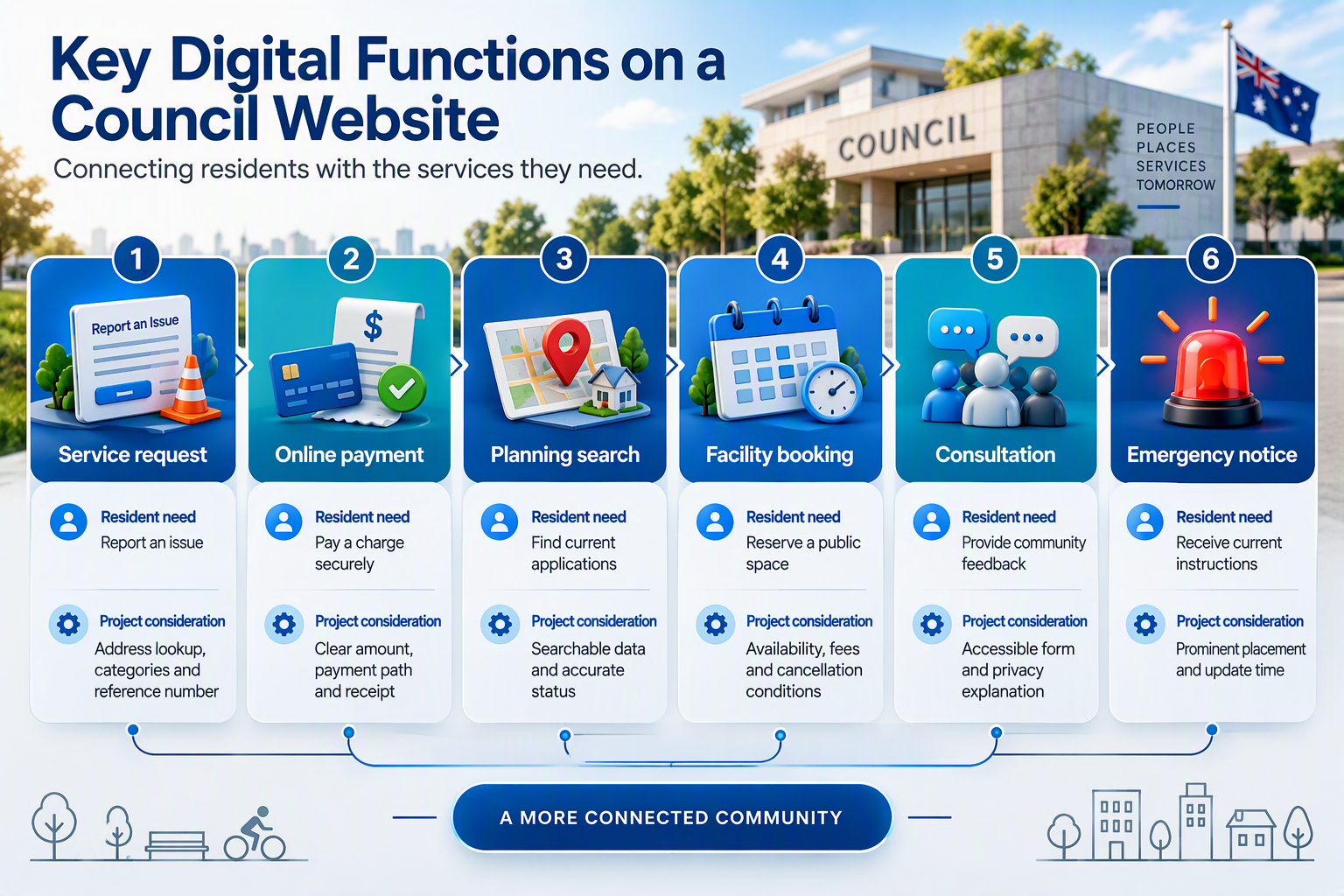
Forms should collect only the information needed to complete or route a request. Error messages should identify the problem, retain safe information and explain how the resident can continue.
The guide to custom web and mobile application development explains how tailored platforms can support integrations, scalability, testing and ongoing maintenance. Every council integration still requires its own technical, privacy and accessibility assessment.
5. Design for mobile use and service disruptions
Residents may access a council website from a phone while travelling or reporting an issue outdoors. Council services, search results and emergency information must remain usable on smaller screens.
Responsive testing should cover navigation, forms, maps, payment pathways and document downloads. Testing only the homepage does not show whether residents can complete practical council tasks successfully.
Emergency information also needs a defined publishing process. A notice should explain what happened, which area is affected, what residents should do and when the information was last updated.
The hosting environment should support expected demand, monitoring and recovery requirements. Councils can review Australian web hosting services while preparing technical requirements, but the suitability of any plan requires a separate assessment.
The hosting page lists Windows and Linux options, SSL, backups, storage and bandwidth across its plans. These broad inclusions do not establish suitability for a council platform without evaluating capacity, availability and recovery requirements.
6. Protect public services and submitted information
Council forms can collect contact details, property information, requests and consultation responses. Security planning should cover administrator accounts, software, forms, uploads, integrations and the hosting environment.
Access should match staff responsibilities. Content editors may publish approved information, while technical administrators manage software, system connections and account permissions.
Important security controls include:
- Multi-factor authentication for privileged accounts
- Controlled permissions and prompt account removal
- Software updates and vulnerability reviews
- Tested backups stored separately from the live website
- Monitoring for malware, errors and failed forms
Councils needing additional scanning or malware response can assess website security services. The service page lists malware monitoring and application security checks, with the exact coverage varying between packages.
Security monitoring cannot remove every risk. Councils still need clear incident ownership, recovery procedures and communication pathways when an online service becomes unavailable.
7. Establish content governance and maintenance
Content governance defines who creates, approves, reviews and removes website information. Without this structure, a newly launched council website can become outdated quickly.
Each priority page should have a service owner. This is the council team responsible for confirming that the page’s information, contact details and instructions remain correct.
Emergency contacts, fees, meeting details, opening hours and application instructions may need frequent checks. Background information may follow a longer review schedule, but every page should still have a clear purpose and owner.
Website maintenance covers software updates, backups, broken links, performance and form testing. A suitable website maintenance service can support technical care, while council teams remain responsible for public information.
The published maintenance packages include WordPress updates, uptime monitoring, SSL checks, backups and reporting. Vulnerability scanning, content allowances, malware protection and backup frequency vary by package.
A practical local government website process
Discovery should identify community needs, service priorities, content risks and technical dependencies. Research may include analytics, resident interviews, service-request data and workshops with council employees.
The project team can then create a task-based sitemap and test wireframes with representative users. A protected staging environment, which is a private version of the new website, allows services to be tested before public launch.
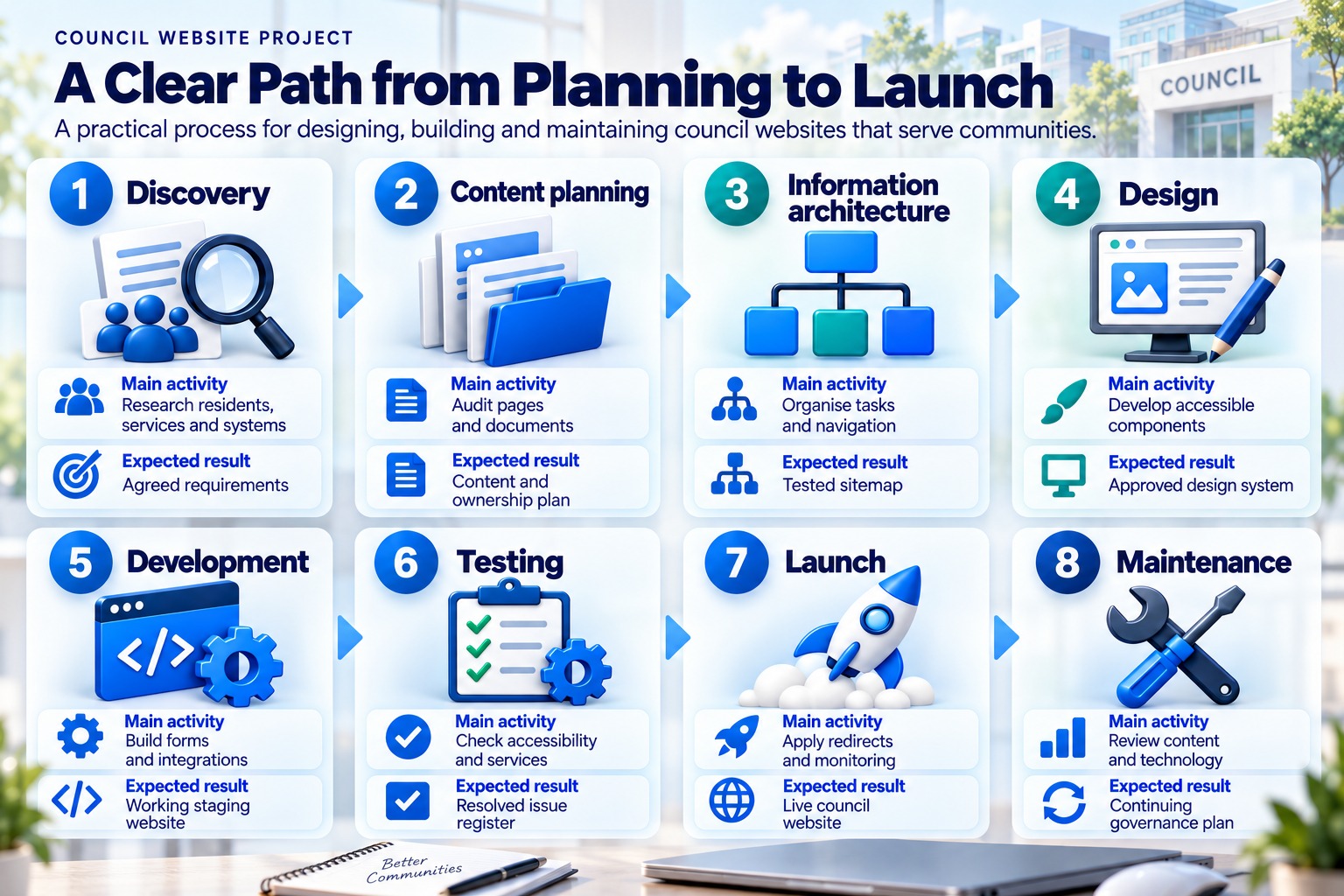
Migration requires particular care on a large council website. Existing pages should be reviewed rather than copied automatically, while important old URLs need redirects to relevant new destinations.
Before launch, councils should test priority journeys, search terms, forms, payment connections, accessibility, redirects, analytics and emergency publishing. Employees also need guidance on plain English, links, headings, images and documents.
Local government website support across Australia
Australian councils can coordinate digital projects through online workshops, staging environments and documented content reviews. Any requirement for onsite work should be confirmed in the project scope rather than assumed.
Councils seeking a Sydney contact point can view the approved map for IT Company Sydney. The public contact page identifies Sydney as the head office.
Teams contacting IT Company Melbourne can prepare their current sitemap, analytics and accessibility findings for an initial discussion. These materials help separate content problems from platform or integration limitations.
A council approaching IT Company Brisbane should document its service platforms and the people responsible for each integration. Clear technical ownership reduces uncertainty during planning and testing.
Organisations assessing IT Company Perth should confirm meeting hours, review arrangements and escalation pathways. These details matter when urgent public information requires assistance across Australian time zones.
Costs, timelines and procurement risks
Local government project costs depend on content volume, accessibility testing, integrations, migration and approval requirements. A small information website cannot be compared with a council platform containing payments, planning searches and public-request workflows.
No verified local-government-specific price or delivery timeframe appears on the reviewed service pages. A written proposal should define discovery, accessibility, information architecture, development, migration, testing, training and continuing support.
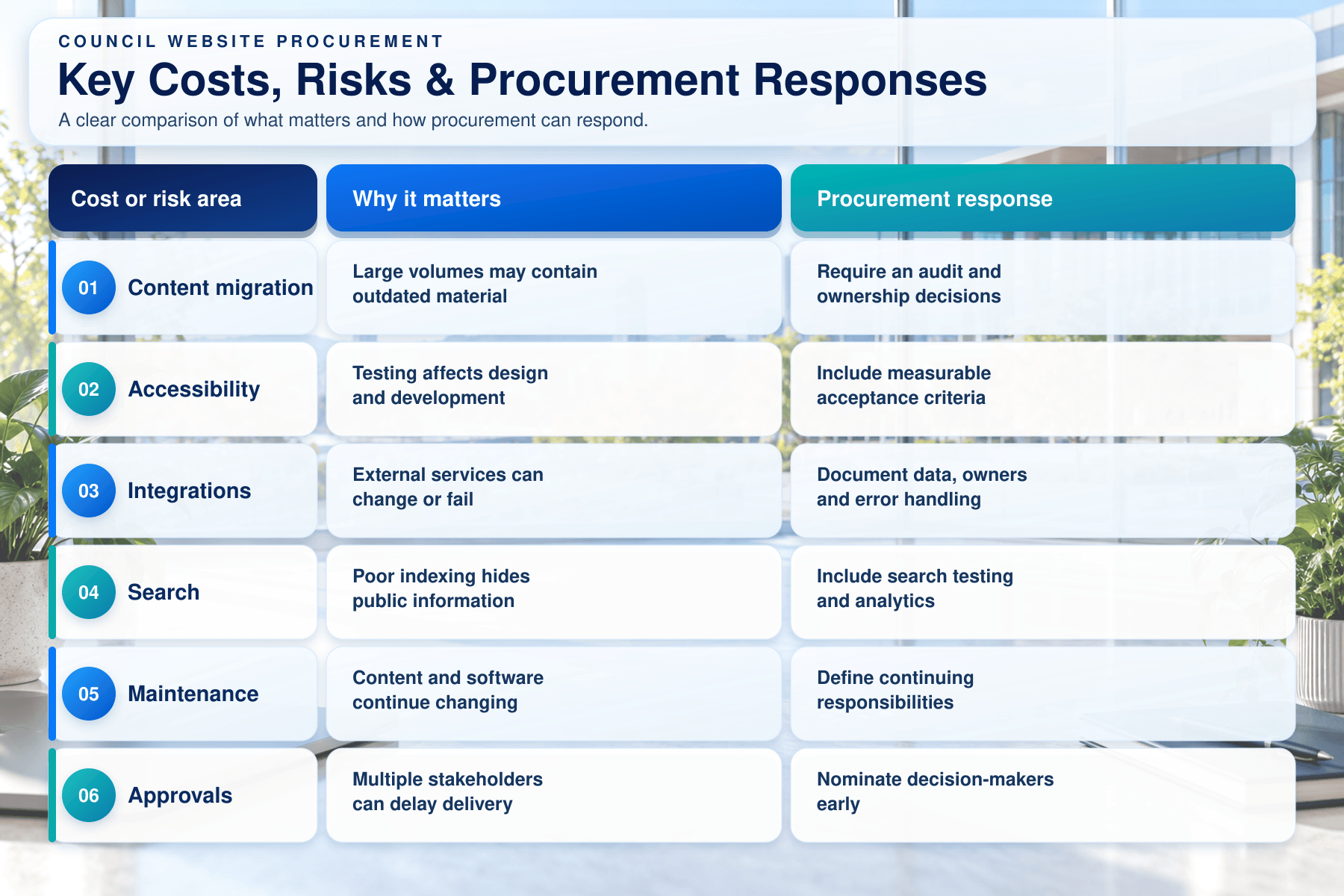
Procurement should examine the complete operating model rather than only the launch price. Hosting, licences, accessibility reviews, maintenance and future system changes can affect the full cost.
The main delivery risks include unclear integration ownership, late accessibility testing and delayed content approval. Councils can reduce these risks by appointing service owners and authorised decision-makers during discovery.
Common local government website design mistakes
Organising navigation around council departments
Internal departments rarely match the way residents think. Navigation should focus on familiar public tasks, community services and plain language.
Moving old content without reviewing it
Automatic migration can preserve duplicate and outdated information. Every important page should have a purpose, owner and review decision.
Publishing essential information only in PDFs
PDFs can create mobile, search and accessibility barriers. Important instructions should appear in accessible HTML whenever practical.
Treating accessibility as a final audit
Late corrections can affect designs, forms and reusable components. Accessibility should begin during procurement and continue after launch.
Using unclear third-party links
Residents need to know when a payment or form opens another platform. Link labels, privacy information and support responsibilities should remain clear.
Launching without content ownership
A new website becomes outdated when no council team owns its pages. Assign service owners, review dates and escalation pathways before launch.
Quick facts
| Question | Direct answer |
|---|---|
| Who uses a council website? | Residents, businesses, visitors and community groups |
| What is its primary purpose? | Provide public information and access to services |
| Where should planning begin? | Community tasks, evidence and service requirements |
| Is accessibility essential? | Yes, across design, content and testing |
| Which integrations may be required? | Payments, bookings, requests and planning platforms |
| What affects cost? | Content, accessibility, migration and integrations |
| Is ongoing maintenance necessary? | Yes, content and technology require review |
| What is the main risk? | A polished website that residents cannot use effectively |
Frequently asked questions
What should a local government website include?
A council website should include clear service information, reliable search, accessible forms, contact details, emergency updates and privacy information. The final structure should reflect the council’s genuine responsibilities and community needs.
Why is accessibility important for council websites?
Council websites provide services to the whole community. Accessible design improves access for people using assistive technologies, keyboards, mobile devices and alternative content formats.
What are the five Digital Inclusion Standard criteria?
The five criteria are embracing diversity, motivating digital use, protecting users, accessibility, and providing flexibility and choice. The final phrase is one combined criterion, not two separate requirements.
Which accessibility requirements should councils apply?
The Digital Inclusion Standard refers government teams to current WCAG guidance, relevant legislation and the Australian Government Style Manual. Councils should confirm which requirements apply within their jurisdiction and procurement framework.
Should a council use online forms?
Online forms can make services easier to access when they are secure, accessible and clear. Councils should also maintain suitable alternatives for residents who cannot use the digital pathway.
How long does a council website take to build?
Timing depends on research, procurement, content, migration, integrations and testing. A project plan should identify stages, approvals and responsibilities rather than relying on one standard timeframe.
How much does local government website design cost?
Cost depends on content volume, custom functions, integrations, accessibility and maintenance. Councils should compare complete project scopes and ongoing operating costs rather than headline build prices.
Does a council website need ongoing maintenance?
Yes. Software, forms, service details, integrations, documents and security controls need regular review. Content governance is as important as technical upkeep.
Should a council website have an emergency mode?
A defined emergency-publishing process is valuable when councils communicate closures, hazards or disruptions. The process should identify authorised publishers, page placement, timestamps and review procedures.
Conclusion
Effective local government website design gives Australian communities clear and equitable access to council information and public services. Strong council websites organise content around resident needs rather than internal departments.
Accessibility, mobile access, search, integrations and security should influence the project from discovery onwards. Adding these requirements after development can create avoidable rework and inconsistent service experiences.
Councils also need to plan for the complete website lifecycle. Service owners, maintenance tasks, emergency publishing and technical escalation arrangements should be established before launch.
To discuss council website architecture, accessibility, integrations or maintenance requirements, contact IT Company Australia. An initial discussion can focus on community tasks and current systems without assuming a particular platform or package.
