

The right cloud backup plan is not the one that stores the most data. It is the one that restores the right workload when your business needs it.
A Melbourne business can lose access to important information for many reasons: a deleted folder, failed server, compromised administrator account, ransomware incident or cloud-application outage. The disruption is rarely limited to files. Staff may be unable to process orders, access email, retrieve customer records, or reconcile accounts.
Introduction
Cloud backup Melbourne services are designed to give a business a separate, controlled recovery path. But providers do not all protect the same workloads, monitor failures in the same way or promise the same recovery outcome. A low monthly price can be suitable for a small file set, yet fall short when a server, database or Microsoft 365 tenant must be restored.
This guide moves from the practical basics to advanced recovery planning. It explains how to compare providers, interpret pricing, set realistic recovery times, and ask better questions before selecting a cloud backup partner.
What Is Cloud Backup?
Cloud backup is the process of copying business data from computers, servers, applications, or cloud platforms to a separate offsite environment. Unlike file-syncing tools, which may synchronise deleted, corrupted or encrypted files across connected devices, cloud backup retains independent recovery versions for a defined period.
If information is lost through human error, equipment failure, a cyber incident or system disruption, selected files or complete workloads can be restored according to the service scope. When assessing cloud backup Melbourne options, businesses should compare workload coverage, backup frequency, retention periods, security controls, recovery assistance, and evidence that restoration is regularly tested.
Start With the Recovery Outcome, Not the Storage Allowance
Cloud backup creates separate copies of business information for recovery after loss, corruption or an attack. A usable arrangement needs defined coverage, retention, access controls, alert handling and a tested restore procedure.
Start with the systems that keep working. A professional-services firm may rely on client files, email and accounting data; a retailer may need orders, stock and point-of-sale information. A laptop has a different recovery priority from a database that supports the whole business.
A dedicated cloud backup service should reflect those differences. Ask which workloads can be restored, to what point in time and by whom not simply how much storage is included. This cloud backup guide for small businesses explains why ordinary cloud storage or file sync should not automatically be treated as independent recovery.
Compare Cloud Backup Provider Models Before You Compare Prices
Providers can use similar language secure, automated, managed or disaster-ready while delivering very different levels of support. The table below compares the operating models a Melbourne business is most likely to encounter.
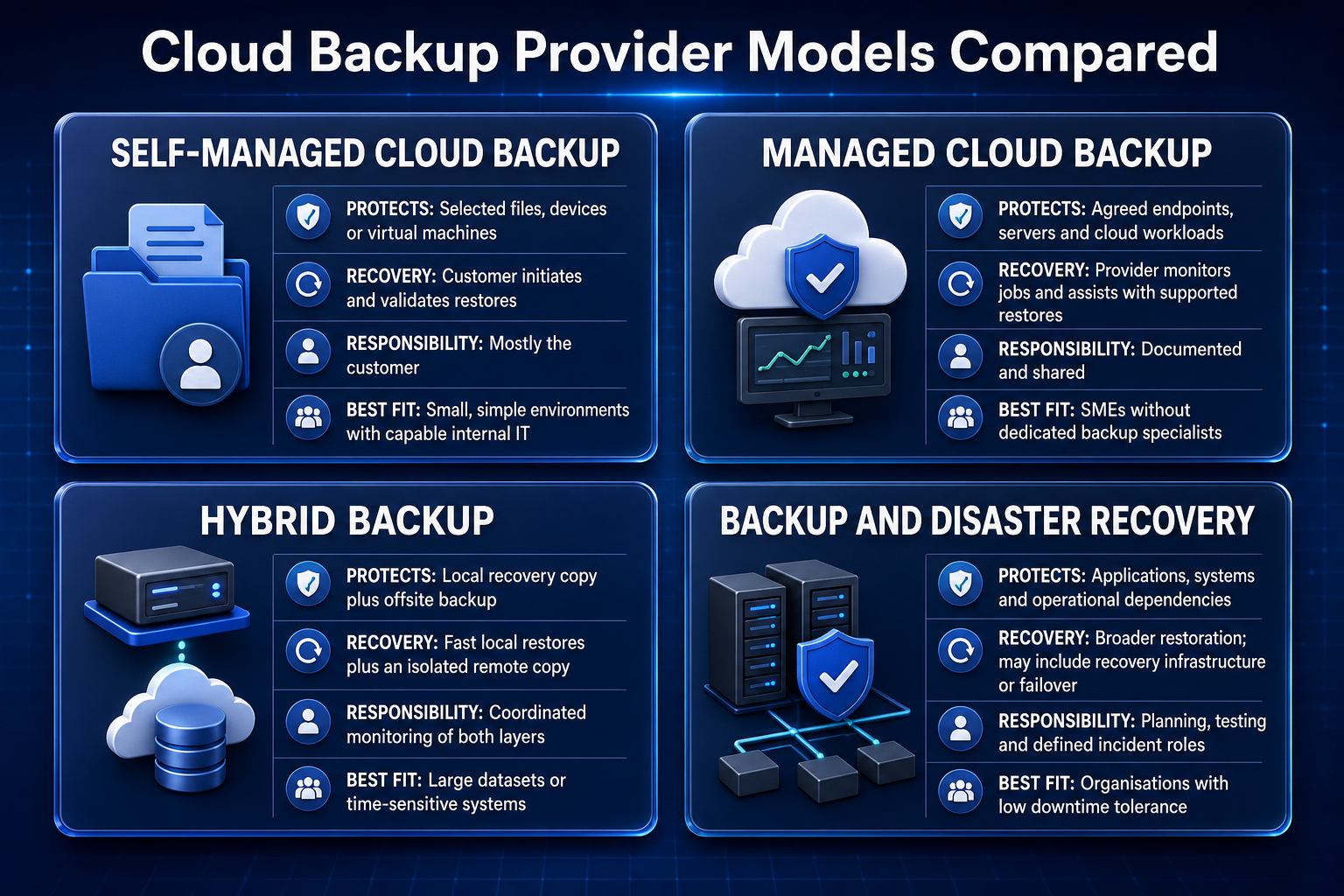
Self-managed backup suits a simple environment with capable internal IT. Managed backup adds monitoring and restoration support. Hybrid backup is useful when a nearby copy is needed for speed as well as an offsite copy for wider protection. Where cloud, SaaS and on-premises systems are connected, a cloud management service can help clarify configuration, identity, monitoring and recovery responsibilities.
Understand Recovery Times Before Comparing Quotes
“Fast recovery” is not a measurable promise. Two terms make it possible to compare provider claims more carefully.
The recovery point objective (RPO) is the maximum amount of recent work the business is prepared to lose. An RPO of four hours means the business needs a usable recovery point no more than four hours old. It informs backup frequency.
The recovery time objective (RTO) is the target time to return a workload to an acceptable operating state. It is not simply the time needed to download data. It may include locating the clean recovery point, restoring the data, rebuilding applications, checking dependencies, changing access settings, and gaining user approval.
A File Restore Is Not the Same as a Workload Recovery
Restoring a document may take minutes. Restoring a server, business database or cloud tenant can take much longer because the data must be consistent, the service must reconnect, and the business needs to validate that it works.
This distinction matters when comparing quotes. Ask whether a stated recovery time means:
- delivery of selected files;
- a supported server or virtual-machine restoration;
- recovery of application data and configuration; or
- a complete business service returned to working order.
For server-dependent operations, backup should sit alongside patching, monitoring, and recovery of ownership. Relevant server management can reduce gaps that otherwise emerge when a restored server still needs configuration, updates or application checks.
Use Recovery Tiers Rather Than One Target for Everything
A practical plan groups workloads by business impact. Critical operational systems may need a short RPO and RTO. Standard user files can normally tolerate less frequent backups and a longer restoration window. Archives may only require periodic copies.
The Australian Signals Directorate’s Essential Eight maturity model recommends that backups reflect business criticality and continuity requirements, are retained securely and are tested. This turns recovery targets from marketing phrases into planned operational decisions.
Ask These 5 Questions Before Choosing a Cloud Backup Provider
A good provider should answer these questions in writing for each important workload. They are designed to turn a broad “backup service” quote into something the business can compare fairly.
Exactly what can you restore?
Ask for a workload-level list: devices, shared files, servers, databases, cloud applications, mailboxes, SharePoint sites and configuration data. Confirm what is excluded, such as settings, permissions, or the system that makes the data usable.
What RPO and RTO apply to each workload?
Daily backups are not always adequate. If a full day of transactions cannot be lost, the RPO must be shorter. Ask the provider to distinguish file restoration from full application or server recovery.
Who notices a failed backup and who performs the restore?
Confirm whether the provider merely sends reports, actively investigates failed jobs, assists with restoration, or performs recovery under an agreed process. Check service hours and escalation arrangements.
How are backups protected from ransomware or privileged misuse?
Ask whether recovery copies use separate administration, multi-factor authentication, protected retention or immutability. Find out whether one production administrator could delete every recovery version.
How often is recovery tested and how is success proven?
A successful job proves data was copied, not that the business can use it. Ask for the testing schedule, type of tests, and evidence of results. Critical workloads should be validated after major changes.
Cloud Backup Melbourne Prices: What Changes the Total Cost?
Cloud backup pricing can begin with a low storage figure and increase as the business adds users, servers, long retention, recovery support, and more demanding recovery targets.
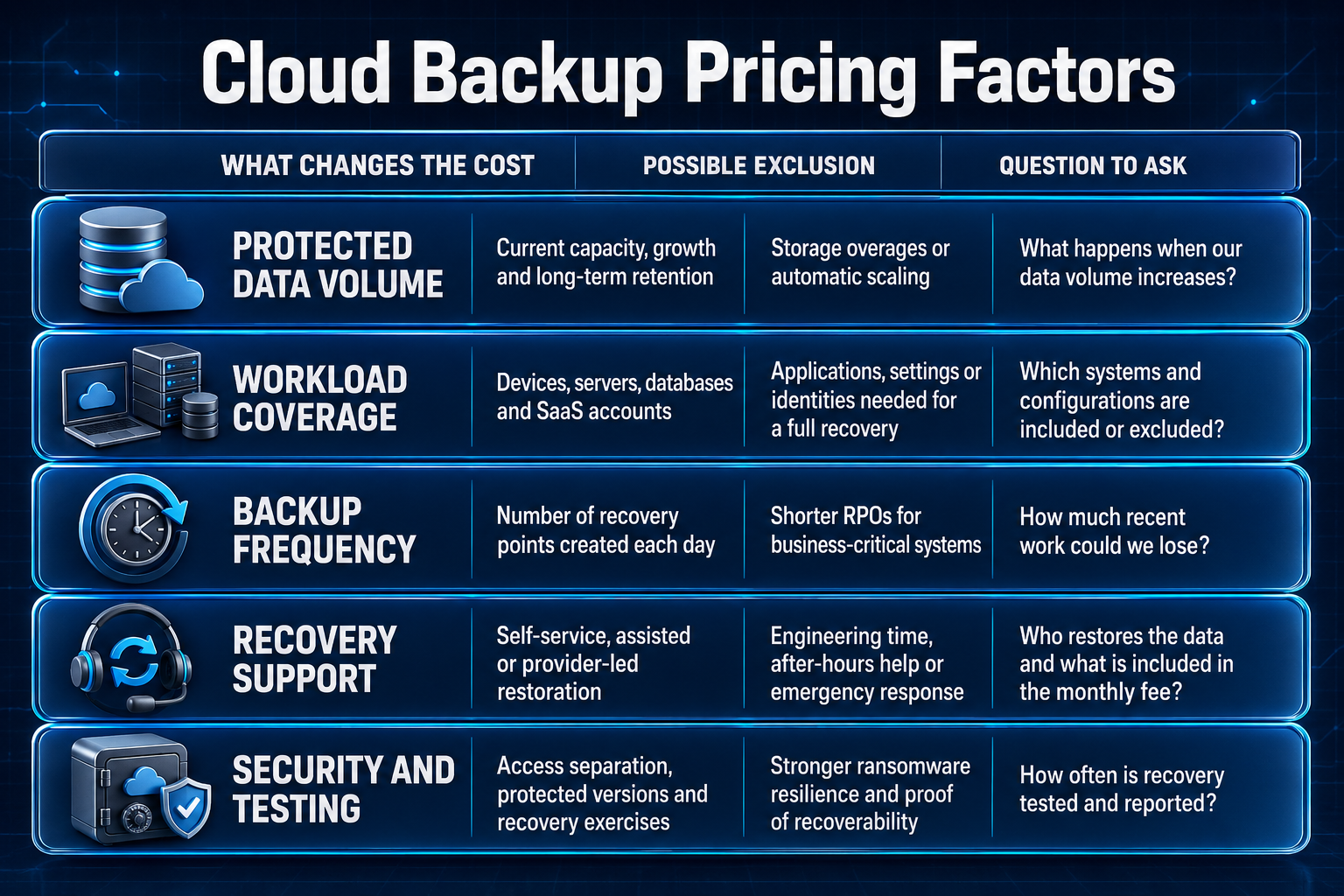
Request proposals using the same workload list, retention, and recovery targets. Then compare onboarding, storage growth, emergency assistance, restore testing, and exit support over three years. This reveals whether a lower entry fee transfers recovery work and risks back to the customer.
Include Microsoft 365, SaaS and Server Workloads in the Same Plan
Modern organisations do not keep all important information on one file server. Business data can be used in Exchange Online, OneDrive, SharePoint, Teams, accounting platforms, CRM tools, endpoint devices, and cloud databases. Each workload has different native retention, recovery options, and ownership boundaries.
Microsoft provides resilient cloud infrastructure, but the business remains responsible for its own information, access and retention decisions. Organisations using Microsoft 365 solutions should identify exactly what needs independent protection: mailboxes, OneDrive files, SharePoint libraries, Teams data, deleted-user data and configuration. An appropriate backup design should preserve the items needed to restore the business process, not only the documents.
SaaS applications should be added to the same workload register as local servers. That prevents a common recovery gap: a provider knows how to restore laptops and servers, but no one has decided how to recover the platform that holds customer records or financial transactions.
Move From Backup Copies to Ransomware-Ready Recovery
The traditional 3-2-1 method remains a useful baseline: keep three copies of important data, on two types of media, with one copy offsite. For higher-risk systems, organisations may add an isolated or immutable copy and restrict who can change recovery settings.
The key is to preserve an unaffected recovery point. Separate production and backup credentials, multi-factor authentication, limited deletion rights and protected retention all help reduce the chance that a compromise affects every copy. They do not guarantee the prevention of ransomware or other incidents.
Backup must work alongside phishing protection, identity controls, endpoint security, patching, and staff awareness. This overview of cybersecurity threats facing Australian small businesses gives helpful context for a layered approach. The Australian Cyber Security Centre also advises restoring from an unaffected backup and checking that backups can be restored in its ransomware recovery guidance.
Why Consider IT Company Australia?
Backup is closely connected to cloud configuration, identity, endpoints, servers, and incident response. A provider with broader capability can help coordinate those responsibilities, but the value comes from clear scope rather than a broad promise.
IT Company Australia’s approach to backup and recovery is built around five practical objectives:
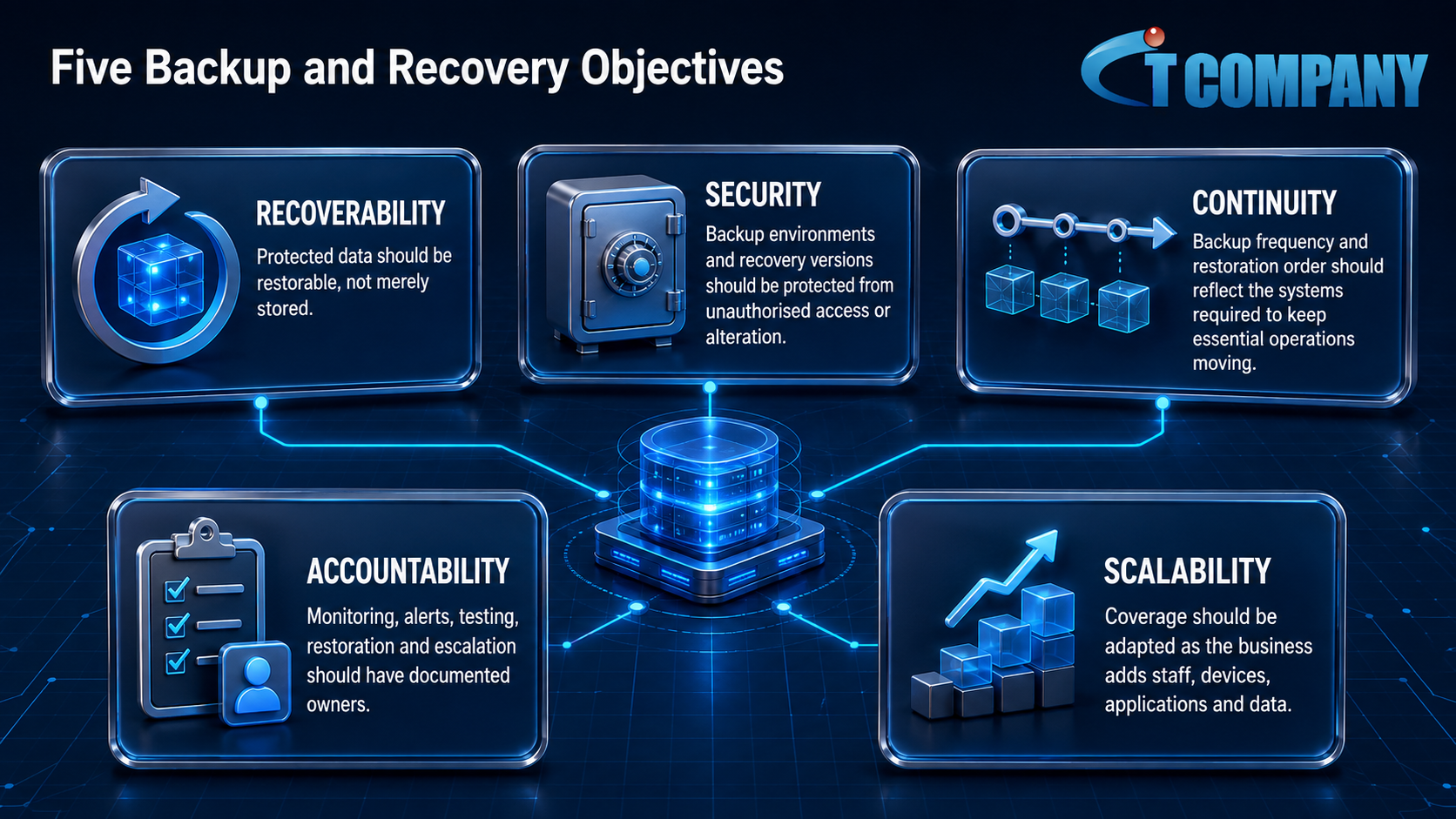
IT Company Australia uses an ISO/IEC 27001:2022-based framework to manage information-security risks through documented processes and controls. However, no framework can eliminate every security risk or make customers automatically compliant. Businesses should still assess their own legal, operational, and regulatory requirements and confirm the scope of the services they use.
For businesses that need a coordinated operational view after the backup review, managed IT services can provide a relevant next step. Any proposal should still be measured against workload coverage, RPO, RTO, retention, testing, support boundaries, and total recovery cost.
Frequently Asked Questions
How quickly can a Melbourne business recover from cloud backups?
Recovery time depends on the workload, amount of data, internet connection, application complexity, recovery method, and agreed support scope. A file may be restored quickly, while a server or database can take much longer to rebuild, validate, and return to service. Request an RTO for each critical workload rather than one generic recovery promise.
Why do cloud backup quotes vary so much?
Quotes differ because they may include different data volumes, retention periods, workloads, backup frequency, monitoring, testing, and restoration support. Compare proposals using the same list of systems and recovery targets. A lower price may exclude the work needed to recover servers, cloud applications, or large volumes of data.
Does Microsoft 365 need an independent backup?
It depends on the business’s retention, recovery, and risk requirements. Microsoft 365 offers native protection and recovery features, but an organisation may need separate copies and longer retention for specific workloads. Review Exchange, OneDrive, SharePoint, Teams and departed-user data rather than assuming one setting covers everything.
Can cloud backup prevent ransomware?
No. Cloud backup is a recovery control, not a complete ransomware-prevention solution. It can reduce the impact of an incident when clean recovery points are separate, protected, and tested. Prevention also needs controls such as identity security, patching, endpoint protection and email security, and email is a common path for harmful messages and credential theft.
How often should recovery be tested?
The frequency should reflect workload importance and how often the environment changes. Sample file tests may be performed regularly, while critical application or disaster-recovery exercises may be scheduled quarterly, twice yearly or after significant changes. Each test should confirm that authorised users can use the restored data or service.
Is a hybrid backup design always better?
Not always. Hybrid backup can offer faster local restores and an offsite copy, but it adds infrastructure and monitoring responsibilities. It is most useful for large datasets or systems with tighter recovery-time targets. Smaller environments may be well served by managed cloud backup if recovery times remain acceptable.
Do backups need to be stored in Australia?
The answer depends on the sensitivity of the information, contractual commitments, industry requirements, and privacy obligations. Ask where backups, replicated copies and metadata are stored, who can access them and how access is logged. The OAIC’s guidance on securing personal information is a useful starting point; obtain advice for your own circumstances where needed.
What should a business do before asking for cloud backup quotes?
Create a short list of critical systems, data owners, acceptable data loss, maximum downtime, required retention, and current recovery gaps. Give the same information to each provider, then ask them to state the exclusions and recovery responsibilities in writing. This produces a much fairer comparison than requesting a price for “backup” alone.
Final Thoughts
The best cloud backup Melbourne provider is not necessarily the one with the lowest storage price or the broadest marketing claim. It is the provider that can restore the systems your business relies on, to an acceptable point in time, within a clearly explained recovery process.
Use the five questions in this guide to compare proposals. Define RPO and RTO by workload, including Microsoft 365 and SaaS platforms in the scope, protect recovery copies from privileged misuse and test the plan before an incident forces the issue.
Before publishing a request proposal, document the systems that matter most and the downtime the business can realistically tolerate. That single step makes provider, cost, and recovery-time comparisons far more meaningful.
