
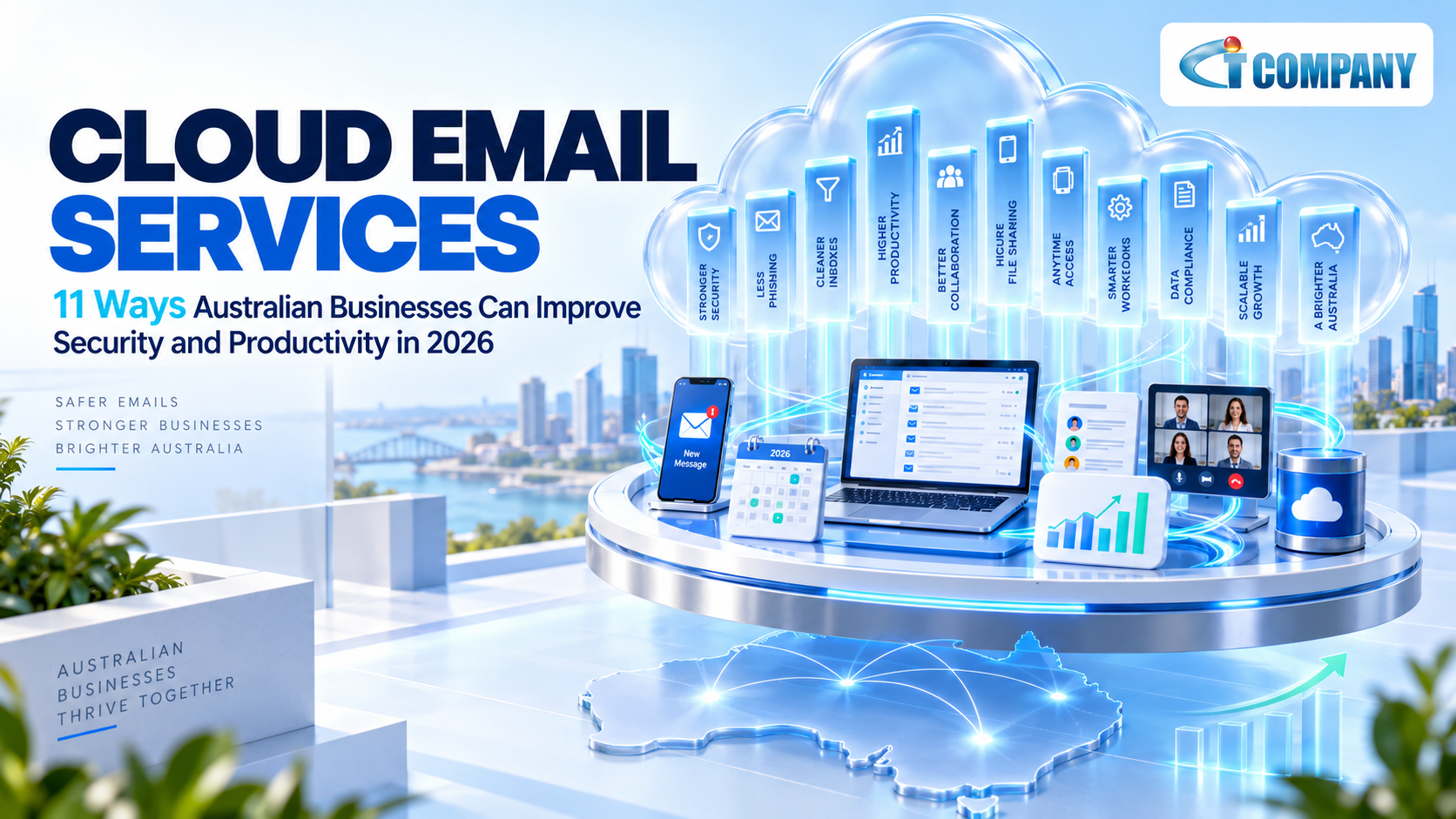
Email is no longer just a place where employees send and receive messages. It connects calendars, customer communication, business identities, documents, and everyday collaboration.
Introduction
For many Australian organisations, cloud email services provide a practical way to bring these functions together without maintaining every part of an email server internally.
The value, however, depends on how the service is configured and managed.
Moving business email to the cloud does not automatically secure every account. It does not remove the need for backup planning. It also does not guarantee lower operating costs.
A well-designed cloud email environment should balance four priorities:
Access → Security → Collaboration → Recovery
This guide explains how cloud email works, why it matters to Australian businesses and eleven ways it can support stronger security and productivity in 2026.
What Are Cloud Email Services?
Cloud email services host business email on infrastructure operated through a cloud platform instead of relying entirely on an email server located inside the organisation.
Employees usually access their mail through Outlook, mobile applications, or a web browser. The platform can also provide calendars, contacts, shared mailboxes, and administrative controls.
Modern cloud email frequently connects with a wider productivity environment. For example, Microsoft 365 solutions can combine professional business email with OneDrive, SharePoint, Teams and identity-management capabilities. Microsoft 365 is only one example. Other hosted business platforms can also provide cloud email. The appropriate option depends on compatibility, security, administration, migration, and support requirements.
The important point is that moving the mailbox to a cloud platform changes where infrastructure is managed. It does not remove the business’s responsibility for user access, security policies, and operational processes.
How Cloud Email Services Work
Cloud email separates the mailbox from a physical server sitting inside one office.
Messages are processed through hosted infrastructure. Authorised users then connect through the internet from approved devices and applications.
A typical environment contains four layers.
- Mailbox hosting processes and stores email.
- Identity management controls who can sign in and what they can access.
- Security controls help identify spam, malware, phishing, and suspicious activity.
- Administration and support cover users, licenses, settings, incidents and ongoing changes.
This structure can make email easier to scale. New users can often be added through licensing and administration rather than by purchasing another physical mail server.
Migration should also be treated separately from normal operations. A cloud email migration is a project. Ongoing administration is a continuing service. Migration planning may need to cover mailboxes, calendars, contacts, shared mailboxes, domain settings, Domain Name System changes, testing, employee communication, and post-migration support. Once migration is complete, the focus shifts to security, account management, support, and optimisation.
Cloud Email vs Traditional Business Email
Cloud email and traditional on-premises email can both support professional business communication. Their operating models are different.
The following comparison shows where responsibilities usually change.
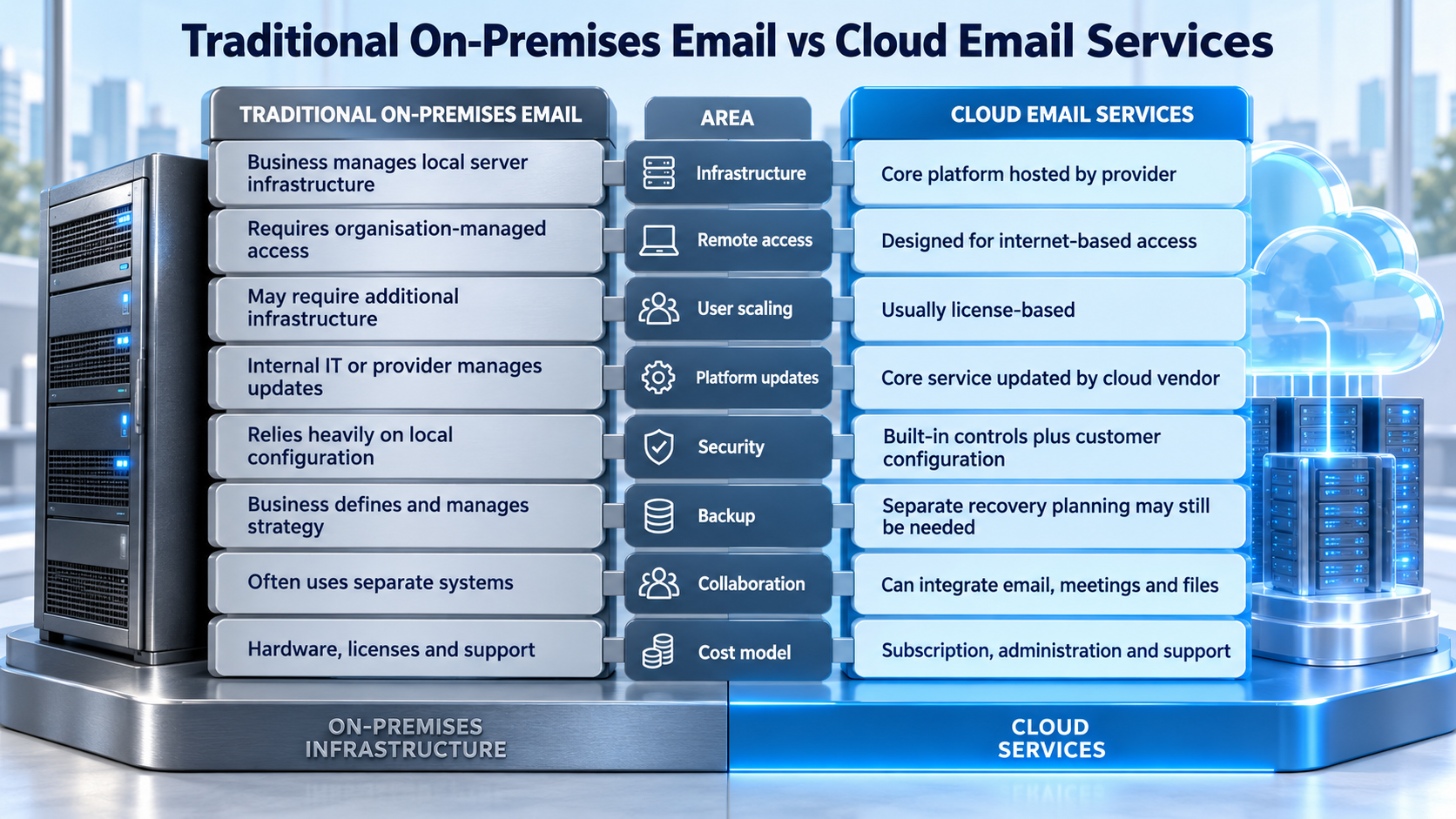
Cloud email creates the most value when it connects communication, identity, and collaboration within one managed environment.
The trade-off is that the business becomes more dependent on internet access, cloud configuration, and the service provider’s platform.
Why Cloud Email Services Matter for Australian Businesses
Australian businesses increasingly operate across offices, homes and mobile working environments.
An employee may answer a customer’s message while traveling. A manager may join a meeting from another state. A project team may need to edit a shared file without emailing several copies back and forth.
Cloud email helps support these working patterns because users can access authorised services from different locations.
Security also matters. A mailbox can contain customer information, invoices, account notifications, and password-reset messages. If an email identity is compromised, the problem may extend beyond the inbox to other cloud services connected to that account.
For this reason, cloud email should be treated as part of the organisation’s wider cloud environment.
Businesses that need a broader view of monitoring, recovery and cloud operations can also review the cloud support services guide for Australian businesses.
The strongest cloud email strategy therefore connects:
Access + Security + Productivity + Recovery + Responsibility
11 Ways Cloud Email Services Can Improve Security and Productivity
Give Employees Controlled Access from More Locations
Cloud email allows employees to access business communication without being physically connected to the office network. They can usually work through desktop software, mobile applications, and web access. This is particularly useful for remote teams, travelling employees, and businesses with several operating locations. The benefit should still be controlled. Access from anywhere should not mean access to every unmanaged device without appropriate security. The objective is flexibility with clear authentication and device rules.
Strengthen Sign-In Security with Multi-Factor Authentication
A password should not be the only control of protecting a business mailbox. Multi-Factor Authentication (MFA) requires another form of verification during sign-in. If an attacker obtains an employee password, the additional authentication step can make account access more difficult. This becomes especially important when one cloud identity connects several services. An employee’s account may give authorised access to email, OneDrive, Teams or SharePoint. A stolen identity can therefore create a wider cloud of risk.
The related article Cloud Spam: How Emails Compromise Cloud Accounts explains in simple terms how a malicious message can lead to broader cloud-account exposure. Cloud security should therefore protect the identity behind the inbox as well as the messages arriving in it.
Improve Protection Against Spam, Phishing and Malware
Cloud email platforms normally include some level of spam and malware filtering. The exact protection varies according to the platform, license, and configuration. A business with higher security requirements may also need stronger phishing detection, suspicious-link analysis, attachment protection, or impersonation controls. For that reason, email hosting and email security solutions should be assessed separately. The email platform hosts the mailbox. The security service protects communication around it. Australian businesses evaluating more advanced message protection can also review the guide to email security with real-time threat detection. This helps prevent businesses from assuming that every cloud mailbox automatically includes the same security capabilities.
Connect Email With Calendars, Meetings and Collaboration
Cloud email becomes more useful when it works with the tools employees already use. A meeting request can move from the inbox into a shared calendar. Employees can join an online meeting from the same environment. Documents can be shared without creating multiple attachment versions. That can make every day work simpler. It also reduces the need to treat email, file sharing, and meetings as completely separate systems. The productivity benefit comes from integration rather than emailing.
Standardise User Onboarding and Offboarding
New employees often need several services before they can work effectively. They may require an email account, cloud storage, access to shared resources, and a particular software license. Cloud platforms can make this easier to standardise. For example, a finance employee might receive email and access to approved finance resources. A contractor may receive a smaller set of permissions. Offboarding deserves the same attention. When an employee leaves, organisations should remove or change access according to an established process. Former accounts should not remain active indefinitely because nobody owns the offboarding task. Businesses that want ongoing user administration alongside wider IT support can review managed IT services.
Reduce Dependence on Physical Email Infrastructure
Traditional business emails can require local server maintenance, operating-system updates, hardware planning, and physical storage. Cloud email shifts much of the underlying platform infrastructure to the cloud provider. This can reduce the amount of physical email technology that the organisation must maintain. However, the business still needs administration. Users must be managed. Security settings need to be reviewed. Licenses need control. Incidents still require an owner. Moving infrastructure to the cloud changes responsibilities. It does not make them disappear.
Keep Email and File Storage in the Right Places
An inbox is useful for communication. It is not always the best permanent home for collaborative business files. When documents remain buried inside email threads, employees can end up working from different versions. Cloud productivity environments allow businesses to separate communication from controlled file collaboration. A project document may belong to a shared storage location where authorised employees can work from the same version. The correct storage location depends on how staff uses the information. Collaborative files generally benefit from controlled sharing, version history and clear permissions rather than remaining permanently inside individual mailboxes.
Plan Retention, Backup and Email Continuity Separately
Cloud hosting does not automatically mean every recovery requirement has been solved.
Three ideas need to be separated.
- Retention helps preserve information according to defined policies.
- Backup creates recoverable copies under a particular protection model.
- Continuity aims to keep communication available during a disruption.
A platform’s built-in retention may be suitable for one organisation but insufficient for another. Australian businesses with additional recovery requirements can evaluate cloud backup services separately from the cloud email license. Before selecting a backup model, the organisation should define what information needs protection and who can perform a restore. It should also determine how quickly communication needs to resume following an outage or account issue.
Protect the Wider Cloud Identity
Once an attacker gains control of a legitimate cloud identity, incoming email filtering is no longer the whole security problem. The attacker may access messages and connected files. They may also use genuine accounts to contact employees or customers. A stronger approach includes monitoring suspicious sign-ins and reviewing unexpected account changes. Administrator privileges should also be restricted to the people who genuinely require them. This is where email security begins to overlap with broader cloud security. Businesses with wider identity, monitoring and incident-response requirements can assess managed cyber security services.
The key principle is simple: Protect the message but also protect the account behind it.
Control License Costs with Role-Based Plans
Cloud subscriptions make it easy to add licenses.
They can also make it easy to keep paying for features some employees do not need. Different roles may require different capabilities. An employee who mainly uses browser-based applications and business email may have different requirements from someone who needs desktop applications or advanced device and security controls. License each role according to the tools and security features it genuinely needs.
Simple Cloud Email Cost Example
Consider an Australian business with 25 employees. Assume that 10 employees can use Microsoft 365 Business Basic while 15 genuinely need Business Standard.
At Microsoft Australia’s prices checked on 17 September 2026:
Business Basic: AU$10.50 per user/month, paid yearly
Business Standard: AU$21.00 per user/month, paid yearly
Microsoft states that these displayed prices exclude GST.
If all 25 employees used Business Standard:
25 × AU$21.00 = AU$525 per month excluding GST
If the organisation used role-based licensing:
10 × AU$10.50 = AU$105
15 × AU$21.00 = AU$315
Total = AU$420 per month excluding GST
The difference is:
AU$105 per month
or:
AU$1,260 per year excluding GST
This is an illustrative calculation rather than a licensing recommendation. Some employees may need a Business Standard or Business Premium because of application, security or device-management requirements. The example simply demonstrates why reviewing user requirements can matter as much as negotiating a discount.
Define Who Owns Support and Incident Response
Cloud email often involves several parties.
The platform vendor operates the core service. An IT provider may administer users and configurations. A security provider may monitor threats. The customer still owns employee procedures and business decisions. Problems arise when responsibilities are unclear.
- If a user cannot access email, who investigates?
- If an unusual sign-in appears, who reviews it?
- If an account is compromised, who revokes sessions and checks related services?
A mature cloud email arrangement defines these responsibilities before an incident occurs.
Using one provider may reduce hand-offs, but only when responsibilities are clearly documented.
Self-Managed vs Managed Cloud Email
Australian businesses can manage cloud email internally or use an external provider.
The correct model depends on internal skills, available time, and the complexity of the environment.
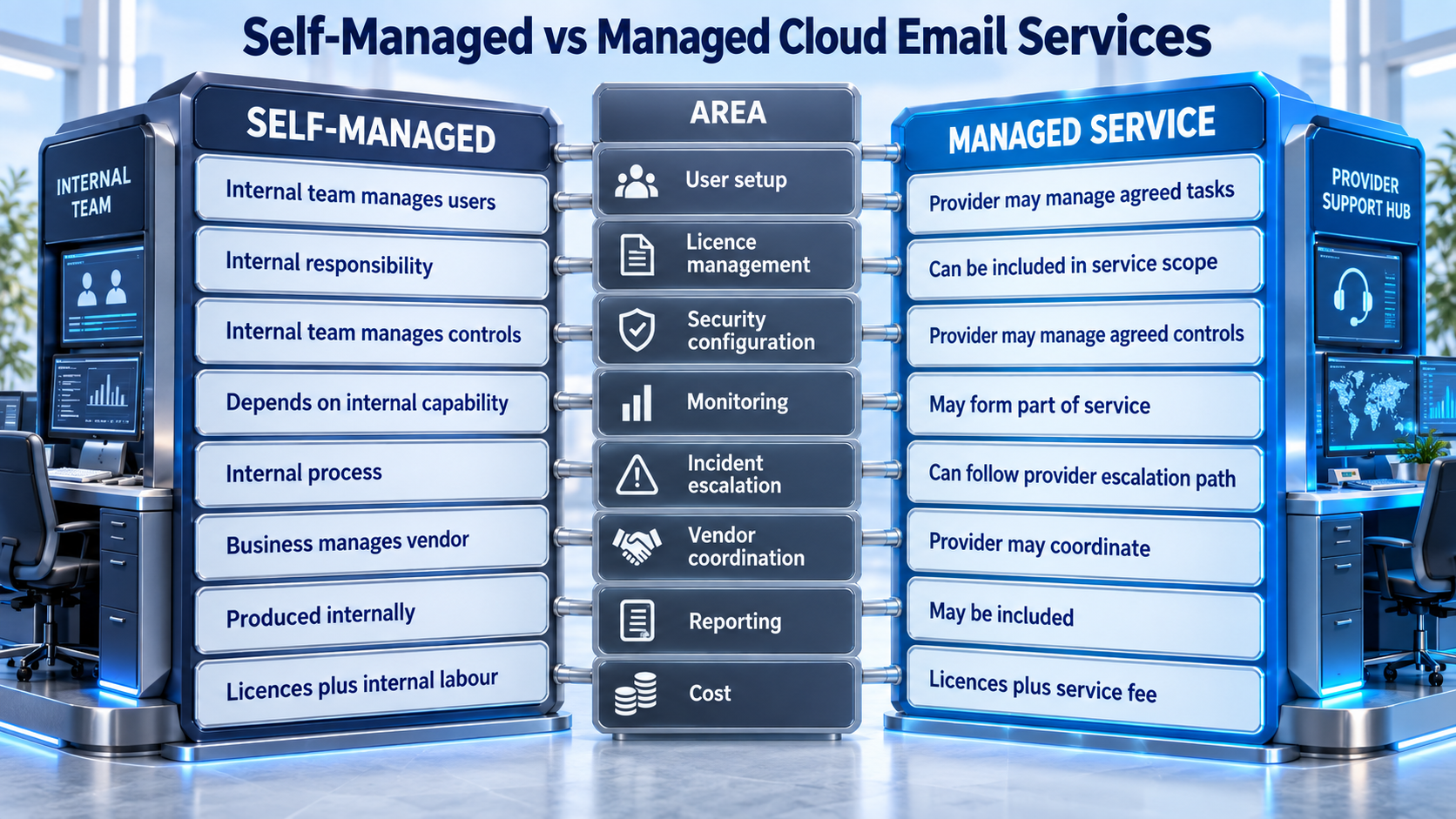
A managed service is useful only when the scope is clear. Businesses should establish what the provider manages and what remains the customer’s responsibility. Support hours and after-hours of escalation should also be documented where they matter.
How Much Do Cloud Email Services Cost in Australia?
Cloud email pricing depends on the platform and the functionality included.
Microsoft Australia’s current business pricing was checked on 17 September 2026.
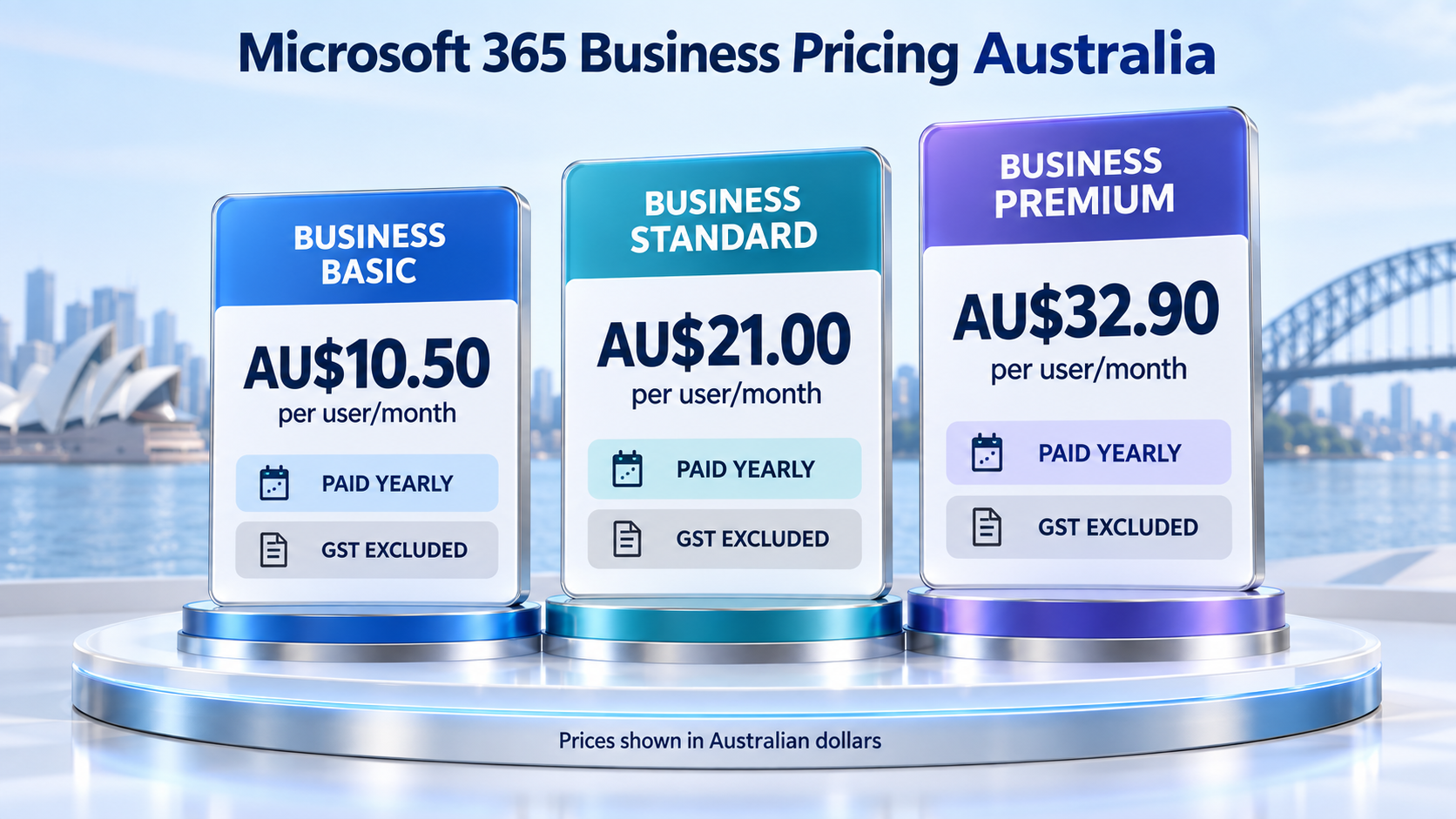
These plans are not identical.
Business Basic includes professional email and web/mobile productivity applications. Business Standard adds desktop productivity applications. Business Premium adds broader security and device management capabilities. Businesses should confirm plan inclusions before purchasing because pricing and product packaging can change.
Total Cost of Ownership for Cloud Email
License price is only part of the cost. Total Cost of Ownership (TCO) considers the broader cost of operating cloud email over time. A realistic comparison can include:
License + migration + administration + security + backup + support
A cheaper plan may require additional services or more internal management. A higher-priced plan may include capabilities that reduce the need for separate tools. Neither is automatically more cost-effective. The right comparison is the total annual cost of meeting the organisation’s actual requirements.
How to Choose a Cloud Email Provider
Begin with the business environment instead of the provider’s marketing package. Before choosing a cloud email service, assess the following:
- User requirements: Determine what employees actually need from email. Some organisations only need hosted mailboxes and calendars, while others require desktop applications, Teams, cloud storage and stronger device controls.
- Migration requirements: Treat migration as a one-off project and cloud administration as an ongoing service.
- Migration scope: Confirm whether the project includes mailbox transfers, shared mailboxes, calendars, contacts, DNS changes, testing and post-migration support.
- Security responsibilities: Identify who will manage MFA, monitor suspicious sign-ins, and investigate potential account compromises.
- Administrative control: Confirm who controls global administrator accounts and who owns the domain and DNS records.
- Shared resources: Include shared mailboxes and distribution groups in the service scope where relevant.
- Retention and backup: Remember that retention and backup are not automatically the same service. Confirm what the platform retains and whether separate backup is required.
- Exit arrangements: Ensure the provider can explain how business data, domains and administrative access will be transferred if the organisation changes providers.
- Broader cloud responsibilities: Businesses evaluating wider cloud operations can use the cloud support services guide to compare monitoring, backup and support responsibilities in more detail.
Where IT Company Australia May Fit
IT Company Australia provides services that connect naturally with a cloud email environment, including Microsoft 365, email security, managed cyber security, cloud backup and managed IT support. That combination may be useful when a cloud email issue crosses several areas.
For example, a suspicious message may become an account-security problem. A migration may require license changes and employee support. A recovery requirement may involve a separate backup service. The advantage of using one provider depends on how clearly those responsibilities are documented.
IT Company Australia’s current About page states that its information security management system is certified to ISO/IEC 27001:2022. Certification can form part of a broader provider review. Businesses should still assess contracted services, security responsibilities, support arrangements, and their own compliance requirements. Certification is not a guarantee that incidents cannot occur.
Australian Service and Contact Pathways
Businesses operating across Australia should confirm whether migration, administration and incident support can be provided consistently to employees in different locations.
Businesses can view ITCompany Sydney through the supplied Google Maps directions page.
Enquiries relating to ITCompany Melbourne, ITCompany Brisbane and ITCompany Perth can be made through the contact page.
Location-specific service hours, support arrangements, and onsite availability should be confirmed directly rather than assumed to be identical.
Frequently Asked Questions
What Are Cloud Email Services?
Cloud email services host business email through a cloud platform rather than relying entirely on an email server operated inside the organisation.
They can also connect email with calendars, collaboration, identity management, and cloud storage.
How Secure Are Cloud Email Services?
Cloud email can provide strong security capabilities, but the outcome depends on configuration and business practices.
MFA, email filtering, administrator controls, identity monitoring and incident response should be considered alongside the hosting platform.
Is Microsoft 365 a Cloud Email Service?
Yes. Microsoft 365 business plans can include Exchange-based professional email as part of a wider cloud productivity environment.
Businesses can review the current Microsoft 365 options according to their user and security requirements.
Do Cloud Email Services Need Separate Backup?
Cloud email may need separate backup when the platform’s retention and recovery capabilities do not meet the organisation’s requirements.
Define which information needs protection, how long it should be retained and who is responsible for restoration before choosing a backup model.
Can Cloud Email Services Improve Productivity?
They can improve productivity when email works effectively with calendars, meetings, shared files, and collaboration tools.
The result still depends on how well the organisation configures the platform and how employees use it.
How Much Does Cloud Business Email Cost in Australia?
Pricing varies according to platform and license.
As of 17 September 2026, Microsoft 365 Business Basic was listed at AU$10.50 per user/month when paid yearly. Business Standard was AU$21.00 and Business Premium AU$32.90 on the same billing basis. Microsoft states that these displayed prices exclude GST.
What Should Australian Businesses Check Before Moving Email to the Cloud?
Review existing mailboxes, users, migration requirements, security, backup, internet dependency, support responsibilities and total cost before selecting a service. The business should also understand who owns domain settings, administrator accounts, and post-migration support.
Final Thoughts
Cloud email services can give Australian businesses a flexible way to manage email, identities and collaboration.
The strongest benefit does not come simply from moving the mailbox away from an office server. It comes from building a clearer operating model around communication.
Employees need controlled access. Accounts need strong authentication. Messages need appropriate protection. Licenses should reflect genuine user requirements. Retention, backup, and continuity should be understood separately. Support responsibilities should be documented.
For many organisations, cloud email becomes part of a wider cloud workplace rather than a stand-alone messaging system. Before choosing a platform or provider, compare the complete environment instead of focusing only on the mailbox price.
Businesses that want to review their current email platform, Microsoft 365 licensing, security requirements or migration scope, can contact IT Company Australia to discuss their environment.
