
Buying a laptop takes minutes, but choosing the wrong one can mean years of poor performance, unnecessary support costs, and premature replacement.
Introduction
Software creates a similar challenge to hardware. A subscription may appear affordable until licenses multiply across teams; former employees retain paid access, or essential security features require a higher tier. Effective hardware and software procurement services extend beyond purchasing products. They connect business requirements with product selection, licensing, configuration, security, deployment, support, and replacement. For Australian businesses in 2026, structured IT procurement helps select technology that suits each workload, remains supportable and provides value throughout its lifecycle. A structured IT procurement service can coordinate these decisions before hardware or software becomes an unmanaged cost.
What Are Hardware and Software Procurement Services?
Hardware and software procurement services help an organisation define requirements, source suitable products, compare vendors, manage licenses, coordinate deployment and plan the technology lifecycle.
Hardware procurement may cover laptops, desktops, workstations, servers, switches, routers, monitors, tablets, and peripherals. Software procurement may include operating systems, Microsoft 365, cybersecurity tools, SaaS applications, collaboration platforms, and specialist business software.
A complete procurement service can therefore involve needs analysis, vendor comparison, product sourcing, licensing, configuration, warranty management, delivery, asset tracking, deployment, renewals and retirement planning. IT Company Australia’s current procurement scope, for example, includes hardware and software sourcing, license management, vendor coordination, hardware/software bundling, warranty tracking and lifecycle management.
It should also answer five practical questions:
- Will this technology work with the existing environment?
- Is it secure and supportable?
- Who will deploy and support it?
- What will it actually cost over time?
- What happens when it needs to be replaced?
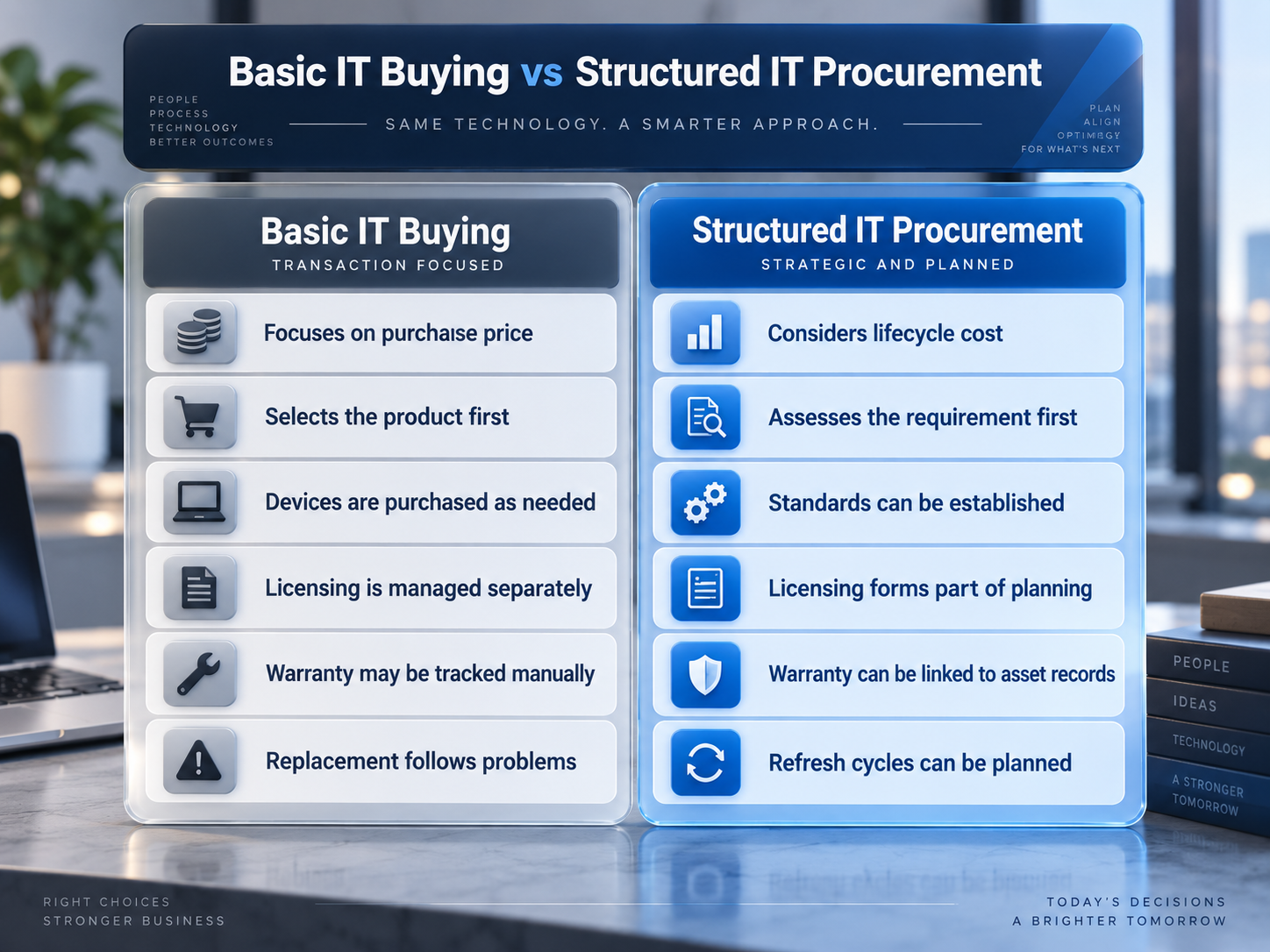
The difference becomes increasingly important as businesses depend on SaaS platforms, cloud infrastructure, connected devices, and distributed teams.
Importance of Hardware and Software Procurement Services
Hardware and software procurement services are important because they help businesses choose technology that fits operational needs, budgets, security requirements, and future growth. Rather than focusing only on the purchase price, a structured procurement approach considers compatibility, licensing, deployment, warranties, support and lifecycle costs, helping organisations reduce unnecessary spending, avoid unsuitable technology and make more informed IT investment decisions.
Why Hardware and Software Procurement Matters for Australian SMEs
For an SME, every technology purchase competes with other business priorities.
That makes procurement less about buying more technology and more about avoiding the wrong technology.
A structured approach can reduce fragmented licensing, inconsistent devices, duplicated applications, unexpected deployment work and equipment that reaches end of support earlier than expected.
Australian businesses also need to consider local commercial realities. GST is generally 10% on most goods and services sold in Australia, so quotations should clearly indicate whether prices include or exclude GST and whether eligible registered businesses can claim GST credits.
Warranties deserve similar attention. Under Australian Consumer Law, some business purchases can qualify for consumer guarantees, including qualifying purchases under the current $100,000 GST-inclusive threshold, subject to the applicable conditions and exceptions. Manufacturer warranties sit alongside, rather than automatically replacing, consumer-guarantee rights.
Those details can make a locally supported procurement path materially different from simply ordering the cheapest product online.
10 Essentials of Hardware and Software Procurement Services in 2026
Use these 10 essentials to control IT costs, reduce risk, and improve every stage of the technology lifecycle.
Start With the Business Requirement, Not the Product
One of the easiest procurement mistakes is selecting technology before defining what the employee or business process actually requires.
A finance employee primarily using cloud applications may need a very different device from a designer running graphics-intensive software. A field employee may value battery life and portability more than maximum processing power.
Before comparing brands or specifications, define the workload, applications, mobility requirements, security needs, expected device life and support environment.
Businesses using broader managed IT services can also align procurement with existing device standards, user support, and technology planning.
The aim is not to buy the most powerful product. It is to buy technology that is fit for purposes.
Compare Total Cost, Not Only the Purchase Price
A procurement decision should be considered more than the amount printed on the first invoice.
A practical total-cost model can include:
Total cost = acquisition + licensing + configuration + deployment + support + maintenance + downtime + replacement
Consider two business laptops priced at $1,400 and $1,700.
The lower-priced device may not provide better value if it needs additional memory, has a shorter warranty, performs poorly with essential software, or requires replacement earlier.
Software requires the same analysis. An oversized license can leave a business paying for unused features, while an inadequate plan can create additional upgrade costs later.
Quotes are therefore most useful when compared against the same specification, responsibilities, and expected lifecycle.
Match Hardware with the Software It Must Run
Hardware and software procurement should be planned together.
Every device must support the operating system, applications, security controls, and peripherals required by its user.
Before purchasing, consider processor and memory requirements, storage, operating-system compatibility, specialist applications, cloud dependencies and potential future workloads.
Infrastructure purchases require similar coordination. A new application may increase server, storage or network demands, making server management relevant to the decision.
For cloud-hosted workloads, organisations should also consider whether the purchase affects subscriptions, performance, access, or existing cloud management services.
Compatibility problems are far cheaper to identify before a purchase order is approved.
Control Software Licensing Before It Controls the Budget
Software procurement has increasingly shifted towards recurring subscriptions, making license management an ongoing cost-control activity.
Microsoft 365 is a useful example. Different plans offer different combinations of applications, administration, storage, and security capabilities. Assigning an identical license to every employee may create unnecessary expenditure, while choosing an unsuitable tier can leave important requirements unmet.
A stronger approach is to match licenses to actual roles and workloads.
Businesses reviewing productivity platforms can compare requirements through Microsoft 365 solutions and explore the broader platform decision in Office 365 vs Google Workspace.
Regular software reviews should identify inactive accounts, overlapping applications, unnecessary subscriptions, and licenses that no longer support a genuine business requirement.
Compare Vendors on Value, Warranty, Delivery and Support
Vendor comparison is where procurement becomes more than price shopping.
For Australian SMEs, a meaningful vendor comparison should consider availability, GST treatment, delivery times, manufacturer warranty, local support options, returns, deployment services, replacement processes and the supplier’s ability to coordinate hardware and licensing.
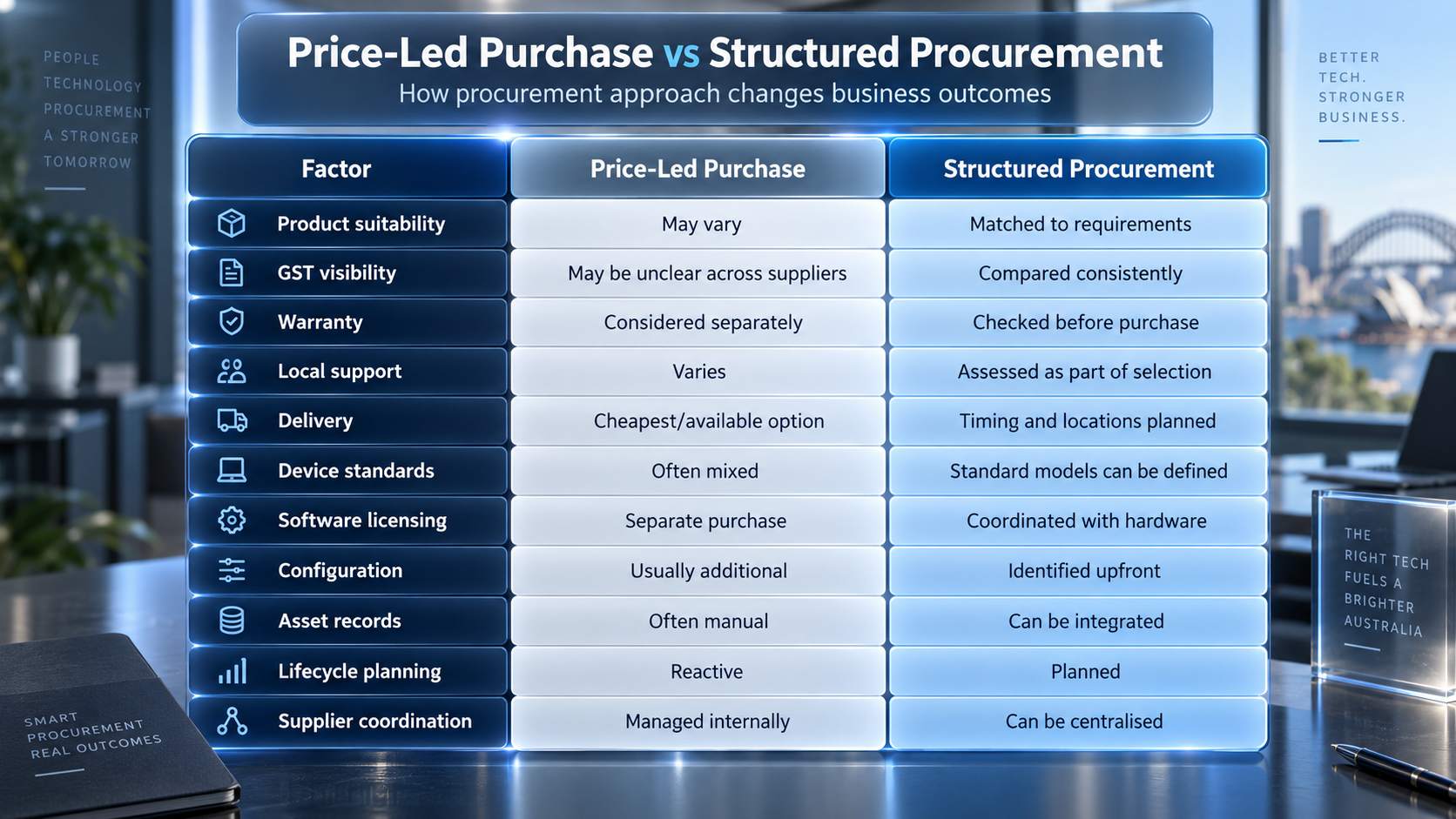
IT Company Australia’s current procurement offering states that it provides tracked Australia-wide delivery, manufacturer warranties, volume-based pricing and lifecycle support. Those are useful comparison points, but they should be tested against the organisation’s actual requirements rather than treated as universal proof of suitability
What should an SME ask a vendor?
Ask who owns warranty escalation, whether replacement devices can be sourced quickly, how multi-site deliveries are handled, what configuration is included, whether prices include GST and what happens if a supplied device is unavailable before deployment.
That turns vendor comparison from “Who quoted less?” into “Who can deliver the required outcome with the fewest unmanaged gaps?”
Make Cybersecurity a Procurement Requirement
Security starts before a device joins the network.
Technology should be assessed for vendor support, operating-system updates, application patching, encryption capability, multi-factor authentication, privileged access controls, and endpoint-management compatibility.
The Australian Signals Directorate’s Essential Eight specifically includes patching applications and operating systems and highlights the risk of unsupported systems. ASD guidance also notes that patches should be applied according to the organisation’s exposure and risk.
For procurement, that creates a practical rule:
Do not purchase technology that is difficult to patch, unsupported or incompatible with required security controls simply because it is cheaper.
Where procurement affects broader security architecture, managed cyber security services and vulnerability scanning provide natural next areas to review.
Governance should support procurement
IT Company Australia currently states that its information-security management system is ISO/IEC 27001:2022 certified. This provides a recognised framework for managing information security risks within its certified scope. Certification remains one due-diligence factor; it does not make a customer environment automatically compliant or eliminate customer-specific risk.
Standardise Where It Creates Value
A growing SME can quickly end up supporting ten laptop models, multiple docks, different chargers, inconsistent warranties, and several software combinations.
That variation increases support effort.
A standard device catalogue can define approved configurations for common employee profiles such as office workers, mobile employees, and higher-performance users.
Standardisation does not mean everyone receives identical equipment. It means differences are intentional.
For more context on how procurement interacts with operational support, see IT Company Service: 12 Essentials for 2026.
Treat Delivery and Deployment as Different Services
Australia-wide delivery can introduce practical complications: multiple offices, remote employees, regional delivery times and equipment arriving before the person or IT team is ready.
A box at reception is not a deployed device.
The complete process may look like:
Procure → Deliver → Configure → Secure → Assign → Record → Support
Before approving a quote, determine whether freight, multi-location delivery, software installation, device configuration, data transfer, onsite deployment and support are included.
For remote teams, direct-to-user delivery can be efficient only when device configuration and access controls have already been planned.
Track Assets, Warranties and Renewals Through the Lifecycle
Procurement should create visibility that lasts beyond the invoice.
An asset record should identify who has the equipment, where it is located, when it was purchased, its warranty status, and its expected replacement date.
Software records should show subscriptions, assigned users, renewal dates, and license ownership.
This matters for budgeting, offboarding, warranty claims and secure retirement.
Australian Consumer Law can also be relevant to qualifying business purchases, so businesses should retain invoices, warranty information and supplier records rather than relying only on the manufacturer’s portal.
Connect Procurement with Recovery and Future IT Planning
A significant technology purchase may affect systems beyond the product itself.
A new server can change backup capacity. A new SaaS platform may hold information outside existing recovery arrangements. A collaboration or email system may introduce different security, retention or access requirements.
Before approving a new system, ask:
If this technology becomes unavailable tomorrow, what is the recovery plan?
Where data-protection requirements change, existing cloud backup services should be reviewed rather than assuming that every new workload is automatically protected.
Changes involving business communications may also affect email security.
This is the point where procurement moves beyond purchasing and becomes part of a broader technology lifecycle.
The article How IT Services Companies in Australia Are Evolving in 2026 provides further context on how cloud, security, support, and technology planning increasingly overlap.
How Are IT Procurement Services Priced in Australia?
There is no single procurement price because businesses buy different products and need different levels of assistance.
Common pricing approaches include:
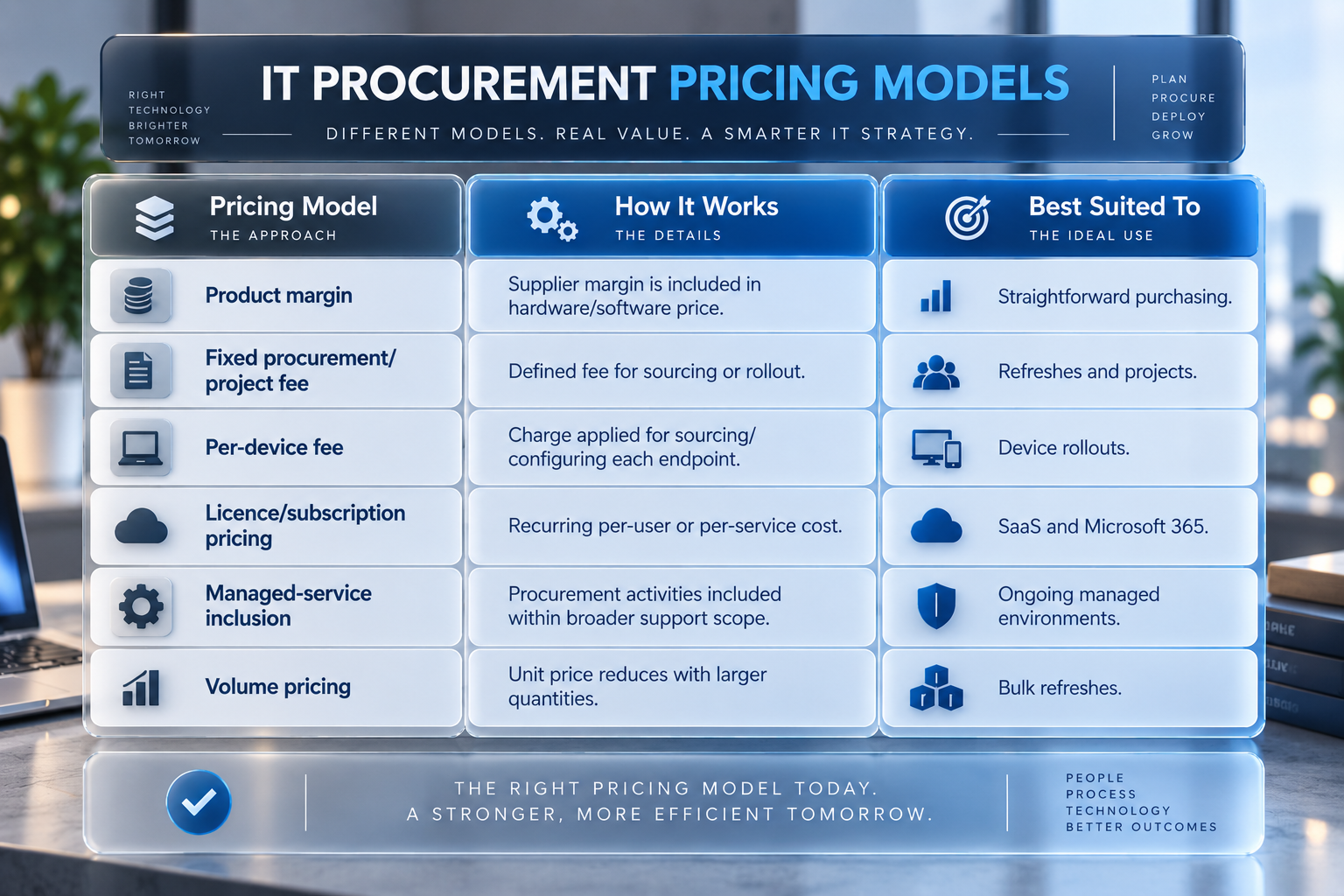
The important issue is not which model is “best”. It is whether the quote clearly separates equipment, GST, licenses, freight, setup, deployment, warranties, projects, and ongoing support.
For an Australian SME, that makes competing offers genuinely comparable.
Why Should an SME Use a Procurement Provider Instead of Buying Directly?
Direct buying is reasonable when the requirement is simple; the buyer knows exactly what is needed, and deployment creates little operational risk.
A procurement provider becomes more valuable when an SME needs to coordinate multiple users, suppliers, licenses, offices, warranties, or security requirements.
The difference is largely one of internal workload and risk ownership.
Buying directly may save a procurement fee, but internal staff then need to research products, verify compatibility, compare licensing, track deliveries, manage warranties, configure devices, update asset records and resolve supplier issues.
For a five-person business purchasing one standard laptop, that may be entirely manageable.
For a 60-person business replacing 25 endpoints across Sydney, Melbourne and remote employees while adjusting Microsoft 365 licenses and endpoint security, coordination itself becomes a significant part of the project.
That is the point where professional procurement can create value even when the hardware itself is available from the same manufacturers.
Why IT Company Australia’s Procurement Model May Fit Some Businesses
IT Company Australia combines hardware and software sourcing with related areas such as licensing, cloud, servers, cyber security, backup and managed IT. This can be useful where one purchase affects several parts of the existing environment. Its hardware and software procurement services should nevertheless be assessed using the same criteria applied to any provider: scope, suitability, warranty, licensing, deployment responsibilities, ongoing support, lifecycle cost and exclusions.
Regional Procurement and Support Considerations
Businesses considering hardware and software procurement services across Australia should confirm how product sourcing, software licensing, device configuration, delivery and after-sales support are handled in each region. IT Company Australia lists contact points for ITCompany Sydney, ITCompany Melbourne, ITCompany Brisbane and ITCompany Perth. Because stock availability, supplier lead times, onsite deployment and warranty processes may vary, confirm who will manage the order, configure the equipment, arrange delivery, handle returns and provide support after deployment.
Frequently Asked Questions
What Are Hardware and Software Procurement Services?
Hardware and software procurement services help organisations define requirements, source suitable technology, compare suppliers, manage licenses, and coordinate purchasing, deployment and lifecycle planning. The aim is to select technology based on business, support, security, and budget requirements rather than price alone.
What Is Included in Hardware Procurement?
Hardware procurement can include product selection, supplier comparison, laptops, desktops, servers, network equipment, peripherals, warranty management, configuration, delivery and lifecycle planning. The exact scope should be confirmed before purchasing.
What Is Included in Software Procurement?
Software procurement may include operating systems, productivity applications, SaaS platforms, security software, license selection, subscription management, renewals, and periodic usage reviews.
Is It Cheaper to Buy IT Equipment Directly?
Sometimes. Direct purchasing can provide a competitive upfront price for straightforward requirements. Businesses should still compare compatibility, warranty, deployment, support and expected lifecycle before determining which option delivers better overall value.
How Can Businesses Reduce Software Licensing Costs?
Match licensing tiers to genuine employee requirements, remove licenses from inactive accounts, review overlapping applications, and reassess subscriptions regularly. Recurring software costs should be measured against actual usage rather than automatically renewed.
Should Cyber Security Be Considered When Buying Hardware?
Yes. Hardware should support current operating systems, vendor security updates, encryption, and the organisation’s required identity, access, and device management controls. Procurement is an opportunity to identify security limitations before equipment enters the business environment.
What Happens After IT Equipment Is Purchased?
The next stages may include configuration, security setup, employee assignment, asset recording, maintenance, support, warranty tracking, replacement planning, and secure retirement. Good procurement therefore extends beyond the original transaction.
Final Thoughts
Effective hardware and software procurement services connect product selection with cost, GST, compatibility, security, licensing, warranties, delivery, deployment and lifecycle planning.
Before your next purchase, ask three questions:
Does technology fit the workload? What will it cost across its lifecycle? Who owns deployment, support, and replacement after it arrives?
Those questions can prevent procurement from becoming a series of disconnected purchases.
Businesses that need help coordinating product selection, licensing, deployment and lifecycle planning can review IT Company Australia’s hardware and software procurement services and request a scope based on their users, workloads and existing environment.
