
Good IT support should resolve today’s problem without leaving tomorrow’s outage untouched. Technology support now extends beyond password resets and equipment repairs. A modern IT company service connects employee support, device management, cloud administration, cyber security, backup and technology planning within one defined operating model.
Introduction
An IT company service can be structured around the level of support and control the business needs. The provider may manage the entire environment or work alongside an internal IT team.
For Australian businesses, the important question is not only how quickly someone responds. It is whether the support plan protects critical systems, identifies developing risks and creates a clear path from a technical alert to a measurable business outcome.
This guide explains 12 essential capabilities, common pricing models and the evidence businesses should request when comparing modern IT support services. It progresses from everyday employee support to recovery, governance and performance measurement.
What Does an IT Company Service Include?
An IT company service typically includes help desk support, device and endpoint management, user access administration, server and network monitoring, cyber security, Microsoft 365 and cloud management, email security, data backup and recovery, IT procurement, and ongoing technology planning. These services are designed to keep business systems secure, reliable and available while giving employees a clear support channel and helping organisations manage technology risks, costs and future requirements.
How an IT Company Service Actually Works
An IT company service is a structured support model that combines user assistance, infrastructure management, cyber security, cloud administration, backup, monitoring and technology planning. Its purpose is to keep business systems reliable, secure and aligned with operational requirements.
An effective service starts before the first support ticket.
During onboarding, the provider identifies:
- Users and business locations
- Laptops, desktops and mobile devices
- Applications and databases
- Servers and network equipment
- Microsoft 365 and cloud services
- External technology suppliers
- Critical business workflows
- Existing security and operational risks
Existing faults should be separated from steady-state support. This distinction allows the customer to understand what requires initial remediation, what the recurring plan covers and what remains outside scope.
Daily work then enters through a service desk or monitoring platform. The provider records the issue, assigns a priority, takes an authorised action and documents the result. Serious events follow an escalation path, while recurring incidents should trigger root-cause analysis.
Scheduled updates, alert reviews, access maintenance, recovery tests and lifecycle planning separate an operating service from reactive repairs.
Scope and shared responsibility matter
Outsourcing does not transfer every technology risk to an external provider. Management must still approve budgets and risk decisions, identify legal obligations and communicate business changes.
A service schedule and responsibility matrix should identify:
- Who monitors each system
- Who approves access and configuration changes
- Who communicates during incidents
- Who investigates security alerts
- Who performs and approves recovery
- Who manages third-party suppliers
- Who maintains documentation
- Who approves additional costs
If a task has no named owner, it is not safely covered merely because it appears related to IT.
The strongest managed IT support plans make shared responsibilities easy to understand. They do not rely on vague phrases such as “complete support” or “everything included”.
Top 12 Modern IT Support Services Explained
IT Help Desk and Incident Support
An IT help desk gives employees a defined route for reporting faults, requesting access and obtaining technical assistance. Depending on the agreement, support may be available through telephone, email, a customer portal or remote-support tools.
A useful managed IT services agreement should clearly define operating hours, supported locations, contact channels, priority levels, response and resolution targets, escalation processes, and conditions that pause service targets.
The agreement should also distinguish between incidents, routine requests and separately charged projects.
An initial response is different from a completed resolution. Businesses should ask how both targets are measured and what happens when another supplier must participate in the investigation.
Useful evidence includes response and resolution reporting by priority, reopened-ticket rates and recurring-incident trends. Ticket volume alone does not show whether the service is effective.
Endpoint and Device Management
Endpoint management covers business laptops, desktops, tablets and other approved devices. It may include equipment records, standard configurations, health monitoring, security settings, software deployment and maintenance.
Coverage should follow each device through its lifecycle, from selection and procurement to initial configuration, employee assignment, monitoring, maintenance, reassignment, secure retirement and disposal.
The service should clarify who replaces failed equipment, maintains warranties and removes business information when an employee leaves.
Bring-your-own-device arrangements require separate rules covering permitted access, minimum security settings and the removal of organisational data without affecting personal information.
A promise to “manage all devices” is not sufficiently precise. Businesses should confirm which operating systems, device types and locations are supported.
Identity and Access Management
Identity and access management controls who can enter business systems and what each person can do after signing in.
Services may include account creation, role-based permissions, multi-factor authentication, password resets, privileged access control, access reviews, account suspension and access removal.
A documented onboarding and offboarding process should specify who approves access, how quickly changes are completed and who verifies that permissions remain appropriate.
Shared accounts should be limited. Privileged administrators should use separate, attributable accounts for administrative work.
Regular access reviews are particularly important when employees change roles, contractors finish work or external suppliers retain remote access. The objective is to ensure that access reflects a current business requirement rather than historical convenience.
Infrastructure Monitoring and Alert Management
Monitoring services watch the availability, capacity and health of important systems. They may identify unavailable services, low storage, unusual activity, failed processes or deteriorating performance before employees report a problem. Monitoring software alone does not deliver an operational outcome. The service agreement should define which systems are monitored, what triggers alerts, whether monitoring is continuous, when alerts are investigated, who receives them, how serious incidents are escalated and how customers receive progress updates.
Thresholds also need regular adjustment, so genuine risks are not hidden among repeated false alarms.
In practice, some disruptive outages occur even though monitoring generates an alert. The failure happens because ownership was unclear, the alert was not reviewed, or the escalation process was incomplete. Effective monitoring therefore combines technology, documented procedures, and human accountability.
A useful service report should show significant alerts, response actions, unresolved exceptions, and recurring conditions that need permanent correction.
Patch, Vulnerability and Cybersecurity Management
Patch management keeps supported operating systems and applications updated. Vulnerability management identifies weaknesses that require further action. A mature process should maintain an accurate software and asset inventory, prioritise updates by risk, test changes before deployment, use agreed maintenance windows, record failed installations, document unresolved exceptions, escalate high-risk vulnerabilities and verify successful remediation.
The Australian Signals Directorate’s Essential Eight maturity model connects patching with controls such as multi-factor authentication, restricted administrative privileges and regular backups.
A managed cyber security service may coordinate monitoring, vulnerability handling and incident escalation. However, its tools, authority, coverage hours and customer responsibilities should still be clearly defined.
Businesses must balance security risk with operational stability. Updates applied too slowly can increase exposure to known weaknesses. Poorly planned updates can disrupt critical applications.
An effective IT support plan should address both risks through testing, approvals, deployment windows and documented exception management.
Network and Server Management
Network and server management can cover physical servers, virtual machines, switches, wireless networks, firewalls, and other core infrastructure.
Common activities include performance monitoring, capacity management, system updates, configuration control, troubleshooting, planned maintenance, availability monitoring and vendor escalation.
A server management service should identify supported platforms, maintenance windows, backup dependencies and emergency-access procedures.
Businesses should also establish whether coverage stops at the operating system or extends to databases, business applications, networks and vendor for escalation.
Without clear boundaries, several suppliers may investigate the same outage while no one owns the overall resolution. A responsibility matrix should name the party responsible for coordinating the complete incident.
Microsoft 365 Administration and Support
Microsoft 365 administration can include licenses, employee accounts, Exchange Online, Teams, SharePoint, OneDrive, security settings and mail-flow management. It may also cover user assistance, group permissions and routine administrative changes.
A Microsoft Office 365 service should explain who approves licenses, creates and removes accounts, controls privileged access, manages external sharing, supports third-party integrations, provides application support, manages security settings and charges for additional activities.
Businesses should not assume that migrations, data recovery, endpoint management, or every Microsoft application is automatically included.
These responsibilities should appear in the service schedule rather than relying on the product name.
Cloud Management and Cost Optimisation
Cloud management connects the performance, security, and availability of cloud workloads with their ongoing costs. The service may cover cloud subscriptions, virtual resources, user access, configuration management, performance monitoring, backup dependencies, availability, spending reports and cost optimisation.
A cloud management service should state which platforms, subscriptions and workloads are included.
The agreement should identify who can create or remove resources, who approves spending changes, and whether cost optimisation is advisory or actively managed.
Reducing expenditure is only beneficial when it does not weaken performance, security or recovery capability. A meaningful review should connect cloud spending with application ownership, utilisation and business value.
Email Security and Messaging Continuity
Email security protects business communication against spam, phishing, malicious attachments, impersonation and account misuse. Relevant controls may include sender authentication, message filtering, attachment analysis, suspicious-link protection, impersonation detection, account-compromise procedures, security reporting and user guidance.
Dedicated business email security should connect with identity management and employee support.
If a suspicious message is followed by an unusual account sign-in, the incident should follow one coordinated escalation path. The agreement should define who investigates, who can restrict an account, how employees are informed, and whether technical response is available outside normal business hours.
Email filtering alone is not a complete response plan. The service must also address identity, access, employee communication, and incident ownership.
Cloud Backup, Recovery and Business Continuity
Backup services create separate recovery copies of selected business information. Effective coverage depends on protected workloads, backup frequency, retention periods, security controls, recovery-point availability, monitoring, restoration responsibilities and regular restore testing.
A completed backup notification only confirms that a job reported success. It does not prove that the organisation can restore usable information within the required timeframe.
A cloud backup service should be assessed against the organisation’s recovery point objective and recovery time objective.
The recovery point objective defines the acceptable amount of recent data loss. The recovery time objective defines the target timeframe for restoring a workload.
Businesses should request evidence from restore testing and confirm who selects the recovery version, performs the restoration and verifies that the recovered information is usable.
Recovery readiness should be demonstrated rather than assumed. Ask how often restores are tested, whether actual recovery times are recorded and who makes decisions during a major incident. A backup that has never been tested provides limited evidence of recoverability.
IT Procurement and Asset Lifecycle Management
IT procurement covers the selection and acquisition of suitable hardware, software and subscriptions.
Asset lifecycle management records ownership, assigned users, locations, warranty and license status, maintenance and security requirements, expected replacement dates, and retirement and disposal details.
An IT procurement service can help coordinate products and suppliers. However, quotations should separate equipment costs from configuration, freight, warranty, licensing and ongoing support.
The lowest purchase price may create higher long-term costs if a device cannot run required applications, receive security updates or meet the organisation’s standard configuration.
Procurement decisions should therefore consider the full operating lifecycle rather than the initial purchase price alone.
IT Strategy, Reporting and Continual Improvement
Strategic IT support connects current technical work with future business requirements. It may include technology roadmaps, service reviews, risk registers, licence planning, lifecycle forecasts, recovery-test results, budget guidance, project recommendations and continual improvement actions.
Useful reporting should explain more than ticket numbers. It should identify recurring incidents, ageing equipment, unresolved risks, unnecessary licenses and actions requiring business approval.
The article on how IT services companies in Australia are evolving in 2026 provides further context about the changing relationship between support, cloud systems, security and automation.
New technology should solve a documented requirement rather than merely expanding the technology catalogue.
A useful service review should answer four questions:
- What has changed?
- What remains at risk?
- What action do you recommend?
- Who owns that action and when will it be reviewed?
Comparing IT Support Models
“IT support” describes several operating models. The right one depends on internal capability, system complexity, acceptable downtime, and desired control.
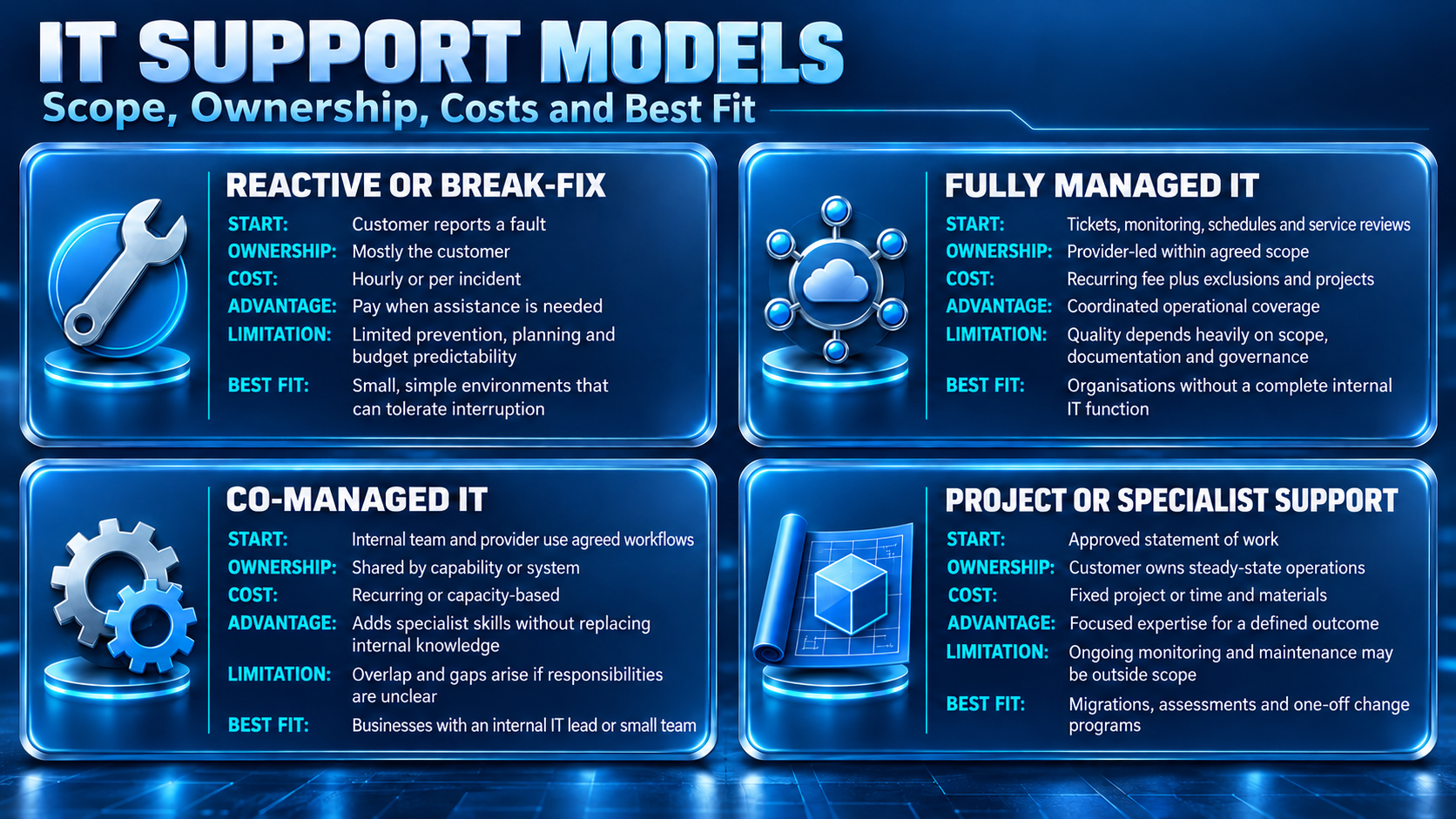
It is only a starting point. A managed plan may exclude line-of-business applications or onsite work, while a precise co-managed agreement can provide broad coverage.
How the Support Model Influences Cost
The support model determines who manages the work, while the pricing model explains how that responsibility is charged. A lower fee may reflect narrower coverage, fewer monitoring responsibilities, or more customer-managed tasks. Businesses should therefore compare service structure and total cost together rather than assessing the monthly price alone.
How IT Company Service Pricing Works
There is no reliable single price for an IT company service without knowing its users, devices, locations, and workloads. Hours, onsite needs, security tools, recovery targets, and technical debt also affect the fee. A cheaper quote may simply contain fewer responsibilities.
Common pricing structures include:
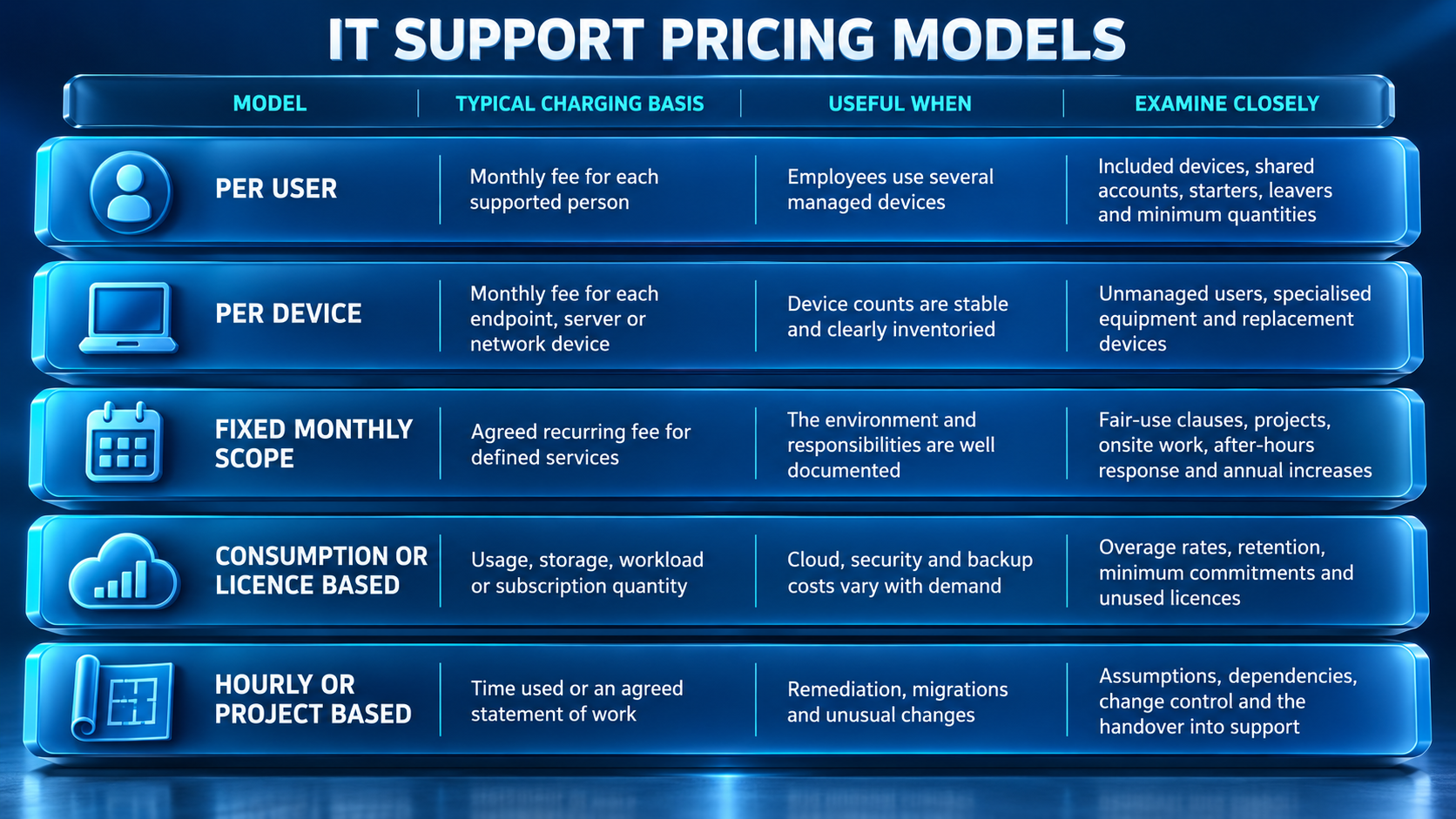
Public component prices are useful reference points, not complete managed-service estimates. On 7 September 2026, IT Company Australia’s server management page listed its Standard plan at AUD 213.11 per month, with a lower rate for a three-year term. This covers the published server scope only and should be rechecked before publication or purchase.
Compare every quote against the same inventory and responsibilities. Separate recurring support, licenses, consumption, onboarding, remediation, projects, onsite visits and after-hours work. Evaluate a realistic annual scenario, including growth and a serious incident, rather than only the headline monthly fee.
How Australian IT Providers Compare
Australian IT providers may advertise similar services but differ significantly in delivery, ownership, response and pricing. The infographic below highlights the practical differences businesses should assess.
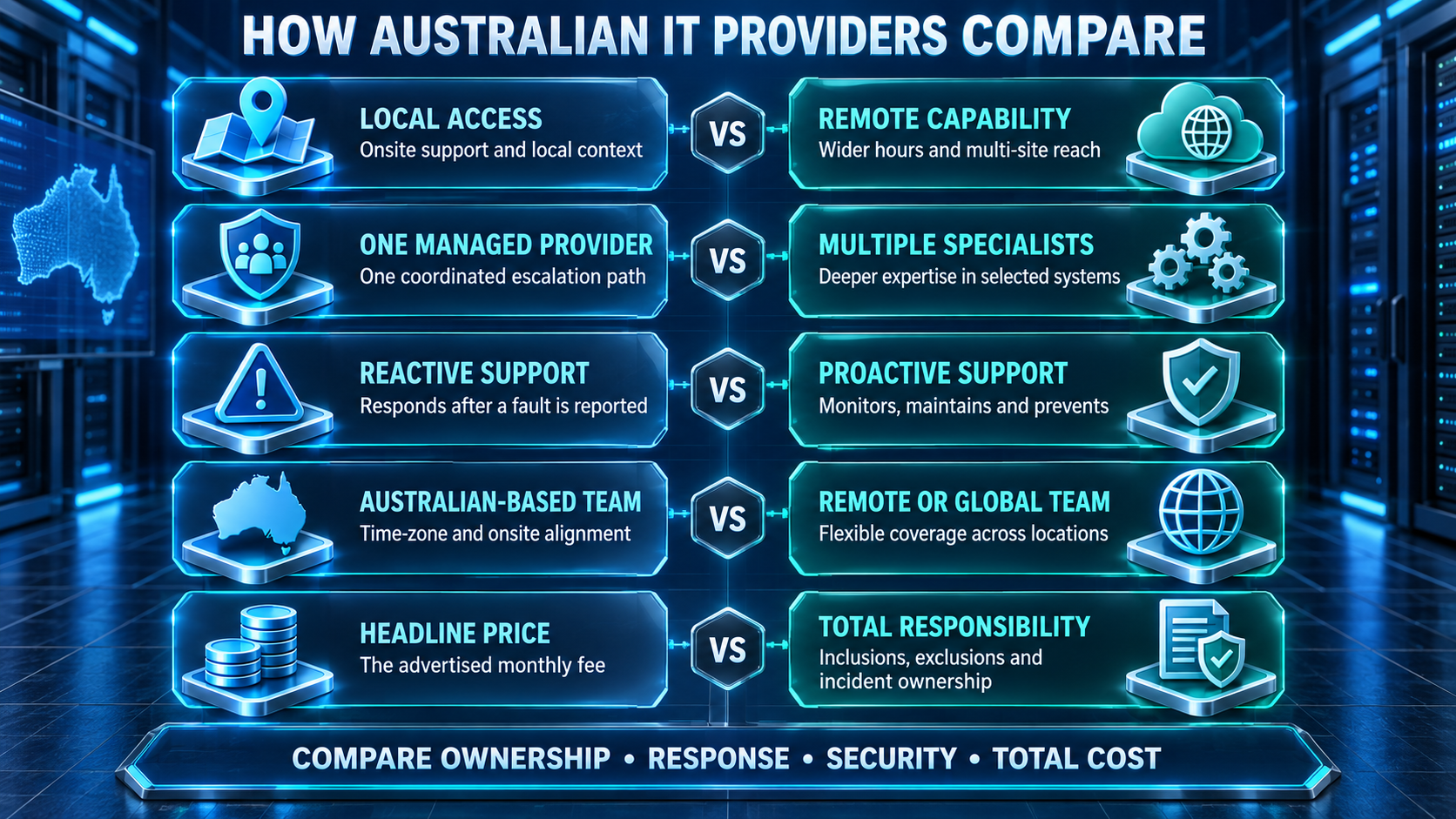
These differences show why the cheapest or closest provider is not automatically the best choice. Compare complete responsibilities and likely business outcomes before evaluating the final price.
Advanced Evaluation: Measure Outcomes, Not Activity
Ticket totals need context: an increase might show deterioration, growth or better reporting, while a decrease could mean prevention or low user confidence. Track response and resolution by priority, reopened and recurring incidents, inventory accuracy, aged security exceptions, restore-test results and actual recovery time.
Service credits do not recover from lost productivity. A stronger review asks what failed, what will change, who owns the action and when it will be tested. For personal information, the OAIC’s Guide to securing personal information also makes retention, access removal and secure disposal relevant service questions across the information lifecycle.
Why IT Company Australia May Fit
IT Company Australia brings user support, servers, cloud, cyber security, email, backup and procurement into one catalogue. That can reduce hand-offs across systems, although customers should still compare scope, people, hours, tools, escalation and third-party dependencies with their requirements.
IT Company Australia’s ISO/IEC 27001:2022-certified information security management system provides a recognised structure for risk management and continual improvement within its certified scope. The ISO overview explains the standard’s information security management focus. Certification can inform due diligence; it neither guarantees zero incidents nor makes customers automatically compliant.
Frequently Asked Questions
What does an IT company service include?
It may include a service desk, endpoint and account management, monitoring, patching, cloud and server administration, security, backup, and planning. The contract should name supported users, systems, locations, hours, and exclusions.
Is managed IT the same as a help desk?
No. A help desk mainly responds to incidents and requests. Managed IT may also include monitoring, maintenance, security, recovery, and planning. The label does not establish a scope.
How much does business IT support cost in Australia?
Cost depends on users, devices, sites, workloads, service hours, security requirements, and the current environment. Compare recurring fees with licenses, onboarding, projects, after-hours of support and consumption charges using the same inventory.
Can an IT provider work alongside an internal team?
Yes. A co-managed model can leave strategic or business-facing work with the internal team while a provider supplies support, monitoring or specialist skills. This managed IT and in-house IT comparison can frame the choice, but responsibilities still need to be mapped.
What should an IT service agreement define?
It should define scope, users, systems, hours, priorities, response targets, escalation, maintenance, customer duties, exclusions, fees, data handling, reporting, change control, and exit assistance. Response and resolution of targets should remain distinct.
Does an IT support plan automatically include cyber security?
Not necessarily. Patching or antivirus may be included while identity protection, vulnerability management, email security or incident response costs extra. Request controls, assets, monitoring hours, and response actions in writing.
Is cloud backup automatically included with cloud support?
No. Cloud administration and backup are different. Native retention may help with mistakes but may not meet recovery requirements. Confirm workload coverage, frequency, retention, protected access, restore ownership and testing.
How can a business change IT providers safely?
Plan before terminating access. Inventory systems, obtain documentation and credentials, preserve logs and backups, agree with cutover duties, rotate privileged access and verify that monitoring and renewals continue through a controlled handover.
Final Thoughts
The best IT company service is not the one with the longest feature list. Its scope, responsibilities, costs, and outcomes match the business. Map critical workflows and support technology, compare providers against the same requirements, and request operating evidence.
Businesses ready to document their needs can review IT Company Australia’s managed IT services and request a scoped assessment. The useful output is a clear record of what will be managed, by whom, during which hours and at what total cost.
