
An Australian business website can remain online while important functions quietly stop working. An enquiry form may fail, a backup may become unusable or an outdated plugin may create a security weakness. Each problem can affect customers before the business receives a warning.
Introduction
Reliable website maintenance and hosting address different parts of this risk. Hosting provides the technical environment that makes the website accessible, while maintenance keeps the website’s software, security, content and customer-facing functions working correctly.
The distinction matters because a hosting provider may keep a server online without fixing a broken booking form. A maintenance provider may update a website without controlling the server resources that influence speed and availability.
The Australian Signals Directorate recommends secure hosting, multi-factor authentication, current software, appropriate access controls and regular website backups. These responsibilities can involve both the hosting provider and the website maintenance team, so every task should have a clear owner.
Do Australian Businesses Need Hosting and Website Maintenance?
Most active Australian business websites need both services. Hosting stores the website and makes it accessible, while maintenance handles software updates, backups, security checks, functional testing and website-level repairs.
One service does not automatically replace the other. Even when a provider sells a combined package, the business should confirm exactly what the provider hosts, monitors, updates, tests and repairs.
In This Guide
This guide explains:
- How website hosting and maintenance differ
- What each service should include
- How both services work together
- Which service arrangement may suit your business
- What to confirm before selecting a provider
Website Maintenance and Hosting Quick Facts
| Question | Direct answer |
|---|---|
| What is website hosting? | The infrastructure that stores website files and makes the website accessible online. |
| What is website maintenance? | Ongoing work that keeps website software, security, content and functions reliable. |
| Does hosting include maintenance? | Not automatically. Inclusions depend on the provider and service agreement. |
| Does maintenance include hosting? | Not always. A maintenance provider may work with an existing hosting company. |
| Who normally needs both? | Businesses using websites for enquiries, bookings, payments, sales or customer support. |
| How often is maintenance required? | Monitoring can be continuous, while practical maintenance may occur weekly or monthly. |
| What determines the cost? | Website size, platform, activity, backup frequency, security needs and support coverage. |
| What should be documented? | Updates, backups, restoration, monitoring, repairs, response targets and exclusions. |
What Is Website Hosting?
Website hosting provides the environment where a website’s files, database and applications operate. When a visitor enters a domain name, the hosting server sends the required website information to the visitor’s browser.
Without hosting, a public website cannot be accessed online. The hosting plan can also influence storage capacity, server response, processing resources and the website’s ability to handle additional traffic.
Australian businesses should select hosting according to website activity and operational importance. Businesses can review services through IT Company Australia when comparing website infrastructure, support and management requirements.
What Does a Hosting Provider Manage?
A hosting provider generally manages the server, network connection and account environment. Depending on the selected plan, the provider may also manage server software, resource monitoring, security settings, SSL installation and hosting-level backups.
These inclusions are not standard across the industry. A basic plan may provide server space and limited technical support, while a managed plan may include server updates, active monitoring and configuration assistance.
The business should confirm who manages the server operating system, database software, hosting control panel and security settings. The service agreement should also explain what happens if the server becomes unavailable or exceeds its allocated resources.
Shared Website Hosting
Shared hosting places several customer websites on the same server. Each website uses resources from a shared pool, which can make this option suitable for smaller informational websites with stable traffic.
The main limitation is that server resources remain shared. Increased activity on one account may affect other accounts if the environment lacks suitable resource controls.
Shared hosting may suit a basic brochure website that publishes contact details, service information and occasional articles. A busy ecommerce store, membership service or complex booking system may need a more isolated hosting environment.
Virtual Private Server Hosting
A virtual private server divides physical server resources into separate virtual environments. Each virtual server receives allocated resources and provides greater control than a standard shared hosting account.
VPS hosting may suit growing businesses, online stores and websites that need more stable performance. Businesses evaluating this option can read the Australian VPS hosting guide.
A VPS can be managed or unmanaged. Managed VPS hosting places more server administration responsibility on the provider, while unmanaged hosting requires the customer or its technical team to configure, update and monitor the server.
Managed WordPress Hosting
Managed WordPress hosting is designed for websites built with WordPress. It may include WordPress-specific backups, server caching, staging tools, security controls and software updates.
The term “managed” does not have one universal meaning. One provider may manage only the server environment, while another may also update WordPress, plugins and themes.
Businesses should confirm whether managed WordPress hosting includes post-update testing, malware removal and website repairs. Installing an update does not prove that enquiry forms, page layouts or payment functions continue to work.
What Is Website Maintenance?
Website maintenance is the ongoing process of keeping a website current, functional and secure. Maintenance can include software updates, backup checks, malware scans, speed reviews, broken-link repairs, form testing and approved content changes.
A professional maintenance service should do more than install updates. The provider should check whether the updates completed successfully and whether important customer journeys remain functional.
IT Company Australia lists updates, uptime monitoring, SSL validation, backups, performance improvement and reporting within its website maintenance services. Businesses should compare the available plans because content, security and recovery coverage may differ.
CMS, Plugin and Theme Updates
Content management systems, themes and plugins receive updates for security, compatibility and functionality. Delaying critical updates can leave known weaknesses available for misuse.
The Australian Signals Directorate advises organisations to apply security patches promptly, particularly for internet-facing systems such as websites. Automatic updates may help, but someone should still confirm that each update installed correctly.
A controlled update process starts with a usable backup. The provider should then complete the update and test important website functions, including forms, bookings, payment processes and mobile layouts.
Website Backups and Restoration
A website backup creates a recoverable copy of website files and data. An effective backup process defines the frequency, storage location, retention period and person responsible for restoring the website.
A WordPress website generally needs both its database and website files for complete restoration. Backups should also occur before major software updates or configuration work.
A successful backup notification does not guarantee recovery. Restoration tests should confirm that the website opens correctly, recent data is available and important functions work in the restored environment.
Website Security Monitoring
Website security monitoring can include malware scans, file-change detection, blacklist monitoring, vulnerability checks and account-access reviews. These controls may identify warning signs, but monitoring does not always include investigation or repair.
Australian cyber security guidance recommends HTTPS, multi-factor authentication, strong passwords, current software and appropriate administrator access. Website owners should also check websites for suspicious changes and unauthorised activity.
The maintenance agreement should explain what happens after a problem appears. Malware detection, removal, investigation, recovery and ongoing protection are separate activities unless the provider clearly combines them.
Functional Website Testing
Functional testing confirms that visitors can complete important actions. For example, visitors may need to send an enquiry, purchase a product, make a booking or sign in to a customer account.
Wesite Performance Maintenance
Website performance depends on both hosting infrastructure and website configuration. For instance, server response, image sizes, database requests, plugins, scripts and third-party services can influence loading time. Therefore, reliable website hosting and maintenance services should examine both server-level and website-level performance.
What Is the Difference Between Hosting and Maintenance?
Hosting manages the environment that runs the website. Maintenance manages the website application, content, functions and ongoing condition within that environment.
The services can overlap around backups, security, performance and support. This overlap creates uncertainty when the provider’s responsibilities are not recorded in writing.
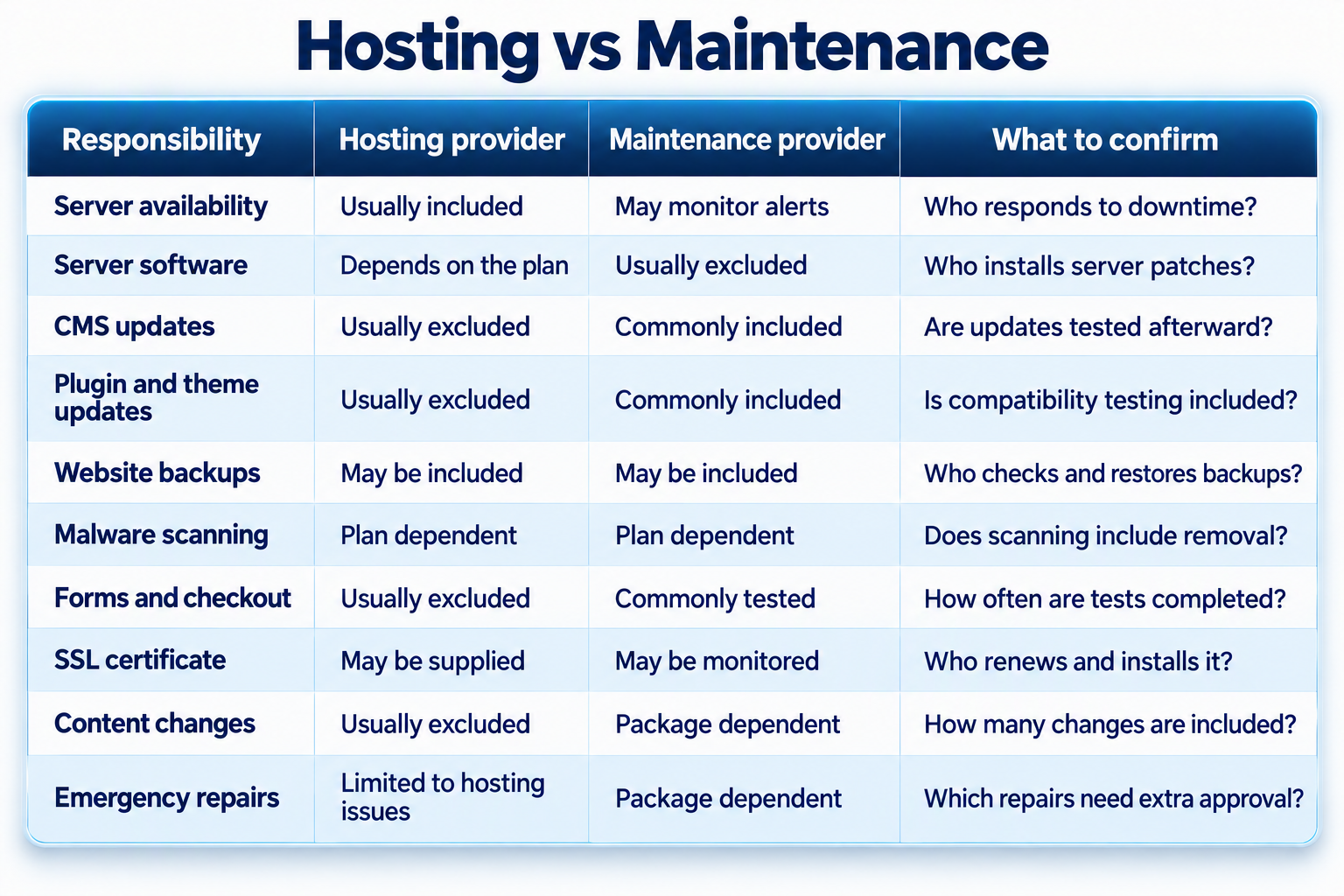
A hosting support request usually covers the server or hosting account. A website maintenance request may require plugin replacement, database repair, configuration changes or content correction.
Businesses should avoid assuming that one technical support team will automatically complete the other team’s work. The agreement should establish ownership before an incident occurs.
How Hosting and Maintenance Work Together
Hosting and maintenance operate as connected layers. Hosting supplies server resources and network availability, while maintenance ensures the website uses those resources efficiently and securely.
For example, a server monitor may show that a website responds normally. The checkout may still fail because a payment extension or external integration has stopped working.
The maintenance provider should test and investigate the checkout process. The hosting provider may then supply server logs or configuration information if the problem involves the hosting environment.
Website Speed Requires Service Coordination
Slow website performance does not always mean the hosting plan is unsuitable. Large images, inefficient scripts, excessive plugins and database problems can slow a website even on a well-configured server. Therefore, affordable website maintenance should include checks for common website-level performance issues.
Website Security Covers Both Layers
A secure server cannot fully protect a website that uses an outdated plugin or weak administrator password. A fully updated website can also remain exposed when the hosting environment is misconfigured or no longer supported.
Security should cover the server, website software, user access, backups and incident response. The agreement should explain how alerts are investigated and who completes recovery work.
No provider can guarantee that a website will never experience a security incident. A realistic service reduces avoidable risks, detects suspicious activity and supports recovery through a documented process.
Do Australian Small Businesses Need Both Services?
Most Australian small businesses need hosting and maintenance when their websites support enquiries, bookings, payments or customer communication. The required level depends on the impact of downtime and the amount of information the business can afford to lose.
A small informational website may use standard hosting with monthly maintenance. An ecommerce website that changes throughout the day may need stronger hosting, daily backups and faster support arrangements.
Businesses can complete some maintenance internally if a trained person has the time, access and technical ability. The business should still document hosting information, backup procedures, update records, emergency contacts and recovery steps.
Website Support for Sydney Businesses
Sydney businesses may depend on websites for professional enquiries, appointments, purchases and customer-service requests. The support level should reflect how quickly customers expect those functions to operate.
Website operators should also consider their responsibilities when collecting personal information through forms or customer accounts. Applicable privacy obligations depend on the organisation, its activities and the information being collected.
Sydney businesses can use this website maintenance checklist to assign tasks, owners and maintenance frequencies. A clear checklist helps separate routine work from urgent technical support.
Recommended Hosting and Maintenance Schedule
The right schedule depends on website activity, transaction volume, customer expectations and data sensitivity. A basic brochure website does not carry the same operational risk as an online store.
The following schedule provides a practical starting point. Each business should adjust the frequency according to its update activity, customer functions and recovery requirements.
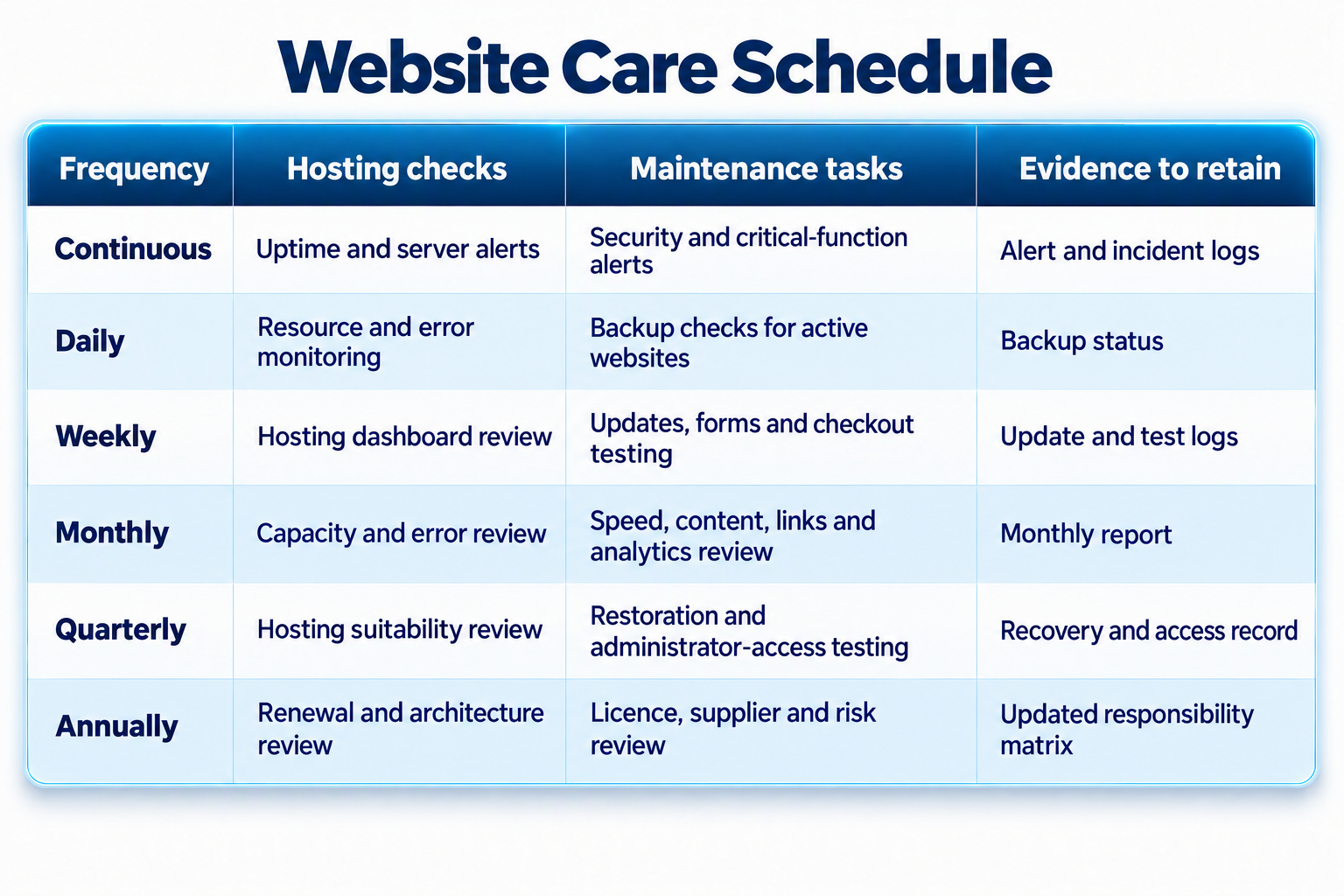
Every activity should have an assigned owner. Monitoring has limited value if no person or provider must investigate and resolve the warning.
Businesses needing a more detailed schedule can review the guide to essential website maintenance tasks. The guide covers monitoring, testing, ownership and reporting requirements.
Can Hosting and Maintenance Support SEO?
Hosting and maintenance can support search performance, but neither service guarantees rankings. In addition, search visibility depends on content quality, relevance, technical accessibility, competition and user experience.
Common Hosting and Maintenance Mistakes
Assuming Hosting Includes Complete Maintenance
A hosting provider may keep the server online without updating website software. The website can remain accessible while forms, integrations or customer functions fail.
The fix is a written responsibility matrix. The document should show each task, its frequency, the responsible provider and the required response when a check fails.
Assuming Every Backup Can Be Restored
An automatic backup alert confirms that a process ran. The alert does not prove that all required files and database information can be recovered.
The fix is a scheduled restoration test. The test should confirm that the website, database and recent content can be restored within the business’s required timeframe.
Applying Updates Without Functional Testing
Software can install successfully while creating a conflict with another plugin, theme or integration. The conflict may affect forms, bookings, layouts or payments.
The fix is to verify the backup, install the update and test key customer journeys. Higher-risk websites may also need a staging environment before changes reach the live website.
Treating Monitoring as Repair Coverage
Monitoring identifies downtime, malware and technical errors. Monitoring does not automatically include investigation, malware removal or recovery work.
The fix is to document what happens after each alert. The agreement should state response hours, investigation limits, repair coverage and additional approval requirements.
Choosing a Plan Only by Price
A cheaper plan may suit a simple website, but it may exclude restoration, security repairs and urgent support. Businesses may discover those exclusions only after an incident occurs.
The fix is to compare inclusions, exclusions and support responsibilities. The decision should reflect the potential impact of lost enquiries, sales or website access.
Giving a Provider Permanent Account Ownership
A provider may create a domain, hosting or analytics account using the provider’s details. This arrangement can complicate migration and reduce the business’s control over its digital assets.
The business should retain ownership of the domain, website files, hosting data and analytics accounts. Providers should receive appropriate access without becoming the permanent owner.
Failing to Document Emergency Escalation
An urgent alert may occur when the usual website contact is unavailable. The provider may then lack permission to complete necessary recovery work.
The fix is an escalation list with current contacts and approval limits. The list should identify who can approve emergency work outside normal business hours.
Combined Service or Separate Providers?
A combined provider can simplify communication because one team can examine the server and website. This approach may reduce delays when the source of a problem is initially unclear.
Separate providers may deliver specialist knowledge and greater independence. However, the business may need to coordinate logs, account access and troubleshooting across two support teams.
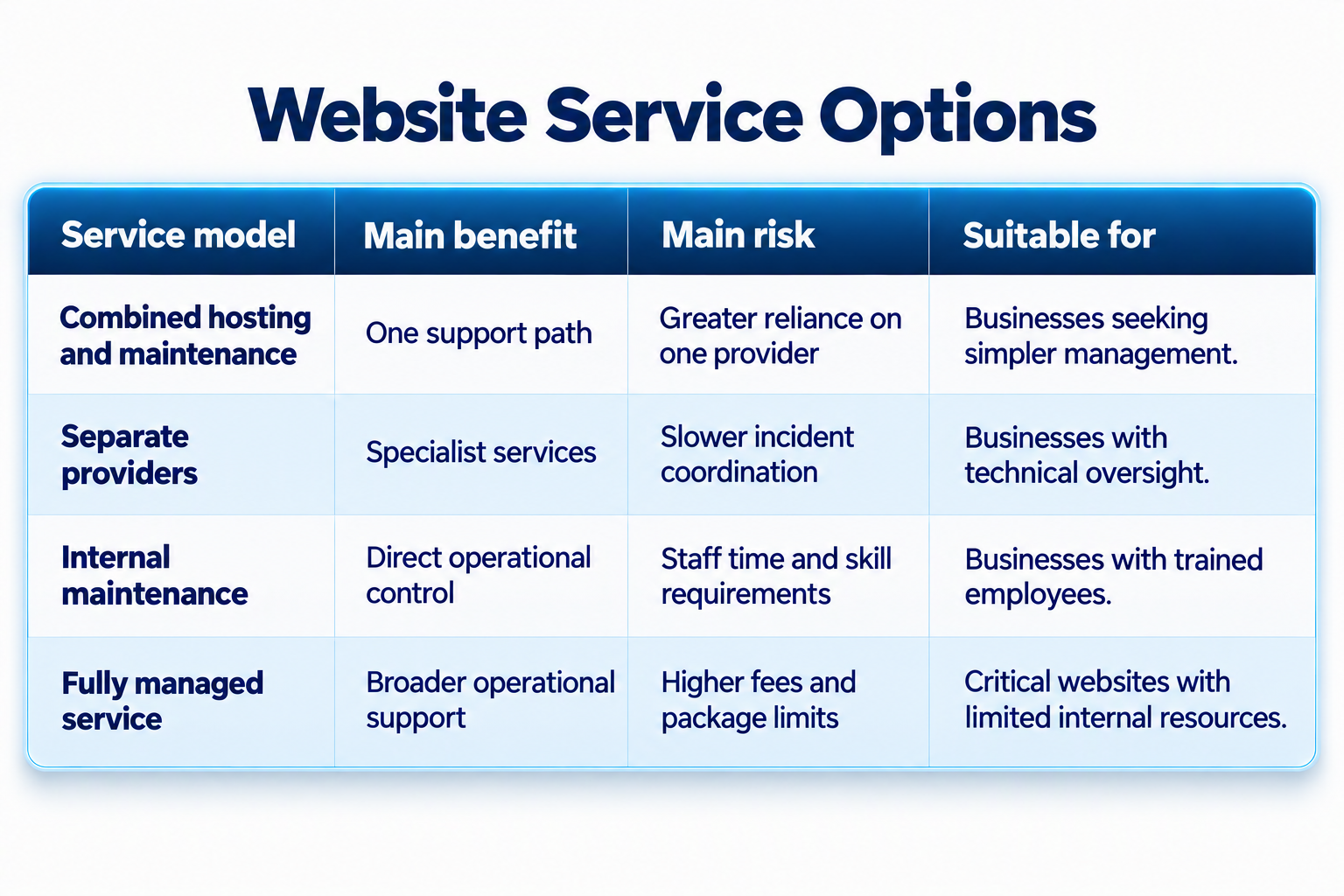
The right arrangement depends on website complexity, internal capability and support expectations. Clear documentation remains essential even when one company provides both services.
Businesses comparing packages can review the website maintenance inclusions guide. The guide explains how routine updates, monitoring, functional testing and support can differ between packages.
How to Select a Website Service Provider
Start by documenting the website’s platform, functions and importance to business operations. Include payment systems, enquiry forms, customer accounts, booking tools and third-party integrations.
Ask the provider to separate hosting, monitoring, maintenance, repairs and recovery. Confirm which services form part of the regular fee and which activities require separate approval.
Request an example maintenance report. A useful report identifies the completed task, result, evidence, issue found, action taken and unresolved recommendation.
Finally, confirm the exit process. The business should retain access to its domain, website files, database, hosting account, backups and analytics information.
Website Service Selection Checklist
Before selecting or renewing a service, confirm the following:
- Record ownership of the domain, hosting account and website data.
- Separate hosting, monitoring, maintenance and repair responsibilities.
- Confirm backup frequency, retention and restoration testing.
- Document software-update and post-update testing procedures.
- Agree on support hours, response targets and emergency escalation.
Frequently Asked Questions
What Is Website Maintenance and Hosting?
Website hosting provides the server environment that makes a website accessible. Website maintenance manages updates, backups, security, performance and customer-facing functions. Most active business websites need both services, even when different providers supply them.
Is Website Hosting the Same as Maintenance?
No. Hosting manages the environment used by the website, while maintenance manages the website itself. Some managed packages combine these responsibilities, but the business should confirm the written inclusions.
Does Website Hosting Include Backups?
Some hosting plans include automatic backups, while others provide limited retention or charge separately. Confirm the backup frequency, storage location, retention period and restoration procedure before relying on the service.
How Often Should a Website Be Maintained?
Monitoring may operate continuously, while software updates and functional checks may occur weekly or monthly. High-activity websites usually need more frequent backups and testing than informational websites.
Can Australian Businesses Use Separate Providers?
Yes. A business can use one provider for hosting and another for website maintenance. Both providers should have clear access, troubleshooting and escalation responsibilities.
Is Managed WordPress Hosting Enough?
Not always. Managed WordPress hosting may include updates and backups, but it may exclude content changes, form testing, malware removal and website-level repairs. Review the exact service scope before relying on it.
Can Website Maintenance Improve SEO?
Website maintenance can support SEO by repairing broken links, monitoring indexing and improving page performance. It cannot guarantee rankings because visibility also depends on relevance, content quality, competition and user experience.
How Much Do Hosting and Maintenance Cost?
Costs vary according to website size, platform, traffic, backup frequency, security requirements and support coverage. Request a written quote because package names do not reveal every inclusion, limit or additional charge.
What Happens When Website Maintenance Is Ignored?
A website may develop security weaknesses, broken functions, outdated content and unusable backups. Some problems remain hidden until a customer reports them or the website experiences an incident.
Can Maintenance Prevent Every Website Incident?
No. Maintenance can reduce avoidable risk, identify warning signs and support recovery, but it cannot prevent every technical or security incident. The provider should explain limitations and recovery procedures without making absolute guarantees.
Final Thoughts
Website maintenance and hosting solve different but closely connected problems. While hosting makes the website accessible, maintenance keeps the software, content, security and customer functions working correctly.