

Your website may work around the clock, but that does not mean it will continue working perfectly without attention. Software becomes outdated, plugins develop compatibility problems, contact forms fail and security risks change over time.
Some faults are immediately visible. Others quietly interfere with enquiries, bookings, payments or email notifications before anyone notices. A website may look normal while an important customer function has stopped working.
Affordable website maintenance gives Australian businesses a more reliable way to manage these risks. Through planned updates, monitoring, backups and technical support, businesses can address smaller problems before they become expensive disruptions.
What Is Website Maintenance?
Website maintenance is the ongoing process of updating, monitoring, backing up and testing a website to keep it secure, accurate and functional. Affordable maintenance provides this support at a cost suited to the website’s size, platform, features and commercial importance.
The required level of care differs between websites. A small information site may only need routine software updates, uptime monitoring and backups. An ecommerce, booking or membership website may require closer monitoring because a technical fault can interrupt transactions or prevent customers from accessing their accounts.
Professional maintenance may cover content management system updates, plugin and theme care, malware monitoring, backup management, performance reviews, broken-link repairs, form testing and minor content changes. It may also include checks of administrator access, SSL certificate status, analytics tools and conversion tracking.
The exact scope should be recorded in a written agreement. This helps businesses understand what is included, what will be checked and which services may create an additional charge.
What Does Website Maintenance Cover?
Effective maintenance looks after the technical structure of the website and the functions customers use.
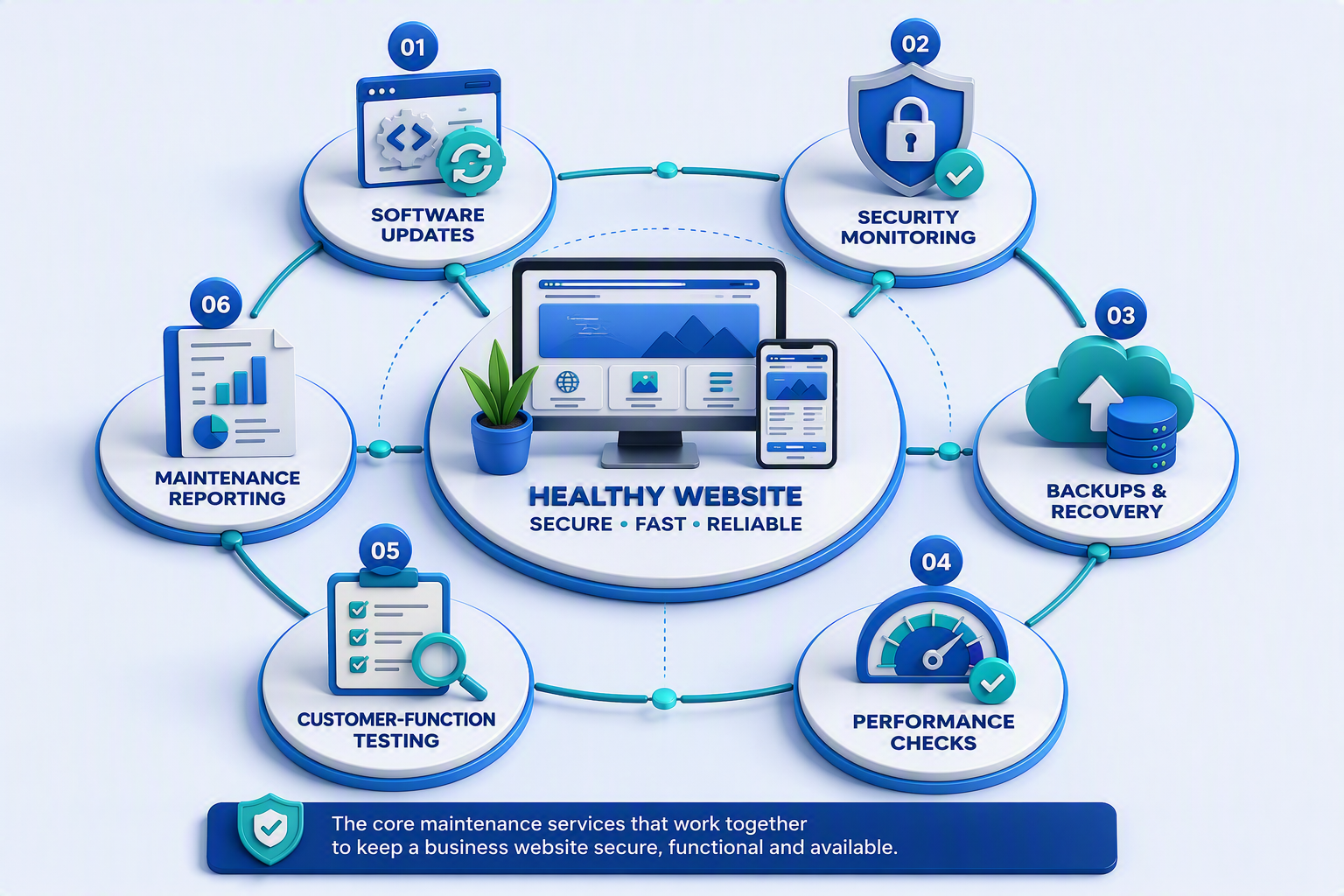
Software updates help keep the website compatible with evolving browsers, hosting environments and third-party services. Security monitoring can reveal suspicious changes, while backups create a recovery option if information is lost or damaged. Performance reviews can uncover oversized images, caching problems or unnecessary software that affects page speed.
Customer-facing functions need equal attention. A contact form may stop sending messages after a plugin update. A booking calendar may display correctly but fail to send confirmations. An online checkout may accept customer details before producing an error at the payment stage.
This is why maintenance should examine complete customer journeys rather than simply checking whether the homepage is online. A website is only supporting the business when its important features work as expected.
Essential Website Maintenance Services
A reliable website depends on several maintenance activities working together. The visual below can help readers understand how software care, security, backups, performance and customer-function testing contribute to overall website health.
Planned Maintenance Versus Reactive Repairs
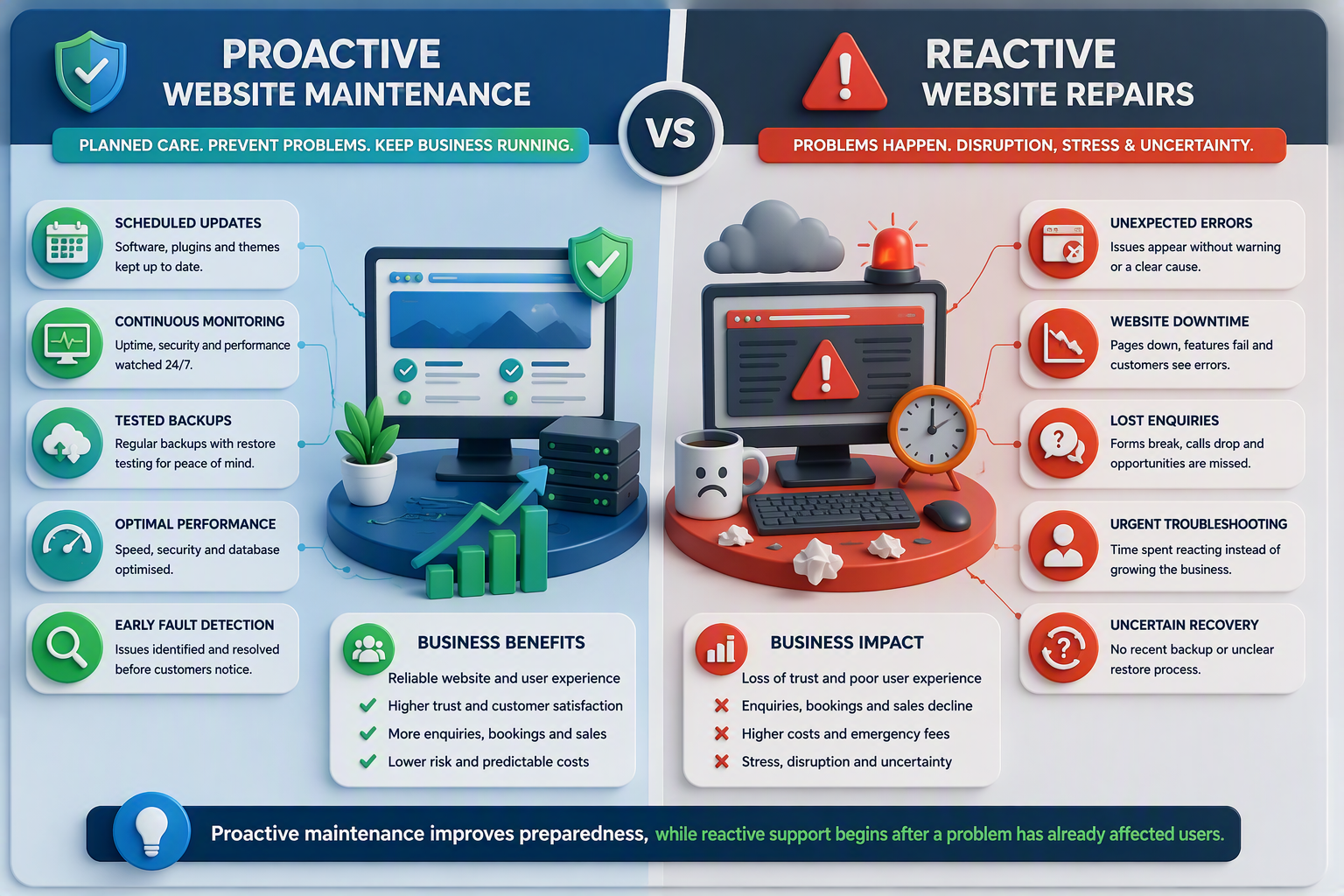
Reactive support usually begins after something has already gone wrong. A customer may report a broken form, staff may notice a decline in enquiries or the website may display an error after an update.
Planned maintenance takes a more controlled approach. Software changes can be scheduled, recovery copies can be created and important website functions can be checked before faults cause wider disruption.
| Area | Planned website maintenance | Reactive website repairs |
|---|---|---|
| Software | Updates are scheduled and checked | Work begins after a feature fails |
| Security | Vulnerabilities and suspicious activity are monitored | Action begins after an alert or incident |
| Backups | Recovery copies follow an agreed schedule | A recent usable copy may not be available |
| Performance | Slow pages and faults can be identified earlier | Problems are addressed after users are affected |
| Customer functions | Forms, bookings and transactions are tested | Failures may remain unnoticed |
| Business impact | Responsibilities and costs are more predictable | Urgent work can increase disruption |
No maintenance provider can prevent every software fault, hosting issue or cyber incident. Planned care can, however, make technical risks more visible and improve the website’s recovery position.
Proactive Maintenance or Reactive Repairs?
The following visual can reinforce this distinction without repeating the comparison table. It should focus on the journey from early detection to controlled recovery, compared with the disruption and uncertainty of emergency repairs.
Website Security Begins With Regular Care
Websites built on content management systems depend on themes, plugins and third-party software. When these components become outdated, they can create compatibility problems and potential security weaknesses.
Website security maintenance may involve applying software updates, scanning for malware, reviewing administrator access and removing unused plugins or themes. Updates should still be handled carefully because a new software version can affect the design or functionality of the site.
Creating a backup before a significant change gives the business a recovery option. Testing the website afterwards helps determine whether forms, navigation, payments and other important features continue to work.
Maintenance is only one part of website protection. The Australian Cyber Security Centre’s Small Business Cyber Security Guide recommends multi-factor authentication, software updates and information backups as important starting measures. It also discusses access controls, strong passphrases, website hardening and staff preparation.
Businesses with wider technology risks may require specialist cybersecurity support in addition to routine website maintenance.
A Backup Is Valuable Only When It Can Be Restored
A website backup provides a copy of important files, databases and settings. However, the existence of a backup does not automatically mean the website can be recovered successfully.
A restore test helps establish whether the saved information is complete, accessible and usable. Without testing, a business may discover after an incident that its latest backup is incomplete, corrupted or too old to provide an effective recovery point.
The backup schedule should reflect how often the website changes. An information site that receives occasional content updates may not need the same schedule as an online store processing daily orders. Booking, ecommerce and membership websites usually require more frequent recovery points because customer and transaction data changes regularly.
Businesses should understand where their backups are stored, how long they are retained and whether copies are separated from the main hosting environment. Restoration responsibilities also need to be clear. Some maintenance plans include recovery assistance, while others charge separately for investigation and restoration.
Hosting and Website Maintenance Are Different
Hosting provides the server environment that stores a website and makes it accessible online. Website maintenance covers the software, functionality, content and technical checks needed to keep the site operating correctly.
A hosting provider may manage the server without updating the website’s plugins, themes or content management system. Similarly, a maintenance provider may support the website while excluding hosting, domain registration, email services and premium software licences.
Using one provider for hosting and maintenance can simplify support because the provider can investigate the server environment and the website. Even then, the responsibilities included in each service should be clearly documented.
WordPress websites may benefit from suitable hosting combined with regular core, plugin and theme checks. Businesses should not assume that hosting automatically provides complete website maintenance.
How Maintenance Supports SEO
Website maintenance can support SEO by protecting the technical condition, accessibility and usability of the site. It cannot guarantee rankings because organic visibility also depends on content quality, relevance, competition, authority and search intent.
Broken links can interrupt navigation, slow pages can frustrate visitors and server errors may prevent content from loading correctly. Maintenance can identify some of these technical problems through performance testing, link reviews and mobile usability checks.
Analytics and conversion tracking also require attention. A theme or plugin update may interfere with measurement tags, leaving the business with incomplete marketing data. Regular checks help confirm whether important conversion events continue to register correctly.
Technical maintenance provides a stable foundation for professional SEO, but it is not a replacement for keyword research, useful content, internal-link development or authority building.
How Often Should a Website Be Maintained?
There is no universal schedule for every website. Maintenance frequency should reflect how often the website changes, what information it stores and how heavily the business depends on it.
Uptime and security monitoring may operate continuously, while backups can run daily, weekly or monthly. Software updates and important customer functions may be reviewed weekly, while performance, content accuracy, analytics and access permissions can form part of a monthly or quarterly cycle.
The right schedule is ultimately based on risk. A business should consider how quickly a fault needs to be detected, how much recent information it can afford to lose and what website downtime would mean for its customers.
Website Maintenance Costs in Australia
Website maintenance costs in Australia vary because providers include different levels of monitoring, technical work, content support and recovery assistance.
The following figures are indicative budgeting estimates, not fixed IT Company Australia prices. Actual costs depend on the website and the agreed service scope.
| Website type | Indicative monthly budget | Typical maintenance level |
|---|---|---|
| Small information website | $100 to $250 | Routine updates, backups, uptime monitoring and basic checks |
| Growing business website | $250 to $500 | Form testing, security reviews, performance checks and reporting |
| Ecommerce or booking website | $500 to $1,000+ | Frequent backups, transaction testing and closer monitoring |
| Complex or custom website | Custom quotation | Integration testing, staging support and agreed response arrangements |
Website traffic, database size, plugin numbers, custom integrations, backup retention and included support time can all affect the final price. Hosting, domain renewals, commercial licences, malware recovery and larger development tasks may also be charged separately.
Businesses should request a written scope, confirm whether GST is included and avoid comparing plans solely by their monthly fee.
Choosing the Right Maintenance Package
The lowest-priced package will not necessarily provide the best value. A basic plan may be suitable for a small information website but insufficient for an ecommerce store, booking platform or membership site.
The agreement should explain which software updates are covered and whether important features are tested afterwards. It should also define backup frequency, restoration support, uptime monitoring, response arrangements and any allowance for content changes.
IT Company Australia’s website maintenance packages currently include WordPress core, plugin and theme updates, performance checks, uptime monitoring, SSL validation, backups, analytics integration and maintenance reporting. Backup schedules and certain security, content and consultation services vary between the Standard, Business and Premium packages.
The best plan is one proportionate to the website’s complexity, commercial role and potential cost of downtime.
Website Maintenance Across Australia
Most website maintenance can be delivered remotely, so businesses are not limited to providers in their immediate area. Organisations in Sydney, Melbourne, Brisbane, Perth, Adelaide and regional Australia can choose support based on technical capability, package scope and response arrangements.
The website’s purpose matters more than the city. An information site may need scheduled updates and form testing, while an ecommerce platform may require transaction checks, closer monitoring and more frequent recovery points.
Keep Your Website Ready for Business
Your website should support enquiries, bookings and sales without forcing your team to manage preventable technical problems. Regular maintenance helps keep software current, customer functions working and recovery options available.
The right level of care depends on the site. Simple websites may only need scheduled support, while transactional platforms may require frequent monitoring, testing and backups.
Explore IT Company Australia’s web maintenance packages or contact the team to discuss support suited to your platform, website functions and business requirements.
Frequently Asked Questions
How much does website maintenance cost in Australia?
A basic maintenance plan may begin at approximately $100 per month, while ecommerce, booking and custom websites generally cost more. Businesses should compare the included updates, backups, monitoring and support rather than focusing only on price.
What does website maintenance include?
Maintenance may include software updates, backups, security monitoring, uptime checks, form testing, performance reviews and minor content changes. Inclusions vary according to the provider and package.
Is hosting the same as website maintenance?
No. Hosting supplies the server environment that keeps the website online. Maintenance covers the website’s software, content, functionality, backups and technical health.
Does website maintenance help SEO?
Maintenance can support SEO by keeping pages accessible, links functional and website performance stable. It cannot guarantee rankings because search visibility also depends on content, relevance, authority and competition.
Can maintenance prevent every cyberattack?
No provider can guarantee complete protection. Updates, backups, monitoring and access reviews can reduce risk, while multi-factor authentication, secure hosting and responsible staff practices provide additional protection.
