
A dangerous business email does not always look suspicious. It may contain a familiar supplier name. It may refer to a genuine invoice. It may even continue with an existing conversation. The only unusual part could be a request to sign in again or send payment to a different account. That is why email security in Townsville needs to address much more than unwanted spam. Businesses need to consider who sent the message, whether an account has been compromised, what action the employee is being asked to take, and what happens if an attack succeeds.
Introduction
This guide is for Townsville business owners, managers and IT decisionmakers who want practical ways to reduce phishing and Business Email Compromise (BEC) without making every day email unnecessarily difficult for employees.
Email security can generally be configured and managed remotely. Townsville businesses should still confirm service hours, escalation arrangements, Microsoft 365 responsibilities and whether required onsite assistance is available for their location.
A useful way to understand modern email security is:
Message → Identity → Action → Response
A filtering system might identify a suspicious message. That does not automatically protect a compromised identity or prevent an employee from approving a fraudulent payment. Effective protection connects technology with business processes and a defined incident response.
What Is Email Security?
Email security combines technical controls, identity protection and business procedures to reduce risks such as phishing, malicious attachments, credential theft, impersonation, and unauthorised mailbox access.
Modern protection can inspect messages before delivery. It can analyse links and attachments. It can also help organisations authenticate their domains and identify suspicious account activity.
The important point is that email filtering and complete email security are not the same thing. A phishing message might send an employee to a fake Microsoft 365 sign-in page. If the attacker obtains usable credentials, the incident has moved beyond the original email.
The attacker may then access a genuine mailbox, monitor conversations, or create forwarding rules. They could also impersonate the employee in later communications.
Businesses comparing email security solutions should therefore establish whether the service covers only filtering or also connects with identity monitoring, investigation and response.
Australian Cyber Security Centre guidance on preventing BEC recommends measures including Multi-Factor Authentication, email authentication and procedures for independently verifying unusual financial requests.
Why Email Security Matters for Townsville Businesses
Email connects many of the business processes of attacker’s value.
Invoices arrive by email. Customers exchange documents. Employees receive password-reset messages and Microsoft 365 notifications. Finance teams communicate with suppliers. Cloud applications often rely on the same business identity.
A compromised inbox can therefore become an entry point into a wider environment.
The ASD Annual Cyber Threat Report 2024–25, published on 14 October 2025, shows why account security matters to Australian organisations. ASD’s Australian Cyber Security Centre reported that 42% of cyber incidents rated Category 3 or above involved compromised accounts or credentials during FY2024–25. Phishing was also recorded in 60% of incidents reported to ASD’s ACSC during that financial year. These figures are not specific to Townsville or email alone. However, they show why Australian businesses should protect user accounts as well as filter suspicious messages.
Those statistics are broader than email alone. It does, however, reinforce why password-only protection is no longer enough for important business accounts. For Townsville businesses, practical email security can be viewed through three connected capabilities.
- Prevention makes compromise more difficult through authentication, secure configuration, and filtering.
- Detection identifies suspicious messages, sign-ins, account activity, or employee reports.
- Response determines who investigates, contains and recovers from the incident.
- Businesses using cloud productivity platforms should also consider what else the same identity can access. The guide on how spam emails can lead to cloud account compromise explains how an unsafe action triggered by email can expose connected cloud services.
Phishing vs Business Email Compromise vs Spoofing
Phishing, BEC, email spoofing and account compromise can interact with one another. They are not identical threats.
Phishing commonly tries to persuade someone to disclose credentials or take an unsafe action. BEC focuses on abusing trusted business communication. Spoofing involves forging sender information. Account compromise means an attacker has gained access to a genuine account. The distinction affects how businesses should respond.
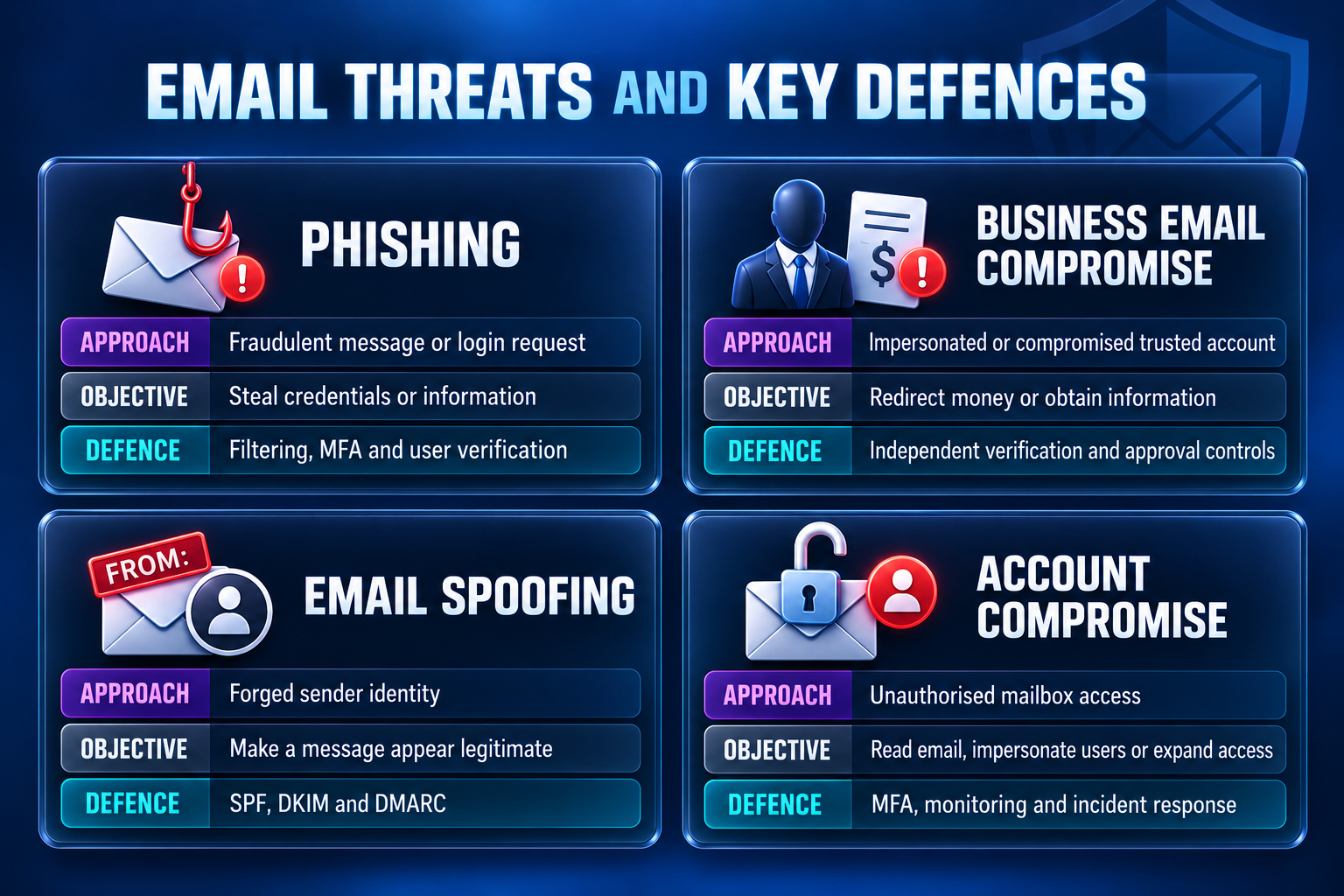
The comparison also demonstrates why filtering alone has limits. A fraudulent payment request might contain no malware at all. If it successfully convinces an accounts employee to change banking details, the organisation needs business controls as well as security technology.
9 Strategies to Reduce Phishing and Business Email Compromise
Protect Business Email Accounts With Multi-Factor Authentication
Multi-Factor Authentication (MFA) requires users to prove their identity through more than a password alone.
Depending on the platform, the additional factor might be an authenticator application, passkey, security key or another approved method.
Australian Cyber Security Centre guidance recommends enabling MFA where possible. Its September 2026 guidance also encourages phishing-resistant options such as passkeys where supported. Higher-risk accounts deserve particular attention. These can include administrators and employees with access to finance, payroll, or sensitive customer information.
Staff should also understand unexpected authentication prompts.
A familiar-looking prompt does not automatically mean it is safe to approve. Organisations using Microsoft 365 should review the licenses and security controls they actually use rather than assuming every Microsoft 365 environment has the same protection.
Configure SPF, DKIM and DMARC for Business Domains
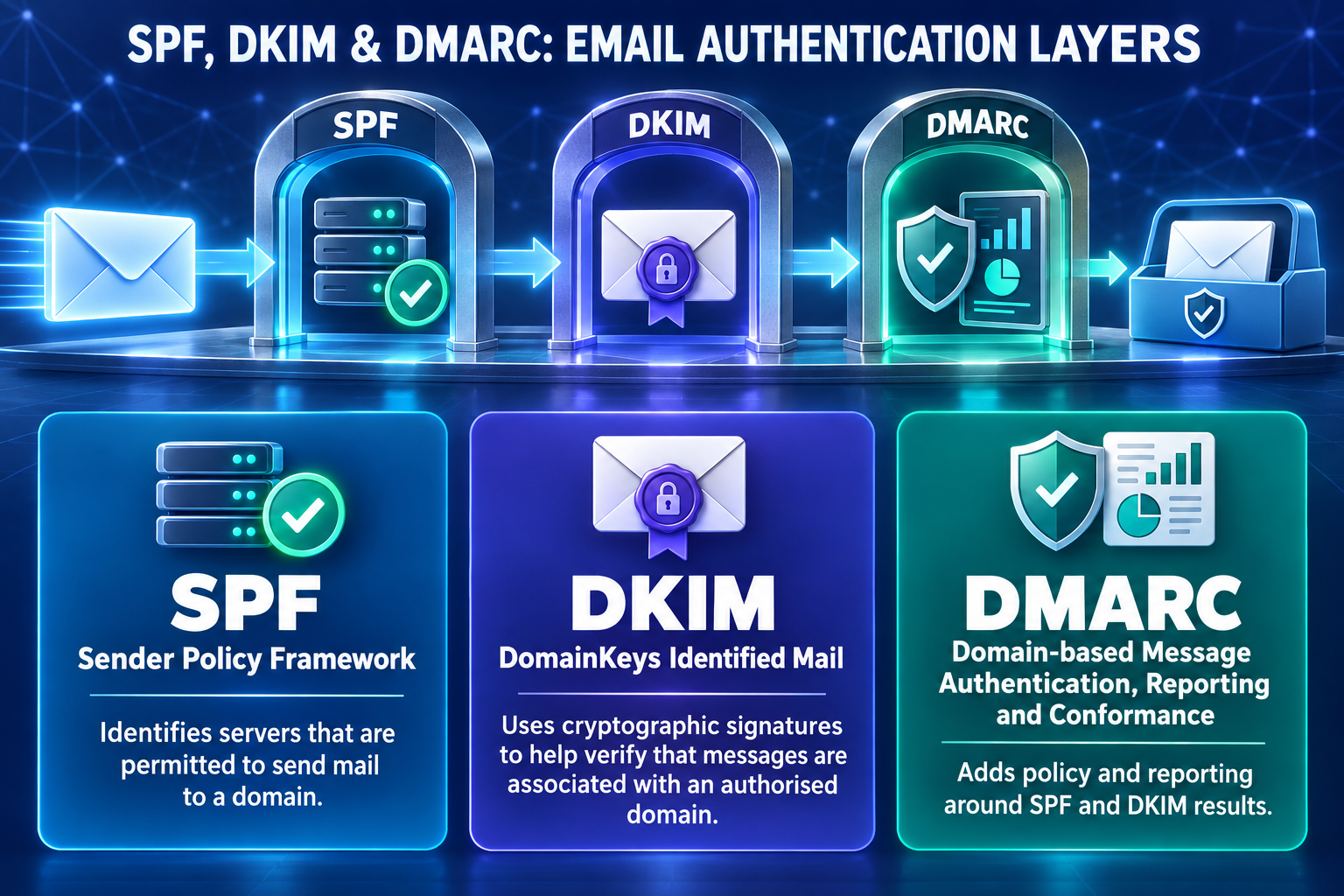
Email authentication helps receiving systems to check whether a message is authorised to use a particular business domain.
Why Email Authentication Matters for Australian Businesses
Australian businesses rely heavily on email for invoices, supplier communication, customer enquiries and account notifications. If criminals successfully impersonate a company’s domain, a fraudulent message can appear more convincing to employees, customers, or suppliers.
SPF, DKIM and DMARC help receiving email systems determine whether messages using a domain are authorised. This can make direct domain spoofing more difficult and help protect the organisation’s email identity. These controls are particularly relevant when businesses regularly exchange financial instructions or sensitive information through email.
Australian Cyber Security Centre guidance specifically recommends SPF, DKIM and DMARC as measures for reducing fake or spoofed email involving business domains. Their limitations are equally important. SPF, DKIM and DMARC do not stop every display-name attack. They do not eliminate lookalike domains. They also cannot prevent a criminal from sending messages through an account that has already been genuinely compromised.
Authentication should therefore work alongside MFA, filtering, monitoring, and employee verification. For Microsoft environments, the Office 365 email security guide provide further context around anti-phishing policies, Safe Links, Safe Attachments and other Microsoft security controls.
Filter Suspicious Messages, Links and Attachments Before Users Act
Employees should not have to make every security decision themselves. Email security platforms can analyse sender characteristics, known threat indicators, message content, URLs and attachments before a message reaches the user.
Exact capabilities depend on the platform and license. One service might provide spam and malware filtering. Another may add impersonation detection, URL analysis, or sandboxing for suspicious files.
Businesses should also be cautious with claims such as “real-time protection”. Automated systems may analyse messages or account signals very quickly. Human investigation and containment may operate under separate service targets.
The real-time email security guide for Australian businesses explains why automated detection and human response should be evaluated separately. A useful question for providers is not simply, “Do you detect threats in real time?” Ask: What happens after something suspicious is detected?
Independently Verify Payment and Bank-Detail Changes
Business Email Compromise becomes especially dangerous when an attacker manipulates a normal financial process.
A convincing message may use the right company name. It may reference a genuine invoice or appear in a familiar conversation.
The safer process is:
Change requested → Independently verify → Approve → Pay
Australian guidance recommends verifying unexpected financial changes through an independently known contact method. Businesses should not rely only on a phone number supplied within the same suspicious email.
Simple Real-World BEC Example
Consider an illustrative Townsville business that regularly pays a supplier $8,000 for equipment. An accounts employee receives an email that appears to come from that supplier. The message says the supplier has changed banks and provides new account details for the next invoice. The supplier’s name is familiar. The amount is correct. The message looks professional. Instead of changing the banking details immediately, the employee calls the supplier using a telephone number already stored in the company’s records. The supplier confirms that its bank account has not changed. The business therefore avoids sending $8,000 to the fraudulent account.
This example shows why BEC cannot be treated purely as a filtering problem. A fraudulent message may contain no malware or dangerous attachment. An independent verification process provides another layer of defense when a request involves money or sensitive information.
Businesses can also consider additional approval requirements for significant or unusual payments. Technology may flag the message. Business procedures help control what happens next.
Protect Microsoft 365 Identities Beyond the Inbox
A successful phishing attack may begin in email but continue through the wider cloud of identity. A phishing email can become more serious if an attacker gains access to the employee’s cloud account. The same account may connect email with OneDrive, SharePoint, Teams and other business applications. For a simple explanation of how this can happen, read Cloud Spam: How Emails Compromise Cloud Accounts.
Australian Cyber Security Centre recovery guidance advises organisations to review passwords, recovery details, active sessions, mailbox rules, third-party application access and login activity following suspected email compromise. That means changing a password may not complete the response. Administrators may also need to revoke sessions or remove unauthorised application access. Townsville businesses using Microsoft 365 should establish who is responsible for these actions before an incident occurs.
Train Employees to Verify Actions, Not Just Spot Poor Grammar
“Look for spelling mistakes” is no longer enough as phishing guidance. Poor grammar can still be a warning sign. Correct grammar does not make an email trustworthy. Employees should instead pay attention to what the message asks them to do.
A request deserves additional scrutiny when it asks someone to sign in unexpectedly, approve authentication, change payment information, open an unexpected file, or ignore a normal business process. Australian Cyber Security Centre guidance highlights requests for money, changes to banking details, unexpected attachments, login requests and suspicious links as issues employees should treat carefully.
Reporting also needs to be straightforward. If an employee believes they clicked a suspicious link, they should know who to contact immediately.
Their responsibility should be to report the concern, not conduct their own investigation.
Monitor Mailboxes for Signs of Account Compromise
Preventive controls will not detect every incident.
Businesses also need a way to recognise suspicious account behaviour after access may have occurred. Unexpected forwarding rules can be particularly important. An attacker may create them to monitor communications or hide selected messages. Unfamiliar sign-ins, unknown application permissions and messages the employee did not send can also warrant investigation.
ASD’s recovery guidance specifically advises reviewing mailbox rules, active sessions, third-party applications and login activity following suspected compromise. Monitoring only has value when someone owns the response. This is where broader managed cyber security may be relevant for businesses that require monitoring and documented escalation beyond basic email filtering.
Create a Business Email Compromise Response Process
Businesses should know what happens after an email attack succeeds.
A practical response sequence is:
Detect → Investigate → Contain → Recover → Review
If an employee enters credentials into a fraudulent website, deleting the phishing email does not contain the account’s compromise.
The organisation may need to secure the account, revoke sessions, and check mailbox rules. It may also need to investigate activity performed while the attacker has access. Where money may have been redirected, the financial institution should be contacted promptly. Australian Cyber Security Centre guidance also directs organisations towards ReportCyber and recommends reviewing account security following an email compromise. Email compromise can also create a privacy issue if personal information is accessed or disclosed.
On 6 July 2026, the Office of the Australian Information Commissioner (OAIC) data breach notification statistics reported that it received 1,205 data breach notifications during the 2025 calendar year. This was an 8% increase from the 1,112 notifications received in 2024.
Not every compromised email account becomes a notifiable data breach. Businesses covered by the Privacy Act should assess the circumstances and determine whether the Notifiable Data Breaches scheme applies.
This does not mean every compromised mailbox becomes a notifiable breach. Entities covered by the Notifiable Data Breaches scheme must assess the particular incident and determine whether notification requirements apply. The OAIC’s June 2026 guidance explains the relevant assessment process. Businesses that want email incident handling connected with broader user and platform support can also review managed IT services.
Measure Email Security by Outcomes, Not Just Blocked Spam
A dashboard showing 20,000 blocked messages may look impressive.
It does not necessarily tell management whether the organisation is handling its most important email risks well. Better measures examine what happens when something meaningful occurs.
- How quickly does someone review an employee-reported phishing message?
- Can the organisation contain a compromised account?
- Are suspicious financial requests independently verified?
- Are recurring attack patterns identified?
Most importantly:
If a genuine email threat is discovered tomorrow morning, who owns the next step?
If the answer is unclear, the business may have filtering technology without a complete operational response model.
Basic Email Filtering vs Layered Email Security
Basic filtering remains useful. It can remove large amounts of unwanted email and stop recognised threats before employees interact with them.
Its limitation is scope. BEC, identity compromise and fraudulent payment requests may extend beyond what one mail filter can control. Layered email security connects message protection with identity controls, employee processes, and incident responsibilities.
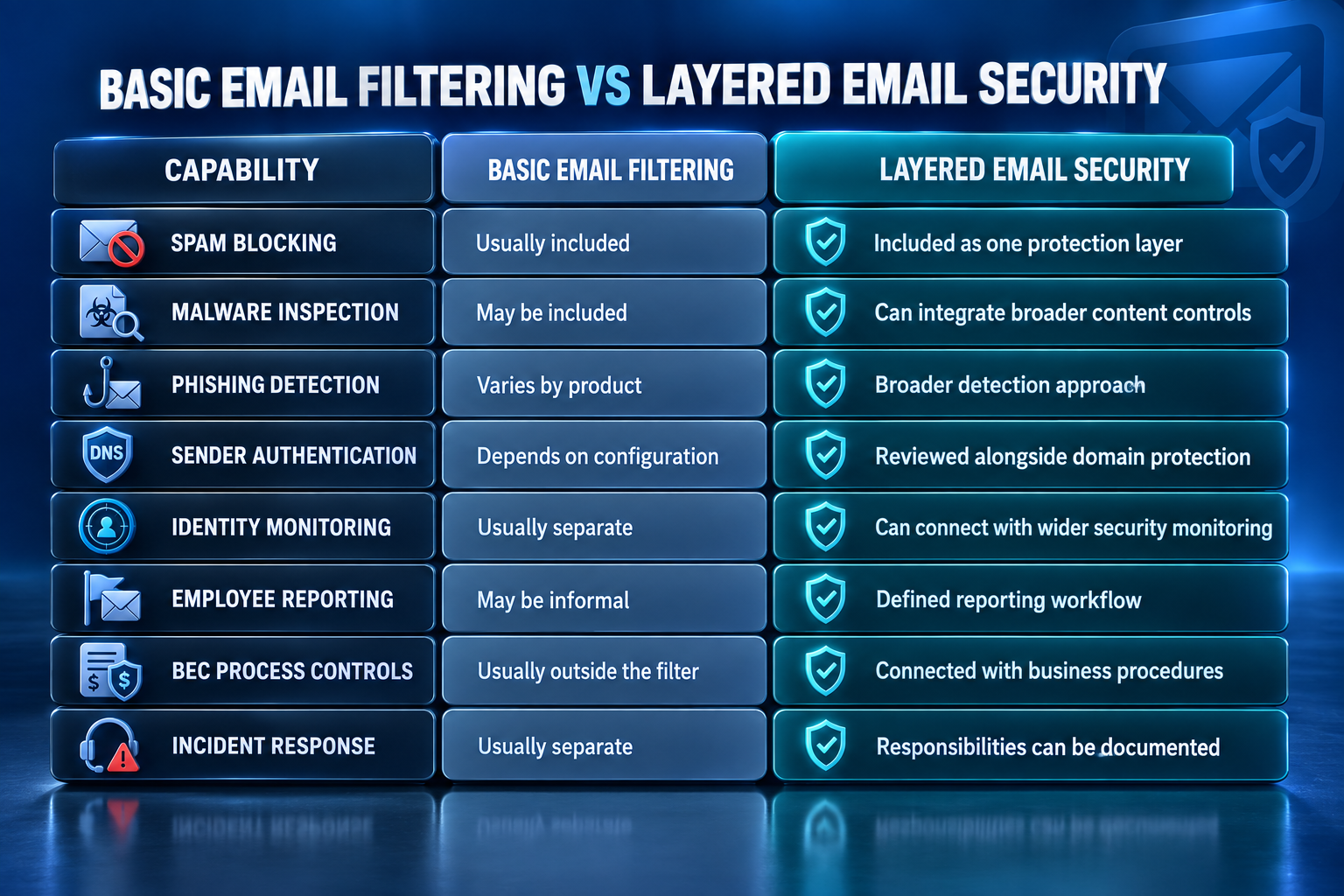
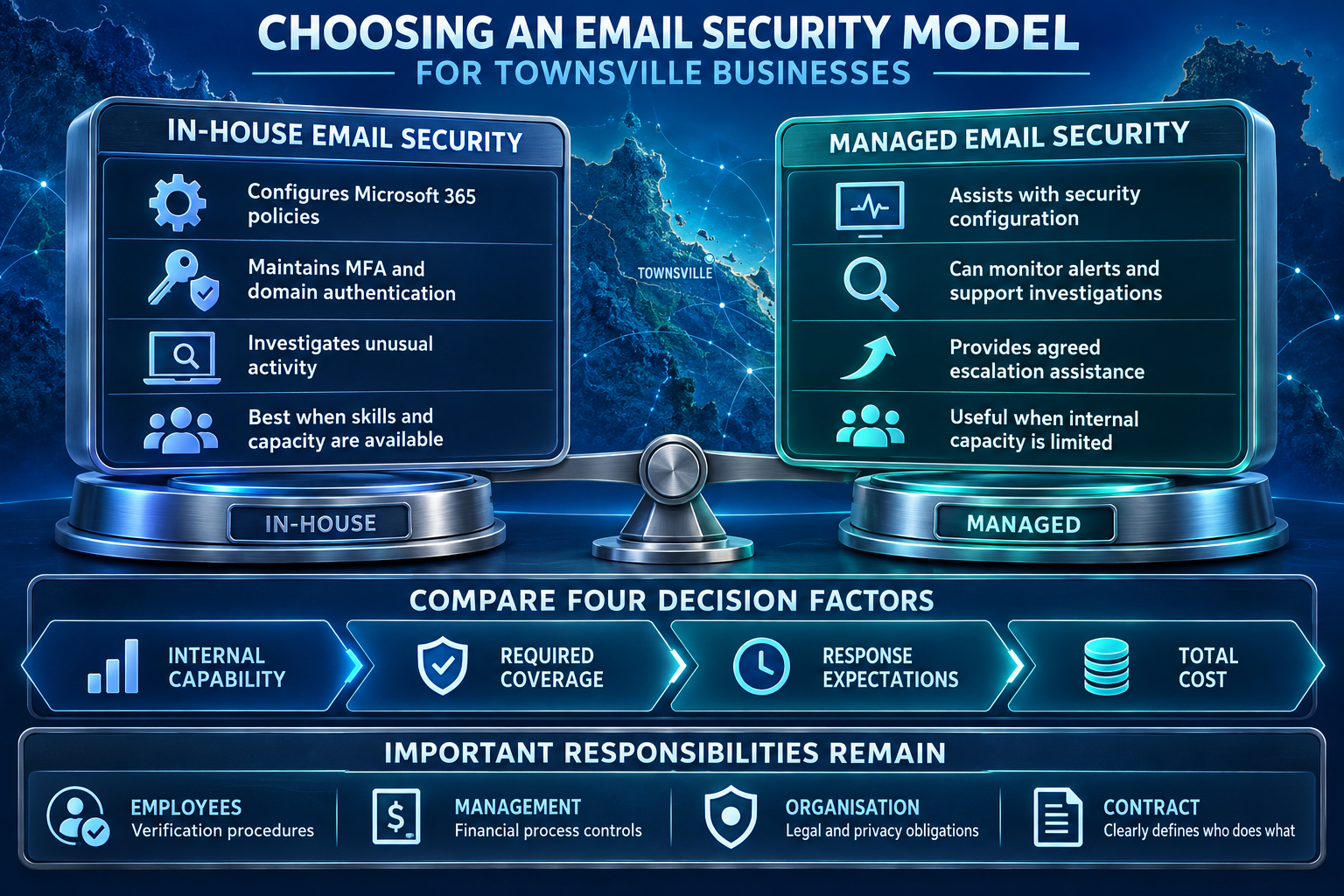
A layered approach is not automatically the correct choice for every organisation. A business with experienced internal IT and security staff may already manage several of these responsibilities internally. A smaller organisation may prefer external support. The important question is whether every critical responsibility has a clear owner.
How Much Does Email Security Cost in Australia?
There is no single standard price for business email security in Australia. Cost depends on the number of users, email platforms, required security controls, and the level of monitoring or support.
At the time of review on 17 September 2026, ITCompany Australia’s Email Security page displayed its Email Security & Protection plan at AUD 36.94 per month. The page also displayed an annual option at AUD 29.55 per month when ordered annually.
The published page lists features such as spam filtering, virus and malware blocking, continuous security updates, spam management and unlimited email protection.
However, the page does not clearly specify whether the advertised price applies per user, mailbox, domain, or organisation. It also does not clearly state whether GST is included or excluded. Businesses should confirm the billing unit, GST treatment, contract term, and included support before using the advertised price to calculate their total cost.
Total Cost of Ownership for Email Security
The advertised monthly price is not necessarily the complete cost.
Total Cost of Ownership (TCO) considers what the organisation may spend to operate and maintain protection over time.
For email security, this can include licensing, initial configuration, administration, monitoring, training, investigation, and support. A low-cost filtering product may need more internal administration. A managed service may cost more each month but transfer some monitoring or response tasks to the provider. Neither model is automatically cheaper overall. Businesses should compare the responsibilities included in each option rather than considering the headline subscription fee alone.
Email Security Townsville: Self-Managed vs Managed Protection
How to Evaluate an Email Security Provider
Start with the scope rather than the marketing language. If the proposal promises “advanced email protection”, determine exactly what that means.
Does the service cover spam and malicious attachments only? Does it include phishing and impersonation controls? Who handles SPF, DKIM, and DMARC?
Then examine identity responsibilities. A provider should be able to explain who investigates unusual sign-ins and compromised Microsoft 365 accounts. It should also be clear who can revoke sessions or review suspicious mailbox rules. Next, examine response times carefully. Automated protection may operate continuously while human support follows different hours or service targets. Those are separate commitments. Pricing also needs context. Find out whether onboarding, configuration, remediation and after-hours of investigation are included or charged separately. Finally, examine the reporting. Useful reporting should help management understand relevant threats, actions, and outstanding issues. A blocked-spam count alone does not demonstrate that serious BEC and identity risks are being managed effectively. Businesses moving from research into comparison can review IT Company Australia’s email security service alongside alternative providers and assess each option against the same requirements.
Where IT Company Australia May Fit
IT Company Australia’s service catalogue includes email security, Microsoft 365, managed cyber security and managed IT. That combination may be relevant when a single email incident crosses several technical areas.
For example, a phishing email may become a Microsoft 365 identity compromise. The response could then require account investigation, user support, and wider security monitoring. Integration may reduce unnecessary hand-offs when responsibilities are documented clearly.
Businesses should still assess IT Company Australia using the same criteria applied to any other provider: threat coverage, licensing, service hours, reporting, human-response responsibilities, exclusions and total cost.
IT Company Australia is ISO/IEC 27001:2022 certified and this can be considered as part of a broader provider review alongside service scope, contractual terms, security responsibilities and the customer’s own compliance requirements. Certification is not a guarantee that incidents cannot occur, or that a customer automatically becomes compliant.
Australian Service and Contact Pathways
Townsville businesses considering managed email security should first confirm how remote configuration, monitoring and incident support would operate for their environment. Any required onsite assistance and location-specific response arrangements should also be confirmed directly.
Businesses can view ITCompany Sydney through the supplied Google Maps directions page. Enquiries relating to ITCompany Sydney, ITCompany Melbourne, ITCompany Brisbane and ITCompany Perth can be made through the company’s contact page. The current contact page lists contact pathways for all four locations.
These location references should not be interpreted as evidence of a Townsville office. Townsville businesses should confirm the delivery model and location-specific availability directly.
Frequently Asked Questions
What Does Email Security Townsville Include?
Email security in Townsville can include spam filtering, malicious-link protection, attachment inspection, phishing detection, email authentication, identity controls, and incident-response procedures.
The exact combination depends on the product, Microsoft 365 licensing and managed-service agreement.
What Is a Business Email Compromise?
Business Email Compromise is fraud that abuses trusted business communication to obtain money, information or access.
The attacker may impersonate an employee or supplier. In other cases, they may send the request through an actual compromised account.
Can Email Filtering Stop Every Phishing Attack?
No. Filtering can reduce exposure but cannot guarantee that every phishing message will be blocked.
Attackers can use social engineering, lookalike domains, and compromised genuine accounts. Organisations therefore need control beyond filtering.
Do SPF, DKIM and DMARC Stop Business Email Compromise?
No. SPF, DKIM and DMARC help authenticate email and reduce direct domain spoofing, but they do not prevent every form of BEC.
They cannot prevent misuse of an already compromised legitimate mailbox.
Does Microsoft 365 Provide Enough Email Security by Itself?
The answer depends on the Microsoft 365 licenses, configuration, and wider security requirements of the organisation.
Businesses should review the controls available in the plans they actually use and decide whether additional monitoring or managed response is required.
The Microsoft 365 email security setup guide provides additional context for organisations reviewing Microsoft environments.
How Much Does Business Email Security Cost?
The cost varies according to users, email platforms, licensing, monitoring, and support scope.
Businesses should compare the complete annual cost and identify whether setup, human investigation, and incident response are included.
What Should a Townsville Business Look for an Email Security Provider?
A Townsville business should compare threat coverage, Microsoft 365 integration, service hours, investigation responsibilities, escalation arrangements and total cost.
Remote delivery can cover many email-security activities. Any requirement for onsite assistance should be confirmed before selecting a provider.
Final Thoughts
A successful email attack often looks ordinary.
There may be no obvious malware. The sender may appear familiar. The message may simply ask an employee to sign in, approve a request, or change a bank account.
That is why email security in Townsville needs to go beyond spam blocking.
A stronger model connects:
Message → Identity → Action → Response
Protect suspicious messages before users interact with them. Protect identities so one stolen password does not automatically provide access. Verify sensitive financial actions through trusted channels. Know who investigates and contains the incident if prevention fails.
For Townsville businesses, the appropriate model depends on the email platform, number of users, internal capabilities, and business risk. Much of the technical work can be provided remotely. Businesses should still confirm service hours, escalation arrangements, and any required onsite coverage.
No security service can guarantee that phishing or Business Email Compromise will never succeed. The practical objective is to make attacks harder to complete, detect suspicious activity sooner, and ensure the organisation knows how to respond.
Businesses that want to compare their existing phishing controls, Microsoft 365 configuration and BEC response arrangements can contact IT Company Australia to discuss a scope based on their environment.
